Google Ads: what it is, how it works, campaign types and how much it costs
Formerly Google AdWords: what Google Ads is, how the auction works, how much it costs and how to create your first campaign
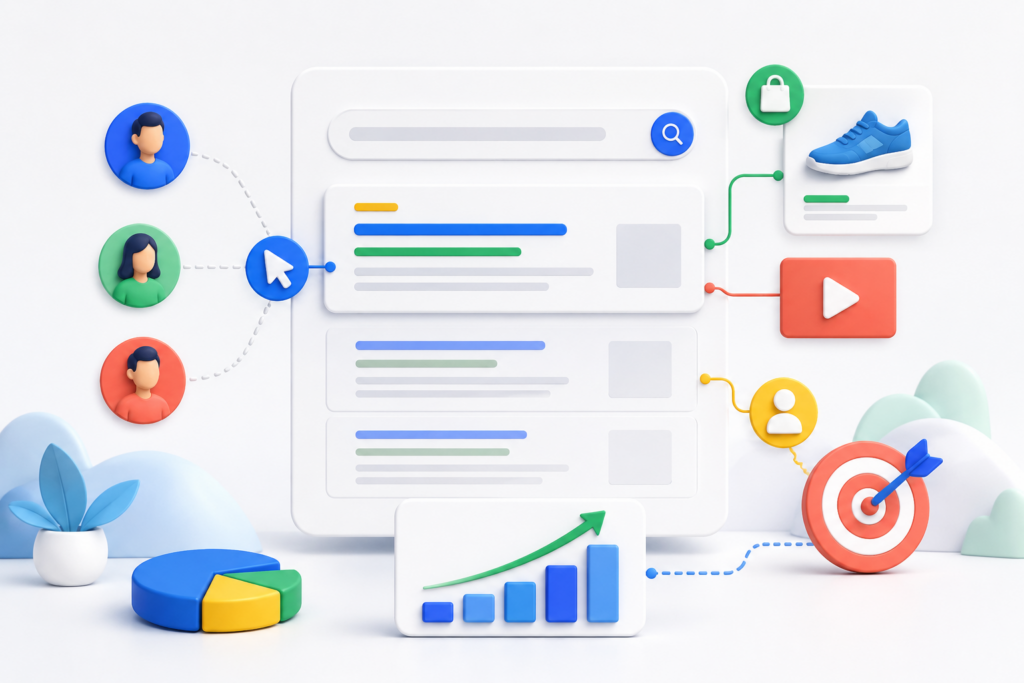
Google Ads is Google’s online advertising platform. It lets businesses and professionals show ads on Google Search, YouTube, Gmail, Maps, Google Play, Discover, apps and partner websites.
Its main advantage is that it helps you reach people at different levels of intent: from users actively searching for a product or service to audiences who are still discovering possible solutions.
Google Ads was previously called Google AdWords.
The name changed in 2018 to reflect an advertising offering that was no longer limited to keyword-based ads.
Quick answer: Google Ads is used to attract qualified traffic, get leads, generate sales, promote apps or increase brand awareness. The advertiser sets a goal, a budget and targeting; Google decides when each ad can be shown through an automated auction.
Drive qualified traffic to a website or landing page.
Get calls, bookings or visits to a physical location.
Promote an app and increase its installs or in-app actions.
Give visibility to a brand, product, service or video.
Reconnect with people who have already interacted with the business, when the applicable settings and consent allow it.
The platform delivers paid results and is not a substitute for organic search rankings. Investing in Google Ads does not directly improve a page’s SEO rankings.
SEO and advertising can complement each other, but they work on different systems: SEO seeks organic visibility, while Google Ads buys advertising opportunities.
How does Google Ads work?
The general process can be summed up in six steps:
The advertiser chooses a goal, such as sales, leads, traffic or awareness.
They select a campaign type based on where and in what format they want to appear.
They set up the audience, location, language and other signals relevant to their business.
They create the ads and assets, for example text, images, videos, logos, links or promotions.
They set a budget and a bidding strategy, aligned with clicks, conversions, conversion value or visibility.
They measure the results and optimize the campaign using conversion, cost and profitability data.
Structure of a Google Ads account
An account is usually organized into three main levels:
Account: contains the general information, users, billing and shared settings.
Campaigns: group the budget, goal, campaign type, locations and other settings.
Ad groups or asset groups: organize related ads, keywords, audiences or assets, depending on the campaign type.
A clear structure makes measurement, budget control and optimization easier.
Types of Google Ads campaigns
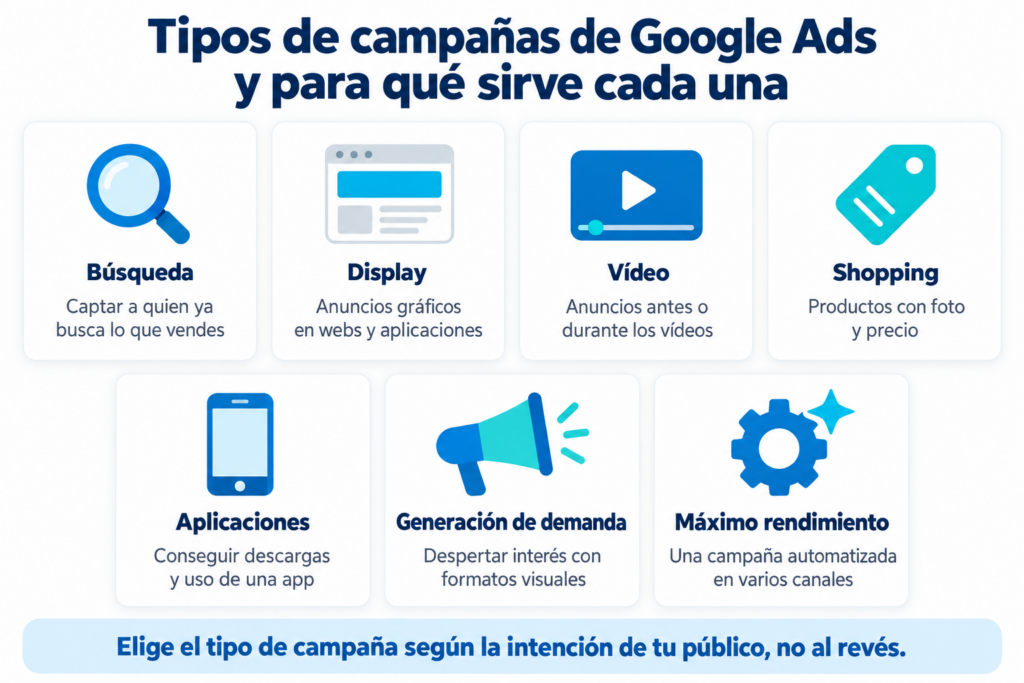
Google Ads offers several campaign types. The available options may vary depending on the goal, the country, the account and platform updates.
Campaign type
Where it can appear
Typical use
Search
Google search results and search partners, depending on settings
Capture active demand, sales and leads
Display
Websites, apps and Google properties
Reach, consideration and remarketing
Video
YouTube and other video placements
Awareness, consideration and conversions
Shopping
Google Search and shopping surfaces
Sell ecommerce products
App
Search, Google Play, YouTube, Display and other inventory
App installs and in-app actions
Demand Gen
YouTube, Shorts, Discover, Gmail and other eligible inventory
Create demand and drive conversions with visual formats
Performance Max
All available Google inventory from a single campaign
Optimize conversions or value across channels
Don’t pay twice for the same customer
Capture the email of everyone who arrives from your ads and keep the conversation going without paying for every click. Free for up to 80,000 emails a month.
Search campaigns mainly show text ads when someone enters a query related to the advertiser’s products or services.
They work especially well for capturing active demand, because they respond to a need the user has already expressed. Their setup can include keywords, match types, responsive search ads and negative keywords.
Example: a renovation company can try to appear when someone searches for “renovation company in Madrid” and send the ad to a page specific to that service.
Display campaigns
Display campaigns use visual, responsive ads that can be shown on websites, apps and properties that belong to the Google Display Network.
They are useful for expanding reach, building awareness and re-engaging audiences who already know the brand. To get good results, the message, creative, targeting and landing page must be aligned.
Video campaigns
Video campaigns let you run ads on YouTube and other eligible inventory. They can be used to introduce a brand, explain a product, build consideration or drive conversions.
The right format and length depend on the goal. In every case, it is a good idea to communicate the value proposition from the start, use a clear call to action and design the video with mobile devices in mind as well.
Shopping campaigns
Shopping campaigns are aimed at online stores. Their ads can show information such as the product’s image, name and price before the user clicks.
To use them, you need to set up and maintain a product catalog in Google Merchant Center and link it to Google Ads. The quality of the catalog data affects the system’s ability to match products with relevant searches.
App campaigns
App campaigns help promote apps across different Google channels. The system combines the assets provided and optimizes their delivery for goals such as installs, in-app actions or pre-registrations, where available.
Accurate event measurement (for example, sign-ups, purchases or subscriptions) is essential to optimize beyond a simple download.
Demand Gen campaigns
Demand Gen campaigns use visual and video formats to reach users on surfaces such as YouTube, Shorts, Discover and Gmail, among other eligible inventory.
They are designed to spark interest and drive actions at stages when the user may not be actively searching. That is why they require engaging creatives, a recognizable proposition and relevant audience signals.
Performance Max campaigns
Performance Max is a goal-based campaign type that gives access to different Google channels from a single campaign, such as Search, YouTube, Display, Discover, Gmail and Maps.
Google uses automation and artificial intelligence to combine assets, signals, bids and placements. The advertiser is still responsible for providing reliable conversion goals, quality assets, business information and a consistent budget.
Performance Max can complement keyword-based Search campaigns, but it does not remove the need to review measurement, profitability and landing page quality.
How does the Google Ads auction work?
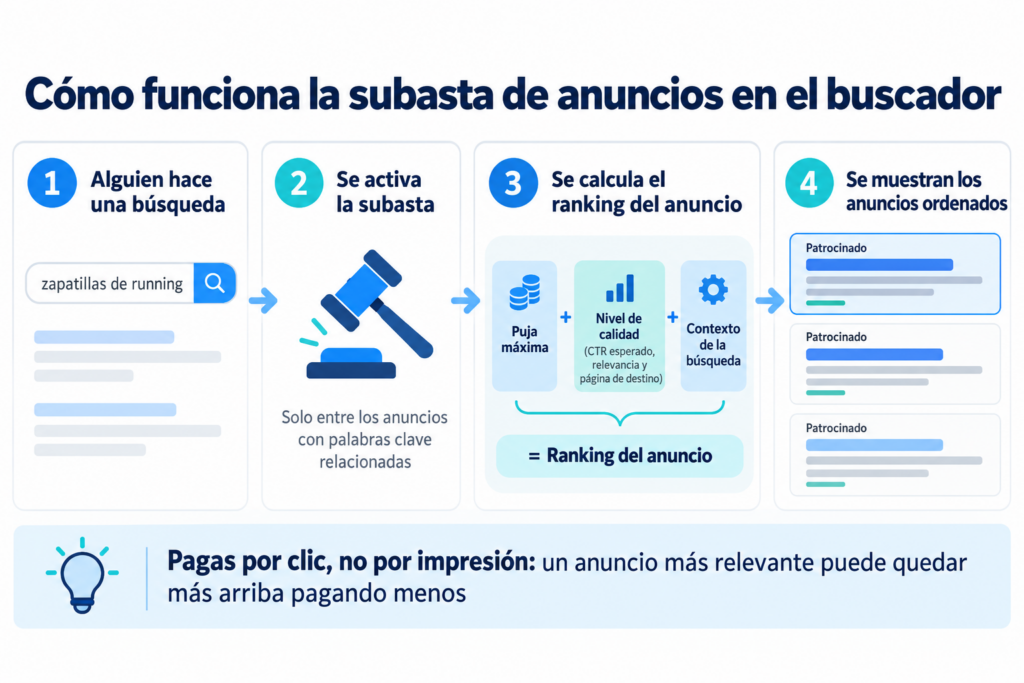
Every time there is an opportunity to show an ad, Google runs an automated auction. The highest bid does not always win.
Ad Rank determines whether an ad can be shown and in what position. Its factors include:
The bid, or the amount the advertiser is willing to pay.
The quality of the ad and landing page at the time of the auction.
Ad Rank thresholds.
The competition in that auction.
The context of the search or impression, such as the device, location, time and nature of the query.
The expected impact of the ad’s assets and formats.
So a relevant ad and a useful landing page can compete better than an offer with a higher bid but a lower-quality experience.
Difference between Ad Rank and Quality Score
They are not the same thing. Ad Rank is calculated in every auction and decides the ad’s eligibility and position. Quality Score is a diagnostic tool for Search campaigns that summarizes expected comparative quality based on elements such as expected CTR, ad relevance and landing page experience.
How much does it cost to advertise on Google Ads?
Google Ads has no universal rate. The cost depends on several factors, including:
Competition in the market and in each auction.
Geographic location and audience.
Campaign type and format.
The quality and relevance of ads and landing pages.
The goal and bidding strategy.
Seasonality, device and timing.
The advertiser sets an average daily budget or, in eligible campaigns, a total budget. Depending on the model, they may pay for or evaluate results using metrics such as:
CPC (cost per click): spend divided by clicks.
CPM (cost per thousand impressions): cost for every thousand impressions.
CPA (cost per acquisition or action): spend divided by conversions.
ROAS (return on ad spend): conversion value divided by ad spend.
The useful question is not just “how much does a click cost?” but “how much can I pay for a conversion and stay profitable?” To answer it, you need to know your margin, the value of each customer and the conversion rate.
Common bidding strategies
The right strategy depends on the goal and the quality of the available data. Common options include:
Maximize clicks.
Target impression share.
Manual CPC, in eligible campaigns.
Maximize conversions.
Target CPA.
Maximize conversion value.
Target ROAS.
Conversion-focused automated strategies use Google AI to adjust bids in every auction. To work properly, they need reliable conversion tracking. Automating a campaign with incomplete data can optimize it toward actions that do not represent real value for the business.
Key metrics for evaluating a campaign
Metrics should be interpreted according to the goal:
Impressions: number of times the ad has been shown.
CTR: percentage of impressions that lead to a click.
Average CPC: average cost of each click.
Conversions: valuable actions attributed to the ads.
Conversion rate: percentage of interactions that end in a conversion.
CPA: average cost of getting a conversion.
Conversion value: monetary value assigned to the recorded actions.
ROAS: revenue or value attributed for each unit of currency spent.
A high CTR does not guarantee profitability, and a low CPC does not necessarily mean quality traffic. Decisions should be based on conversions, value and business goals.
How to create an effective Google Ads campaign
1. Define a conversion that represents value
Decide which action you want people to take: a purchase, an information request, a booking, a qualified call or a subscription. Set up measurement before scaling the budget.
2. Choose the campaign type based on intent
Use Search when you want to respond to active demand; Shopping to promote a catalog; Video or Demand Gen to work with visual formats; App for an app; and Performance Max when you have conversion goals, good assets and solid measurement across channels.
3. Create ads that match the search and the offer
The ad should make it clear what you offer, who it is for and why it is relevant. Include a specific call to action and avoid promises the landing page cannot keep.
4. Optimize the landing page
The landing page should load quickly, be mobile-friendly and keep the ad, offer and call to action consistent. Reduce distractions and ask only for the data you need.
Not every visitor will buy in their first session. A campaign can send people to a landing page with a useful resource or an offer; after obtaining valid consent, an email sequence can educate the contact, address objections and bring them closer to a purchase.
This combination turns Google Ads into an acquisition channel and email into an owned channel for building the relationship. See also how to create sign-up pages and how to send bulk emails step by step.
6. Review search terms, audiences and profitability
Analyze which queries, placements, devices, times, ads and pages generate results. Exclude irrelevant traffic when appropriate, test new variations and avoid making major changes before you have enough data.
Advantages and disadvantages of Google Ads
Advantages
It lets you launch campaigns and gain visibility quickly.
It reaches users with high purchase intent on Search.
It offers different channels and formats from a single platform.
It lets you control budgets, locations and goals.
It makes it easier to measure conversions and profitability.
It can complement SEO, content, landing pages and email marketing.
Disadvantages
Paid visibility drops when you stop investing.
Incorrect measurement can lead to wrong decisions.
Competitive markets can drive up acquisition costs.
Automation does not replace a quality strategy, offer and creatives.
It requires ongoing optimization and adapting to platform changes.
Frequently asked questions about Google Ads
Are Google Ads and Google AdWords the same thing?
Yes. Google AdWords was renamed Google Ads in 2018. The current name reflects that the platform includes many more formats than keyword-based text ads.
Does Google Ads improve SEO?
Not directly. Paying for ads does not raise a website’s organic ranking. Both channels can be coordinated to cover different searches, test messages and increase visibility, but their ranking systems are independent.
Can you use Google Ads on a small budget?
Yes, although feasibility depends on the competition, the goal and the conversion rate. It is a good idea to start with specific targeting, measure conversions and compare the CPA with the real value each customer brings.
When do you pay in Google Ads?
It depends on the campaign type and the strategy. In many cases the cost is tied to clicks, impressions, views or conversions, although billing and optimization do not always use exactly the same metric.
Which campaign type is best?
There is no universally best type. Search is usually a good fit for capturing explicit demand; Shopping, for catalogs; Video and Demand Gen, for visual formats; App, for apps; and Performance Max, for conversion goals across channels. The choice should be based on the goal, the available assets and measurement.
What do you need before launching a campaign?
At a minimum: a measurable goal, a clear offer, a working landing page, ad assets, a budget, targeting and conversion tracking. It is also advisable to define in advance the CPA or ROAS that would make the campaign profitable.
What is the difference between Google Ads and Google AdSense?
Google Ads is for advertisers: you pay for your ads to appear. Google AdSense is for publishers: you get paid for showing other people’s ads on your website or blog.
How Mailrelay helps you
Google Ads brings you visitors, but every click costs money and most people don’t buy on their first visit. If you add a subscription form to your landing page, you can stay in touch with them by email without paying for every visit again.
With Mailrelay you can send an automated welcome sequence to new contacts, store where they came from in custom fields to segment them, and use UTM parameters to measure which campaigns bring you the best customers. The free account includes up to 80,000 emails a month and 20,000 contacts, with human support on all plans.
Get more out of every click on your ads
Turn the visitors you pay for into subscribers and send them welcome and follow-up campaigns.
We use cookies on our website to give you the most relevant experience by remembering your preferences and repeat visits. By clicking “Accept”, you consent to the use of ALL the cookies.
We use cookies to help you navigate efficiently and perform certain functions. You will find detailed information about all cookies under each consent category below.
Necessary
Always active
Necessary cookies are required to enable the basic features of this site, such as providing secure log-in or adjusting your consent preferences. These cookies do not store any personally identifiable data.
Functional
Functional cookies help perform certain functionalities like sharing the content of the website on social media platforms, collecting feedback, and other third-party features.
Advertisement
Advertisement cookies are used to provide visitors with customised advertisements based on the pages you visited previously and to analyse the effectiveness of the ad campaigns.
Analytics
Analytical cookies are used to understand how visitors interact with the website. These cookies help provide information on metrics such as the number of visitors, bounce rate, traffic source, etc.