Landing page creator: what it is and which tools include it for free
What is a landing page creator?
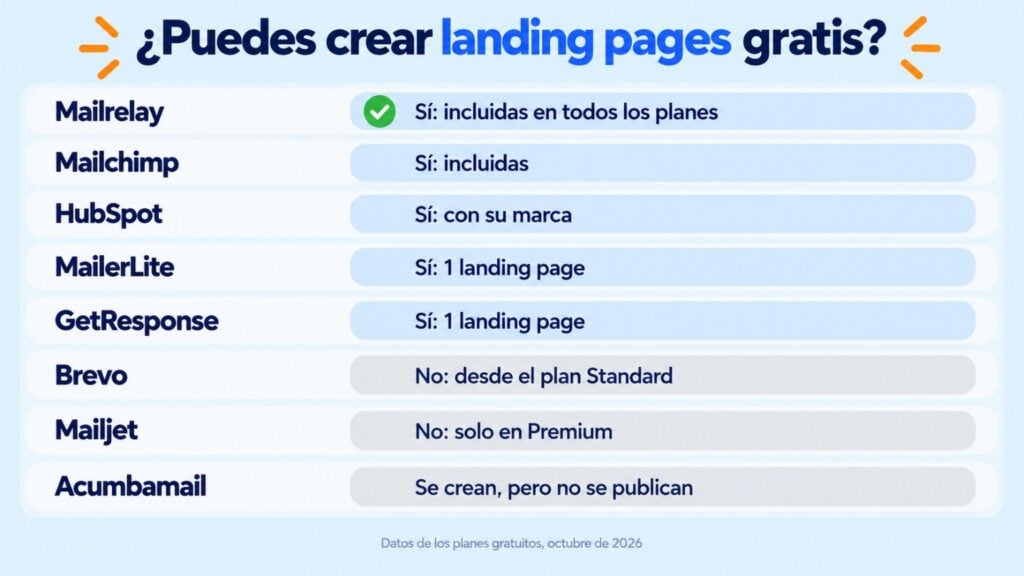
A landing page creator is a tool for building landing pages without coding, using templates and a visual editor. Among email marketing platforms, Mailrelay, Mailchimp and HubSpot include a landing page creator in their free plan, while MailerLite and GetResponse include it with a single page. Brevo, Mailjet and Acumbamail keep it for their paid plans.
The difference lies in the limits: how many pages you can publish, whether they carry the tool’s branding and whether contacts go straight into your email list.
“A landing page makes sense when you want your contacts to do something specific, such as subscribe. In Mailrelay you can create a landing page with a subscription form, drive traffic to it and have each sign-up trigger an automation, for example. It’s very useful if you don’t have a designer to adapt your website.”
Jose Argudo, CMO at Mailrelay
What is a landing page creator?
A landing page creator is an editor that lets you design and publish a landing page without touching any code. You pick a template, change the text and images, add a form and publish the page with its own link.
It is mostly used by marketing teams and small businesses that want to launch a campaign without relying on a developer or building a full website.
There are two types:
- Creators built into an email marketing tool, such as Mailrelay, Mailchimp or MailerLite. Contacts who sign up go straight into your list.
- Standalone creators or website builders, such as Wix, Unbounce or Leadpages. They give you more design freedom, but you have to connect them to your email tool.
Which platforms include a landing page builder at no extra cost?
This table sums up what each email marketing platform offers in its free plan. The data was checked on their websites in October 2026:
| Tool | Landing pages in the free plan? | Details |
|---|---|---|
| Mailrelay | Yes | Landing pages, templates, sign-up forms, custom fields and conversion tracking included in every plan |
| Mailchimp | Yes | Landing pages included in the Free plan, with no stated limit |
| HubSpot | Yes | Included in the free tools, with HubSpot branding. No branding from Starter up |
| MailerLite | Yes, 1 | One website and one landing page in the Free plan |
| GetResponse | Yes, 1 | One landing page with basic features. Landing page A/B tests are paid |
| Brevo | No | From the Standard plan, with one landing page |
| Mailjet | No | Premium plan only |
| Acumbamail | Can’t be published | You can create them, but the free plan doesn’t let you publish them |
Prices and plans change often. Check the terms on each tool’s website before deciding.
What a good landing page creator should have
Not every creator is suited to the same things. Before choosing, check these points:
- Templates: they save you time and give you a structure that already works.
- No-code editor: so you can change text, images and colors without technical help.
- Forms connected to your list: so every sign-up goes straight into your email list, without exporting or importing files.
- Custom fields: to ask for more than the email address, such as the contact’s city or the topic they’re interested in.
- Mobile-friendly design: most visits come from phones.
- Conversion tracking: how many visits the page gets and how many turn into contacts.
- Free plan limits: how many pages you can publish, whether there’s a visit cap and whether the page carries the tool’s branding.
If you want to compare two versions of a page, also check whether the tool offers landing page A/B tests and on which plan.
Create your first landing page for free
Templates, sign-up forms and conversion tracking, included in Mailrelay’s free account.
Landing page creator or website builder: which one you need
If your goal is to capture subscribers, a landing page created in your email tool is usually enough. You have the form, the list and the sending in one place, and you can send a welcome email as soon as someone signs up.
A website builder like Wix makes more sense if you need a multi-page website, an online store or a highly customized design. In that case, connect the forms to your email tool through an integration or an embedded subscription form.
| You need… | Your best option |
|---|---|
| Capture subscribers for your newsletter | Your email tool’s creator |
| A page for each campaign or ad | Your email tool’s creator |
| Offer a guide or a lead magnet | Your email tool’s creator |
| A full website or an online store | A website builder |
| A custom design with lots of testing | A paid standalone creator |
How to create an effective landing page without technical knowledge
- Set a single goal. A landing page works best when it asks for just one thing, such as subscribing or downloading a guide.
- Choose a template and adapt the text, colors and images to your brand.
- Write a clear headline that says what the visitor gets.
- Ask only for the data you’re going to use. Every extra field is a reason not to finish the form.
- Remove distracting menus and links.
- Publish and share the link on your social networks, ads, website or emails, with UTM parameters to see which channel works.
- Measure sign-ups and improve the page based on the results.
How Mailrelay helps you
Mailrelay gives you a free landing page creator on every plan, including the free account.
| What you need | How Mailrelay solves it |
|---|---|
| Create the page without coding | Templates or a blank page, with a visual editor |
| Capture contacts | Sign-up forms with custom fields |
| Store the contacts | They go straight into the subscriber group you choose |
| Welcome them | An automation sends the email as soon as they sign up |
| Measure results | Real-time conversion tracking |
| Stay in touch | Newsletters and campaigns from the same dashboard, up to 80,000 emails a month to 20,000 contacts on the free account |
Capture subscribers and send them your campaigns from the same dashboard
Landing pages and email marketing on Mailrelay’s free account, up to 20,000 contacts.
Landing page creator FAQ
Which platforms include a landing page builder at no extra cost?
Among email marketing tools, Mailrelay, Mailchimp and HubSpot include a landing page creator in their free plan. MailerLite and GetResponse include it with a single page. Brevo and Mailjet keep it for paid plans, and Acumbamail lets you create landing pages but not publish them without paying.
Are there free landing page creators with more than one page?
Yes. MailerLite and GetResponse limit the free plan to one landing page. Mailrelay and Mailchimp include landing pages in the free plan without stating a number on their pricing page. HubSpot includes them too, but with its branding.
Do I need to know how to code to create a landing page?
No. Landing page creators work with templates and a visual editor. You only have to change the text, images and form.
Can I connect the landing page to my email list?
If you use your email marketing tool’s creator, the connection is direct: every sign-up goes into your list. With a website builder or a standalone creator, you need an integration or an embedded form.
What’s the difference between a landing page and a form or a pop-up?
A landing page is a full page dedicated to a single goal, with its own link. A subscription form is embedded in a page on your website, and a pop-up appears over the content while the visitor browses. You can combine them: the landing page for campaigns and ads, and the form or pop-up for people already visiting your website.

Jose Argudo
CMO at Mailrelay. Writes about email marketing, copywriting and conversion for SMEs and entrepreneurs.