
Does the open rate of your email campaigns stay between 12% and 18%?
A more creative subject line can certainly help, but it is a strategy that has some limits.
Not everything is solved with good words, right?
Currently, the open rate remains a critical metric in email marketing statistics.
Although you must keep in mind that between:
- Privacy issues (some email clients block open tracking)
- Automatic email preloading (done by some email services like Gmail)
- And more aggressive filters
The reality is that the open rate is a metric to be analyzed carefully.
Is it still possible to achieve open rates of 25% or more?
Yes, and even more, it is not an unreasonable goal at all.
Improving and maintaining a good open rate will help your business achieve its marketing goals stably.
Quick checklist to improve your open rate (without touching DNS settings)
These settings are important, as we saw here.
And since they are key, we will assume you already have this set up correctly (if not, contact our support team).
Aside from that, what can you do?
- Send to a highly engaged segment of contacts. This way you will know what your top open rate would be.
- Use the preheader as a ‘second subject line’. That is, take advantage of this space to convince the reader to open your email.
- Personalize the subject line. We already explained this here and it can really help improve the open rate of your campaigns.
- Systematically run A/B tests to find out which types of subject lines work best.

Open rate in 2026: what it measures and what it DOES NOT
A brief definition of open rate would be the percentage of delivered emails that register an ‘open or impression‘.
How is this metric measured?
This part is important.
How do email marketing tools know that a sent email has been opened?
This is usually done by tracking the loading of a small invisible image (pixel).
This image is invisible and can’t be seen in the sent email, but, like the rest of the images, it is not embedded within the email, rather, when it is opened, it is requested from the server to be displayed.
When this request is received by the system, it knows the email has been opened.
Because otherwise, the request would not have been sent.
In what cases can this detection fail?
Although it is a highly effective detection method, there are certain scenarios where it will not be able to measure 100%.
For example, if the destination server blocks the loading of images, it cannot be measured.
Other systems like Apple’s Mail Privacy Protection work differently.
When a user activates this protection in Apple Mail, the client can preload images via proxy servers.
Gmail also does it.
It preloads your emails to run various checks:
- Review content
- Links
- Attachments
- Etc.
And make sure it doesn’t present a problem for the receiver.
But when opening your emails, they are loading the images.
This results in opens whose origin is not a human, but a server, which can slightly inflate the statistics.
Email marketing tools like Mailrelay try to detect these cases, although it is not always possible.
Does this invalidate the open rate as a key metric?
No, because the deviation is not that large and you will still be able to easily spot trends.
But you should also complement this statistic with others:
- Click-through rate
- Click-to-open rate
- Unsubscribes
- Spam complaints
For example, if your click rate remains stable, but the open rate has had a very drastic spike in a specific campaign, it could be due to the influence of these systems we have discussed.

Why a goal of 25% open rate or more?
If you ask an AI about a good open rate, it will probably point you to something around 30% to 40%, based on information published by different email marketing tools.
What to consider regarding this answer?
- It doesn’t take into account your contact list, origin, age, etc.
- It is a general statistic, not separated by market niches.
- It probably also mixes normal mass emails with transactional ones (which inflates the average).
- And it also doesn’t consider the services that, as we saw earlier, Gmail or Apple can inflate opens.
Therefore, and from my personal experience, it seems to me that a 25% rate is a valid, realistic, achievable average to use as a baseline.
If you don’t reach that rate, it is okay, it is about improving your current rate.
And if you exceed it, it is a good sign, but you can still work to improve your current rates.
Let’s say that 25% can be considered a reasonable, achievable, and positive average.
What is best?
Considering that 25% is a good figure, start from your current data and try to improve, observing the evolution of your data.
It is not an all or nothing, or a goal, but rather a working reference upon which to observe trends.

Segmenting, the most sensible option to increase the open rate
Segmenting your contact list is usually the most efficient option to improve the open rate.
Why?
There are several reasons.
On one hand, it is clear that if you match contacts with content that is of interest to them, the open rate will be higher.
That is direct and immediate.
And on the other hand, we have a gradual effect.
If email providers (Gmail, Outlook, servers) see that your emails tend to generate reactions, are opened, readers click on links, etc. They reward this, and more of your emails will reach the inbox.
More emails in the inbox means a higher number of opens. Therefore, it is a way of working that feeds back on itself.
The reverse also happens.
If the emails you send don’t generate any reaction, email providers may slowly leave them in lower-priority folders, or even in spam.
That is why segmentation usually helps a lot.
Does it help to send to the most active contacts first?
Actually, yes.
But you don’t need to do anything for this, because Mailrelay already does it automatically, sending first to the most active contacts and then to the rest (within the same campaign).
If you want to manually segment the contacts, you have several options that you can find in the Subscribers – Segmentation menu.
For example, you can search for contacts who have clicked on an email in the last month:
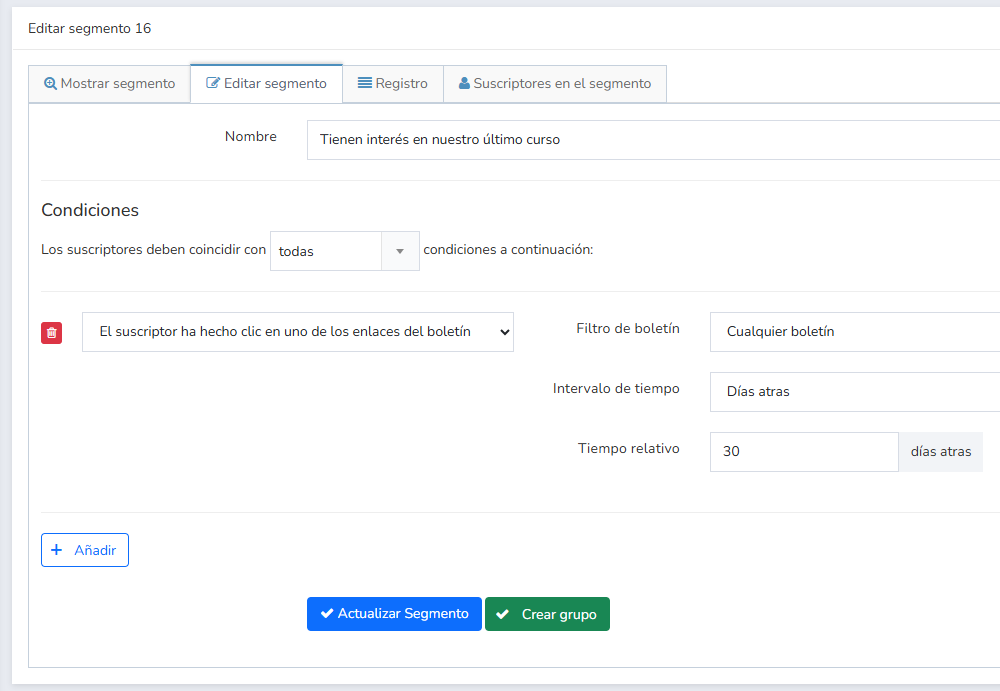
And create a group, or segment, with these most active contacts, to whom you can send.
Another option available is segmentation by contact reputation:
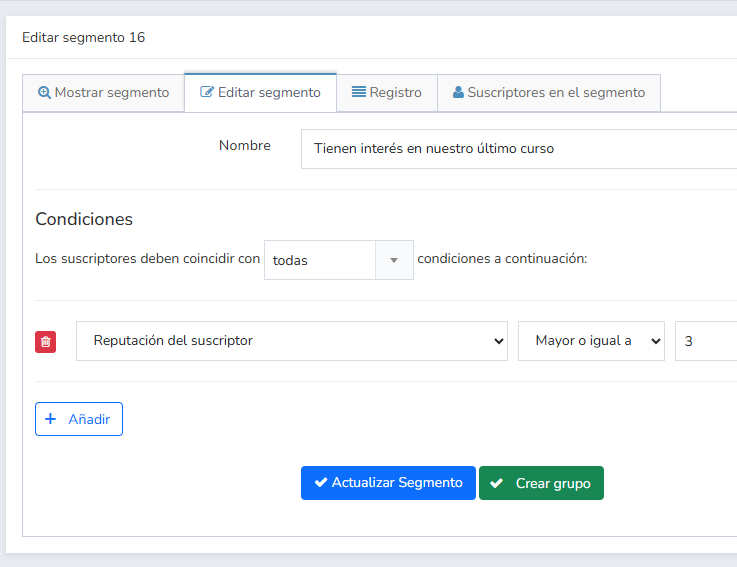
As you send emails, Mailrelay observes the reactions of these contacts. If they open the emails, if they click, and with this data, and its frequency, it calculates the reputation.
It is a simple way to segment contacts based on their engagement with your brand.
Although it requires you to send some emails first in order to calculate.
In general, it is always better to send to the most active contacts first, and then to the rest, avoiding emails you haven’t sent to in over 6 months, as those have a high possibility of bouncing.
Email lists age
This is inevitable.
No matter how well you do everything, contacts will eventually get tired and lose interest.
So you should detect them and not continue sending indefinitely to these contacts.
You can create a group and try to reactivate them, but if this doesn’t work, the best thing is simply to stop sending to them.
As we mentioned before, sending to contacts who don’t react to your emails can generate, over time, a reduction in opens, as providers will place your emails in less priority folders.

Allow them to easily unsubscribe
It is tempting to try to make the number of contacts only go up, never down.
It seems to offer more sales opportunities, right?
However, if you accumulate:
- Contacts that never interact
- Spam complaints
- High number of bounces
All of these are negative signals for your list, which email providers use to deduce or calculate its quality.
It is clear that if the number of negative signals is high, your deliverability will not be good.
Allowing easy unsubscription reduces spam complaints.
Requirements for good deliverability have been significantly tightened
We saw this in this article, which I recommend you read, as it is very detailed with current requirements.
In summary:
- Easy unsubscription, as easy as possible
- Spam complaint rate below 0.3%
- Unsubscribe headers present (these are automatically placed by Mailrelay)
- Use double opt-in to ensure sending to contacts who want your emails
The double opt-in part is indispensable if you want to have the highest possible open rate.
Here we talked about how to ensure confirmation emails reach their destination, if that is what worries you.
Subject, sender, and preheader: tools to increase the open rate
If you have already checked your contact list.
And worked on segmentation.
The next step would be to run tests with different:
- Senders
- Subjects
- Preheader
This combination is the first thing contacts see when they receive your email.
If together they make your email stand out from the rest, it is easier to get a good open rate.
You can configure all these elements when editing the newsletter:
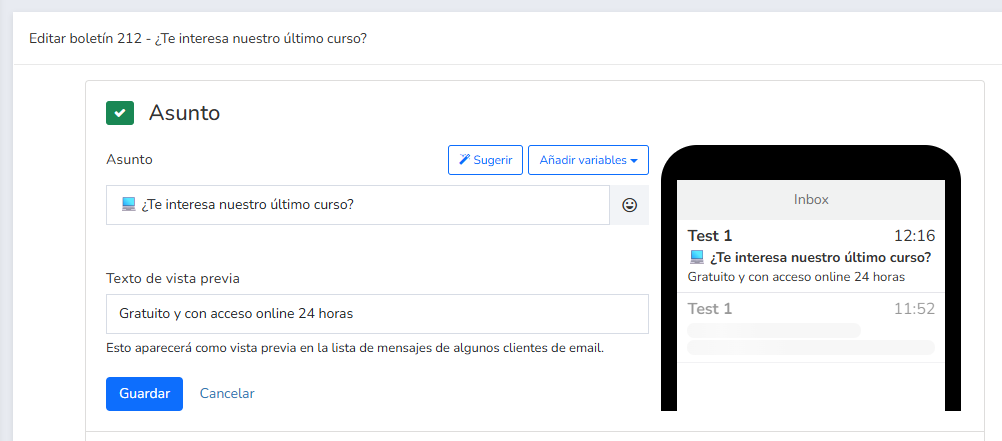
Additionally, you have several options available to add custom fields, emojis, or AI-suggested titles.
It is important that the sender is visible, known, human, and not a no-reply, this will increase the trust of your contacts and improve open rates.
Is it advisable to change the sender frequently?
It is not recommended, although if you have doubts about the effectiveness of the sender you are using, you can run an A/B test (in newsletters – A/B Test), to test with a different sender, comparing it with the original, and see if the problem is there.
About the subject of your email
It is customary to recommend brevity, remember that you don’t want to give all the details in the subject line, but you also don’t want it to be super generic.
For instance
- Discount
It would be too short.
- Only today 15% discount on a selection of products from our brand
It could be too long and not look good on different devices.
- Only today! 15% discount
It would be brief but effective. Especially if the sender makes it clear who the sender of the message is, your company.
Would you like a more creative subject line?
That is good, as it will help differentiate your email from the rest.
- 15% discount is much more
As in the case of senders, if you have doubts, it is time to run an A/B test to find with data which is the best option.
Tip, use the preheader:
If the subject line falls short, especially since it should be brief, don’t forget to take advantage of the preheader space (preview text), as it allows you to add a bit more text.
Ideally, it should complement the subject line, perhaps with some extra information.
Some tips for creating effective preheaders would be:
- If the subject line is very creative, the preheader would help you include something more concrete
- In the opposite case, if you have used a precise subject line, you could use the preheader to add some element that generates curiosity
If you don’t add a preheader, it is most likely that the email provider will add any text it finds in your email at the beginning. Like the typical “web version” or an image URL.
That doesn’t look very good.

Sending frequency of your email campaigns and its relationship with open rates
Can sending more or less frequently affect the open rate?
Yes, and for various reasons.
It is not as simple as thinking that if you send more there will directly be more opens.
If you send too frequently, you might exhaust your contacts, and they will unsubscribe, or start ignoring your emails.
Is it not correct then to increase the sending frequency?
Yes, but always checkng the statistics carefully:
- Evolution of the open rate
- Evolution of clicks
- Number of unsubscribe requests
- And number of spam complaints
If positive data increases, such as open rates and clicks, and negative data, such as unsubscribes and spam complaints, remain stable, you can consider increasing the frequency and keep monitoring.
Be careful with reducing the frequency too much!
This is actually more dangerous for the open rate.
When going a long time without sending, several things happen:
- It is most likely that contacts will forget your brand, as they don’t receive enough emails to remember you
- Over time, emails can become unused, and generate bounces (errors). If there are many errors, your domain reputation will be affected, harming future results
Don’t send less than once every 15 days or you could really accumulate too many invalid emails.

Don’t forget about A/B tests, they help a lot with open rates
We have already mentioned it several times throughout the article, A/B tests are a very useful tool that can help you discover the best subject lines to increase the open rate.
You can find these options in Campaigns – A/B Tests menu.
What options are available to you?
- Test with up to three different subject lines
- Percentage of contacts (from a group) that will receive the test
- How to decide which final version to send (highest click rate, open rate, or manual)
For example:
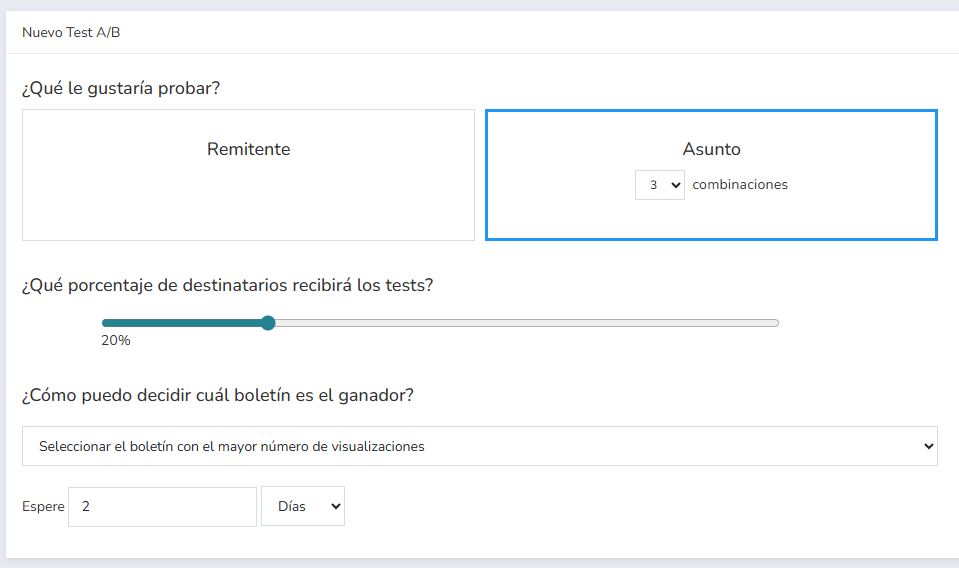
This type of test will help you discover, with data, what types of subject lines work best with your list.
Or with specific segments.
You can segment and run A/B tests for different segments, as it is very possible that each segment responds better to different subject lines.
Don’t just stick to subject and sender tests, you can also try sending your mailings at different times to see which ones work best.
In summary:
How to increase the open rate fast?
- Avoid sending to disinterested contacts, segment first
- Test different senders, subject lines, and preheaders, if possible with A/B tests
- Don’t change the sender often, so that it is recognizable to your contacts
- Always observe the evolution of the statistics
These simple tips will help you maximize your open rate.