Multichannel automation
What is it, how does it work, and why does it improve your email marketing?
Multichannel automation is an online marketing strategy that coordinates automated messages across various channels, such as email and SMS, based on user behavior.
The goal of automation is to send the right message, on the right channel, at the right time.
That’s why multichannel automation is a key element of marketing.
Sending a generic email to your entire database isn’t enough.
It’s much more effective to guide contacts through every stage of the customer journey with relevant messages.
If someone subscribes, they can receive a welcome email.
If they click a link later on, they can enter a follow-up flow.
And if they don’t respond, you can reinforce the connection with a short, direct SMS.
That’s multichannel automation applied to email marketing and SMS.
What is multichannel automation
Multichannel automation is the planning and execution of automated flows using multiple interconnected communication channels.
Instead of handling email on one side and SMS on the other, multichannel automation brings both channels together within a single workflow.
This way, every user action can trigger a specific response.
For example, someone signs up via a form to download a guide.
First, they get an email with access to the document.
Two days later, if they haven’t opened that email, you can send another one, or even an SMS reminder.
If they finally click, the system can add a tag to the contact, move them to another group or trigger another sequence.
All of this is easy to build with the Mailrelay automation editor.
Using this tool helps you design more natural and effective communications.
How multichannel automation works in email marketing
Multichannel automation works based on rules or conditions.
Each rule connects an event with an action.
For example, the following click check:
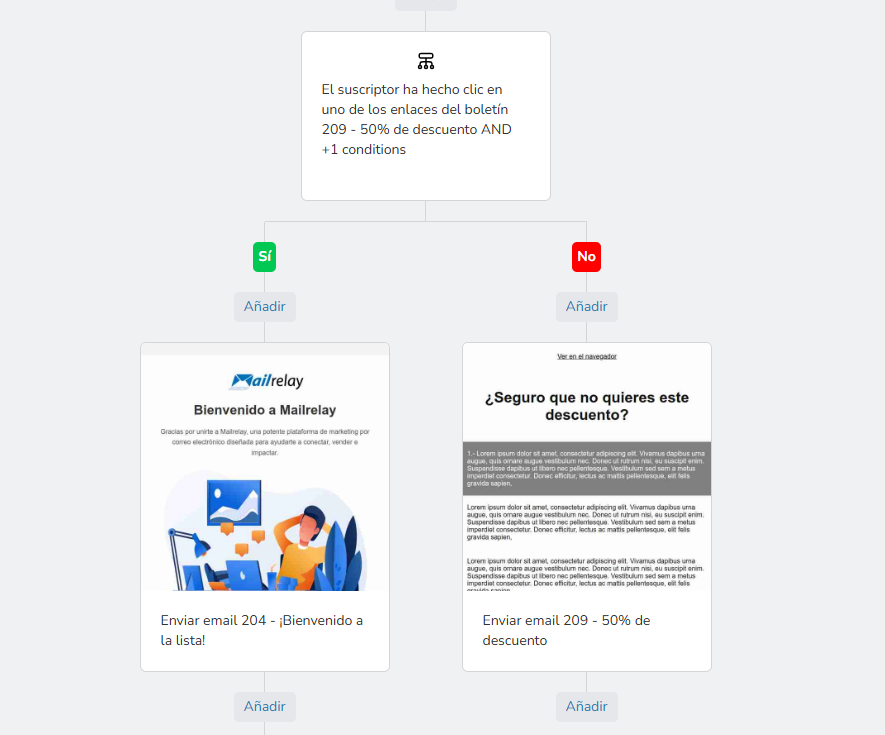
Sending a different email in each case.
The process starts with an entry point that triggers it.
For instance, a subscription, a click, a group change, etc.
From there, the flow executes actions:
- It can send an email
- Wait a few hours
- Check a condition
- Send an SMS.
- Add a tag
- It can even move the contact to another group
- Or end the journey
There are multiple types of actions you can use to customize your automation.
The better you define the logic, the better results you’ll get.
Entry points, conditions, and actions
Entry points start the flow.
Conditions decide which path each contact follows.
Actions execute what happens next.
This structure makes multichannel automation flexible. Not all users take the same path. And that’s an advantage, because every person shows different signals.
Tags help keep your database organized. But they can also be used to trigger decisions.
For example, you can tag someone as ‘interested’, ‘customer’, ‘inactive’, or ‘clicked on offer’.
Then, you can use those tags to accurately segment your contacts and tailor your future campaigns to the most appropriate audience.
Benefits of multichannel automation
The first benefit is time.
When you set up an automation, it works on its own.
You stop repeating tasks and can dedicate that time to other things.
The second benefit is relevance.
Multichannel automation responds to the user’s actual behavior. That means the message arrives with more context.
The third benefit is conversion.
When you combine email and SMS wisely, you increase your chances of making an impact. Email lets you explain an offer in more detail. SMS, on the other hand, lets you add urgency or remind people of a specific action.
The fourth benefit is the customer experience.
When contacts receive emails tailored to their current needs, the overall experience is much better.
The fifth benefit is measurement.
Multichannel automation lets you track opens, clicks, replies, conversions, unsubscribes, and the most effective paths. As a result, you can optimize your flows based on data rather than intuition.
Multichannel automation and omnichannel aren’t the same thing
They are similar concepts, but they aren’t the same.
Omnichannel aims to provide a consistent experience across all touchpoints.
Multichannel automation, on the other hand, focuses on coordinating automated actions across multiple channels.
In other words, omnichannel is a global view of the experience. Multichannel automation is one way to put that view into practice.
That’s why a company can use multichannel automation without having developed a full omnichannel strategy.
Examples of multichannel automation that actually work
One of the most common cases is the welcome flow.
Someone subscribes and then receives an introductory email.
You can set it up so that, if they don’t open it, for example, a different email with a call to action is sent.
If they click, the system tags them as interested and triggers an email sequence.
Another common example is the abandoned cart.
The first touchpoint could be an email featuring the pending product. If there’s no response, an SMS can remind them to complete the purchase.
It also works really well for re-engagement.
If a contact hasn’t opened an email in weeks, you can send one with useful content. Then, if they remain inactive, the flow can try an SMS or a one-off offer.
How to create a multichannel automation strategy
Start by setting a goal.
Before creating the flow, decide what you want to achieve. More sales, more clicks, more replies, or better customer loyalty.
Next, choose the key moment.
Not every point in the customer journey needs a flow.
Start with the most profitable ones:
- Welcome
- Abandoned cart
- Sales follow-up
- Re-engagement
These touchpoints are usually a great starting point.
Next, define the rules.
- What triggers the flow?
- In that case, what is the system waiting for?
- Is there a condition that splits the flow?
- What happens if the person doesn’t open the email?
- What if they do click?
Next, write short, clear messages. Most users don’t have time to waste.
That’s why you should draft a brief email with a single purpose and a single call to action.
Finally, measure, analyze, and optimize.
What metrics you should track in multichannel automation
The first is the email open rate.
And after that, the click-through rate to get an idea of user engagement.
Additionally, it’s a good idea to monitor unsubscribes, the pace at which users move through the flow, and the points where the sequence loses momentum.
Common mistakes in multichannel automation
The first mistake is repeating the exact same message across all channels, hoping for better results; in reality, this just tires out the recipient.
The second mistake is automating without segmenting.
If you don’t use conditions, groups, or tags, the flow loses its effectiveness.
The third mistake is starting out with too much complexity.
It’s better to begin with a simple flow, and once you gain experience, create a more complex one that fits your evolving needs.
The fourth mistake is not checking your statistics.
Without analytics, multichannel automation usually isn’t effective.
The fifth mistake is using tools that aren’t connected.
Work with an email marketing tool that lets you centralize campaigns, automations, lists and statistics in one place.
Frequently asked questions about multichannel automation
What is multichannel automation in a nutshell?
It’s a strategy that automates messages across various channels, such as email and SMS, within the same workflow.
Is multichannel automation only for large companies?
No. It’s also useful for SMEs, e-commerce stores, and businesses with small databases.
What channels does multichannel automation usually include?
The most common are email and SMS. However, it can also be extended to other touchpoints.
What is the best flow to start with in multichannel automation?
Usually, the welcome flow. It’s easy to build and adds value with little effort.
Does multichannel automation replace email marketing?
No. It boosts it. Email is still key, but it becomes more effective when it’s coordinated with other channels.
What do I need to set up multichannel automation?
You need clear goals, a proper database, well-written messages, and a tool capable of handling workflows, conditions, and tracking.
How do I know if my multichannel automation is working?
You should monitor opens, clicks, conversions, unsubscribes, and user behavior at each step of the flow.
If the journey improves with every adjustment, you’re on the right track.