From small businesses to large international companies, communicating with customers through digital channels is essential.
That’s why communication software that integrates multiple channels can be a great solution for these businesses.
Bringing together various communication tools in one place.
Mailrelay integrates email, SMS, and WhatsApp on a single platform.
Thanks to these channels, you can reach the vast majority of customers, covering the most widely used forms of digital communication.
Such as newsletters, promotions, bulk SMS, WhatsApp notifications, and much more.
The best part about these tools?
You’ll have access to statistics to track effectiveness at all times.
¿Qué otras funcionalidades apoyarán a estas campañas?
Beyond simply sending and analyzing these campaigns, there are other features that can help you, such as:
- Automations (workflows)
- Landing pages
- Integrations (SMTP and API)
So that your communication with customers reaches them wherever they are.
Email marketing: the pillar of digital communication for businesses
Email remains the preferred channel for business communications in most companies.
For an SME, email marketing is essential.
It lets you send newsletters, personalized offers, and updates directly to your customers’ or subscribers’ inboxes.
What should you expect from email marketing software?
· Subscriber list management:
A tool like Mailrelay helps you handle multiple tasks with your contacts:
- Remove bounces
- Manage unsubscribes
- Segment your contacts
- Manage statistics
- Etc.
This keeps your contact list in perfect shape, which helps your sender reputation.
Mailrelay has a drag-and-drop editor that lets you create beautiful emails in minutes, with no effort.
You can find more information in this article.
You don’t need any design experience — just drag the different elements wherever you want them.
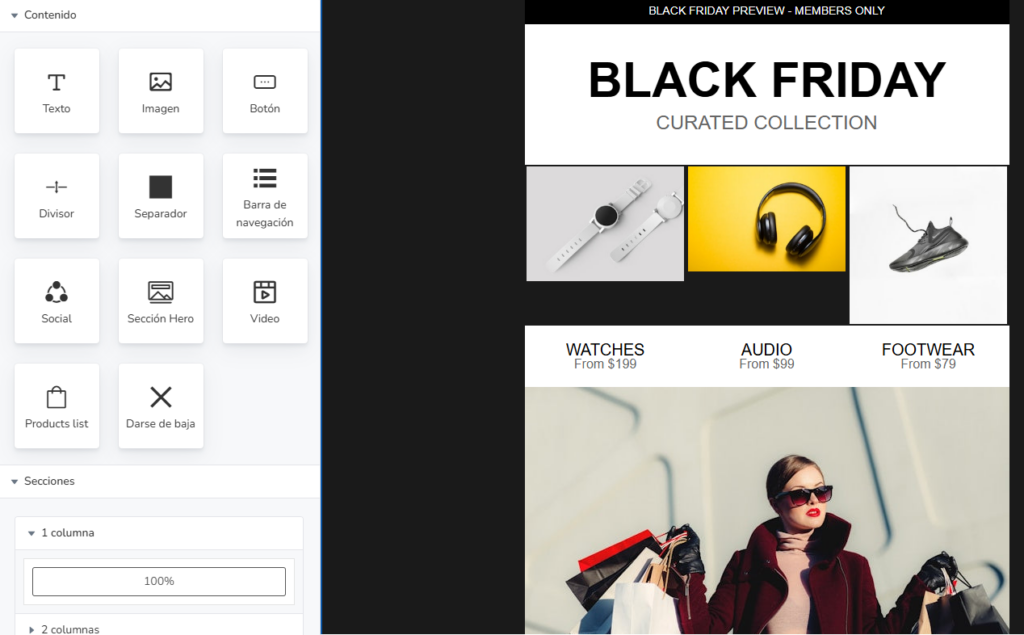
Ready-made templates are also included, along with the option to use the built-in AI to create a template for you.
All options that will save you time.
· Content personalization:
Insert personalized content using variables or custom fields to make your emails unique for each recipient.
You could show the recipient’s name, or even make a section visible or not based on a contact field.
· Scheduled and segmented sends:
You can schedule when sends will happen and segment which contacts receive them, to ensure maximum effectiveness.
· Email automations:
Having automations (autoresponders and automation workflows) can save a lot of work by sending emails based on contacts’ actions.
Such as subscribing, opening an email, or clicking a link.
Automating these actions lets you scale your email marketing.
Email marketing is one of the online marketing tools with the highest return on investment (ROI). In fact, if you use Mailrelay’s free account, the return is total — pure profit.
And as always, measurable.

SMS marketing: text messages for instant reach
Email marketing can be perfectly complemented with bulk SMS campaigns.
Mailrelay lets you create SMS campaigns very easily:
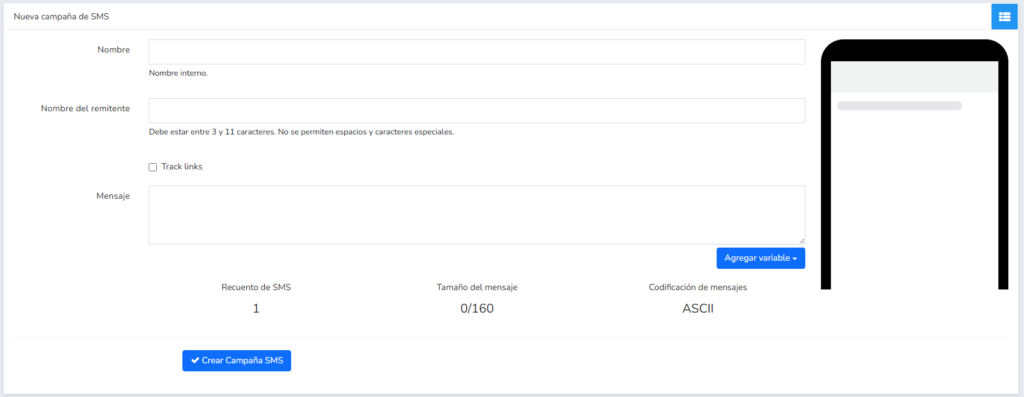
Even with tracking and custom variables!
You’ll be able to create unique SMS messages!
What can you use SMS campaigns for?
· Flash promotions and exclusive discounts:
For example, you can send a time-limited discount code via SMS, so it reaches your customers and contacts as quickly as possible.
You can even combine an email campaign with an SMS one, offering the same discount to maximize your reach.
· Appointment or booking reminders:
Ideal for reminding customers about appointments, offers to specific contacts, delivery notices, order confirmations, or other types of alerts.
For this kind of transactional SMS, you can use the API.
With Mailrelay you can send both email and SMS campaigns, view their statistics, and analyze results.
In fact, you can turn a regular newsletter into an SMS campaign from the newsletter’s “show” option:

This conversion will create an SMS campaign for you:
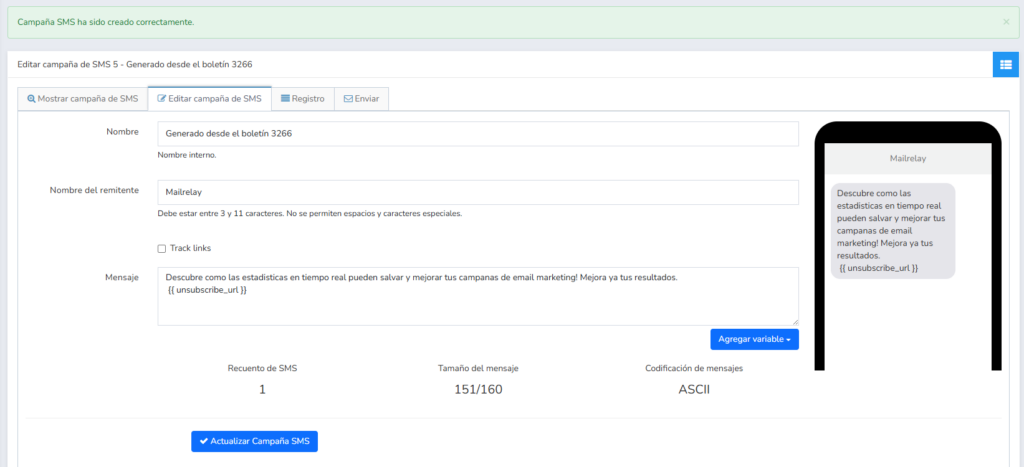
You can edit this message however you like.
Notice that it also includes an unsubscribe link.

WhatsApp Business: instant, personal communication
In Spain, WhatsApp has become a key channel for both personal and professional use.
Many SMEs already use it to chat with customers, resolve questions, and even close sales quickly.
That’s why WhatsApp marketing is another channel added to Mailrelay.
Mailrelay lets you send WhatsApp Business campaigns in bulk.
What does this mean?
Basically, you’ll be able to send WhatsApp messages to contacts who’ve given you permission, using templates approved by WhatsApp (required for commercial sends).
These messages can include text, links, and even images or PDFs, giving you a very rich way to reach customers.
For example, below you can see the WhatsApp template editor:
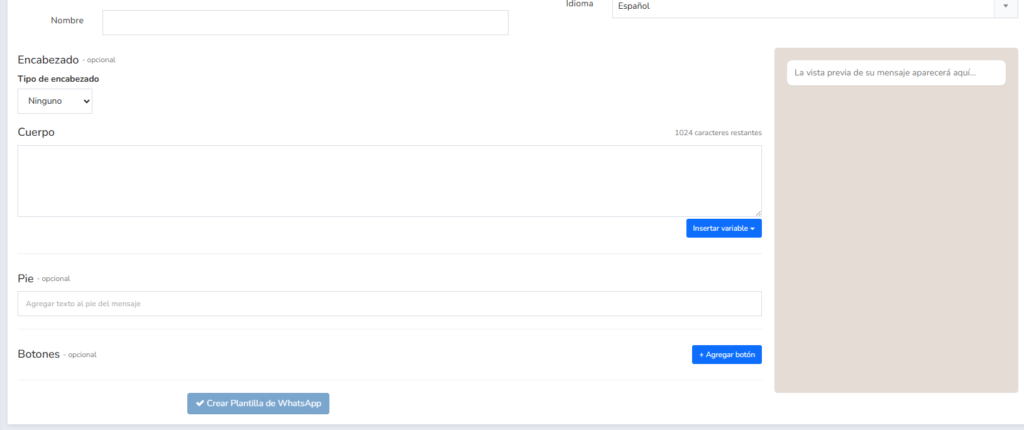
· Advantages of using WhatsApp Business:
- Immediacy and closeness: many customers prefer receiving messages on WhatsApp because they see it as almost a personal chat. Communication is more conversational and direct.
- Very high read rate: just like with SMS, a WhatsApp message is usually read within minutes. If you have important announcements (for example, a product launch or a schedule change), WhatsApp ensures your customers find out quickly.
Mailrelay offers the option to create WhatsApp campaigns in a way very similar to email campaigns.
You write your message (following WhatsApp Business policies), select the recipient list, and schedule the send.
Everything is managed from the same panel where you control your emails and SMS.
This gives you a unified view of your communication with customers.

Marketing automations: save time and increase impact
One of Mailrelay’s most interesting features would be automations.
They let you communicate with your customers and contacts based on their own actions.
Let’s look at some examples:
· Welcome series:
For example, when someone subscribes to your newsletter, you can start sending a series of emails.
For example, an introduction, followed by a series of emails over the following days.
Since it’s automated, every contact who signs up would receive it.
· Drip campaigns:
Similar to the previous point, but not specifically after sign-up.
You can create a series that sends useful content, such as tutorials, case studies, guides, etc.
The best part is that with Mailrelay you can add conditions to these emails:
- To check whether they open them
- Whether they click
- Etc.
And with that information, split the flow into two paths — whether they meet the condition or not — giving you more flexibility.
· Automatic behavior-based actions:
For example, if a subscriber clicks a specific link in your newsletter showing interest in a certain product, the system can move them to a special group.
And that’s not all — it can also automatically send them another email.
Or an SMS!
· Abandoned cart reminders:
If you have an online store, you can integrate the WooCommerce platform to send an email to users who left products in their cart without buying.
That automatic reminder can encourage them to complete their order.
Automations let you combine channels within the same flow.
For example, you can send an email, check whether it’s opened, and then send an SMS:
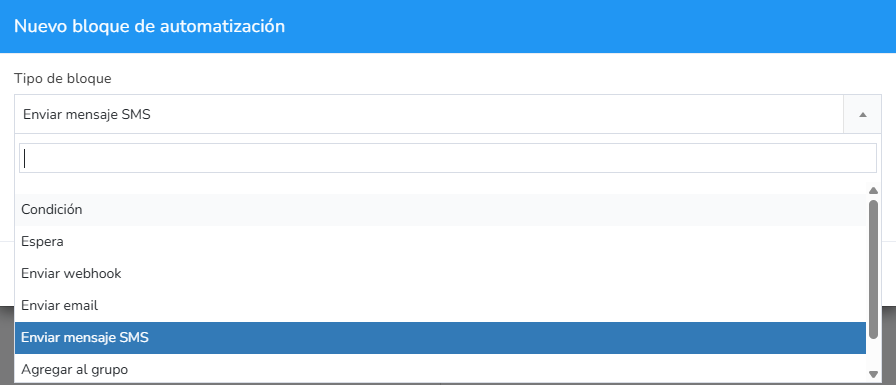
Mailrelay includes a very complete automation module, included in the free account.
You can try it with no limitations!

Landing pages and forms to capture subscribers
In addition to contacting existing customers, businesses — big and small — need to capture new contacts.
Mailrelay lets you capture new contacts mainly in two ways:
· Subscription forms:
This is the essential way to capture new subscribers.
You can create new forms in the Subscribers – Subscription forms menu.
Below you can see a simple form with a couple of fields:
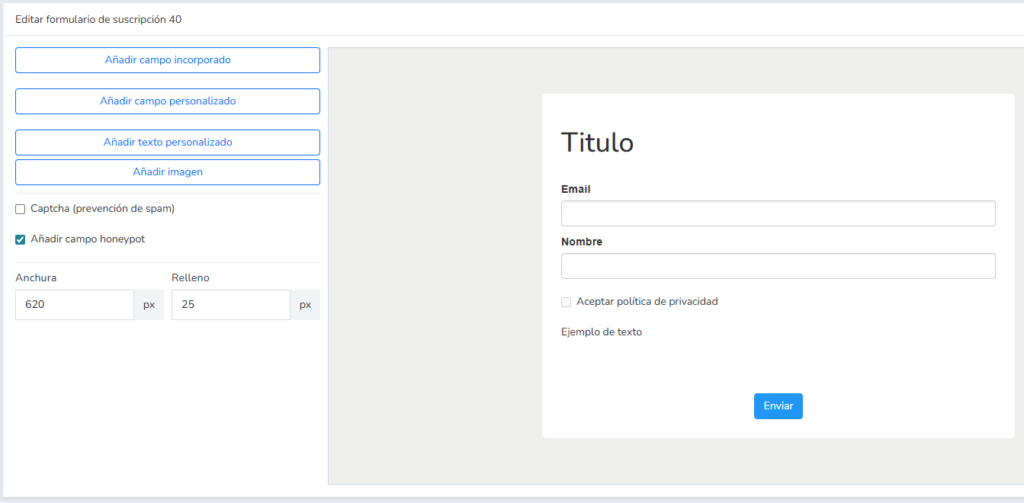
This is a basic form, with the essential fields.
You can enhance it with many more options and add custom fields.
That way you could get the contact data you need (to use it as custom fields, for example).
In any case, this form lets you save contacts in the group you choose.
And from there, launch an automation, for example.
· Landing pages:
Landing pages are pages created with the goal of converting visitors into customers — or subscribers, in this case.
You can insert the forms we mentioned in the previous point into these landing pages.
You can create these in the “Landing pages” menu of your Mailrelay account.
You have a more complete article on the subject here.
The landing page builder is very similar to the one for newsletters, so it’s very easy to use.
These landing pages, just like forms, generate a URL you can share:
- On social media
- Ad campaigns
- Or on your website, for example
And that way, capture new contacts.

Results analysis and constant optimization
All the communication tools we’ve covered (email, SMS, WhatsApp) come with statistics so you can analyze your campaign results.
What statistics can you find in Mailrelay?
· In email marketing:
Email is one of the channels that offers the most statistical information.
We already covered this in this article.
You’ll have information, among other statistics, about:
- Open rate
- Click rate
- Number of unsubscribes
- Spam complaints
- Rebotes
- Etc.
With all this information, you’ll be able to improve your email campaigns based on data.
· In SMS:
For SMS campaigns, you’ll be able to see both the messages that have already been processed and those that have actually been delivered.
If you include links in your SMS, you’ll also see information about the clicks made.
· In WhatsApp:
For WhatsApp campaigns, you’ll see the following information:
- Messages processed
- Delivered
- Read
- And failed
You’ll also be able to see the conversations these messages have generated.
· A/B testing is also included here:
For the A/B tests you run, you’ll also have information in their own section.
About which versions have more opens and clicks, so you can decide on the final version to send.

Integration via SMTP and API with your systems
Both SMEs and large companies usually use other tools in parallel (for example, your WordPress website, an e-commerce platform, or a CRM to manage customers).
That’s why it’s essential for your communication software to integrate with your existing systems.
With Mailrelay, you have several integration options, including:
· SMTP sending:
You can use the platform’s mailing infrastructure to send transactional emails or automatic notifications from your own applications.
Por ejemplo, podrías configurar Mailrelay como servidor SMTP de tu tienda online para que los emails de confirmación de pedido salgan a través de nuestros servidores (mejorando la entregabilidad y pudiendo registrar esas métricas en Mailrelay).
It’s also useful for connecting web forms or internal systems, so that all your emails go out with the same high delivery rate.
· REST API:
Mailrelay has a powerful API, which lets you integrate practically any service with Mailrelay (provided it also has one).
With the Mailrelay API, for example, you could automate contact syncing from your CRM: every time you add a new customer to your internal database, it’s automatically sent to a Mailrelay list for future campaigns.
Or vice versa, you could query a campaign’s results via the API from another application.
The possibilities are endless, and having a well-documented API guarantees you can adapt the tool to your business’s specific needs.
· Make.com:
With Make (which can connect to the Mailrelay API), you’ll be able to integrate hundreds of services with each other.
It’s a way to integrate Mailrelay without any technical knowledge.

Ease of use and dedicated support for SMEs and large companies
Most businesses don’t want to spend a lot of time on training, so they don’t want complex tools.
They want the learning curve to be as smooth as possible.
That’s why we’ve designed the Mailrelay dashboard to be easy to use, with all the features grouped in the most logical way, so everything is easy to find.
Unlike many tools whose customer support is limited (or nonexistent on free plans), Mailrelay offers personalized support even with the free account.
This includes phone support, live chat, and a help ticket system.
Having experts available to guide you through setup, answer deliverability questions, or help you implement a complex automation is enormously valuable for your business.
This combination of ease of use and dedicated support ensures you truly get the most out of the platform’s capabilities.
Advantages of Mailrelay over other communication solutions
With everything we’ve covered, it’s fair to say that Mailrelay stands out as communication software for SMEs and large companies in Spain, thanks to a series of clear competitive advantages:
· Unbeatable free plan:
It lets you send up to 80,000 emails a month to 20,000 contacts at no cost, with no time limit.
In comparison, other email marketing tools offer much more limited free plans or only temporary trials.
With Mailrelay, you can scale your subscriber base without worrying about paying right away — ideal for entrepreneurs and growing businesses.
· Multichannel in a single platform:
Unlike most competitors, who focus only on email or require expensive add-ons for SMS/WhatsApp, Mailrelay natively includes bulk SMS and WhatsApp sending alongside email.
· Automation and A/B testing included:
Mailrelay offers all the marketing automation and A/B testing features we’ve discussed, right from its free plan.
Many rival platforms reserve these advanced capabilities for their more expensive premium plans.
Here, an SME can implement complex automated flows and optimize its campaigns through testing without paying extra.
· High delivery rates and reliability:
Thanks to its own optimized infrastructure (dedicated IPs, AI-based anti-spam systems, etc.), Mailrelay makes sure your emails reach their destination.
· Detailed reports and heat maps:
You’ll get exhaustive statistics on all your sends.
This lets you analyze your subscribers’ behavior in full detail.
For example, you’ll know exactly which parts of your message attract the most interest thanks to the click heat maps in your newsletters.
· Integrations and flexibility:
With support for a REST API, SMTP, a WordPress plugin, and compatibility with third-party automation services, Mailrelay easily adapts to your business’s ecosystem.
You’ll be able to connect it to your website, online store, or other applications without any hassle.
· Expert support, in Spanish:
While cheaper solutions often lack real support, Mailrelay proudly offers responsive assistance in your language, even for free users.
This gives peace of mind to any SME, knowing they won’t be alone when facing any technical challenge or strategic question.
· Ease of use for all levels:
The learning curve with Mailrelay is short.
The simple, well-organized interface means sending your first campaign or creating a basic automation takes just minutes.
You don’t need specialized knowledge.
Even so, the tool has the power to support the digital marketing needs of more advanced businesses.
Ultimately, Mailrelay combines the best of both worlds: a complete email marketing tool (campaigns, automations, forms, analytics) enhanced with multichannel features (SMS, WhatsApp) and a customer-first approach (affordable prices, dedicated support).