In your content strategy, you may be choosing to publish multiple posts on the same topic to create related posts or clusters so that they complement each other. But keyword cannibalization, or SEO cannibalization, could be the result.
These clusters are great for showing your expertise to both your customers and search engines.
In fact, each new piece of content should be one more step on the path that takes your website to the top of the search rankings.
In practice, however, optimizing too many different pages for the same or closely related keywords can make your content compete with itself.
This doesn’t only apply to a blog, but to any website. And it doesn’t only happen with clusters, but also with any content that, at first, doesn’t seem to address the same search intent. And the results can be the opposite of what you’re looking for.
Want to know whether two or more URLs on your website are cannibalizing each other?
![SEO cannibalization [what it is and how to fix it]](https://mailrelay.com/wp-content/uploads/2022/05/canibalizacion-seo.jpg "SEO cannibalization [what it is and how to fix it]")
What is keyword cannibalization
Keyword cannibalization happens when two or more pages of a website, blog articles or even products in an ecommerce store end up targeting the same keyword, whether long-tail or short-tail.
And it’s very easy to fall into this trap if we publish content often.
After publishing pages and posts for a while, we might forget that we already have content targeting a particular search intent. The result would be competing against ourselves for traffic, backlinks, conversions and rankings.
SEO cannibalization means splitting traffic between the two or more pages that are competing with each other. Which can mean a lower conversion rate and CTR.
In addition, Google will have to choose which of them to rank higher, and it may not be the one we want to rank.
The negative impact of keyword cannibalization on your website’s SEO
There are cases where cannibalization isn’t a problem. Giants like Apple or Amazon, for example, cannibalize content and take up the top search results in the SERPs without breaking a sweat. And that’s that.
This kind of cannibalized search result, whether indented or not, is not only not a problem but a big advantage.
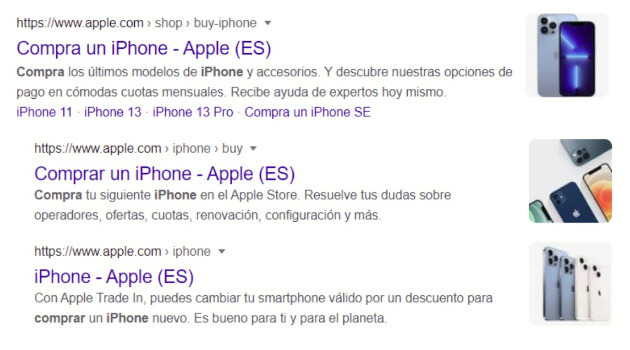
Wouldn’t it be fantastic to take up so much space with several URLs (and not just sitelinks) that would bring us sales, no matter which search result users choose to click?
These are exceptional cases that work for very high-authority pages and very specific search terms that will achieve their goals.
However, for ordinary mortals like you and me, SEO cannibalization doesn’t translate into conversions and has negative consequences.
Content cannibalization has a negative impact on your page authority. The authority a well-ranked URL would gain has to be split and shared among the 2 or more pages competing for that search term.
2. Lower content quality
Instead of offering relevant, in-depth content on a single page, it may look like you’re trying to create more, lower-quality content as filler. If users find the same content over and over again, the bounce rate will rise and your position in the SERPs will drop.
3. Google may choose the wrong page
Cannibalization confuses search engines. You’re offering them two or more results for the same search intent, and they can’t tell which one is most relevant.
The result? They might choose to rank a page that isn’t the one you want to rank, pushing down the one that matters most to you. Or, even worse, Google won’t know which one to keep and will give priority to your competitors.
4. Damage to your link building strategy
If the backlinks you earn naturally point to several of the pages targeting the same keyword rather than to just one, they lose value for SEO rankings.
A page you’re less interested in could end up getting more links, instead of you focusing your efforts on the one that really suits you.
How to detect cannibalization on a website
There are many ways to detect content cannibalization on a website. The quickest is to use the right SEO tools, such as Sistrix or Semrush, for example.
But if you don’t have tools, there are great footprints that can help you with this task.
It’s as simple as typing into Google:
· site:yourdomain.com keyword
Replacing yourdomain.com with your website’s domain and adding the keywords you’re ranking for.
In Google Search Console, a free tool, you can also go to Search results, in the Pages tab. This way you won’t see which keywords are cannibalizing, but you will see which URLs you need to review.
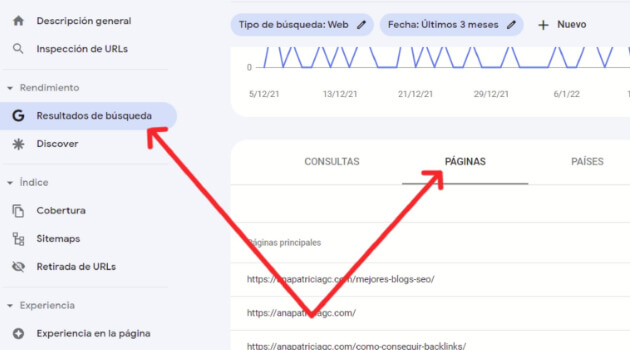
The results you get will give you a lot of information that can be very useful.
How to fix SEO cannibalization errors
Content cannibalization is quite a common problem. Website and blog owners without SEO knowledge often write texts without a defined heading structure and without choosing the keywords needed for each page.
But there’s a solution. There are several actions you can take on your site to fix keyword cannibalization errors.
● Merge content.
When you discover that two or more URLs cover practically the same topic and compete for the same keyword, you can merge them.
Choose the one that interests you most and, if the others have content you can use to expand the one you’ve chosen, don’t hesitate to curate it and expand it as much as necessary.
Check whether the pages you haven’t chosen as the main one have traffic or backlinks. If they don’t, a 410 status code is the way to tell Google that the page has been permanently removed.
If they do have traffic or backlinks, the solution is a 301 redirect to the page you’ve decided to keep. You’ll lose some link juice from the backlinks you’d earned, but not all of it. And you won’t lose traffic.
A canonical tag tells search engines which page is the main one and which one they should show in the organic results.
That way we’ll avoid the risk of penalties, since Google won’t consider that we have duplicate content.
However, Google could choose as the main page the one you don’t want to highlight. Weigh up whether this action is right for you.
● Use the noindex tag
In some cases, for whatever reason, you may not want to get rid of any of the cannibalizing pages.
It’s not the norm, but it could happen. In that case, you can add a noindex tag to the less important ones, so they’ll be crawled but won’t appear in search results.
Tips to avoid SEO cannibalization
As you can see, SEO cannibalization can be a disaster, since it can ruin the effectiveness of all your hard work.
However, there are a few guidelines you can follow to prevent it:
1. Focus on users’ search intent
Even if the keywords are different, the search intent can be the same.
I know it sounds a bit confusing, but it’s very simple.
We all search for what we need in our browser to find answers. And what we’re looking for can be searched in different ways.
I can type “how to make money with a blog” into my browser, for example, if I’m interested in that topic. But you can also do that search with “tips for monetizing a blog”.
If I take advantage of that search intent, combined with the relevant keywords and their semantic variations, I can get traffic from the users who make that search.
And if that content is well optimized and offers all the information my visitors are looking for, they won’t need to go to another website for results.
Creating one piece of content per search intent will prevent cannibalization.

2. Use redirects
Choose which of the cannibalized URLs has the most authority, ranking keywords and inbound links.
Then curate the content of the chosen URL with all the information and redirect the others to the one that’s strongest.
That way, if you’ve shared those other URLs on social media, for example, all the users who click those links will land on the one you’ve curated and expanded, and you won’t lose traffic, which is what would happen if you simply deleted them.
3. Improve your internal linking
The internal linking you set up on your website helps Google understand the page hierarchy. Reviewing your internal linking structure can help prevent SEO cannibalization.
The links we place on our pages should point to the ones we consider most important, the ones with the most value that can give us the best results.
By reviewing your link profile, you can find the links pointing to the pages that matter less and change them so they point to others with more value and potential.
4. Remove what’s left over
This should be the last option, but there are cases where it’s best to cut your losses.
When a page has thin content that adds nothing for users and may at the same time be stealing traffic from a similar, better page, you need to consider whether it’s worth deleting.
But always make sure it has no inbound links before deleting it.
If you don’t know much about web optimization, fixing SEO cannibalization can seem like mission impossible.
But if you have a website, it’s very important to get up to speed so you can optimize it, or to hire an SEO consultant, since the fight to appear in the top positions (and therefore get more organic traffic) is more competitive every day.
How can you prevent cannibalization from now on? Review all the points above and use footprints (site:yourdomain.com keyword) to find out whether you already have content that addresses the search intent you want to create new content for.
To keep strengthening your SEO strategy, it’s also useful to understand what Domain Authority is and how it affects your rankings, and to review these SEO basics if you’re just starting to work on your website’s rankings.
If you want to review the basics of all this, here’s what SEO is.