In the world of digital marketing, email marketing remains one of the most effective strategies for reaching customers directly and driving engagement.
However, creating attractive, effective emails can be a challenge.
This is where HTML templates for newsletters come into play.
HTML newsletter templates are predefined frameworks that contain the HTML code needed to structure and design an email.
These templates let marketers focus on the content of the email instead of worrying about the technical aspects of design.
However, like any tool, HTML newsletter templates have their advantages and disadvantages.
Although they can save time and ensure consistency, they can also have design limitations and can sometimes come across as impersonal.
Therefore, it’s important to understand when and how to use them effectively in your email marketing strategy.
HTML newsletter templates are basically predefined frameworks that contain the HTML code needed to structure and design an email.
These templates are used to format emails and let you embed images, links, buttons and other interactive elements directly in the body of the email.
Each HTML template can be customized to fit the company’s brand and adapt to the specific goals of the email marketing campaign.
In addition, these templates can be reused, which makes it possible to maintain visual consistency across all email communications.
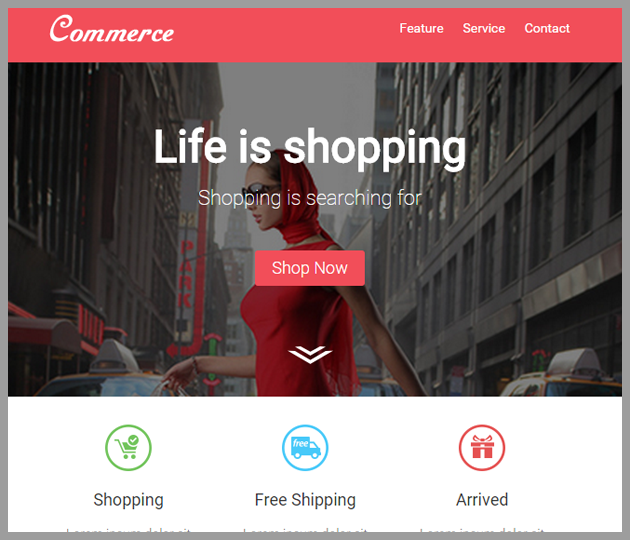
Example of an HTML email template

→ Comparison with plain-text emails
In contrast to HTML templates, plain-text emails are emails that contain only text, with no additional formatting, images, links or interactive elements.
Plain text has the advantage of being simple and direct.
You don’t have to worry about how it will look in different email clients, since there is no design that can get distorted.
In addition, plain-text emails tend to have lower rates of being flagged as spam, since they are less likely to contain elements that spam filters may see as suspicious.
However, plain-text emails lack the ability to capture the reader’s attention through design.
You can’t use brand colors, highlight important information with formatting, or embed call-to-action buttons.
In short, they lack the visual elements that can increase engagement and conversion.
Therefore, the choice between HTML newsletter templates and plain-text emails will depend on your specific goals, your audience and the type of message you’re sending.
· Advantages of using HTML templates
→ Time savings
Using HTML templates can save a lot of time.
Instead of starting from scratch with every new email, you can reuse an existing template and simply update the content.
This means you don’t have to worry about design or coding details every time you send an email, which can greatly speed up the email creation process.
→ Design consistency
HTML templates also let you maintain design consistency across all your emails.
This is crucial for brand recognition, since recipients will start to associate certain designs and formats with your company.
In addition, design consistency can make your emails easier for recipients to navigate, since they will know what to expect.
→ Ease of use
Although HTML can seem intimidating if you have no experience with it, many HTML templates are designed to be easy to use, even for non-programmers.
Many of them come with drag-and-drop editors, which let you customize your design easily without having to touch the code.
→ Optimization for different devices
One of the great advantages of HTML templates is that they are usually optimized for different devices.
This means they will look good on both a computer screen and a mobile screen.
Since a large number of people read emails on their phones, this optimization is crucial to ensure that your emails are readable and appealing, regardless of the device your recipients are using.

· Disadvantages of using HTML templates
→ Design limitations
Despite the advantages, HTML templates can also have some design limitations.
For example, you may not be able to customize certain elements of the template as much as you’d like, or you may find yourself limited by the design options the template offers.
Also, if you want a truly unique design that stands out from the crowd, predefined templates may not be enough.
→ Potential compatibility issues
Another potential problem with HTML templates is compatibility with different email clients.
Not all email clients interpret HTML code the same way, which means your email may not look exactly the same in every email client.
Although many templates are designed to be compatible with a wide range of email clients, there may be occasional variations and issues.
→ Risk of seeming impersonal
Finally, although HTML templates can save time and ensure consistency, there is also a risk that your emails will seem impersonal or generic.
If recipients see the same format over and over, they may start to perceive your emails as less personal.
To avoid this, it’s important to personalize your emails as much as possible, even when you’re using templates.
· Cases where using HTML templates is recommended
If you send newsletters regularly (weekly, monthly, etc.), HTML templates can be useful for maintaining a consistent, professional look.
Recipients will appreciate the familiarity and consistency of your communications.
→ Product or service announcements:
HTML templates are great for showcasing products or services in an attractive way.
You can include images, call-to-action buttons and other interactive elements to make your announcement more engaging and effective.
→ Emails with complex or varied content:
If your email includes a variety of content, such as articles, links, announcements and more, an HTML template can help organize everything clearly and in a way that’s easy to follow.
→ When you need detailed analytics:
HTML templates let you include tracking and analytics, which helps you understand how recipients interact with your email.
You can see which links they click, whether they open the email and much more.
→ When branding is essential:
If your brand’s visual identity is important to your marketing strategy, HTML templates let you easily incorporate your brand’s colors, logos and other brand elements into your emails.
Remember, however, that even in these cases it’s important to personalize your emails as much as possible so they don’t seem generic or impersonal.
· Cases where it’s best to avoid HTML templates
→ One-to-one communication:
When it comes to direct, personal communication, such as a follow-up email after a meeting or a reply to a specific customer inquiry, it’s best to avoid HTML templates and opt for a plain-text format.
This will help the message feel more personal and direct.
→ When simplicity is key:
If your message is short and to the point, a plain-text email can be more effective.
Long, visually heavy emails can overwhelm the recipient and cause your main message to get lost.
→ If you don’t have the technical skills or resources:
If you’re not familiar with HTML and don’t have access to a designer or developer, it may be best to avoid HTML templates.
Although many are easy to use, they may still require a certain level of technical skill to customize and optimize properly.
· Conclusions
HTML newsletter templates are a valuable tool in email marketing.
They offer significant advantages, such as time savings, design consistency, ease of use and optimization for different devices.
However, they also have drawbacks, such as design limitations, potential compatibility issues and the risk of seeming impersonal.
The decision to use HTML templates or not will depend on your specific goals, your audience and the type of message you’re sending.
As a general rule, it’s important to remember that personalization and relevance are key to the success of email marketing.
So whether you choose to use HTML templates or plain-text emails, you should always strive to make your messages as personalized and relevant as possible for your recipients.
If you’re wondering how to structure your own, in our glossary we explain what an email template is and what role it plays in your campaigns.