Can you use email addresses with accents, ñ or ç?
What each part of an address accepts, what happens in Gmail and Hotmail, and how to avoid errors in your list

What each part of an address accepts, what happens in Gmail and Hotmail, and how to avoid errors in your list
Whether you want to send newsletters from an email address that contains these kinds of characters, or some of your recipients’ addresses contain them, there are several things to keep in mind.
In practice, no. The vast majority of email addresses are written without accents, ñ or ç, because the main providers don’t let you create them with those characters.
Technically, it has been possible since 2012, thanks to the SMTPUTF8 standard, an extension of the SMTP protocol. But it’s rarely used, and many servers, forms and programs still don’t support it. That’s why, if someone reads out their email address to you, you’ll normally write it without accents even if their name has them: jose.nunez@… rather than josé.núñez@….
This table sums up the most common questions:
| Question | Short answer |
|---|---|
| Can an email address have accents? | According to the SMTPUTF8 standard, yes. In practice, hardly any address has them |
| Can you use ñ in an email address? | Same as accents: it’s allowed, but Gmail and Outlook don’t let you create accounts with ñ |
| Can I write from Gmail to an address with ñ? | Yes. Gmail has sent and received emails from those addresses since 2014 |
| Does capitalization matter? | Not in practice: JOSE@ and jose@ reach the same inbox |
| Can domains have ñ or accents? | Yes. .es domains have allowed them since 2007 |
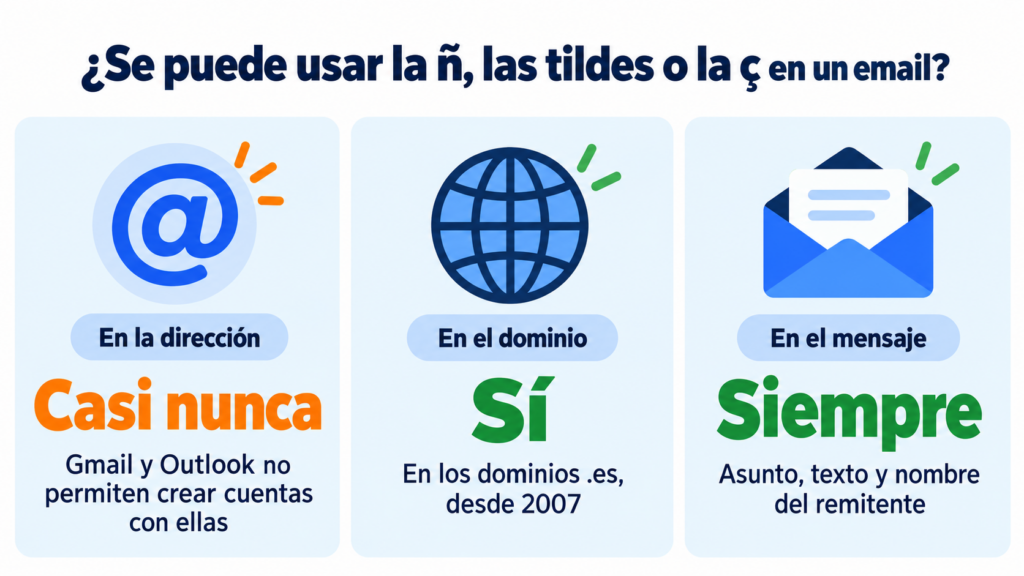
Below is the full explanation: which characters each part of an address accepts and which standards govern it.
First, you need to understand that an email address is divided into two parts, separated by the @:
local-part@domain-name
And it must comply with the rules for domain names.
These usually include letters, numbers, hyphens and dots (you may come across domain names with ñ). You can find more information at the following link https://en.wikipedia.org/wiki/Email_address
The local part can use any of the following characters:
Keep in mind that the local part must comply with what is set out in https://datatracker.ietf.org/doc/html/rfc5322, so addresses that include:
May not work on all email servers and clients.
For more information, you can read the following article https://en.wikipedia.org/wiki/Email_address
Before I finish, here’s a video you might also find interesting, on how to send bulk email that makes an impact:
Send emails with accents and ñ without any problems
Write your campaigns in the Mailrelay editor and send a test email to check how they look before sending them.
No. Although the standard allows it, the big providers only let you create addresses with unaccented letters, numbers and a few symbols.
Gmail. In August 2014, Google announced that Gmail could send and receive emails from addresses with accents or in non-Latin alphabets, such as Cyrillic or Japanese. In the same announcement, it made clear that Google accounts would continue to use only unaccented Latin characters. That’s why you can’t create an address like núñ[email protected].
Outlook and Hotmail. In 2018, Microsoft added the ability to send and receive messages from internationalized addresses to Exchange Online, the Microsoft 365 email service. But it doesn’t let you create accounts with those characters either. In Outlook.com and Hotmail, the username accepts letters, numbers, dots, hyphens and underscores.
As you can see, you can write to an address with ñ from Gmail or Outlook, but you can’t have one. If you want an email address that reflects the ñ in your name or brand, the most realistic option is a corporate email address on your own domain with ñ, as you’ll see below, or choosing a version without it.
The part after the @ can include ñ, accents or ç more easily. These are known as internationalized domains.
In Spain, .es domains have accepted the characters á, à, é, è, í, ï, ó, ò, ú, ü, ñ, ç and the Catalan geminated L since October 2, 2007, according to the official .es domain registry.
Internally, these domains are converted into a format that uses only basic characters, called Punycode. For example, españa.es becomes xn--espaa-rta.es. Users don’t see it, but it’s what servers understand.
That said, even if the domain works in the browser, it’s worth checking that your email provider supports addresses on that domain. And if you’re going to send campaigns from it, review your sending domain settings. And register the version without ñ too, so nobody gets it wrong when typing it.
In practice, no. You can type [email protected] or [email protected] and the message will reach the same inbox.
The technical standard (RFC 5321) says that the local part, the bit before the @, could be case-sensitive. But the standard itself advises against relying on this, and the big providers, such as Gmail, Outlook or Yahoo Mail, treat it as case-insensitive. The domain is never case-sensitive.
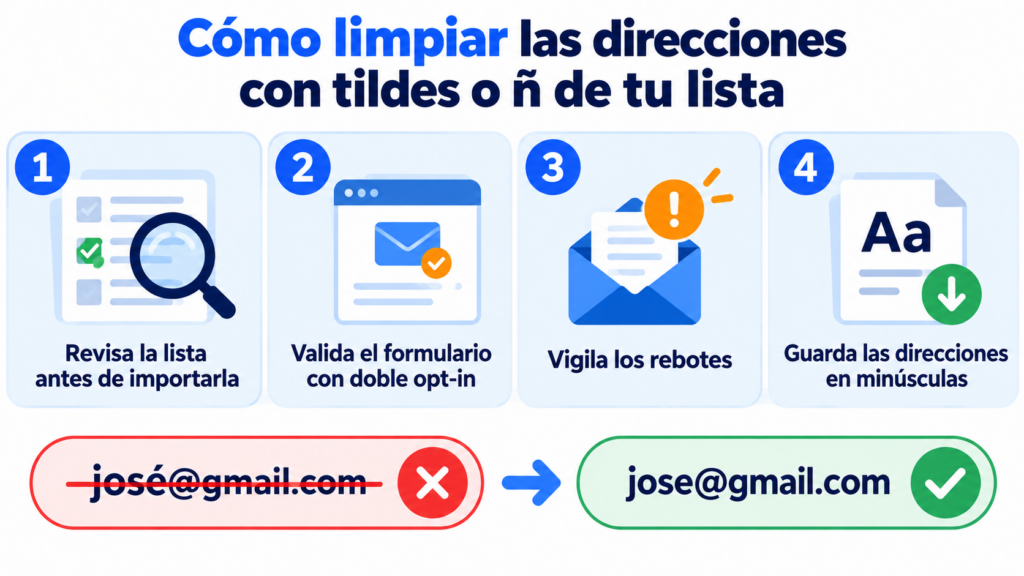
That’s why it’s best to always store and type addresses in lowercase. You’ll avoid duplicates in your lists and confusion when reading them out.
If you manage a subscriber list, you’ll probably come across an address like josé@gmail.com. It’s almost always a typo: since Gmail doesn’t allow accents, that account can’t exist.
These guidelines will help you keep your list clean:
Before you import your contacts, look for addresses with accents, ñ or spaces and correct or remove them. If the domain belongs to a big provider, such as gmail.com or hotmail.com, they’re definitely errors.
In your subscription forms, validate the email format and turn on double opt-in. That way, only addresses that exist and have been confirmed by their owner get into your list.
And keep an eye on bounces. A misspelled address generates a hard bounce, and too many bounces damage your sender reputation and your deliverability.
At Mailrelay, automatic list cleaning is included in all plans, including the free account. And if you have questions about an import, our support team can help you by chat, ticket or phone.
Keep in mind that all this refers to addresses. Inside the message, you can use accents, ñ and ç without any problem: the subject line, the text and the sender name display correctly in any modern email program, because they are sent with UTF-8 encoding.
In short, although it is possible to use email addresses with accents, ñ or ç thanks to the SMTPUTF8 standard, it’s best to avoid them because of potential compatibility and deliverability problems.
It’s better to use email addresses with standard ASCII characters to ensure effective, hassle-free communication.
At Mailrelay, we’re aware of this and work every day on our email marketing service to make this tool accessible to everyone. Sign up for Mailrelay and enjoy sending bulk emails for free!
Do email addresses have accents? Usually not. The SMTPUTF8 standard has allowed accents since 2012, but Gmail and Outlook don’t let you create accounts with them, so hardly any address has them.
Can you use ñ in an email? In the address, only if the provider supports it, and the main ones don’t. In the message text, the subject line or the sender name, yes, without any problem.
Can I create a Hotmail address with ñ? No. In Outlook.com and Hotmail, the username only accepts unaccented letters, numbers, dots, hyphens and underscores.
Are email addresses case-sensitive? In practice, no. The big providers don’t distinguish between uppercase and lowercase, although it’s best to always write addresses in lowercase.
Which characters can’t you use in an email address? In typical addresses: spaces, accents, ñ, ç and symbols such as parentheses or commas. The safest option is to use only letters, numbers, dots, hyphens and underscores.
Send your campaigns for free with Mailrelay
Up to 80,000 emails per month and 20,000 contacts, with human support on all plans.
Here are some other articles you might be interested in:

Jose Argudo
CMO at Mailrelay. Writes about email marketing, copywriting, and conversion for small businesses and entrepreneurs.