Header: what it is, types and examples
The first thing anyone reads, in a document, a web page or a newsletter
A header is the part at the beginning of a text that announces what it’s about or who’s sending it. It can be a title, a line of details or a block with the logo.
You’ll find them in documents, letters, news stories, web pages and emails. In each one it does the same job: orienting readers before they start reading.
What does header mean?
The Spanish word for header, encabezado, comes from the verb encabezar, which means to be at the head of something. That’s why it’s used for whatever goes at the top, the “head” of a page or a message.
The Diccionario de la lengua española lists two closely related Spanish words:
| Word | What the dictionary says | Where it’s used most |
|---|---|---|
| Encabezado | A newspaper headline | Especially in Mexico, Argentina, Ecuador, Honduras and Uruguay |
| Encabezamiento | The words that, following a set formula, open a document | In Spain and in administrative language |
In practice, the two are used as synonyms. You’ll also hear cabecera and, in computing, the English word header.
Types of header
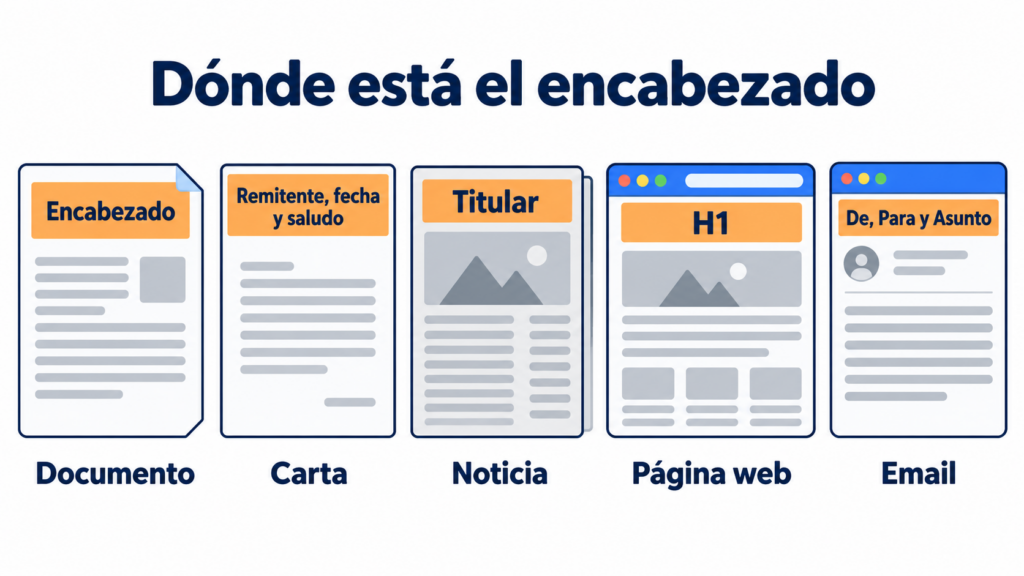
Depending on where it appears, a header changes in form and content:
| Type | Where it is | What it includes |
|---|---|---|
| Document | In the top margin of every page | Title, company name, logo, date or page number |
| Letter | At the beginning, before the body text | Sender’s details, place and date, recipient’s details and greeting |
| News story | Above the text | Kicker, headline and subheadline |
| Web page | At the top and in each section | The main title (H1) and section headings (H2 to H6) |
| At the top of the message and in its code | Sender, recipient, subject, date and technical sending details |
The header in a document and in Word
In a document, the header is the strip in the top margin that repeats on every page. Its counterpart is the footer, which does the same in the bottom margin.
To add one in Word, go to Insert > Header and choose a design. You can also double-click the top margin of the page.
You can set a different header for the first page or for odd and even pages. When you’re done, click Close Header and Footer.
The header of a letter
In a formal letter or a business letter, the header (or heading) brings together the details that come before the body text. Here’s an example:
| Part | Example |
|---|---|
| Sender’s letterhead | Company name, address and phone number |
| Place and date | Madrid, 1 October 2026 |
| Recipient’s details | Name, position and company |
| Subject or reference | Subject: collaboration proposal |
| Greeting | Dear Ms García, |
In a professional email you don’t need a letterhead or a postal address. Your details go in the email signature, at the end of the message.
The header of a news story
In journalism, the header is the headline: the line in large type that sums up the story. In Mexico and much of Latin America it’s called encabezado, while Spain prefers titular.
It usually has three parts: the kicker, a short line that gives context; the headline, with the main idea; and the subheadline or summary, which adds an important detail.
A good headline answers the story’s basic questions, such as who and what. The same applies to a press release.
Headers on a web page
On a web page, headers are the headings that organize the content. HTML has six levels, from the h1 tag to h6:
- H1: the page’s main title. Usually there’s only one.
- H2: the title of each section.
- H3 to H6: the subsections within each section.
Headings make a page easy to skim, let screen readers jump from section to section and help search engines understand what the page is about.
Don’t confuse them with the header tag, which groups the site’s visual header, with the logo and the menu. Nor with the head section of the code, where the metatags go.
Make your brand recognizable from the very first line
Design your newsletter header with your logo and colors, and save it in a template for every send.
The header of an email
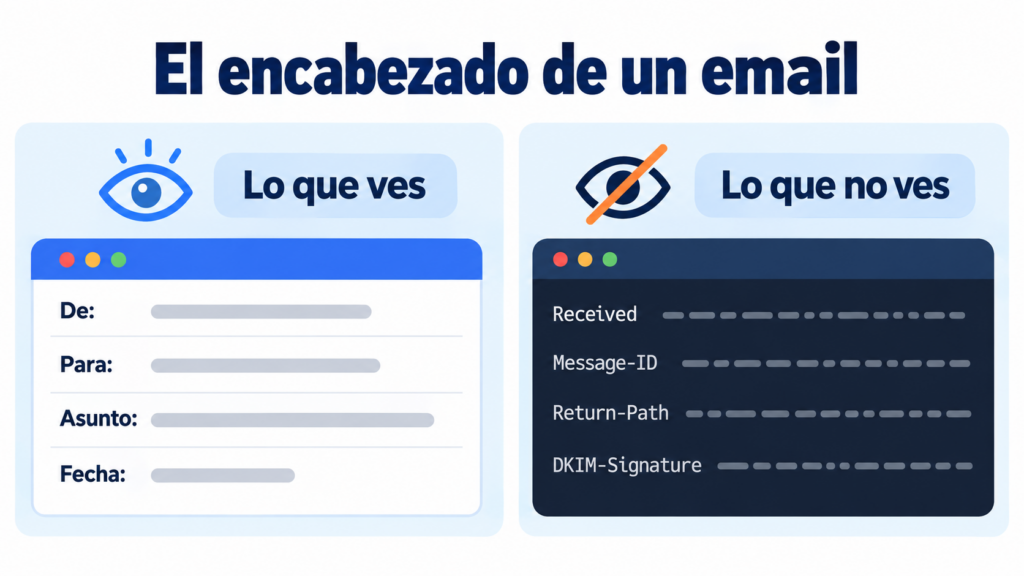
An email has two different headers: the one the recipient sees and the one in the message’s code.
The visible header is what appears at the top of the message: the sender, the recipient, the subject line and the date.
The technical headers are lines the reader doesn’t see, such as these:
| Header | What it indicates |
|---|---|
| Received | Each server the message has passed through |
| Message-ID | A unique identifier for the email |
| Return-Path | The address bounces are returned to |
| DKIM-Signature | The DKIM signature that proves the message hasn’t been altered |
| Authentication-Results | The result of the SPF, DKIM and DMARC checks |
Their format is defined by the Internet Message Format standard. To see them in Gmail, open the email, click the three dots and choose Show original.
In a newsletter, header also refers to the top strip of the design, with the logo, the menu or a link to view the email in the browser. It’s your brand’s first impression, and you repeat it in every send with an email template.
You’ll find every part of a message in our entry on email structure.
How to write a good header
Whether it’s for a document, a website or an email campaign. These tips will help:
- Keep it short. A headline is read at a glance. In an email subject line, mobile phones usually show only the first 30 or 40 characters.
- Say what readers will find. A clear header works better than a clever one nobody understands.
- Put the important part first: the keyword, the figure or the benefit.
- Respect the hierarchy. One H1 per page and each level nested within the one above, without skipping levels.
- Keep a consistent style, with the same font, the same size and the same logo on every page or send.
To dig deeper, check out our entry on copywriting.
How Mailrelay helps you
With Mailrelay you can create your newsletter header with the drag-and-drop editor. Add your logo, your colors and your menu, and save it in a template to reuse it.
Before sending, write the subject line and the preheader, and run an A/B test to find out which one more people open.
Technical headers, such as the DKIM signature or the Return-Path, are handled by the platform for you.
The free account lets you send up to 80,000 emails a month to 20,000 contacts, with chat, ticket and phone support.
Send your newsletters with Mailrelay
Up to 80,000 emails a month to 20,000 contacts with the free account, with chat, ticket and phone support.
Frequently asked questions about headers
What is a header? It’s the part at the beginning of a text that announces its content or its author. It can be a title, a line of details or a block with a logo.
What’s the difference between encabezado and encabezamiento? They’re used as synonyms. Encabezamiento is more common in Spain and in administrative documents, while encabezado is used in Mexico and other Latin American countries, where it also means headline.
What goes in the header of a letter? The sender’s details, the place and date, the recipient’s details, the subject and the greeting.
How do you add a header in Word? Go to Insert > Header and choose a design, or double-click the top margin of the page.
What is an email header? It’s the information that accompanies the message: sender, recipient, subject and date, plus technical headers that record the path it has taken and whether it’s authenticated.