Transactional SMS: what they are, examples and how to send them
Notifications your customers need to receive right away, with examples to copy
Transactional SMS are automatic text messages sent to customers to inform them about activity related to their transactions or accounts.
They are triggered by an action the customer takes or by a change to their order, appointment or account. Confirming a purchase, announcing a shipment, reminding someone of an appointment or sending a verification code. They aren’t meant to sell, but to inform at the right moment.
In short: to send them, you need a platform that sends them as soon as the event happens. In Mailrelay you can do it in two ways: with your account’s automations or with the API, when it is your store or your software that triggers the notification. If you send to Spanish numbers with your company name as the sender, register the alias with the CNMC first.
What is a transactional text?
A transactional text is any message a company sends to a customer because of something that happened in their relationship: an order, a payment, a booking or a change to their account. It can arrive by SMS, by transactional email or by WhatsApp Business. What defines it isn’t the channel, but the reason: it reports something the customer needs to know and doesn’t promote anything.
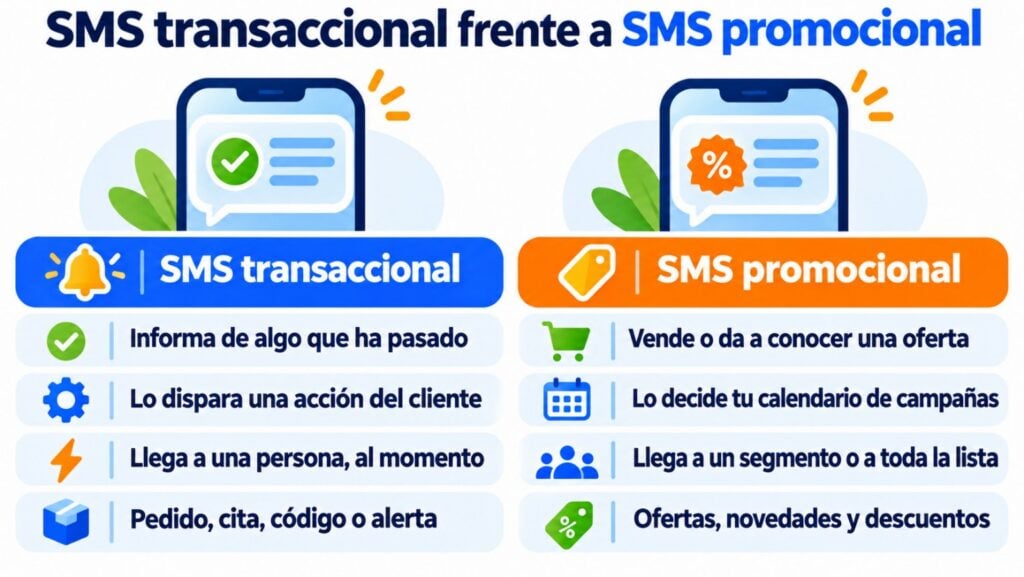
Transactional SMS vs. promotional SMS: how they differ
| Transactional SMS | Promotional SMS | |
|---|---|---|
| Goal | Report something that has happened | Sell or promote an offer |
| What triggers it | A customer action or event | Your campaign calendar |
| Who receives it | One person, at that moment | A segment or the whole list |
| Content | Specific details: order, appointment, code | Offers, news, discounts |
| Permission | It’s sent because of the customer relationship | Requires prior consent |
| Timing | When the event happens | At reasonable hours |
As soon as a notification includes an offer, it becomes a commercial communication and you need the recipient’s permission. You’ll find the basic rules in legal email marketing: GDPR and LSSI.
Send your SMS notifications from Mailrelay
Confirmations, reminders and alerts from the same account as your emails, with the API or with automations.
Transactional SMS examples
These are eight common notifications, with a sample text you can adapt. They all fit in a single 160-character SMS if you drop the accents the standard format doesn’t support (we cover this below the table).
| Type | When it is sent | Example |
|---|---|---|
| Order confirmation | When the purchase is completed | TiendaVerde: we’ve received your order 4821. We’ll let you know when it ships. Details: tiendaverde.es/p/4821 |
| Shipping | When the package ships | Your order 4821 is on its way and will arrive on Thursday. Track your shipment at tiendaverde.es/e/4821 |
| Appointment | The day before | Reminder: your appointment is tomorrow at 10:30 at Clínica Sol. To change it, go to clinicasol.es/cita |
| Event attendance | On registration and the day before | Your place at the 14/11 workshop is confirmed. See you at 18:00 at Calle Mayor 5. |
| OTP code | When logging in or paying | Your verification code is 482913. It expires in 5 minutes. Don’t share it with anyone. |
| Security alert | When there is a new login | New login to your account from an unknown device. If it wasn’t you, change your password. |
| Payment reminder | Before the due date | Your November bill is due on the 5th. You can pay it at tiendaverde.es/pago |
| Change or incident | When something changes | Your class today has moved to 19:00 due to an incident. Sorry for the inconvenience. |
Watch out for accents: á, í, ó and ú aren’t in the standard SMS alphabet, and neither are emojis. If you use them, the limit drops to 70 characters and a 90-character notification is sent as two SMS. That’s why many companies write their notifications without those accents. We explain this in our SMS character limit entry. You’ll find more ideas in OTP codes, payment reminders and email marketing for events.
How do you implement SMS for confirmations and alerts?
There are three ways to do it, depending on where the event that triggers the notification happens:
- With automations, if the event happens in your Mailrelay account: a subscription, a date or being added to a group. For example, a registration confirmation and a reminder the day before the event.
- With the API, if the event happens in your store, your CRM or your booking software. Your system calls Mailrelay’s transactional SMS API and the notification goes out at that moment.
- With tools like Make, if you don’t want to code. They connect your store or your form to Mailrelay. We explain it in how to connect Mailrelay with Make.
Before you send the first one, go through these five steps:
- Register your alias. Since September 15, 2026, the CNMC requires you to register the sender name you use to send to Spanish numbers. If you don’t, the SMS arrives from a random number and your customer won’t know who is texting them.
- Prepare short templates. One idea per message, with the variable data (name, order number, date) and a link if needed.
- Send only what’s necessary. Every SMS has a cost, and every extra notification takes attention away from the ones that matter.
- Mind the timing. Urgent notifications go out right away. Reminders are best sent at reasonable hours.
- Check deliveries. See which SMS were delivered and which weren’t, and fix the wrong numbers.
You can send transactional SMS from Mailrelay in two ways: with the API or with automations. That said, don’t put offers in SMS that are important notifications. If you do, you undermine the channel, and many customers will end up unsubscribing from SMS notifications you might need later on.
Jose Argudo, CMO at Mailrelay
SMS, email or WhatsApp for your notifications?
SMS is the channel for what’s urgent and short: a code, a last-minute change or a reminder. It reaches any mobile phone, with no internet or apps needed. For an order summary with all the details, an invoice or a receipt, transactional email is a better fit. And WhatsApp makes sense when you expect the customer to reply. We cover it in Email, SMS or WhatsApp?.
How Mailrelay helps
With Mailrelay, you send SMS from the same account as your emails:
- Transactional SMS API, so your store or your software can send confirmations and alerts right away. It works on any plan, including the free one, as long as you have SMS credits.
- SMS in automations, combined with emails and wait steps: a registration confirmation, an appointment reminder or a notification the day before an event.
- Sender with your company name, from 3 to 11 characters, and alias registration with the CNMC from your account.
- Delivery statistics: which SMS were delivered and which weren’t. Mailrelay flags the ones that bounce.
- Prepaid credits with no commitment, the same for your campaigns and your transactional SMS. You’ll find the rates by country in SMS pricing.
Connect your SMS notifications
Create your free account, register your alias and send your first transactional SMS.
Frequently asked questions about transactional SMS
How much does it cost to send a transactional SMS?
It depends on the destination country and the number of messages. In Mailrelay, they use the same prepaid credits as SMS campaigns. Check the rates in SMS pricing.
How many characters can a transactional SMS have?
Up to 160 characters, or 70 if it includes emojis or other special characters. If you go over, the message is split into several SMS.
Can I send transactional SMS from my online store?
Yes, by connecting your store to the Mailrelay API, directly or with Make. The SMS API works on any plan as long as you have SMS credits. The Mailrelay plugin for WooCommerce syncs your customers, but for now it doesn’t send order or shipping SMS.
What happens if I don’t register my alias with the CNMC?
SMS to Spanish numbers arrive from a random numeric sender instead of your company name. Numeric senders and messages sent outside Spain are not affected.
What’s the difference between a transactional SMS and an OTP code?
An OTP is a type of transactional SMS: a one-time code to verify a login or a payment. We explain it in OTP.