Email marketing is one of the most effective tools for attracting and retaining customers.
But in an increasingly competitive environment, it’s key to take advantage of all available innovations.
One of the most important is artificial intelligence (AI), which allows you to automate, optimize, and personalize campaigns like never before.
In this article, you’ll learn how to use AI in your email marketing campaigns with Mailrelay, an ideal platform for beginners thanks to its free account with powerful integrated tools.
Benefits of AI in Email Marketing
Artificial intelligence can take your email marketing to the next level thanks to key benefits such as:
- Personalization: send emails tailored to each segment, increasing their relevance.
- Automation: reduces manual effort by generating content quickly and automatically.
- Results optimization: improves open and conversion rates by sending emails with better subject lines, content, and calls to action.

How AI Works in Mailrelay
At Mailrelay, we’ve integrated artificial intelligence directly into the newsletter editor.
Even in the free account, you can access tools that automatically generate text for attractive subject lines and tailored content.
You simply provide basic instructions and receive a draft ready to personalize and send.
Let’s take a closer look at these points.
· Generate Email Subject Lines with AI
The first step is to add a newsletter to your newsletter section and give it a roughly indicative subject line.

That will create the newsletter, and you’ll see the sections you can start editing, starting with the subject line:
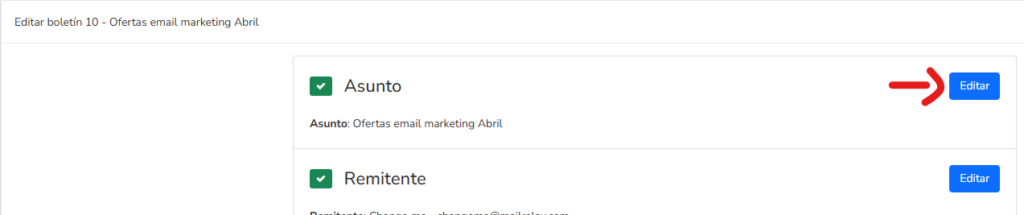
When you open the section, you’ll see all the options, including the ability to modify the subject line, write preview text, and use the “Suggest” option, which displays the AI features.
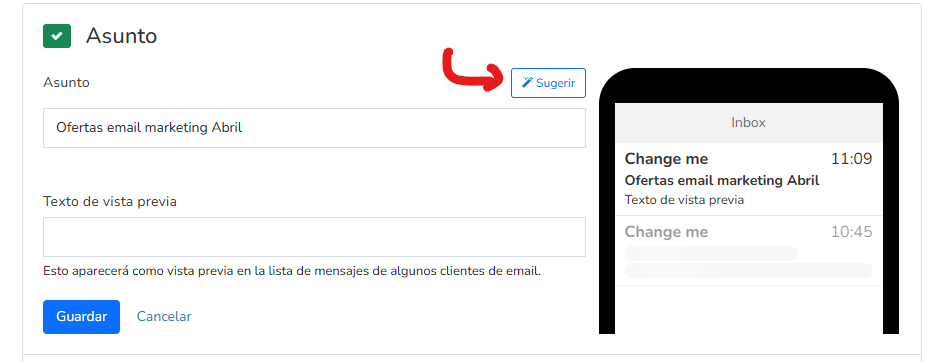
When you click, you’ll see a screen like the following:
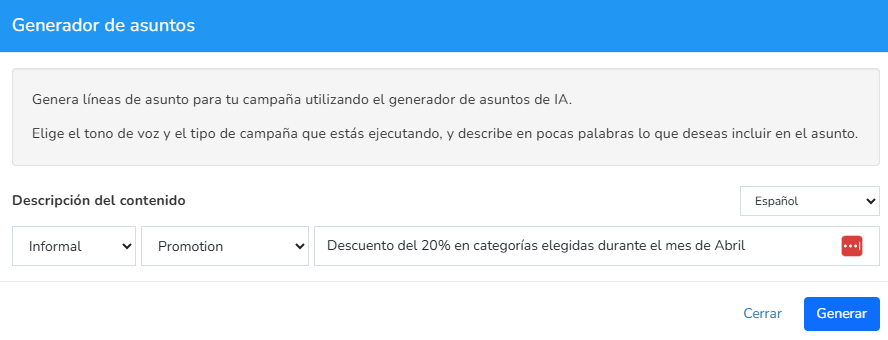
The fields from left to right correspond to:
- Tone of voice (natural, formal, informal…)
- Type of campaign (announcement, promotion, newsletter…)
- Brief description of the content
- Language
Once you fill in everything, click “Generate” and several subject line examples will appear, so you can choose the one you like best.
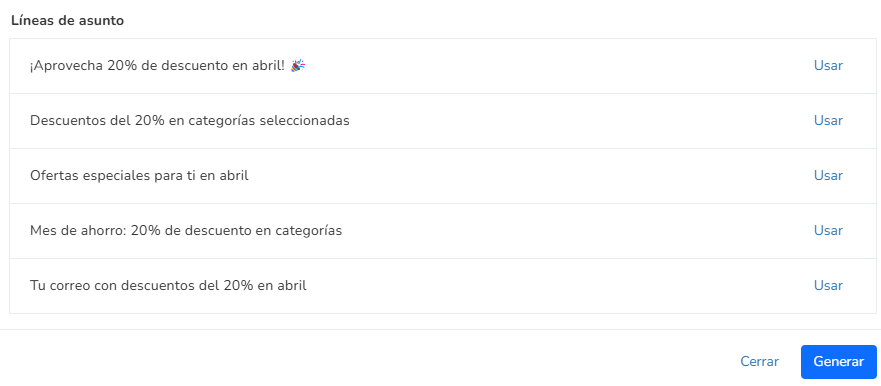
Now all you have to do is click “use” and the selected subject will be applied.
· Generate Newsletter or Email Content with AI
The process is similar, but now we’ll go to the content editing section:

And we’ll select the option to generate templates with AI:
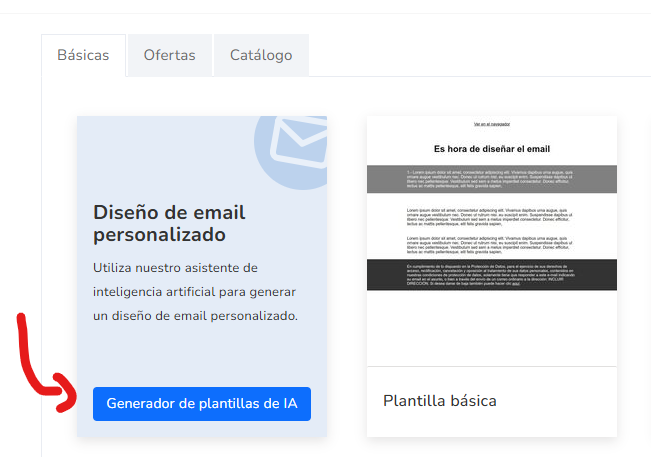
Once selected, the data you need to fill in is very simple:
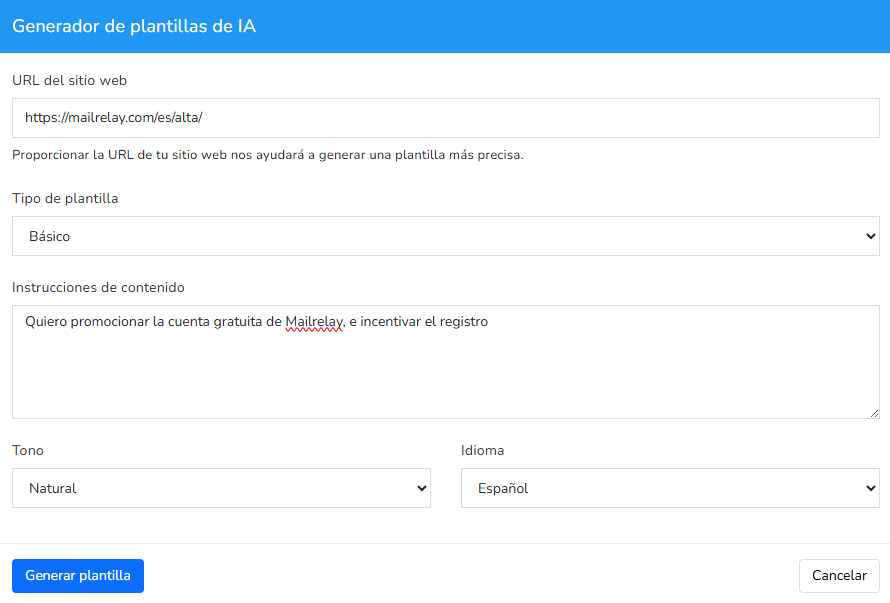
You only need to enter your website URL, the type of template (basic, products…), roughly what you want, the tone and language, and you’ll get a result similar to the following:
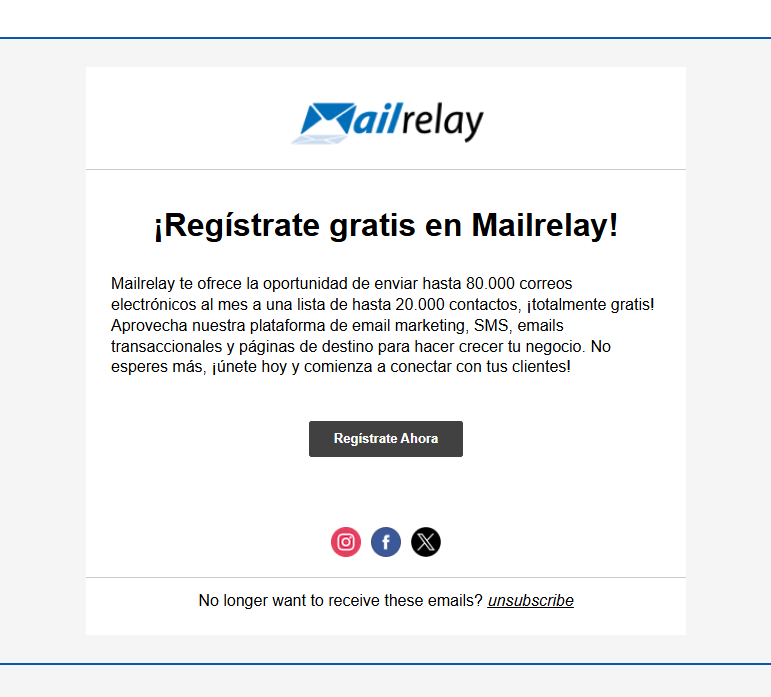
From there, you can modify the design, expand it with more sections, change the text, or if you like it, send it as it is.
As you can see, it’s an option that saves a lot of time in our email marketing.
· Don’t Forget the Free Mailrelay Account
Mailrelay’s free account is ideal for beginners and small businesses, as it allows you to send up to 80,000 emails per month to up to 20,000 contacts at no cost.
This provides an excellent opportunity to explore and take advantage of advanced features such as AI-assisted newsletter generation, without the need for upfront investment.

Best Ways to Use AI in Email Marketing
AI can transform how you create your campaigns.
For instance
· Fast Personalization
Use AI to personalize content and subject lines based on your subscribers’ profiles, offering a more individualized experience.
· Campaign Planning
Plan and create automated email flows using external tools like ChatGPT to get creative ideas for email sequences (welcome, lead nurturing, reactivation, etc.), thus optimizing timing and the impact of each message.
· Fast Content Generation
The AI integrated into Mailrelay helps you generate catchy subject lines and effective email bodies in just a few minutes, which is especially useful for those with little time or limited writing experience.

Recommended External AI Tools
In addition to Mailrelay, there are complementary tools that can help you maximize your campaign impact:
- ChatGPT: ideal for generating flow ideas, subject lines, and creative content.
- Copy.ai: a tool specialized in generating persuasive and engaging texts.
- Grammarly: to review the grammar and style of AI-generated texts.
- Jasper.ai: excellent for creating varied and engaging content.
- Midjourney o DALL·E: tools to generate unique images that visually support your campaigns.

Frequently Asked Questions About AI in Email Marketing
Let’s try to answer some of the most common questions about using AI for typical email marketing tasks:
· Should I rely completely on AI for my campaigns?
AI is a very useful tool, but it should be used to support your creativity and personal judgment, never as a complete replacement.
· How effective are AI-generated subject lines?
AI-generated subject lines are usually attractive and effective, but it’s recommended to run A/B testing to confirm which ones work best with your audience.
· Can I use AI even if I have no previous experience?
Yes, current tools like Mailrelay are intuitive and easy to use, making AI accessible to people with no prior experience.
· Is AI-generated information safe?
You should always review AI-generated content to ensure its accuracy and coherence before sending it to your subscribers.
Conclusion
Integrating AI into your email marketing campaigns with Mailrelay is simple and effective, especially using the generous free account.
Feel free to explore these tools and significantly improve the quality of your emails.