Digital advertising: a real revolution… at the click of a button.
The internet changed everything: how we live, how we work, how we consume and—as you’d expect—how we advertise.
Thanks to it, any brand can advertise and gain visibility.
On a local scale or a global one.
And it doesn’t matter how small you are, or that you don’t have in-depth knowledge of digital marketing.
Once you understand the ABCs of internet advertising, this tool is within your reach. It’s all about testing and improving little by little. Keep reading, because in this guide we’ll cover:
- What internet advertising is (and isn’t)
- Types of advertising and examples of internet ads
- How to choose the most suitable type of internet advertising
- The basics before you start creating online advertising
What is internet advertising?
Let’s start at the beginning.
“Internet advertising is a type of advertising carried out through different digital channels: email, social media, websites, blogs, apps, search result rankings and any other online medium or platform.”
This definition of internet advertising might seem almost too simple, but there’s no need to reinvent the wheel.
Internet advertising, online advertising, digital advertising… it doesn’t matter, they’re generally different names for the same concept: advertising actions carried out on a digital medium.
Okay, now we know what internet advertising is. But it’s also important to clarify what it isn’t.
Some people talk about “online advertising” when they actually mean “online marketing” in general. This is a common mistake because, online or not, marketing is a broader concept.
Have you ever heard of the four Ps of marketing?
- Product or service
- Price
- Place
- Promotion
These four Ps are the basic elements of the definition of the marketing concept. And as you can see, advertising corresponds only to the last point: the P of Promotion.
Advertising consists of carrying out promotional actions with the aim of increasing brand visibility and, consequently, sales. That’s exactly what billboard, press or TV ads do.
And on the internet? Well, there are ads there too, only we make them in other formats and they’re distributed through other channels.
→ Instead of an ad in a magazine, we put a banner on a digital medium.
→ Instead of a TV spot, we make a YouTube video.
→ Instead of a billboard, we run a Social Ads campaign.
In fact, big brands, the stars of TV campaigns or outdoor advertising, also include internet advertising as an essential ingredient in their mix.
Because they know they have to be where their audience is: and that place is less and less a TV set…
…and more and more a phone, a tablet or a computer.
Types and examples of internet advertising
Okay, we’ve got the theory, the definition. But there are tons of types and formats of online advertising.
So the best way for you to understand what online advertising is and what opportunities it offers is by looking at examples of ads.
Let’s get to it: there are more, but these are the main types of internet advertising you should know.
- Google Ads
- Google Display Ads
- Social Ads
- Gmail Ads
- Email Marketing
1. Google Ads (search campaigns)
Google Ads is Google’s advertising platform, formerly known as AdWords.
And probably the most popular way to advertise on the internet (along with banners, which we’ll talk about later).
It works simply: when a potential buyer performs a search related to your product or service… BAM! Google shows your ads.
Let’s look at an example. Imagine you have a small online store and you’ve just identified a need for your business: getting up to speed on social media.
You type “social media management” into the search engine, and this comes up.
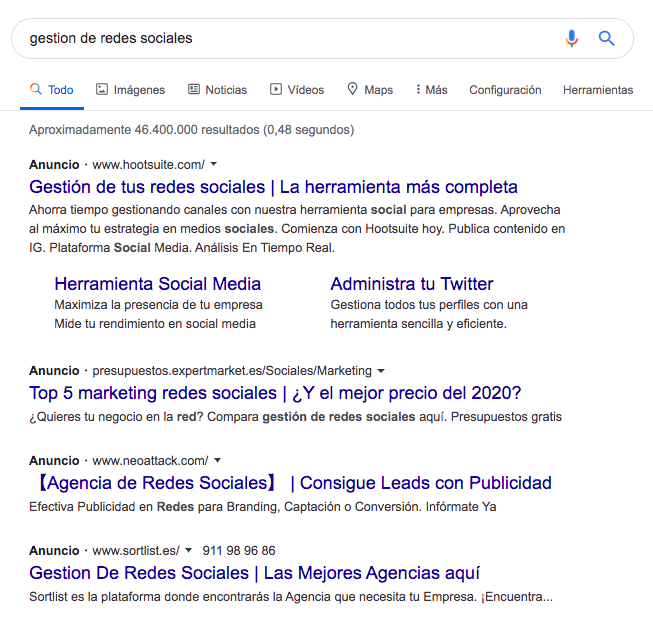
Google shows you ads for management tools and social media agencies, because it’s deduced from your search that you’re not yet sure what you want.
Are you looking for a tool to do it yourself? Or maybe an agency or someone to handle it professionally for you?
If you were clearly looking for an outside service, you’d probably have made a different search: something like “social media agencies”. And in that case, the results would be different too.
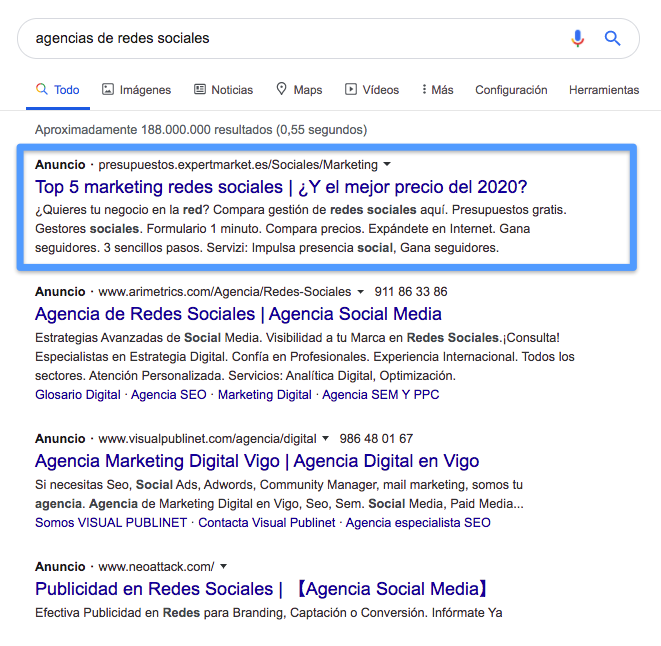
Look at the first result. Now Google no longer shows you the ad for the management tool, because it knows that’s not what you’re looking for.
That ability to show relevant product or service ads at the exact moment someone is searching for them is the key to Google Ads’ success.
In fact, the most conservative statistics estimate that for every $1 invested in Google Ads, an advertiser gets back $2. But according to Google’s own data, that figure could go as high as $8.
In other words, Google Ads campaigns would have an ROI (return on investment) of between 200% and 800%.
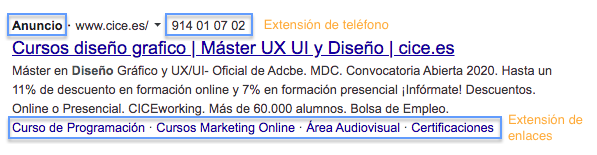
Google Ads ads are recognizable: they appear above or below the regular search results, but they look very similar. The main difference is that the word “Ad” appears in bold right above the title.
They can also include extensions (a kind of additional elements) to show the phone number, the location on Google Maps or links to relevant pages on the site.
2. Google Display Ads
Display advertising is very similar to print advertising, but in digital form.
While Google Ads shows text ads when a user makes a particular search, Google Display shows graphic ads placed on websites within Google’s network (Google Display Network).
The most famous—or perhaps infamous—format of display advertising is banners: those small squares or rectangles of advertising you find all over the web.
There’s a huge variety of banner formats and sizes, and in fact it’s common to combine them within the same display advertising campaign.
Check out all the variations Front uses in its launch banners.

Multiple formats, sizes, copy… one same message: email management is easier with Front, start your free trial!
But wait, let’s go back for a moment to that bit about banners being an infamous format
…that’s a figure of speech, and there’s a reason for it.
In the early days of internet advertising, banners were massively overused, and quality and creativity were sorely lacking. That’s why they earned a bad reputation.
On top of that, overexposure makes us immune to advertising: ads no longer grab our attention as much; some say we don’t even see banners anymore.
But this isn’t a problem specific to display, it’s a problem for all advertising.
And in the end, banners are still one of advertisers’ favorite formats for increasing brand awareness.
Keep in mind that a banner can be well made or poorly made, and more or less creative. Just like any other type of advertising.
“Just like any marketing campaign, the success of a banner campaign lies in the quality of the creative.
– Bob Arnold, Digital Media & Strategy Lead, Google”
And if you don’t believe it, check out this example from Intel.
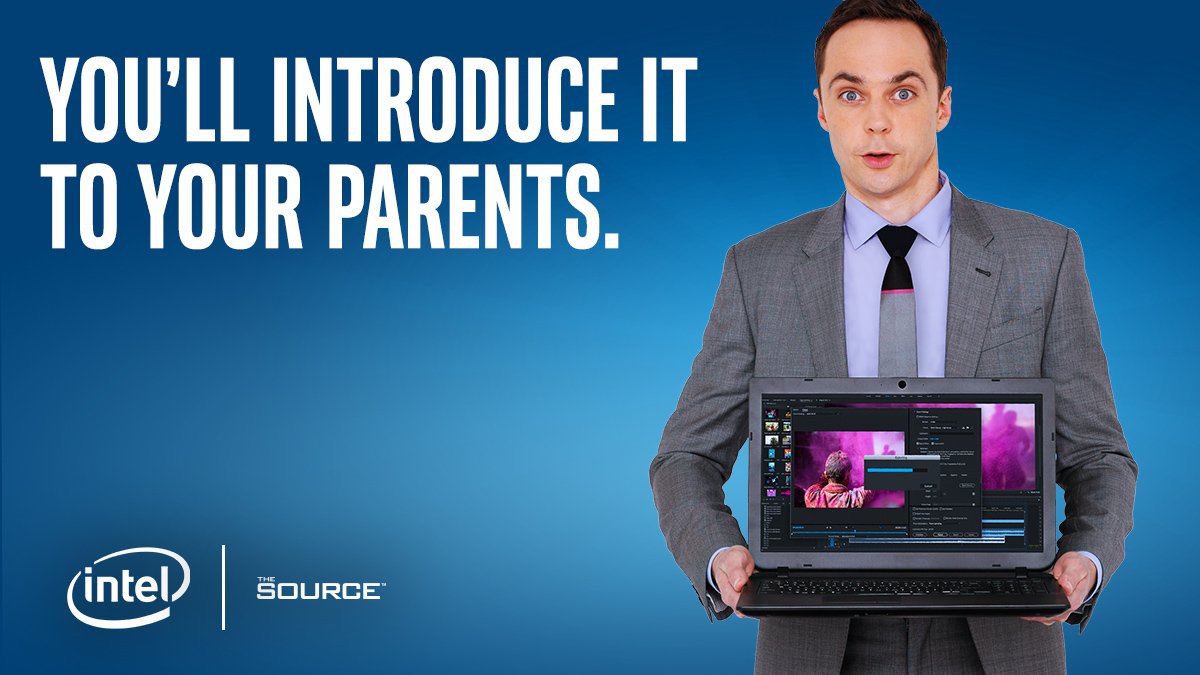
What they’re doing here is comparing the power of their processor to human intelligence, but in a very creative way.
An Intel processor is like Sheldon Cooper’s brain—does that grab your attention or what?
3. Social Ads
Facebook, Twitter, LinkedIn, YouTube, Instagram… they’re more than just social networks where you can organically build a community with your audience.
They’re fantastic internet advertising channels.
A shortcut to quickly reach new users who might be interested in your product.
And with two major advantages over an organic social media strategy (organic = without paid internet ads):
1. They work immediately. Building a community organically, on the other hand, takes time, and results aren’t visible until the medium/long term.
2. They give you access to a bigger audience. Because organic reach (how many people your posts reach without running ads) keeps getting lower. Social Ads boost that reach, exponentially multiplying your visibility.
And what type of social media advertising works best? Let’s start by talking about the channels where the most is invested in advertising.
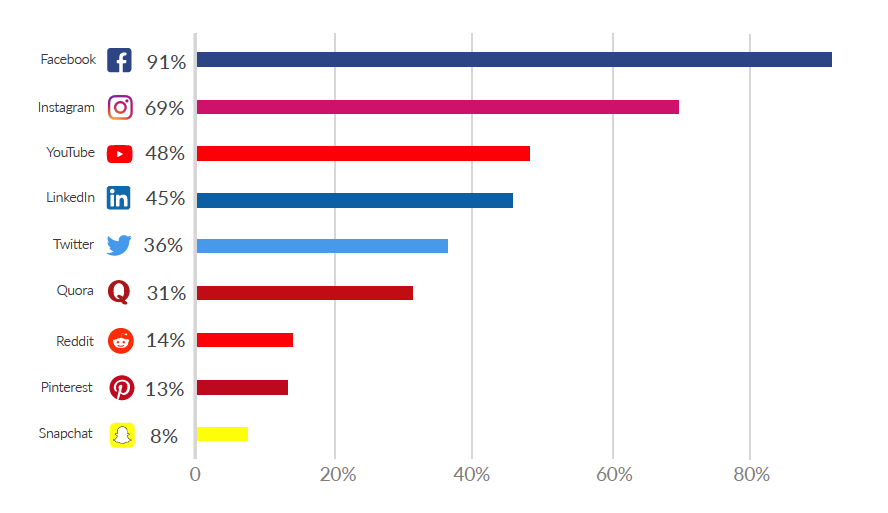
According to PPC Hero data, Facebook is the queen of Social Ads (91%), followed by Instagram, YouTube, LinkedIn and Twitter.
Facebook Ads
91% of advertisers who invest in Social Ads run ads on Facebook.
The possibilities for advertising online with Facebook Ads are huge: images, videos, stories, Messenger ads, sequences, carousels that combine videos and images…
There’s always some type of campaign that fits the idea you have in mind.
Check out how Overstock uses stories in this campaign. It’s an immersive video experience that fills the whole screen, and it’s made simply from product images (impressive!).
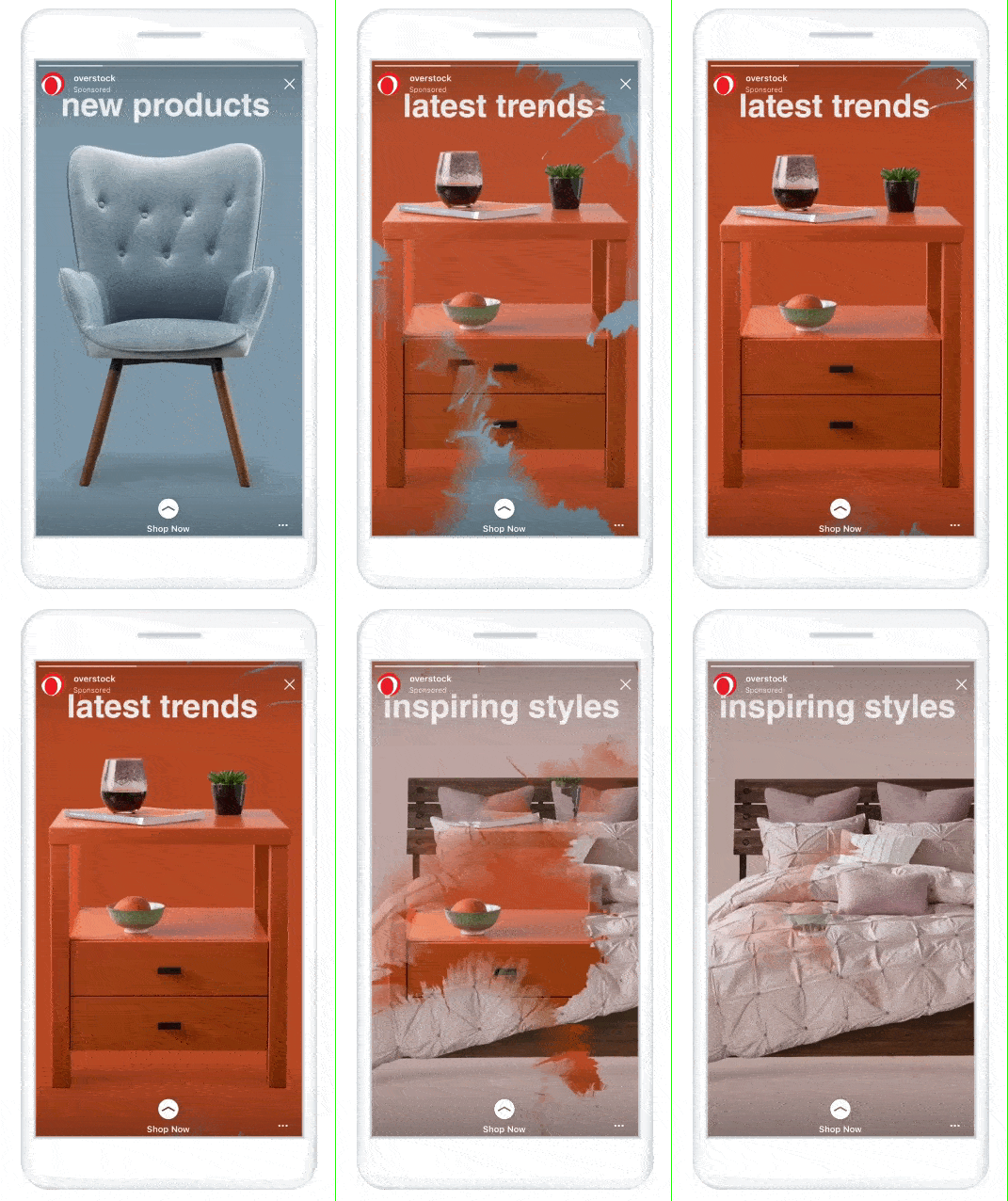
Example of advertising on Facebook
Instagram Ads
Instagram ranks second in advertising investment, with 69% of advertisers using this network for their Social Ads campaigns.
The advertising options on Instagram and Facebook are very similar, almost as if these two platforms were sisters.
● Both are managed from Facebook’s ad manager (Facebook Ads Manager)
● And they share the main ad formats (stories, photo, video and sequence ads)
But on Instagram Ads, everything revolves around inspiration.
That’s the key the 8fit app uses in this campaign to drive its audience to action.
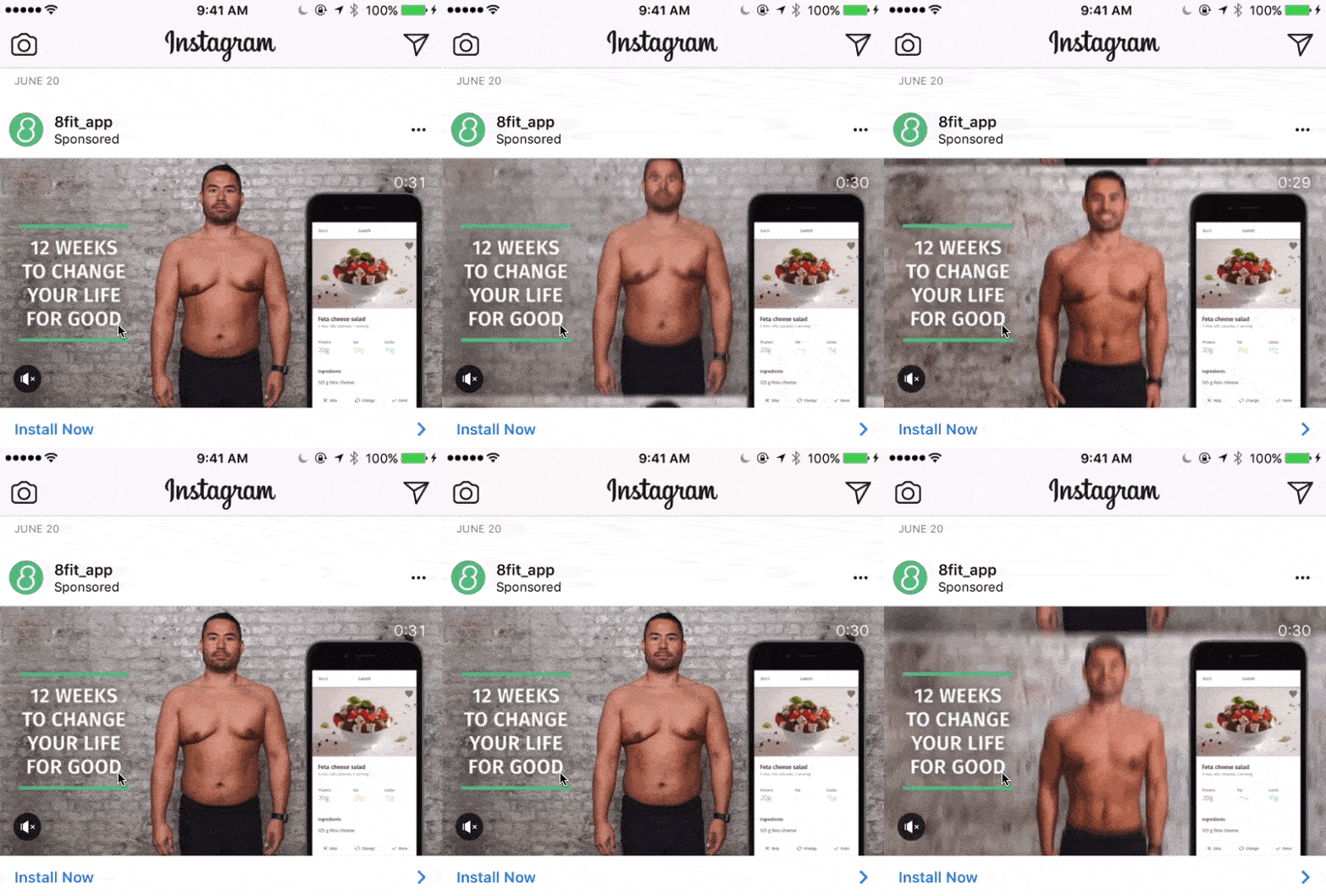
Example of advertising on Instagram
They don’t just offer you a challenge: improve your life in 12 weeks by downloading their app. To help you picture it better, they show you a before and after, inspiring you to think about your new self.
YouTube Ads
Choose the correct answer. YouTube is…
A) The 2nd biggest search engine we look everything up on
B) The new shop window for stores
C) The new tutorial for any product
All the answers are correct.
The rise of video—as a marketing format and in society at large—has made YouTube all of that and more.
With 1.5 billion monthly users, YouTube is the 2nd most visited site on the entire internet after Google.
And the 3rd social network where the most is invested in advertising (and growing). In fact, according to YouTube’s own data, the number of small businesses advertising on YouTube has doubled in the last two years.

Example of advertising on YouTube
Although there are more options, YouTube’s most popular ads are the ones that play before, during or after another video. And here we have three main types of ads:
● Skippable in-stream ads: after 5 seconds, the user can decide whether to keep watching or skip them.
● Non-skippable in-stream ads: they last a maximum of 15 seconds, but can’t be skipped.
● Bumper ads: these can’t be skipped either, but they last a maximum of 6 seconds.

Example of a bumper ad on YouTube
If you want to make a video longer than 15 seconds, you have to invest in skippable ads… hmm, sounds risky? That’s where the TrueView option comes in: if the video is watched for less than 30 seconds or there’s no interaction with it, you don’t have to pay.
LinkedIn Ads
LinkedIn advertising might be less well known, because it targets highly specialized professional audiences.
But that’s exactly what makes it the go-to network for B2B marketing.
Its great strength is that it lets you target by industry, company size, job title, experience, city… If you sell to businesses, LinkedIn lets you reach exactly the person who will make the purchasing decision.
Imagine your customers are small Spanish marketing agencies with between 2 and 10 employees that work remotely.
Reaching such a specific audience is difficult. But LinkedIn makes it possible and offers us different advertising options, such as promoted posts with images or videos, text ads and private InMail messages.
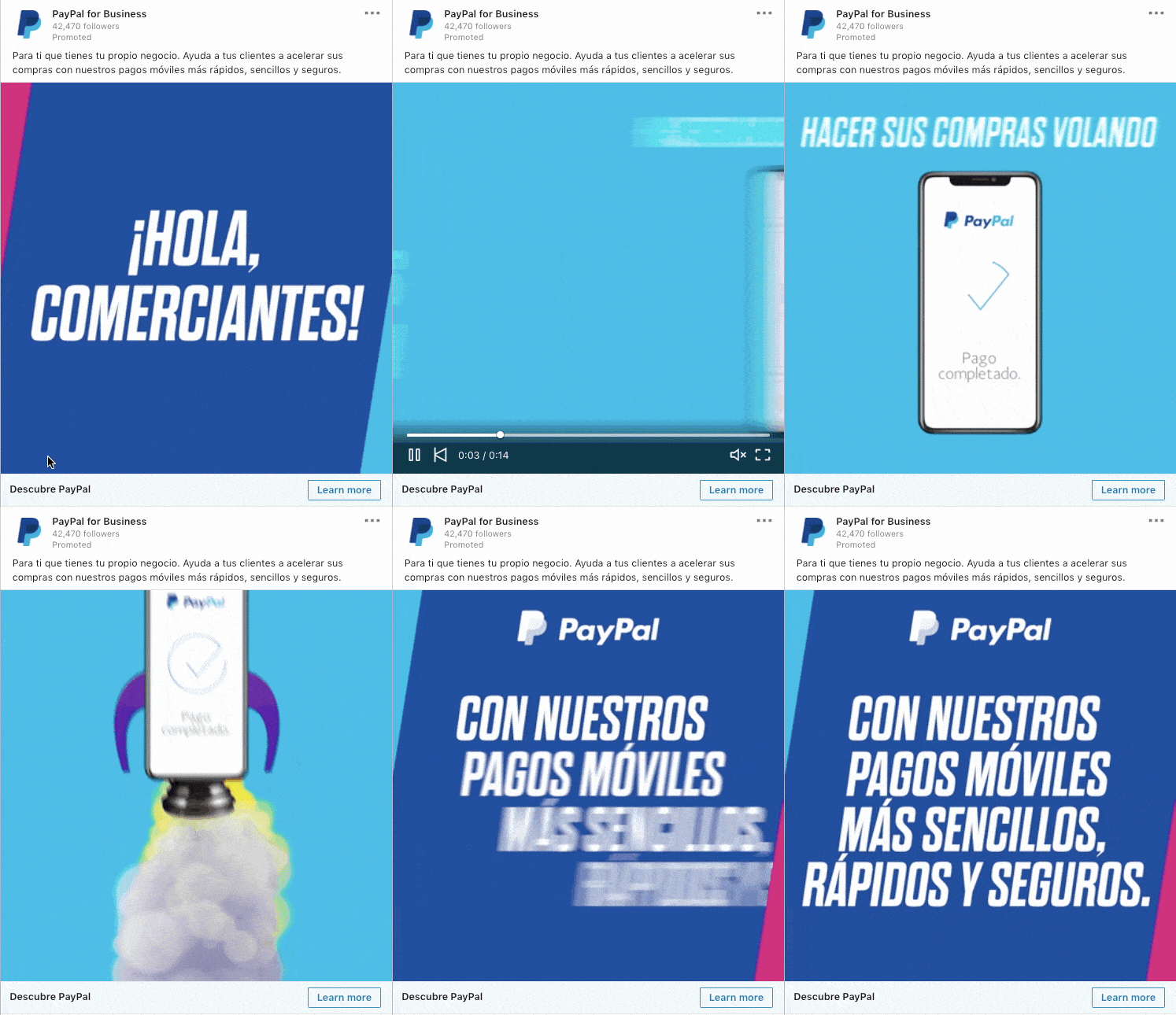
Example of LinkedIn advertising – promoted post
Twitter Ads
Do you want more followers? Get more retweets? Get people to visit your website? Get new customers?
Whatever your answer, Twitter has the right type of campaign for you. And so you only pay for the result you’re after.
In other words, Twitter’s advertising options are perfectly aligned with advertisers’ marketing goals. That’s why they offer campaigns for:
- Brand awareness
- Tweet engagement
- Followers
- Website clicks
- App downloads
In this example you can see a campaign from CELSA, which would aim to position the company as a leader in sustainability and grow its follower base.

Example of Twitter Ads
4. Email Marketing
Email marketing is a whole world of its own, and it’s waaaay more than just a channel for advertising.
In fact, if you think that’s all it’s good for, you’re not just limiting your opportunities: you risk burning out your audience’s interest.
That said, email marketing can also be considered a type of internet advertising. Especially promotional campaigns, like those introducing and launching new products.
Check out how Airbnb presents its “local cooking experiences”. For anyone who can’t imagine life without good food and is looking for local cooking experiences.
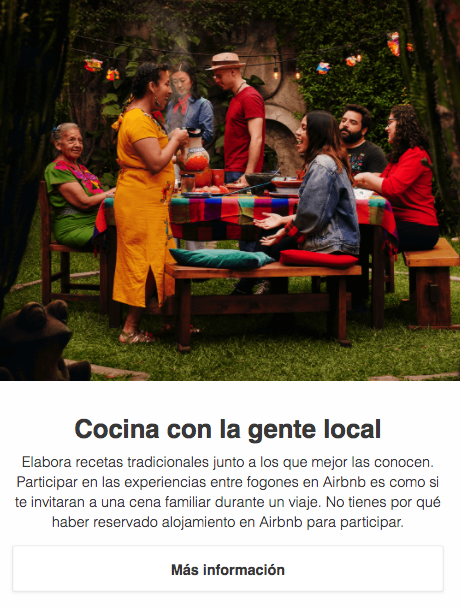
Example of an email marketing campaign
This extremely visual campaign, with a strong storytelling component, could easily have been a YouTube ad or a Facebook or Instagram story.
Its goal is to get the audience to learn about this new service, drive more visits to the website and increase bookings for this type of experience.
It’s a promotion carried out through a digital medium. But it differs from the other types of internet advertising we’ve seen in two ways:
1. The audience is organic: this campaign only reaches Airbnb users who have opted in to receive this type of email. It’s not possible to directly reach a new audience.
2. It’s not a paid ad: sending it doesn’t involve any cost beyond the cost of the mass email tool, because there’s no ad space to buy.
→ Related shortcut: what is email marketing, definition and key benefits
So email marketing would be a much more affordable internet advertising option, great. But…
What happens if you don’t have a database to send the campaign to? Is it still possible to advertise by email?
Yes! But not by buying lists: purchased databases are considered a bad email marketing practice, so that option is off the table.
But that’s exactly where the next point comes in: Gmail advertising.
5. Advertising on Gmail
Gmail ads can appear in the Social or Promotions tab, highlighted with the word “Ad” in green right before the subject line.

When clicked, these ads can take you straight to the advertiser’s website or expand like a regular email, which can also contain videos, forms, etc.
For example, clicking on the HBO email from the image above would show this.
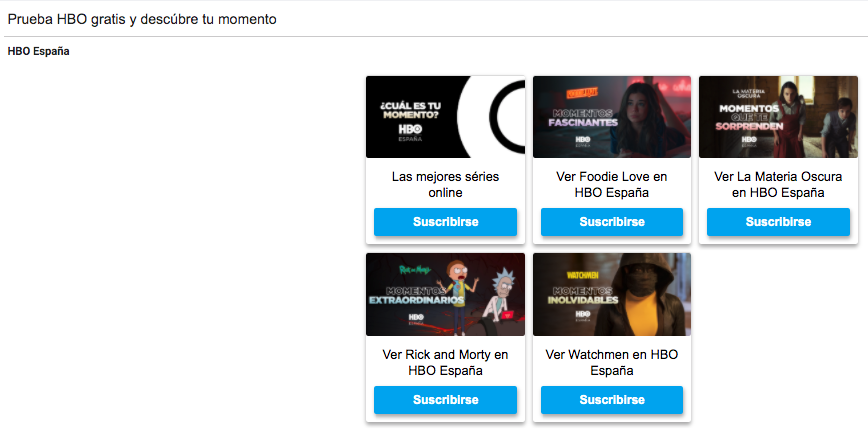
Example of advertising on Gmail
And as you can see, it’s an email that could easily pass for a regular email marketing promotional campaign.
The main difference is that this email could be received not only by HBO subscribers, but also by anyone who has shown interest in other streaming platforms or in TV shows in general.
In other words, Gmail advertising lets you reach a bigger audience. And a hyper-targeted one at that: by demographic criteria, interests, people who’ve visited a specific URL or a YouTube video from your competitor.
There’s even targeting by purchase intent, so your email-slash-ad can reach people who’ve shown a clear interest in buying your product.
How to choose the most suitable type of online advertising
There are so many online advertising channels that it can feel intimidating to settle on just one, right?
Ideally, you should focus on one first, then test, measure and make decisions. And once you’ve drawn your conclusions, you can diversify your investment into new channels.
But when weighing your different options, keep these two aspects in mind.
1) The channels where your audience spends time.
For example, imagine you’re a chef and you’ve created an online creative cooking course.
Instagram would be a good starting point for an internet advertising campaign: it’s a very visual network where foodies—your potential customers—are constantly looking for inspiration.
But if you sell tourist experiences for retirees, Instagram might not be the best option, even though it’s a perfect network for anything travel-related. If your audience isn’t familiar with this network and doesn’t spend time on it, you’ll just be throwing money away.
2) The buying stage they’re at
Take a moment to think about your ad campaign’s audience.
- Do they know your product or service?
- Do they know they need it?
- Are they ready to buy?
The type of online advertising you choose should adapt to those answers.
Imagine you have a stationery store and want to promote a new type of marker. Your audience probably isn’t searching for information about the product, because they don’t even know it exists, so a Google ad wouldn’t do you much good.
A visual campaign on Facebook targeting craft enthusiasts, on the other hand, could help your audience discover the product and get interested in it.
How to create online advertising
If you already know which type of internet advertising might be best suited for your business, it’s time to get to work.
In this guide, we’re not going to go into the details of how to set up ad campaigns on this or that channel. That would be impossible! Each type of online advertising could fill an entire in-depth guide on its own.
But if you want to take the next step, here’s the basics you should know.
Internet advertising budget
The budget itself, the amount you’re going to invest in ads, is up to you.
But before you start setting up campaigns, you need to know how internet advertising budgets work. And there are basically two models: PPC and PPM.
The PPC model (Pay Per Click)
The concept of PPC is really simple: you pay for the clicks you get.
Imagine you have a Google Ads ad that gets triggered when someone searches for “freelance designer”. Every time your ad appears in the results, that counts as an impression.
In a PPC model, impressions are free. In other words, your ad can be shown thousands of times and your audience can see it thousands of times. But if there’s no click, there’s no cost.
The PPM model (Pay Per Mille)
PPM model (Pay Per Mille)
Actually, the word “Mille” refers to impressions. So PPM literally means: payment per thousand impressions.
We’ve already seen that every time your ad is shown, it counts as an impression. But the difference is that in this model you pay a price for each batch of a thousand impressions, whether there are clicks or not.
Quick example: if the cost is €5 per thousand impressions and you want to get a million impressions, you’d have to invest €5,000.
Creating an ad campaign on Google Ads
When we talk about Google Ads, we usually mean the text ads shown in Google’s search results.
But Google Ads is also the platform used to manage four types of digital advertising:
- Search campaigns
- Display campaigns
- YouTube advertising
- Gmail advertising
In other words, your ad will be shown in Gmail, in Google, on other sites in its display network, or on YouTube. It doesn’t matter: you’ll manage it all from Google Ads.
The platform is designed so that all kinds of businesses can use it, regardless of their marketing knowledge or their internet advertising budget.
By following its instructions, setting up a campaign with Google Ads is relatively easy. And if you already know what your ad’s messages, images or videos are going to be, the process will be much faster.
The different advertising options you can manage with Google Ads mostly work on the PPC model, although the PPM option exists too.
On YouTube, CPE or Cost Per Engagement is also used, which is basically a pay-per-action model (for example, watching a video).
Social Ads are managed from each social network’s own advertising platform, except for Instagram Ads (remember: those are managed from Facebook’s ad manager).
The process is fully guided, so you just have to follow the steps provided. Take your time reading their resource and help pages, because you’ll find inspiring examples and tips to make your advertising more effective.
Here’s the official starting point for each channel:
Social media advertising budgets also work with CPC and CPM models. But it’s quite common to have other payment models depending on the goal and type of campaign.
For example, in Twitter follower campaigns, you pay for each new follower you get, and in engagement campaigns you only pay for interactions with a promoted tweet (likes, retweets, etc.).
Creating an ad campaign with email marketing
And we’ll finish with our favorite: email marketing campaigns.
They’re managed directly from mass email tools, like Mailrelay. And aside from the budget part, the process is pretty similar.
- You choose which group of subscribers will receive the email
- You put together the email’s text and images in the tool’s editor
- The countdown begins: 3, 2, 1… campaign scheduled!
Compared to other types of internet advertising, its lower entry cost is a big point in its favor.
But the great advantage of email marketing is its versatility: it’s useful for advertising, but useful for much more too.
With a good strategy, you can build an ongoing relationship with your audience, giving them what they need at every stage of the buying process.
If you’ve settled on this channel, we walk you through the whole process from A to Z in our guide “how to do email marketing step by step” (a must-read!).
→ And one last related shortcut: 4 mass email templates for your next promotional campaign.
See you next time!
Within this ecosystem, digital advertising is the central piece that connects all the channels we’re going to cover.