
Not sure how to sell by email? In this article, we’ll walk you through a quick and simple guide so you can harness the power of email effectively to sell almost anything.
Over the years, email marketing has proven to be a tool that delivers results.
In other words, the vast majority of companies that invest money in sending email campaigns see a return on that investment.
This brings us to a first question that needs answering.
Let’s start there
· If selling by email is so profitable, why don’t some companies do it?
It’s an interesting question, and there are at least three answers to it:
- Thinking, wrongly in my view, that it’s an outdated strategy
- Not knowing the strategies and methods for selling by email (or even thinking that email marketing is complicated)
- The cost of rolling it out across the company (tools, staff)
- Using other online marketing alternatives (which are often less effective)
Generally, it all comes down to not knowing what’s possible, or wrongly assuming that the costs will outweigh the benefits.
That’s not the case. Let’s see why.
Costs are usually far lower than the benefits we can get, especially since there are free email marketing tools.
In this post, we’ll answer these questions, starting from the basics.

1. ► What’s the first thing we need to do email marketing?
Something that will certainly come in handy for our mailings is our own contact list.
If we already have a list, we can divide the contacts into two types:
- Our own customers who have hired or bought our services in the past (and who have given us permission to contact them by email)
- And new leads we get through marketing campaigns (who sign up through a subscription form)
That’s it, it’s not that hard.
We’ll avoid purchased lists and the like
Among other things, they’ll cause SPAM problems, damage our domain’s reputation, and so on. In the long run, it’s not worth it, because our emails will land in SPAM or won’t even be delivered.
:: What do professionals and companies usually worry about?
Not having any contacts.
But that’s no obstacle to selling by email or to developing an email marketing strategy.
From the moment we plan any online marketing action, we can start selling by email.
Whether it’s creating content for our blog, a Google Ads or Facebook Ads campaign, or a social media campaign.
All of these campaigns generate traffic.
Capture the traffic that reaches our website
We can encourage every visitor to our website, all of them potential customers, to subscribe. Every sign-up will be useful to us.
In other words, we can grow our contact list without any problem. What’s more, it’s one of the most profitable things we can do, because it helps us make the most of the traffic coming to our website.
This is actually a very common strategy: create a sales page, drive traffic to it with some kind of paid campaign, and capture new contacts who are potentially interested in our products.

2. ► A simple, free and powerful email marketing tool
No complications.
On this blog we naturally recommend that you use our tool, Mailrelay, but there’s no fine print and no tricks.
With Mailrelay you won’t find:
- A daily sending limit
- Or limits on the features available
The Mailrelay free account offers something very simple and powerful:
- The ability to send up to 80,000 emails per month
- Manage up to 20,000 contacts
- With technical support
- No commitment
- And no need to provide cards or payment methods
It’s a great tool for selling by email, and you can create your free account.
We now have two of the things we need to sell by email.
A contact list, and a tool to send the emails.
What else do we need?

3. ►We need to import our contacts / create subscription forms
At this point we need to work on our contacts: either import them if we already have a contact list, or set up subscription forms to get new contacts.
With Mailrelay, both are very easy.
:: Importing your contact list into Mailrelay
Here’s a direct link to the tutorial where you can see how to import your contact list into Mailrelay. It’s very quick to do:
That way you can import your contacts into Mailrelay and send them your bulk mailings.
And to get more, or new, contacts
:: Subscription forms to get new sign-ups
For that, we have two tutorials:
- How to add a Mailrelay subscription form in WordPress
- How to add a Mailrelay form with Bloom, SumoMe and Thrive Leads
With these two guides, you’ll be able to create forms that let people sign up on your website. And that way, get new contacts and potential customers.
What’s the next thing we need?

4. ►Newsletter design / first automation
It’s time to send our campaigns and start selling.
At this point we have two tasks to do. Let’s take a look:
:: Prepare a mailing to send to the list we’ve already uploaded
If we want to send “something” to the contacts we already have, such as past customers, subscribers, etc. We prepare a new design and send it. It’s very easy:
In this video, you can see how to put together a newsletter quickly and easily with Mailrelay’s drag & drop editor.
And then send it from there.
The other thing we need to do is
:: Set up a first automation
This will let us, for example, do something very common, like sending an email after a contact signs up.
It’s a way to introduce ourselves and start the relationship. You’ll find a tutorial here:
That way, when someone signs up through your subscription forms, you can introduce yourself, offer a discount or an ebook, or simply take the opportunity to try to make a sale.
For example, in ecommerce it’s common to offer a discount to get the contact to sign up and, at the same time, encourage a sale.
What else do we need?

5. ► An effective sales email template
We can give our mailings many different structures. My recommendation is to keep it simple and use a straightforward, visible structure with a clear format.
I suggest this format, which is widely used and has a proven track record:
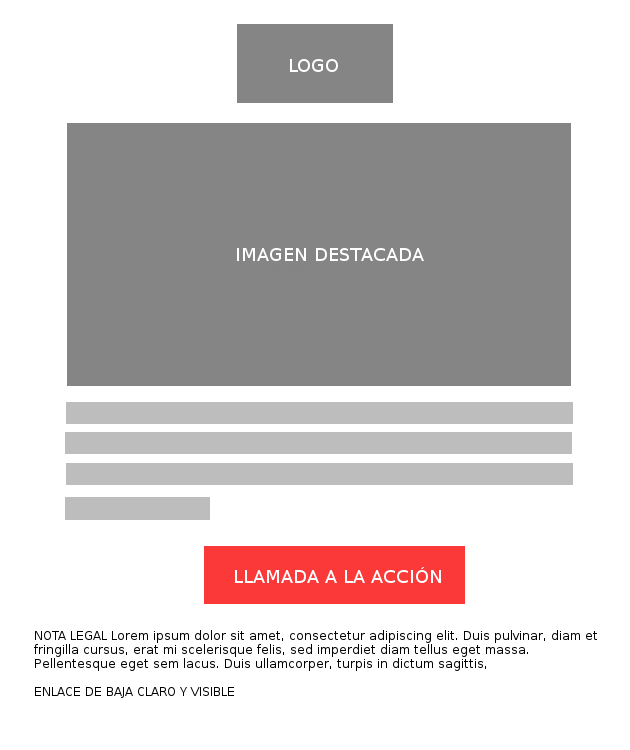
It’s a format designed to sell a single product, so it can work really well for:
- Promoting a new product or service
- Sending an offer or a discount
- Encouraging sales of products related to previous purchases
- Updates and news
As you can see, there’s very little text, and that’s not a bad thing. We need to be able to pack several things into that minimal text:
- The need we meet, even if subtly
- The key benefits of our solution
- If possible, a brief comparison with other solutions
- Removing points of friction
- A call to action with a trigger
Put like that, this outline may seem complex to use. The truth is it takes practice, so let me give you an example. An example based on our email marketing tool.
► Example of sales copy based on this outline
Email subject: Increase your sales opportunities, for free
Email text: Increase how often you communicate with your customers and sell more thanks to bulk email sending. The Mailrelay free account lets you send up to 80,000 emails a month for free, with no daily sending limit and with technical support. You don’t need to enter any cards or payment methods to create your free account
Do you have fewer than 20,000 contacts?
Call to action: Don’t pay, it’s free
This very short text contains all the necessary elements.
From there, you can make it longer, go into a few more details, or even add a bit of storytelling, but that’s the basic skeleton.
If reading it has made you want to do email marketing, you can sign up for a free Mailrelay account below.
Well, as you can see, the design includes an image, so the last thing we need is

6. ►An image and an image editor
There are lots of places where you can get free images.
I can recommend:
:: unsplash.com
There are also many sites that let you edit images. I recommend these two image editing tools:
:: Squoosh
:: Canva
You don’t need anything else to edit your images, and at this point
· Don’t have time to write your own sales emails?
Don’t worry. We know that lack of time is a fairly common problem, and we’ve come up with a very effective solution. Pre-written sales templates.
They’re email templates that give you a starting point, which you can then modify as much as you need so they fit
· You don’t need anything else to sell by email
With these 6 points we’ve covered, you’ll be able to prepare your newsletters and send your bulk mailings without any problem and, in many cases, at no cost.
I’ve skipped a few more technical points, such as setting up SPF, DKIM and a custom domain, which are also important and necessary. But I consider them part of the email marketing tool itself.
And in Mailrelay’s case, for example, support for these points is provided both within the tool itself and by the support team.
We don’t need to think about complex tools that are hard to roll out in the company.
Selling by email is actually simple. With what I’ve explained in this post, you can do it without any problem.
Ready to boost your sales and profits?
Choosing a good email template and relying on mailing automation will save you a lot of time in this process.

Jose Argudo
CMO at Mailrelay. Writes about email marketing, copywriting, and conversion for small businesses and entrepreneurs.