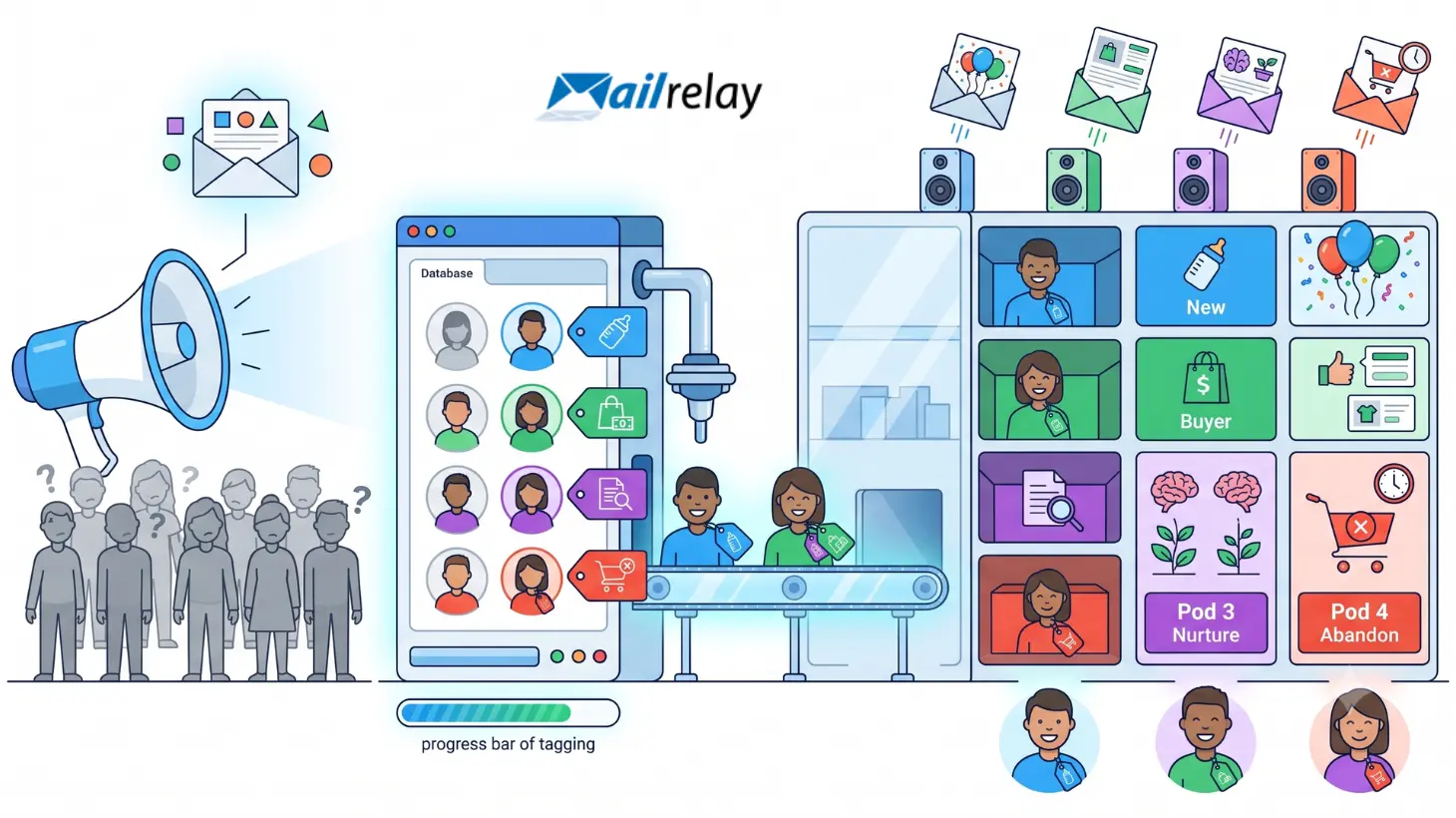
Sending email marketing campaigns without segmentation is like talking to all your customers the same way, even though each one is at a different stage.
A user who just subscribed is not the same as a customer who has already purchased several times. You also shouldn’t send the same message to someone interested in a specific product as to someone who only downloaded a guide months ago.
That’s where email tags come in.
Tags let you organize your database better, identify interests, classify contacts, and send much more relevant campaigns. Instead of working with one huge list where everyone looks the same, you can create smarter groups based on behavior, source, purchases, interaction, or customer stage.
In this article, we’ll look at what email tags are, how to use them in email marketing, what mistakes to avoid, and how you can apply them to improve your campaigns.
Organize your contacts with tags and segments
With Mailrelay, you can tag, segment, and send each group the right message. Free for up to 20,000 contacts.
What Are Email Tags?
Email tags are internal labels assigned to contacts, campaigns, or behaviors to better organize information within an email marketing platform.
Put simply: an email tag is used to identify something important about a contact.
For example, you can tag someone as “new customer,” “interested in product A,” “webinar attendee,” “cold lead,” “repeat buyer,” or “inactive user.”
The user doesn’t need to see the tag. It’s usually internal information that helps you work your campaigns better.
The difference between a list and a tag lies in the level of detail. A list can group all your subscribers, but tags let you classify them with more precision.
For example, imagine you have an online store selling pet products. You can have one general subscriber list, but within that list apply tags like:
- Interested in dogs.
- Interested in cats.
- Customer who has bought pet food.
- Customer who has bought toys.
- User who downloaded a guide.
- Contact who hasn’t opened emails in months.
Thanks to those tags, you can send campaigns that are much more tailored to each person.
This concept is also known simply as email tags, and the idea is the same: organizing contacts and actions to communicate better.

Benefits of Using Email Tags
Using email tags isn’t just about staying organized. It’s a way to improve your entire email marketing strategy.
When you tag your contacts well, you can better understand who’s in your database, what they’re interested in, and what type of message is likely to work best in each case.
The first major benefit is segmentation. Tags let you separate contacts according to criteria that are useful for your business. You don’t need to create dozens of separate lists. You can work with a cleaner database and use tags to differentiate behaviors, interests, or customer stages.
They also improve personalization. If you know a user has shown interest in a specific product, you can send them content related to that interest. If you know they’ve already bought, you can send them post-purchase recommendations. And if you know they haven’t opened your emails in a while, you can include them in a re-engagement campaign.
Another important benefit is automation. Tags can act as triggers to start a specific sequence. For example, when a contact receives the “downloaded guide” tag, they can automatically enter a series of educational emails.
The main benefits of using email tags are:
- Better segmentation: you can divide your database by interests, purchases, source, or behavior.
- More personalization: each contact can receive messages that are more relevant to their situation.
- Greater relevance: you reduce generic campaigns and increase the usefulness of your content.
- Better internal organization: your team understands more clearly what kind of contacts it has.
- More precise automations: you can trigger workflows based on specific tags.
- Better analysis: you can compare results between groups of contacts.
- Less saturation: you avoid sending campaigns to users they’re not relevant to.
In short, tags turn a generic database into a much more useful one.
Recommended Structure for Email Tags
One of the most common mistakes when working with email tags is creating them without any criteria.
At first, it seems convenient. You create a tag for each campaign, another for each product, another for each idea, and another for each test. But over time, you end up with a disorganized system that no one understands.
That’s why, before you start, it’s worth defining a clear structure.
A good tag structure should be simple, descriptive, and easy to maintain. The goal isn’t to have many tags, but to have the tags you need to make better decisions.
You can organize your tags into categories like these:
- Contact source: website, form, webinar, social media, event, Manychat, physical store.
- User interest: product A, service B, SEO content, discounts, training, newsletter.
- Customer stage: new subscriber, lead, new customer, repeat customer, inactive customer.
- Behavior: opened campaign, clicked, downloaded resource, abandoned cart, requested information.
- Campaign type: promotion, newsletter, launch, re-engagement, post-purchase.
- Interaction level: high interaction, low interaction, no recent activity.
It’s also important to define a naming convention for them. If each person on the team creates tags in a different style, the system will lose its usefulness.
For example, you shouldn’t mix tags like these:
- New customer.
- new-customer.
- New Customers.
- New customer 2026.
- first-time buyer.
They could all mean something similar, but they would create confusion.
A clearer structure would be:
- Customer – New.
- Customer – Recurring.
- Customer – Inactive.
- Interest – Product A.
- Source – Webinar.
- Action – Guide download.
This kind of naming convention makes tags easier to find, quicker to understand, and helps keep your database cleaner.
The basic rule is simple: if a tag doesn’t help you segment, automate, analyze, or make decisions, you probably don’t need to create it.

How to Use Tags to Better Segment Your Contacts
Tags help you segment better because they add context to each contact.
It’s not enough to know that someone is subscribed to your newsletter. What matters is understanding how they arrived, what they’re interested in, what actions they’ve taken, and where they stand in their relationship with your brand.
For example, you can use tags to differentiate contacts by their source. Someone who signed up through a blog form isn’t the same as someone who came from a paid campaign, an event, a download, or a Manychat automation.
You can also tag based on interests. If a user clicks several times on ecommerce-related content, it makes sense to mark them with a tag related to that topic. That way, you’ll be able to send them more targeted campaigns in the future.
Another very useful option is tagging by behavior. For example, you can identify users who open your emails frequently, contacts who click, people who have stopped engaging, or customers who bought a specific product.
Some practical ways to segment with tags include:
- By source: contacts coming from the website, social media, an event, a webinar, or external campaigns.
- By interest: users interested in a specific product, service, category, or topic.
- By interaction: contacts who open, click, don’t engage, or have been inactive for a while.
- By purchase: new customers, repeat buyers, users who bought a specific category.
- By stage: cold lead, qualified lead, customer, inactive customer, or re-engaged contact.
- By action: guide download, webinar attendance, demo request, cart abandonment.
The key is not to tag just for the sake of tagging. Every tag should serve a purpose afterward.
For example, if you tag a contact as “interested in automation,” you should be able to send them content about automation, use cases, comparisons, or a related offer.
If you tag someone as “inactive customer,” you should be able to include them in a win-back campaign.
And if you tag someone as “high interaction,” it may make sense to send them launches, priority promotions, or more advanced content.
Email tags are useful because they turn user behavior into actionable information.
Segment better, convert more
Combine tags, groups, and custom fields to send relevant campaigns and automations that work.
Best Email Tag Examples Across Platforms
Tags can vary depending on the email marketing platform you use, but the underlying logic is usually similar: organizing contacts to segment, automate, and personalize campaigns.
In some tools, tags are applied directly to contacts. In others, they can be combined with lists, groups, segments, custom fields, or automations.
What matters isn’t the exact name of the feature, but how you use it within your strategy.
Here are some examples of email tags you can apply in email marketing platforms:
- Tag by source: “Source – Instagram,” “Source – Webinar,” “Source – Blog.”
- Tag by interest: “Interest – Email Marketing,” “Interest – Ecommerce,” “Interest – Automation.”
- Tag by behavior: “Clicked,” “Opened Campaign,” “Not Engaging.”
- Tag by stage: “New Lead,” “Qualified Lead,” “Repeat Customer.”
- Tag by campaign: “Campaign – Black Friday,” “Campaign – Course Launch.”
- Tag by product: “Bought Product A,” “Interested in Service B.”
- Tag by relationship: “Partner,” “Affiliate,” “Supplier,” “VIP Customer.”
For example, a B2B company might tag a contact as “Source – LinkedIn,” “Interest – Software,” and “Qualified Lead.” With that combination, they would know where the contact came from, what they’re interested in, and where they stand in the funnel.
An ecommerce store, on the other hand, might use tags like “Customer – First Purchase,” “Interest – Women’s Fashion,” or “Action – Abandoned Cart.”
And a training company might use tags like “Webinar Attendee,” “Downloaded Guide,” “Interest – Advanced Course,” or “Active Student.”
In every case, tags help you send fewer generic campaigns and more relevant messages.

Other articles that may interest you:
- 360º Marketing: What It Is, Strategies, and How to Implement It Step by Step
- What is Manychat? Uses, available channels, and pricing
- B2B Marketing: What Is It? Types and Examples of B2B Business Models
- Customer Relationships: What They Are, How to Strengthen Them, and Best Strategies
- Strategic Marketing: What It Is, Benefits, Techniques, and Examples
Common Mistakes When Using Email Tags
Tags are very useful, but they can become a problem if used without any order.
The most common mistake is creating too many tags. When every campaign, every action, and every small difference has its own tag, the system becomes difficult to understand and maintain.
Another common mistake is not having a clear naming convention. If one person on the team creates the tag “New Customer” and another creates “Customer New,” you’ll probably end up duplicating information.
It’s also common to create tags that end up never being used. This creates clutter within the platform and makes it harder to find the tags that really matter.
Another problem arises when old tags are never reviewed. A tag from a past campaign might make sense for a few weeks, but if it’s not cleaned up afterward, it will end up taking up space and confusing the team.
The most common mistakes are:
- Creating too many tags without a clear structure.
- Using different names for tags that mean the same thing.
- Not defining who can create new tags.
- Not reviewing old or duplicate tags.
- Tagging contacts without being clear on what it will be used for later.
- Using tags that are too generic.
- Not combining tags with real segmentation.
- Not respecting permissions or consent in your communications.
To avoid this, it’s best to work with a simple structure and review the system periodically.
A good practice is to ask yourself before creating a tag:
Will this tag help me segment, personalize, automate, or analyze better?
If the answer is no, you probably don’t need it.
Best Platform for Implementing Email Tags
The best platform for implementing email tags isn’t necessarily the one that lets you create the most tags.
It’s the one that lets you use them effectively within your email marketing strategy.
A good platform should let you organize contacts, segment audiences, create campaigns, automate sends, analyze results, and keep a clean database.
It’s also important that it be easy to use. If the tool is too complex, the team is more likely to end up creating tags without any criteria, or avoiding using them altogether.
When choosing a platform to work with email tags, it’s worth paying attention to these points:
- Ease of organizing contacts.
- Segmentation options.
- Ability to work with groups, fields, or tags.
- Automations.
- Campaign statistics.
- Unsubscribe and permission management.
- Scalability.
- Technical support.
- Ease of importing contacts.
- Integrations with other tools.
With Mailrelay, you can put this organization and segmentation logic into practice using lists, groups, custom fields, campaigns, and automations, so you can send more relevant messages to each type of contact.
This is especially useful if you capture leads from different channels: web forms, social media campaigns, Manychat, events, landing pages, or sales actions.
The idea is simple: the better organized your database is, the better campaigns you’ll be able to send.
Because email marketing isn’t about sending more.
It’s about sending better.
Mailrelay: Up to 80,000 Free Emails for Your 360 Digital Marketing Campaigns
Email tags are a key piece for organizing your email marketing strategy.
They help you better understand your contacts, segment campaigns, personalize messages, and create smarter automations.
But for all of this to work, you need a platform that lets you manage your database well and send campaigns professionally.
With Mailrelay, you can create email marketing campaigns, send newsletters, organize contacts, segment your audience, and measure the results of your sends.
Plus, you can get started for free.
With Mailrelay you get:
- Up to 80,000 free emails per month.
- Up to 20,000 contacts.
- No credit card required.
- Contact segmentation.
- Automations.
- Campaign statistics.
- Specialized technical support.
That way, you can apply a more organized, more personalized, and more profitable email marketing strategy from day one.
Because a good email tag isn’t just an internal label.
It’s a way to better understand your contacts and send them the message they really need.
Start for free with Mailrelay
Create your free Mailrelay account and start sending better-segmented email marketing campaigns. No credit card required.
These tags are key to segmentation in email marketing, since they let you group your subscribers according to their actual behavior.

Jose Argudo
CMO at Mailrelay. Writes about email marketing, copywriting, and conversion for small businesses and entrepreneurs.