List-Unsubscribe: what the unsubscribe header is and how one-click unsubscribe works
The header that adds the one-click unsubscribe button in Gmail and Yahoo, and why it is mandatory
List-Unsubscribe is a technical email header that tells the email client how to unsubscribe the recipient. Thanks to it, Gmail, Yahoo, Outlook and Apple Mail show an “Unsubscribe” button next to the sender, so the user doesn’t have to look for the link at the bottom of the message.
It isn’t visible inside the email. It goes in the headers, the part of the message read by mail servers and email programs.
What is the List-Unsubscribe header for?
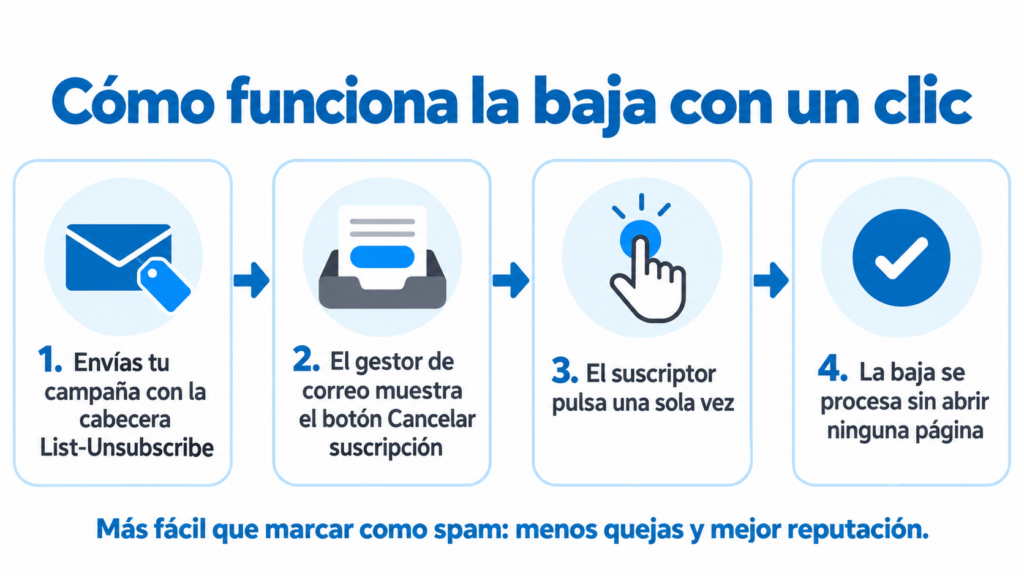
Its goal is to make unsubscribing easier than marking the email as spam. If subscribers can’t find a way to leave your list, they hit “Spam”, and every complaint like that damages your sender reputation.
When the unsubscribe button is in plain sight, three things happen. Users leave without getting annoyed, you stop sending to people who don’t want to read you, and mailbox providers see that you respect your recipients. That’s why it is one of the foundations of good deliverability.
How does List-Unsubscribe work?
The header can contain two types of address:
An email address (mailto). The email client sends a message to that address and the sender unsubscribes the contact. This is the oldest method, defined in the RFC 2369 standard in 1998.
A URL (https). The email client calls that address and the unsubscribe is processed on the sender’s server.
Since 2017 there has also been one-click unsubscribe (RFC 8058). A second header, List-Unsubscribe-Post, is added, which lets the email client unsubscribe the user without opening any page or asking for confirmation. This is the version Gmail and Yahoo require today.
This is what the two headers look like in an email’s code:
List-Unsubscribe:
, List-Unsubscribe-Post: List-Unsubscribe=One-Click
Send emails that meet Gmail and Yahoo requirements
Easy unsubscribe for your subscribers, on the free account too.
What is the difference between List-Unsubscribe and the unsubscribe link?
Both are used to unsubscribe, but they are not the same thing and you should have both.
| List-Unsubscribe header | Unsubscribe link in the email | |
|---|---|---|
| Where it is | In the message’s technical headers | In the body, usually in the footer |
| Who shows it | The email client, with its own button | You, within your design |
| What the user sees | “Unsubscribe” next to the sender | A text or link at the bottom |
| Is it mandatory? | Yes, for bulk sending to Gmail and Yahoo | Yes, by law (LSSI and GDPR) |
The law requires every commercial communication to offer a simple, free way to unsubscribe. The header doesn’t replace that link: it complements it. You’ll find more details about unsubscribing in the Unsubscribe entry.
Why do Gmail and Yahoo require one-click unsubscribe?
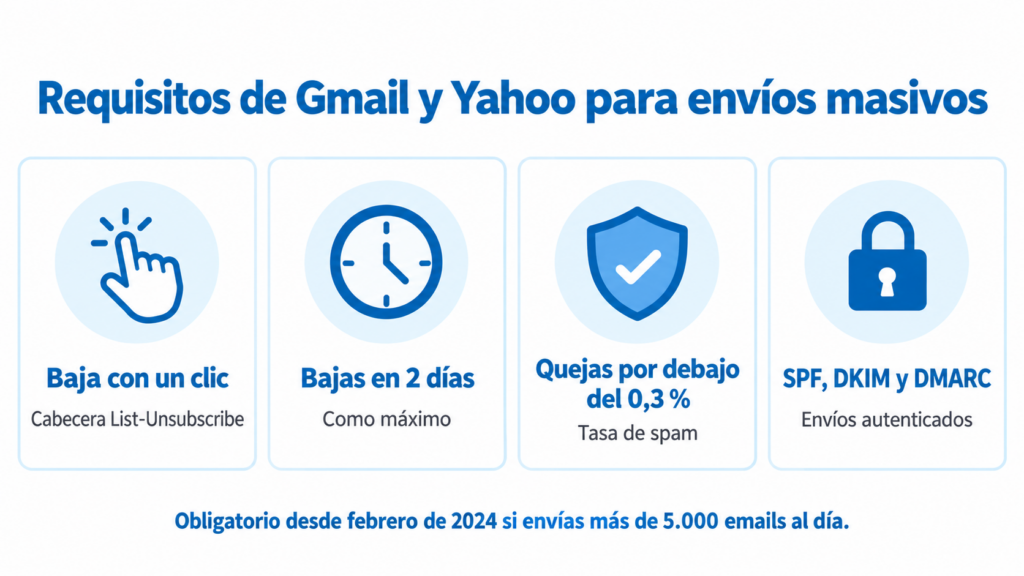
Since February 2024, Gmail and Yahoo require senders who send more than 5,000 emails a day to:
- Include the List-Unsubscribe header with one-click unsubscribe in marketing emails.
- Process unsubscribes within 2 days at most.
- Keep the spam complaint rate below 0.3%.
- Authenticate their sending with SPF, DKIM and DMARC.
Since May 2025, Microsoft has applied similar requirements to bulk senders who send to Outlook.com and Hotmail.
If you don’t meet them, your emails may end up in the spam folder or be rejected. You can review the technical side in the email authentication guide.
How can you tell if an email has the List-Unsubscribe header?
In Gmail. Open the email, click the three dots and choose “Show original”. Search for “List-Unsubscribe” in the text that appears.
In Outlook. Open the message, go to File > Properties (or “View message source” in Outlook on the web) and search for the same word in the headers.
Another clue: if the “Unsubscribe” link appears next to the sender’s name, the email already has it.
Common unsubscribe mistakes
Hiding the unsubscribe link. Tiny text or the same color as the background. The user ends up clicking “Spam”.
Asking for a password or several steps. Unsubscribing should be immediate.
Continuing to send after someone unsubscribes. Besides damaging your reputation, it breaks the law.
Not monitoring unsubscribes. A rising unsubscribe rate is a sign that something is wrong with your frequency or content.
How Mailrelay helps you
Mailrelay automatically adds the List-Unsubscribe header with one-click unsubscribe to every campaign, on the free account too. You don’t have to set anything up: your sending meets the Gmail and Yahoo requirement from the very first email.
In addition, every campaign includes its unsubscribe link, and anyone who unsubscribes stops receiving your campaigns without you having to do anything. In the statistics you can see how many unsubscribes and complaints each campaign generates.
The free account lets you send up to 80,000 emails a month to 20,000 contacts, with human support on every plan.
Take care of your deliverability from your very first campaign
Up to 80,000 emails a month for free, with human support on every plan.
List-Unsubscribe FAQ
These are the most common questions about the List-Unsubscribe header.
What does List-Unsubscribe mean?
It’s the “list unsubscribe header”. It tells the email client how to unsubscribe the recipient and lets it show a button to do so.
What is one-click unsubscribe?
It’s the version of List-Unsubscribe that lets users unsubscribe with a single click, without opening any page. It is added with the List-Unsubscribe-Post header.
Is the List-Unsubscribe header mandatory?
For bulk sending to Gmail and Yahoo, yes, since February 2024. And even if you send little, it is good practice to avoid spam complaints.
Gmail decides when to show it. It usually appears for senders who send regularly and have a good reputation, as long as the email has the header and is properly authenticated.
Does the List-Unsubscribe header replace the unsubscribe link?
No. The law requires the email itself to include a simple way to unsubscribe. The best approach is to have both.