
Are you worried that an important email campaign won’t reach its destination?
From promotions and news to priority communications, there are email campaigns that must have maximum results no matter what.
And if the list is starting to get somewhat larger, the concerns also tend to be greater.
The goal is the same, whether you have 100 emails or 50,000, reaching the inbox.
However, larger mailing lists can cause some problems that smaller lists don’t usually cause.
That’s why in this article we are going to look at some tips for sending emails to larger lists.
These are a series of best practices focused on large mass mailings, which smaller lists can also use to get excellent results.
Are you interested in this article even if you don’t currently have deliverability problems?
Yes, of course.
Because an “unknown” error can come to light the moment you need to send a critical mailing.
It is worth knowing and avoiding them.
Let’s get to it! 😃
First, what is deliverability and why is it so important?
Deliverability refers to the ability of an email marketing tool to get your emails to their destination.
Preferably to the inbox (although that also depends on you, and the best practices we are going to see).
Good deliverability means that a high number of the emails you send reach their destination.
And why is deliverability so critical?
Because it determines the effective reach of your campaign.
For example, if you have 50,000 subscribers but your deliverability rate is 85%, it means that 15% of your contacts (7,500 people!) will not see your email in their inbox.
With these numbers it already seems like a major problem, right?
And it is clear that solving it, or avoiding it, will produce a significant improvement in opens, clicks, and conversions.
If these metrics improve, the success of the campaign is greater, of course.

Deliverability challenges in mass campaigns (for example 50,000+ contacts)
As we mentioned before, high-volume email campaigns require certain considerations.
Let’s look at the ones we consider most important:
· Volume spikes and sender reputation:
Most well-known email providers (Gmail, Outlook, Yahoo!…) have information on the volume of emails a sender/domain sends.
That is, if you have never sent anything, they know it.
If you usually send 1,000 emails a week, too.
And what happens if you go from sending nothing, or very little, to sending more than 10,000 emails?
That’s quite suspicious, right?
Drastic changes in volume, especially if the sender has no reputation, or is new, can cause problems.
Problems that result in emails ending up in the spam folder.
And since you don’t want these providers to label you a spammer, it is best to avoid drastic spikes in email sends, and work in a staggered manner.
Plan ahead.
· List quality and bounce risk:
We already talked a bit about this in this article.
The problem is not the volume of the contact list, as long as the contact list is properly maintained.
A well-maintained list does not cause problems.
What can happen if the list is very extensive and you haven’t sent anything to it in a long time?
Most likely, there will be many emails that bounce.
A bounce is an email that returns some type of error, such as the email no longer existing, or the entire domain being unavailable.
As you can imagine, this is something that is more likely to happen with lists you haven’t sent to in months or years.
The problem is that a high bounce rate (over 2%) is seen as a problem by ISPs (we talk about that here).
They value it as something negative, suspicious.
Especially if we link it to the previous point.
A large spike in email send volume with a high number of bounces is a very bad sign.
Which can cause the sender domain to end up on blacklists.
Can this happen even if your list is completely legitimate?
Yes, because the main problem is that nothing has been sent to the list in a long time; that lack of maintenance is the key to many errors occurring.
· Greater impact of spam complaints:
Another point that is directly related to the other two.
Sending, suddenly, to a large list that you haven’t sent to in a long time can generate spam complaints.
Why?
The reasons can vary:
- They no longer remember subscribing
- If it is a company email, perhaps it is now managed by someone else (who didn’t subscribe)
- There is no visible way to unsubscribe, so marking as spam is easier
But, in short, if the list is old, the risk is high.
Is it that important?
Yes.
Because if complaints exceed 0.03%, you will have problems.
That’s only 15 complaints for every 50,000 emails you send.
That’s very few, right?
And what can the effects be?
- For example, limiting delivery (your emails may be left waiting to be accepted, processed)
- Sending more of your emails to the spam folder
- Or even blocking part of your traffic (rejecting the emails you send)
To help you avoid this, Mailrelay warns you visually:
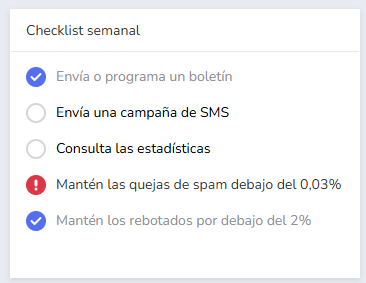
If this warning lights up, you will normally see some deliverability problem.
Contact our support team so we can help you.
· Technical capacity and infrastructure:
Not all email marketing tools can send large volumes of emails effectively.
A special infrastructure is necessary.
Mailrelay has been developed with high-volume mass mailings especially in mind.
How to keep the contact list as clean as possible?
Below we will look at some key ideas to keep the contact list in the best possible condition.
A first, fundamental piece of advice:
· Send frequently:
This is the easiest way to keep a contact list in perfect condition.
With each send, Mailrelay will detect bounces, unsubscribes, and possible spam complaints, cleaning them from the list, so that you no longer send to those addresses in future email campaigns.
If you send with some frequency, the errors will be few, they will be detected, and they will not accumulate.
In addition, your contacts will not “forget” that they are subscribed, so spam complaints for this reason will also be reduced.
However.
· Add a visible unsubscribe link
This is a simple way to avoid some spam complaints.
If contacts see that they can easily unsubscribe, it is easier than marking the emails as spam.
Of course, everyone would prefer that contacts do not unsubscribe, but not including the link to do so is not usually an effective solution.
This is especially important in high-volume mailing campaigns, where spam complaints can quickly accumulate to the point of negatively impacting deliverability.
· This -> A first email is not a cleaning method:
I hesitated about putting this section first, to be honest.
Because it is a very, very common misconception.
Can Mailrelay detect errors and spam complaints?
Yes, of course, without any problem.
The problem is not that Mailrelay detects these errors, which it does, and removes them from the list, which it does.
No, it’s not that.
The problem is that this first send, due to this volume of errors and complaints, can cause your domain to end up on a blacklist.
Which will affect your next sends quite negatively.
If you have a very old list, to which you haven’t sent in a long time, don’t do a full send to it; segment it and analyze if it is worth sending to the rest with the risks involved.
But first, you can review the next point.
· Remove invalid emails and bounces:
This can take a bit of work, but helps a lot in the long run.
Review your list to try to remove:
- Emails that have been typed incorrectly
- Emails from domains that no longer exist / do not work (for example if they now host a parked domain)
- Emails that seem suspicious of not belonging to a person
- Or simply the oldest emails, which you obtained years ago
This small cleanup, even if not perfect, can help these first campaigns produce significantly fewer errors.
· Identify and remove inactive subscribers:
No one likes to lose thousands of contacts, because they represent thousands of lost sales opportunities.
And even so, perhaps it is something that needs to be done.
If your first sends have little impact, with a large volume of contacts who do not open or click on your emails, you will have to act.
Why is it necessary to do something with these emails that do seem correct?
Well this is logical.
Think that Gmail, Outlook, Yahoo! use algorithms, and at this point probably AI, to determine if they leave an email in the inbox, promotions, spam, or outright reject it.
If a sender sends 10,000 emails, and of those, only 1,000 open it, what conclusion can these services draw from that sender?
That most recipients are not interested in the emails they send.
“Well, but some others are!” you might say.
And you might be right.
But this is not about being right, but about statistics, cold numbers.
So, if you want these services to value you positively, do something with inactive contacts.
Either you win them back, or you delete them, but if not, they will be like a stone that gradually drags down your results.
· Send only to opt-in contacts (who have given their permission):
If you don’t know what double opt-in is, review this content.
Basically, it’s about sending your mailings to people who really want to receive them.
This is what will truly improve deliverability.
Seems easy, right? It should be.
Well, if you meet all these points, and plan an appropriate sending frequency, increasing little by little if you have never sent before, and you maintain it, deliverability should not be a problem, no matter how high the volume of your email campaigns is.
Let’s move now to another key point.
Without checking it you shouldn’t even send a small newsletter.

Set up sender authentication and other key technical aspects
Yes, before sending your mailings there are some technical configurations to make.
Let’s look at them in the following points.
· SPF (Sender Policy Framework):
It is a record in your hosting’s DNS that serves to indicate which servers can send emails on behalf of your domain.
It is a kind of permission.
When your emails reach the destination servers, they check if the sending server is on that “list”; if it is not, it can be rejected or end up in spam.
· DKIM (DomainKeys Identified Mail):
It is a kind of digital signature that is added to your emails.
Basically, your sending server “signs” each message with a private key and recipients can verify the signature with the public key published in your DNS.
If the content of the email were altered or did not come from your domain, the signature would not be valid.
In this way, a correct DKIM proves that the message has not been modified along the way and that it is effectively authorized by the sending domain.
· DMARC (Domain-based Message Authentication, Reporting & Conformance):
This is a somewhat more advanced protocol.
It allows the sending domain to indicate policies on what to do if an email fails the SPF/DKIM verifications (for example, reject it).
· Why are these configurations important?
Basically because Gmail, Outlook, Yahoo! and others check these configurations as a baseline to know if an email has a proper sender or if it is spam.
Or phishing, which would be worse.
Therefore, there is a strong possibility that emails will end up in spam or be rejected if these settings are not present or are incorrect.
In your Mailrelay account, you can find information about these settings in the menu “Settings” – “Email Authentication”.
And of course, if you have any questions you can contact our support team.
· Use your own domain with a good reputation:
There is a very, very common mistake.
And that is to think that just because of sending a large volume of emails, they will go to spam.
As we have seen, this is not the case.
But it leads many companies to think that, to avoid risks, it is best to register a new domain just for sending.
Which is a mistake that can have serious results.
Since Gmail, Outlook, Yahoo! and others have no references for this new domain; it’s new, of course.
And therefore suspected of sending spam until proven otherwise.
If we combine this with a poorly maintained list, the results are usually terrible.
Would they be better using the company’s usual domain?
Following the tips we have seen above, surely yes.
· Consider the sending IP and infrastructure:
When you send 50,000+ emails, the IP address from which they are sent becomes highly relevant.
If you use an email marketing provider, like Mailrelay, you may be sending from shared IPs (used by many clients) or a dedicated IP (exclusive to you).
Both options have pros and cons that you must weigh carefully:
- With shared IPs, the reputation is diluted among multiple senders. This can be good because you benefit from already warmed-up IPs with a good reputation without having to do it by yourself.
- With dedicated IPs, you have total control over the reputation, but also the responsibility of taking care of it.
Well, let’s now move on to the next important point for high-volume mailing campaigns.

Take care of the content of your emails
Just like with smaller campaigns, mass email campaigns require care in their contents.
In fact, if the campaign is critical, you should review the following points very well before sending.
Let’s get to it.
· Avoid words that make your email look like spam:
Look, we cannot take this separately.
You will surely say “of course, if I have a free offer, I have to put it in my email”.
And it’s true.
That’s why everything must be analyzed as a whole:
- If your sender domain is fairly new, or has a poor sending reputation (you haven’t sent large volume mailings).
- The list has not been well maintained and will return bounces and spam complaints
- And furthermore the email, because of its text, looks like spam
Well, the sum makes for too many negative signals.
That’s why, if you are going to start carrying out high-volume mailing campaigns, especially at the beginning, take special care with the text content, avoid:
- Words like “FREE”, “Exclusive offer!”, “easy money”, “URGENT”
- Also, do not write the entire text in uppercase, nor use excessive punctuation marks or emojis
- The content and the subject line are better if they are related
- Unsubscribe link always visible
- Avoid shortened links or links to suspicious domains
- Also add your address and contact details, legal notice, etc.
The more careful the email content, the better.
· Design a balanced email (text and images):
Even if you are in a hurry, do not design an email that is just a single image.
I know you might be thinking “but it’s convenient for me, and I already have the image ready, why can’t I use it?”.
Well, there is an explanation.
In the past, spammers used to create emails that were just an image, with the texts they wanted, hoping that this way the anti-spam filters, which could not read images, would not categorize them as spam.
Very clever.
Nowadays, filters can indeed read the text in images.
However, they still view these practices as something suspicious, even if they are legitimate.
In addition, they can present usability problems, because if the images are not displayed, the email will appear to be practically empty.
What proportion of text and images would be ideal?
The ideal would be something close to 60% text and 40% images.
Keeping in mind that a single large image increases the percentage, in proportion.
Add text; if you don’t have time, use the editor’s AI to create an email base for yourself with enough text, and then add the images you want.
· The sender is very important:
Always try to use a sender to which contacts can reply.
Email is, by default, a two-way channel; in fact, it is a very good sign if contacts reply.
There are companies that prefer to send with “no-reply” type emails, and although this is not penalized directly (like not including an unsubscribe link), it is detrimental.
Why is using a no-reply sender detrimental?
We have to go back again to the best-known ISPs (Gmail, Outlook, Yahoo!), and how they value the interaction with the emails you send, which is:
- Email opens
- Clicks on links
- Replies to those emails
If you keep removing options, things get worse.
For example, if it’s a first email to a somewhat old list, with quite a few bounces, that already means low opens.
If, in addition, the email has no links to click on and cannot be replied to, it turns out that mailing will have no interaction.
Which surely penalizes your future sends.
The more interaction options your emails have, the better.
Even in critical and massive campaigns that are only informational, it doesn’t matter.
· Always offer a clear unsubscribe path:
We have already talked about this, I will not extend much further.
Simply put, your emails must have an unsubscribe link.
· Use the AI editor:
If you don’t have time to write an email, use the editor’s AI to create a base for you to work with.
For example, with some simple prompts:
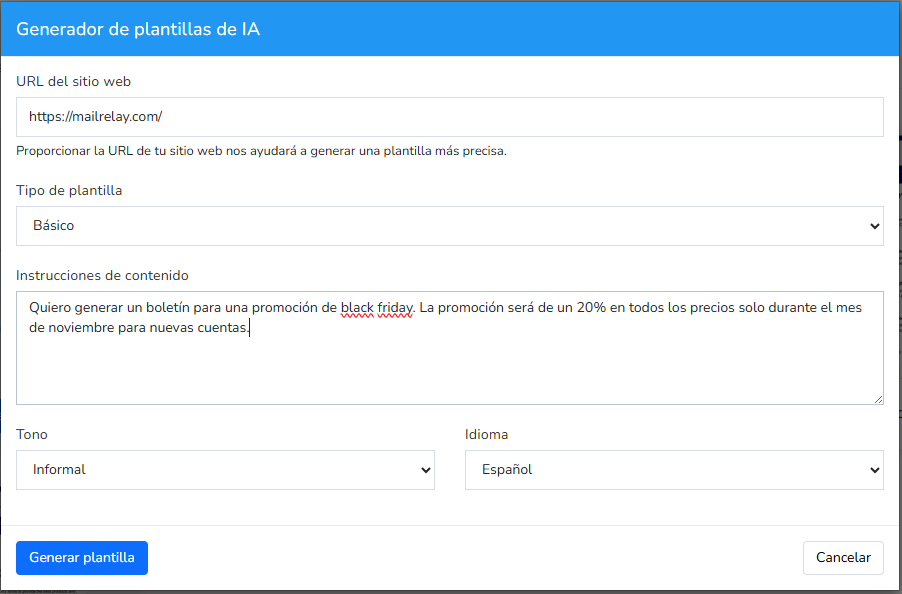
It is possible to generate a base to work with:

And from there you can add texts, images, whatever you need.
But you have already saved some time, right?
· Segment by interest:
Even if you have a huge contact list, and you are not very clear about the difference between some contacts and others, try to find some way to segment them:
- Perhaps by geographic location
- By the time they have been on your list
- If you have had previous contact or not
- By the services or products they used to purchase from you
- Etc.
Whatever it is.
A segmented send will always yield better results, where you send content that may be of interest to that segment.
Than a general mass mailing that is the same for everyone.
It is the difference between taking advantage of all the opportunities on your list, or simply burning it.
It takes a lot to get a high-volume contact list, take care of it.
Remember that if you have more data on your contact list than just name and email, Mailrelay’s segmentation system can help you divide that list accurately.
· Take advantage of automation and save time:
Even sends to tens of thousands of contacts are susceptible to certain automation.
How?
Very simply.
I’ll give you an example right below:
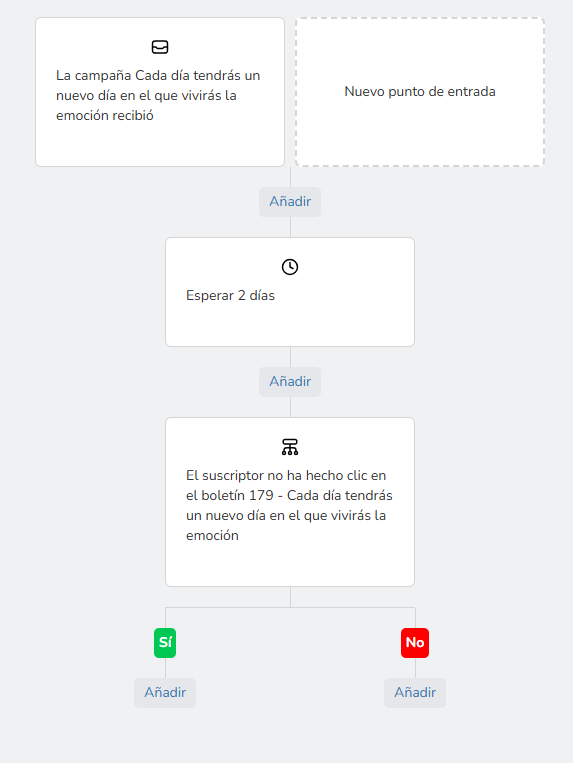
This is a very simple automation to perform, but it can be applied to any type of send:
- You send your campaign, however massive it may be, it doesn’t matter
- You add a wait time (so that contacts can see it and react to it)
- You carry out some verification (that they open, click, etc.)
- And depending on whether the action is fulfilled or not, you perform one action or another, such as sending another mailing
This way you can send highly segmented mass mailings, with specific contents, very easily and automatically.
This type of automation allows you to send very specific content for each user.

Send with the appropriate frequency and plan your mass mailings
As we have discussed so far, leaving a list without sends for a long time can present a problem, because on the next send we make, it may accumulate many errors.
How long can we leave a list “stopped”?
Well, the general recommendation is not to leave a list without sends for more than three months.
After that time, the list will accumulate errors for various reasons:
- Abandoned accounts
- Domains that no longer exist
- Users who have changed their email
- Loss of interest
- Etc.
All this will cause many contacts to return errors (bounces), not react, or mark emails as spam.
Preventing this from happening is easy by planning a proper sending frequency.
Especially if you have a critical, high-volume campaign in mind, you must have everything ready in advance.
· Find a suitable sending cadence:
We will start from a basis, which is the need to send useful emails to your contacts.
How often can you do that?
Ideally, it would be a minimum of every 15 days.
One month maximum.
A monthly newsletter should be the absolute minimum if you want to maintain the health of your list.
And from there, observe the results.
It is very, very possible that increasing the sending frequency will increase your results, don’t be afraid to test.
· Plan the acquisition of new contacts:
As we have seen, the norm is that with each send some contacts are lost, it’s normal.
So the best thing is for you to plan the capture of new contacts to replenish the ones being lost.
In addition, these new contacts usually show very good interaction, which can also improve how Gmail, Outlook and Yahoo! see you, since they will see that there are contacts who are very active with your emails.
That is good.
· Look closely at the statistics:
Mailrelay offers you a very good statistics panel with which you can analyze your sends:
- Emails delivered
- Opens
- Clicks
- Heat maps
- Hard and soft bounces
- Unsubscribes
- Spam complaints
- Details about contacts (location, etc.)
All this information will help you better understand how your sends are working, so you can analyze:
- Best days to send
- Best times to send
- Effective subject lines
- Most effective content
Use this information so that your mass mailing campaigns have the best possible results.
· Plan volume increases gradually (warm-up):
Although we have been mentioning this throughout the article, it is worth insisting one more time because it is very important.
If you have a contact list, large or small, to which you haven’t sent in a long time:
- Do not suddenly send to the entire list at once
I insist, that is not the way to clean the list.
What can you do instead of that?
You can start by sending to a somewhat smaller volume, for example 5,000 contacts.
Yes, it is little, but it can guide you to know the real status of the list, and from there increase the volume of sends if the volume of errors and complaints is acceptable:
- Bounces below 2%
- Spam complaints below 0.03%
If the numbers are higher, beware, your domain may end up penalized.
· Consider the time and day of sending:
The time and send in principle are not determining factors for deliverability, that is true.
However, indirectly they are related.
Because as we have seen, opens, clicks, and other interactions, such as forwards, are viewed positively.
If you send on a day or time when these interactions are less likely, you will have fewer positive data points and your sender will seem less reliable, because contacts “seem” to have less interest.
Additionally, if you send at suboptimal times or days, your mailings can get buried among other emails, it is better that you send at times you know your contacts are active.

Monitor your metrics and run tests before the final campaign
Once your mass email campaign is sent, you can’t take it back, the results will be what they will be.
Do not turn it into flipping a coin; that would not be logical.
Especially if your mailing is critical and you need contacts to receive the information (or generate sales).
What would be the best thing to do in these cases?
· Test before sending to the entire list:
The best practice is for you to create a small group with test emails of yours and do a small send to make sure everything is fine.
That there are no errors in the settings, in the content, etc.
To make sure everything is okay.
And after that, if everything is fine, plan a small send like we mentioned before, of a few thousand contacts, and thus see real statistics of sends to the different servers (Gmail, Outlook, Yahoo!)
From there, plan a few more small sends and keep watching the evolution.
· Analyze in real time during the send:
This is not possible in small lists because the send will be practically immediate.
If the list is already getting closer to 100,000 contacts then perhaps you will have time to see if many bounces are returning upon sending.
The recommendation in this case?
Pause the send and contact our support team, do not continue accumulating errors.
Especially if you see that there are many spam complaints, that is very serious.
· But also be patient:
Statistics will accumulate over time, meaning, opens, clicks, will go up over time.
It is not something immediate, give it at least 24 hours to start seeing results more similar to what the final will be.
· Run A/B tests to use the best possible subject line:
Especially in mass email campaigns, if you want to have the best results, do an A/B test of the subject lines.
Even in critical campaigns where you send a notice, and it seems to you that the subject is obvious and does not need to, or should not be heavily modified.
Even in those cases, do tests, it will show in the results.
Furthermore, Mailrelay allows you to run A/B testing very easily.
Mailrelay, the email marketing platform for the most massive sends
So far we have talked quite a bit about what you must do so that the most critical mass email campaigns have the best results.
Why is Mailrelay the best option for these mass sends?
· Developed for mass send volume:
Mailrelay has more than two decades of experience sending mass mailings.
Since the beginning, the tool was designed and developed with the goal of sending mass emails in mind.
And during all this time, improvements have been added and it has been adapted to the reality of the different services, always with that goal in mind.
That’s many years of experience, don’t you think?
· The largest free account on the market:
Since we have a tool designed, prepared and ready to send the most massive email marketing campaigns, why not create the largest free account too?
That’s how the Mailrelay free account was born.
Which in fact has been growing over the years and currently allows sending:
- Up to 80,000 emails per month
- To a list of up to 20,000 contacts
You truly won’t find a free email marketing account that allows you to send a larger volume of emails.
The Mailrelay one is perfect for you to test the tool with a realistic volume if your contact list is quite large.
If your list has more than 50,000 contacts, how are you going to test the tool by sending 500?
You can’t.
With the Mailrelay free account you can.
· Dedicated technical support (even in the free account):
This is one of the great advantages of Mailrelay, technical support included in all accounts.
Thanks to the support you can be sure of using the tool at its maximum effectiveness, taking advantage of all the features we have seen in this article.
And many others that are waiting for you in your Mailrelay account.
If you had to keep a couple of key concepts
I believe that two of the most important concepts for deliverability in high-volume email sends would be:
1) Do not use the first send as a tool to “clean” the contact list, as it can result in more problems than anything else.
2) If you have not sent a campaign to that list before, or haven’t sent to it in several months, start little by little and increase the volume according to the results.
These two tips alone can save you many, many deliverability problems.
I hope this article is useful to you!