Attracting subscribers is the first step in any email marketing campaign, right? After all, without subscribers, we have no one to send content to and no one to draw to our brand.
There are plenty of effective techniques for attracting subscribers, from a basic pop-up on our website to paid advertising campaigns that boost visibility and lead generation.
Maybe it’s because of the industry I work in, but one of my favorite graphic resources to use on the web is the banner (and if it’s creative, even better).
That’s why, in this article, I’m going to share some basic ideas on the subject with you, so that you can also consider using creative banners to attract more subscribers interested in your business.
Before we start, here’s a quick summary of everything we’ll cover in this post:
- Essential elements and functions of web banners.
- Types of banners (classic and modern).
- Creative banners I’ve designed with my team that will inspire you.
In this section, we’ll answer questions such as: what graphic and text elements should a well-designed banner contain? How do you create banners with a specific purpose, such as attracting subscribers?…
You only need to browse the Internet for a little while to come across countless banners trying to catch your attention. However…
“…Every brand uses a different creative style, but they all include a set of basic elements with a specific goal or function.”
You’re probably wondering how a banner, such a small advertising space, manages to attract a certain audience and generate conversions.
That’s why you need to know how to handle all the graphic and text elements in an original and creative way, so that the viewer gets the message right at a single glance.
The level of creativity will depend on the effort its creator puts in, as well as on the tone the brand gives to each of its promotional messages.
Even so, there is a common basic structure that we find in visually effective banners:
- Visual content: Keep in mind that a banner sits inside a web page that has its own content. To make your banner stand out, you need to include an eye-catching graphic element. You can include illustrations, images, icons, symbols, cartoons, logos, etc.
- Headline and subheadline: The headline will be the most striking phrase in the banner and the one that grabs the user’s attention. So you should use it to convey the essence of the advertising message, so that it’s quick and easy to understand. The subheadline is where you explain the main message in a little more depth.
- Promotional text: It’s not a good idea to overload banners with text, so try to keep it as short as possible. That said, don’t make it too brief either. Users need to know what they’re looking at and what you’re promoting or advertising.
- Call to action: When creating effective banners, never forget to include a call to action, such as a button or text box that tells users what you expect them to do. In this case, it would be a call to action urging them to subscribe to a newsletter.
Banners can include more elements, but that will depend mainly on the space available (a small banner is not the same as an interstitial one, a concept I’ll tell you about later).
So, before you even think about the design or text of your creative banner, you should be aware of the space you have available on your website to place it, so you can create it with the right size and proportions.
As I mentioned above, when creating banners, you can pursue many different goals. You may want to get clicks to a sales landing page or, as in this case, drive traffic to a subscription form to carry out an effective mailing strategy.
As with any marketing effort, being clear about what you want to achieve before getting down to work is important, especially if you decide to invest in banner design.
Now that you know how important it can be to have a specific goal, which will or won’t be achieved depending on the creativity of the design and the layout of the different elements in the banner, let’s look at some of their possible functions:
- Attract traffic: Although there are many other ways to gain visibility and online traffic, banners are a very good way to attract visitors. I can assure you that having creative banners on your website can greatly improve your brand image.
- Get contact details: Do you want to bring your users to your contact forms? You can do it with eye-catching, well-placed banners that link to your contact page.
- Promote: Draw your users to giveaways, offers and promotions with promotional banners.
- Gain followers: When you create new social media profiles, it can be hard to grow your community of followers. Creative banners will be a great help with this.
- Attract subscribers: This is the function we’re interested in for this article, as banners are a very good option for growing the subscribers to your newsletter or email communication strategy.
Whether placed on your own website or on other pages, the main goal when creating banners is to turn users into customers through a call to action (any of those mentioned).
In addition to web banners, you can also create banners for social media or for your own newsletters. The placement you choose will depend on the type of marketing strategy you’re carrying out.
Understanding color psychology is essential to maximize the impact of your banners.
Colors aren’t just decorative; they also carry messages and emotions.
For example, red is often associated with urgency or passion, while blue conveys trust and calm.
- Red: Ideal for grabbing attention and prompting action. It’s commonly used for offers and discounts.
- Blue: This color conveys trust and professionalism. It’s perfect for technology companies or financial services.
- Green: This color is linked to nature and health. It works well for eco-friendly products or wellness services.
- Yellow: This color is associated with happiness and optimism. It can work well for highlighting specific features of a product.
It’s vital to strike a balance and make sure the colors you choose match your brand identity and the message you want to convey.
► The importance of typography
Typography in banners is just as critical as color.
A font that is hard to read or unattractive could put people off clicking on your banner.
Some key points to consider:
- Readability: Choose fonts that are easy to read on different devices. Sometimes the simplest fonts are the most effective.
- Style: The style of the typography should match the tone of the message. For example, a script font might be appropriate for an invitation to an elegant event, while a bold font might be better for a sales offer.
- Size: Make sure the text is large enough to be readable but not so large that it overwhelms the overall design.
- Contrast: The typography should contrast well with the background so that the text stands out and is easy to read.
Carefully choosing colors and typography can make the difference between a banner people ignore and one that generates clicks and conversions.

New formats for creating banners emerge every day. We normally use the term banner to refer to any advertising creative we see on the Internet, but strictly speaking, a banner is just one specific type.
These online communication pieces evolve at the same pace as websites themselves. However, there are certain sizes and models that have survived since the first banners were created and are still in use today.
This is the most basic format of all and the one we commonly know. It has an elongated horizontal shape, resembling a flag or standard (which is what the word means in English), and its standard size is around 480×60 pixels.
It was originally created to be placed at the top of web pages, although it has gradually fallen out of use.
Although it may seem otherwise, it’s the least eye-catching format of all and the one brands use least nowadays.
Here’s an example:

It measures around 234×60 pixels (roughly half a classic banner) and is the simplest creatively, since these banners are made to be placed in spots with limited space.
Even so, this banner tends to catch users’ attention quite well thanks to its simplicity and originality. It’s an excellent way to attract attention on websites overloaded with larger elements.
This is a banner design that is starting to adapt more to current trends, specifically to web development with full-width images. Although the average size is 728×90 pixels, the width usually spans the full width of the page, while the height is left free to creativity.
On top of that, this type of banner often includes video or an image carousel, which can mean even tripling its height.
► Medium rectangle
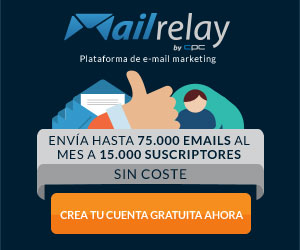
This is really the classic format that comes to everyone’s mind when thinking about web banner design. It’s practically square, with an average size of 300×250 pixels, although other sizes can be found today.
This type of banner is easy to find on almost any website. They’re created in a static format or as a gif (that is, with several images shown one after another).
Here’s an example:
► Skyscraper
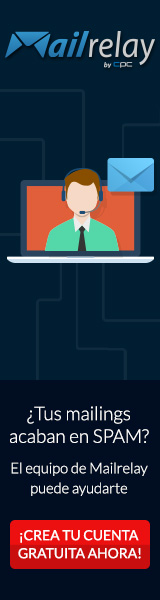
At 120×600 pixels, it’s tall and vertical, like a skyscraper. It’s common to find it in the sidebars of many websites, especially those of media outlets.
Another example:

In addition to these classic formats, other types of banners have emerged as websites and online channels in general have evolved. These are formats we’re already used to and that we see more and more on newly developed websites.
If you’re going to create banners for your subscriber acquisition strategy, it’s also worth knowing these formats, as they’re the most flexible and leave the most room for creativity. They’re classified not so much by size as by their interactivity.
► Interstitial
This is a fairly intrusive banner, which in turn guarantees its visibility. It appears on top of the web page the user is visiting, taking up all or most of the screen.
In addition to having a close button, it usually contains videos or images the user can interact with without leaving the banner.
► Pop-up
It appeared before interstitials and is the intermediate step between the more traditional banners and the modern ones. It also sits on top of the web page, but with the size of a medium rectangle.
They’re not popular with users because they’re too intrusive. This is because they were overused for several years.
These are banners of any size that don’t have a fixed position on the web page and follow users as they browse it.
In these cases, good creative work is essential, since the banner follows the user and we don’t want it to have the opposite effect and overwhelm them.
► Expandable formats
They can increase in size, usually when you hover the mouse over them. In their small state, the creative is often reduced to a call to action inviting users to expand the banner.
Video banners are quickly gaining ground, and it’s easy to see why.
Video is a dynamic and engaging way to capture the user’s attention.
But it’s not just about placing any video; there are several things to keep in mind:
- Relevant content: The video should be short and aligned with the message you want to convey. You don’t want people to lose interest before they reach the call-to-action.
- Autoplay vs Click-to-Play: Some video banners start automatically, while others require the user to click to watch them. Each option has its pros and cons, so assess which one best suits your target audience.
- Video quality: Make sure the video is high quality but also optimized for the web, so it doesn’t slow down the page load time.
- Call-to-Action: As with any other type of banner, a clear and effective CTA is crucial. You could include it at the end of the video or use an always-visible button.
► Banners with interactive elements
Interactive banners take user engagement to the next level.
Instead of being mere spectators, users become active participants, which increases the likelihood of conversion.
Some examples include:
- Image sliders: let users view different products or features by swiping their finger or moving the cursor.
- Subscription forms: adding a small form inside the banner to collect emails or phone numbers can be an excellent way to grow your marketing list.
- Games or quizzes: small games or quizzes can keep users entertained and engaged while getting your message across effectively.
- Hover effects: These effects are triggered when the cursor is placed over different elements of the banner, revealing more information or changing the appearance to signal interactivity.

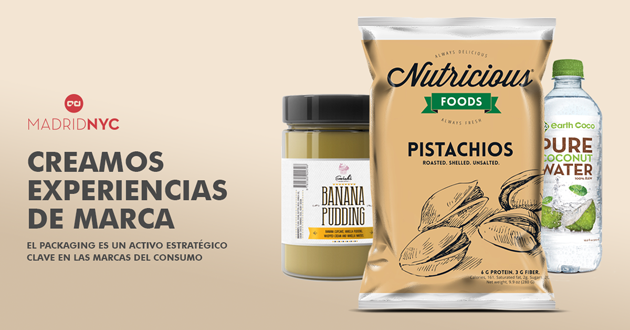
Now that we’ve covered the theory, I’d like to show you some creative banner designs made by my team. They cover a range of topics, but I’m sure they’ll be great examples to inspire you.
In fact, both designers and our own clients, when they ask us for this kind of work, need to look at other creatives to get an idea of the final style they’ll give their web banners.
Take a look at these 4 examples! I’d love for you to leave a comment at the end of this article and let me know what you think 🙂




Having the right tools is essential for creating attractive and effective banners.
You don’t need to be a professional graphic designer; there are plenty of options that will let you get high-quality results.
► Recommended software
- Adobe Photoshop: This is the industry standard when it comes to graphic design. It offers a wide range of tools for creating highly customized banners, but it has a steeper learning curve.
- Canva: This web-based software is incredibly easy to use and offers lots of banner templates. Ideal for beginners or for those who need quick results.
- Snappa: This is another online service that lets users create banners easily. It offers a decent selection of templates and is very easy to use.
- CorelDRAW: This software offers a robust set of graphic design tools. Although less popular than Photoshop, it’s still a strong option for creating banners.
► Free templates and resources
- FreePik: This website offers a wide variety of free banner templates. Just make sure you respect the terms of use and licenses.
- Pexels / Unsplash: For high-quality, royalty-free images, these platforms are excellent resources. Images can add a professional touch to your banners.
- Google Fonts: If you’re looking for free, high-quality fonts, Google Fonts is an invaluable resource. The right typography can make your banner stand out.
- Iconfinder: This site offers a wide variety of icons you can use in your banners. They have both free and premium options.
In short, designing effective banners has become much more accessible thanks to a wide range of tools, both paid and free.
That said, don’t forget that a good banner is just one piece of the puzzle in your marketing strategy.
To really take your campaign to the next level, nothing beats a solid email marketing and SMS marketing strategy. And in that respect, Mailrelay is unbeatable in terms of quality and customer service. 😉
Conclusions
There are a great many graphic and creative resources for getting our message across to users on the Internet. Some are more flexible than others and, specifically, the web banner is one of the most versatile options, thanks to its different sizes and functions, as well as its graphic and text elements.
In this article, we’ve gone through, one by one, the different creative banners you can use on your website and even in other online marketing strategies.
The different types of banners have evolved from more classic formats, with standard sizes and limited uses, to advanced designs that follow web trends, such as the use of full-width background images.
Of all the functions or goals you can pursue by placing a banner, the idea of attracting quality leads to grow your subscriber base is a fantastic way to boost the launch of your next email marketing campaign.
What about you? What do you think about using creative banners to attract leads? Have you ever used them to improve your mailing strategies?

Jose Argudo
CMO at Mailrelay. Writes about email marketing, copywriting and conversion for small businesses and entrepreneurs.