
Automating email campaigns has become essential to save time and improve the effectiveness of email marketing.
Thanks to automation, companies can send personalized messages at the right time without manual intervention.
This increases interaction with their subscribers.
Currently, there are several popular tools that allow you to create automated email workflows, schedule campaigns, and easily analyze results.
Among the most notable are:
- Mailrelay
- Mailchimp
- Brevo
- Acumbamail
- Teenvio
- Doppler
Each one has its own strengths.
We will analyze the best tools to automate email campaigns, comparing their key features.
We will see what makes each one stand out.
Of course, we will look at the most interesting aspects of automation with Mailrelay, naturally.
Let’s move directly to see which are the best tools to automate email campaigns:
- 1 · Mailrelay
- 1.1 > Advantages of Mailrelay
- 1.1.1 · Extremely generous free plan:
- 1.1.2 · Dedicated technical support in different languages:
- 1.1.3 · Automations and A/B tests included:
- 1.1.4 · Conditional automation flows:
- 1.1.5 · Powerful segmentation and personalization:
- 1.1.6 · Real-time reports:
- 1.1.7 · High deliverability and reliability:
- 1.1.8 · Intuitive interface with a smart editor:
- 1.1.9 · SMS included in the automation flow:
- 1.1.10 · Landing pages:
- 1.1.11 · Free image repository
- 1.1.12 · Wide variety of integration systems:
- 1.1.13 · Below you can see a simple example of the automation flow:
- 1.1 > Advantages of Mailrelay
- 2 · Brevo (formerly Sendinblue)
- 3 · Mailchimp
- 4 · Acumbamail
- 5 Teenvio
- 6 · Doppler (By Doppler)
- 7 How to choose the best email automation tool?
- 8 · Having reached this point

· Mailrelay
Mailrelay is a very easy-to-use email marketing platform with a 100% focus on ease of use, deliverability, and user support.
It is ideal for companies looking to automate email campaigns without complications, without the need to outsource that service due to high complexity.
Not to mention that it also has the largest free plan on the market.
Unlike other solutions, Mailrelay offers all the essential automation and analysis features from the very beginning, even in its free version.
It also stands out for its customer service in multiple languages, available to all users (including, again, those with a free account).
> Advantages of Mailrelay
· Extremely generous free plan:
It allows you to send up to 80,000 emails per month to a maximum of 20,000 contacts.
No advertising or hidden costs
Small businesses can do mass email marketing with no initial investment.
· Dedicated technical support in different languages:
Even users of the free plan have access to support via phone, chat, and tickets.
This level of close and multilingual support is not common in other tools, especially for free accounts.
· Automations and A/B tests included:
Mailrelay allows you to configure autoresponders, welcome series, drip campaigns, cart recovery, and other email automations from the free account.
· Conditional automation flows:
Easily set the conditions for contacts to go through one branch or another of the automation flow.
· Powerful segmentation and personalization:
It is possible to segment the contact list using filters or custom fields. The most interesting thing is that the segmentations are dynamic.
So if the contacts’ data changes, they will leave or enter the segment without you having to do anything.
These segmentations can also be applied to automation flows.
· Real-time reports:
The platform provides statistics for each step of the automation flow, so you know which contacts are going through them.
· High deliverability and reliability:
It is optimized for emails to reach the inbox (includes SPF/DKIM and DMARC authentication).
With a robust infrastructure, it ensures reliable mass mailings.
This translates into good delivery rates.
· Intuitive interface with a smart editor:
The multilingual control panel is simple to navigate.
It includes a drag & drop newsletter editor to design professional emails.
Additionally, it integrates AI-assisted writing features that help create engaging content for campaigns.
· SMS included in the automation flow:
If you wish, you can include SMS messages in addition to emails in the automation flow.
· Landing pages:
To start an automation flow, you can create a landing page where contacts subscribe through a registration form and begin receiving the email flow you have created.
· Free image repository
In addition to the AI editor, we include a repository of free images to make creating your newsletters even easier, so you can create truly unique designs.
· Wide variety of integration systems:
By working globally, Mailrelay has multiple ways to integrate with other services, among which you find:
This way you can synchronize your automatic email flows with hundreds of other tools.
· Below you can see a simple example of the automation flow:
- An entry condition
- A wait block
- An email action
- Change the contact’s group
- And a conditional that splits the flow into two paths: one for those who meet the condition and another for those who don’t.
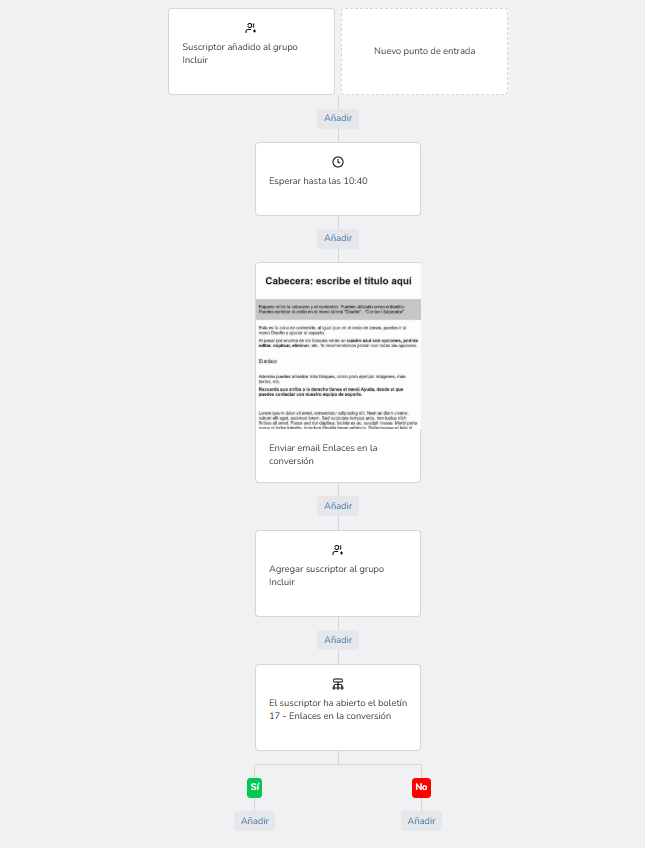
As you can see, very simple, but at the same time with great automation potential.

· Brevo (formerly Sendinblue)
Brevo is one of the most complex tools for automating email marketing.
This French-origin platform (formerly known as Sendinblue) is characterized by its multichannel approach.
In addition to email marketing with advanced automations, it includes options for SMS, chat for websites, a basic CRM, and even AI features, just like Mailrelay.
Furthermore, it offers its interface and support in six languages, making it accessible to businesses worldwide.
> Advantages of Brevo
· Advanced automation from the free version:
It allows you to create automated workflows (for example, sending emails based on actions on your website, special dates, subscriber behavior, etc.) even with the free plan.
It has an easy-to-use visual automation editor, with no need for technical knowledge.
· Integrated multichannel marketing:
With Brevo, you can complement your email campaigns with SMS messages, WhatsApp campaigns, live chat on your website, or even manage Facebook ads from the same platform.
This variety of channels helps orchestrate a unified communication strategy from a single place.
· Unlimited contacts in the free plan:
Brevo’s free plan doesn’t limit the number of subscribers you can have.
This allows you to grow your list without worrying about subscriber limits (although daily sends have a cap, which we’ll cover in the drawbacks).
> Disadvantages of Brevo
· Daily sending limit on the free plan:
The free account only allows you to send 300 emails per day (about 9,000 per month).
This limit can be a hindrance for those who need to send a campaign to many contacts at once, unless they upgrade to a higher paid plan.
· Some features require higher plans:
Tools like A/B testing (subject or content tests) or the landing page editor are not available in the basic plans.
To access all the advanced automation and analysis functionalities, it is necessary to purchase a Business plan or higher.
· Advanced support not included in all plans:
Brevo offers support, but priority phone support is reserved for Enterprise-level plans.
Free users or those on low-tier plans mainly have documentation and email support, but not immediate personalized assistance.
· Complexity for basic users:
As a complete digital marketing suite, Brevo can be overwhelming for small businesses that only want to send simple newsletters.
The multitude of available options adds complexity if not all of these features are going to be used.

· Mailchimp
Mailchimp is one of the best-known email platforms worldwide, recognizable by its monkey logo.
It is distinguished by the simplicity of its interface and for incorporating functionalities additional to email marketing.
Mailchimp has expanded its capabilities beyond email: today it also offers landing page creation, social media ad management, physical postcard mailings, and a certain level of CRM.
It is a robust solution designed to cover different aspects of digital marketing, although some of its advanced tools can be excessive or costly for other needs.
> Advantages of Mailchimp
· Wide variety of templates and intuitive design:
Like Mailrelay, it provides numerous professional email templates and a drag-and-drop email editor, ideal for users without programming knowledge.
Creating visually attractive newsletters is very simple with its built-in design tools.
· Additional marketing features:
In addition to sending emails, Mailchimp allows you to create landing pages, design ads for Facebook/Instagram, publish on social media, and more, all from the platform.
This versatility makes it an all-in-one tool for managing multichannel campaigns (email + other channels) from the same place.
· Extensive integrations:
Due to its massive popularity, Mailchimp integrates with almost any service or application, from Shopify and WordPress to CRMs and proprietary e-commerce platforms.
This makes it easy to connect the platform with your digital ecosystem to exchange customer data, sales, subscriptions, etc.
> Disadvantages of Mailchimp
· Very limited free plan currently:
Mailchimp used to stand out for its free account, but currently its free plan only allows up to 500 contacts and about 1,000 monthly emails.
This is equivalent to approximately 2 emails per subscriber.
Furthermore, advanced automations are restricted in the free version (only some basic autoresponders are allowed).
Upon exceeding these limits, it is mandatory to switch to a paid plan, which increases the cost considerably.
· Interface and support in English:
Users who don’t speak English may find it difficult to get support, as the platform and its help services are primarily in English.
This can be a barrier for users who don’t speak english.
Likewise, Mailchimp’s direct technical support (via chat or email) is provided only in English and is not available on free plans.
· High price when scaling:
Mailchimp’s paid plans are based on the number of contacts.
As the subscriber list grows, the monthly cost can increase significantly.
Many small businesses find that upon exceeding a few thousand contacts, the value for money is no longer attractive compared to more affordable alternatives.
· Overwhelming advanced features:
For new users, the number of options (very detailed segmentations, complex automations, multiple campaign types) can be confusing.
Correctly configuring all of Mailchimp’s tools sometimes requires a steep learning curve.

· Acumbamail
Acumbamail, like Mailrelay, is a Spanish email marketing tool.
It is characterized by its ease of use and customer service in Spanish.
It also offers additional features such as SMS sending and an integrated landing page editor.
With Acumbamail, you can send newsletters, create basic automation flows, design simple landing pages, and even send mass SMS from the same platform.
> Advantages of Acumbamail
· Interface in Spanish and close support:
The entire application is in Spanish, designed for local users.
It offers personalized technical support via chat, email, and even phone during office hours (a service available for paying customers).
Except for Mailrelay, few competitors provide such direct help, and even fewer to users of basic accounts.
· Affordable plans with no long-term commitment:
Acumbamail offers affordable paid plans, with its basic plan starting at a low monthly price.
This offers flexibility to small businesses, as it can be canceled at any time without being tied to long contracts.
· Integrated complementary functionalities:
In addition to email marketing, the platform includes a landing page editor to create subscription pages and an SMS marketing sending service.
This way, simple multichannel campaigns can be managed without the need for additional external tools.
· Ease of getting started quickly:
The learning curve is short.
It has pre-designed templates, an intuitive contact manager, and pre-configured basic automations (like welcome emails) that can be activated with a few clicks.
It is ideal for getting quick results without technical complications.
> Disadvantages of Acumbamail
· Free plan with low limits:
Acumbamail’s free account allows for just 250 subscribers and 2,000 monthly emails (with a daily limit of 250 messages).
Furthermore, this free version doesn’t include advanced automation features or A/B testing.
To access email automations, it is necessary to upgrade to a paid plan.
· · Fewer advanced features than major competitors:
Although it covers the basics, Acumbamail may fall short in features for advanced users.
For example, it lacks some advanced segmentation or lead scoring options that international platforms geared towards large companies do offer.
· Limited templates and resources in the basic plan:
The variety of email templates and designs is good, but not as extensive as in Mailchimp or other international tools.
Some premium templates, as well as the complete image library, require a higher plan.
· Restricted scalability due to pricing model:
Acumbamail’s plans are based mainly on the number of monthly emails.
If a company needs to send emails very frequently to a large list, it might have to jump to higher plans or buy extra limits.
This reduces the cost advantage over other solutions with unlimited sends.

Teenvio
Teenvio is another Spanish email marketing platform, geared towards offering a “human” and close service.
It is characterized by simplicity.
Like Mailrelay, it allows you to create a campaign in three steps (design, selection of recipients, and sending), which is why it is appreciated by users with no prior experience.
Teenvio also includes SMS marketing functionalities, contact segmentation, and real-time statistics.
Although it is not as well-known internationally, it has carved out a space among small local businesses thanks to its ease of use and support in our language.
> Advantages of Teenvio
· Free and fast customer service:
Teenvio offers free phone support even on its free plan.
Additionally, it provides assistance by email.
Few competitors, among which Mailrelay stands out, provide personalized help to free users, which is a plus for those who are starting out and need guidance.
· Reasonable initial free plan:
It allows you to manage up to 5,000 contacts and send 5,000 emails per month at no cost.
This limit is more generous than many other free services, making it a good fit for small projects just starting to build their list.
· Detailed visual statistics:
After each campaign, Teenvio shows complete performance metrics (open rate, clicks, bounces, unsubscribes, etc.).
Its “hot zones” functionality stands out, acting as a heatmap indicating which areas of the email got the most clicks.
This visualization helps to understand reader behavior and optimize future designs.
> Disadvantages of Teenvio
· Limited automations:
Teenvio allows you to schedule emails and has basic autoresponders.
However, it doesn’t offer advanced automation flows with multiple steps or complex conditions.
Companies that require sophisticated email sequences (based on subscriber behavior or sales funnels) may find the tool limited in this aspect.
· Reduced free sending capacity for high volumes:
While 5,000 emails/month are sufficient to start, they fall short compared to the 80,000 monthly emails that Mailrelay offers for free.
A rapidly growing business would have to migrate to a paid plan on Teenvio to send more emails.
This represents an additional cost as the list grows.
· No integrated landing page editor:
Unlike other solutions, Teenvio doesn’t have its own tool to create registration or conversion pages.
To create a custom landing page to capture subscribers, you will have to use an external service and integrate it manually with the mailing list.
· Smaller ecosystem of integrations:
As a smaller platform, it has a limited number of direct integrations with other applications (CRMs, online stores, etc.).
While API connections are possible, it doesn’t have as many ready-to-use integrations as its international competitors.

· Doppler (By Doppler)
Doppler (also known simply as FromDoppler) is an email marketing solution founded in Argentina, which is now widely used in Latin America and has a presence in Spain.
Its focus is on offering a complete platform to manage contacts, create email campaigns, and execute simple automated actions, complemented by some SMS features and external integrations.
Doppler has become known for its Spanish version.
It also offers webinars, guides, and educational content in digital marketing.
In this way, it seeks to position itself as an ally of Spanish-speaking companies in their email strategy.
> Advantages of Doppler
· Geared towards the Hispanic market:
The platform and all its educational material are in Spanish.
It offers support and advice adapted to local needs, understanding aspects such as regulations (GDPR) and the particularities of emailing in Spain and Latin America.
This cultural proximity is advantageous compared to global tools available only in English.
· Basic automations and segmentation:
Doppler allows you to configure simple automatic emails (for example, sending a welcome message to a new subscriber or an email on special dates).
It also makes it easy to segment contacts according to their activity (who opened or didn’t open, who clicked, etc.) for objectives like reactivating inactive users or sending targeted promotions.
· Complementary SMS sending:
Although its strength is email, Doppler offers the option to send mass SMS to contacts in several countries (Spain, USA, and a large part of Latin America) from the same tool.
This helps reinforce important campaigns with an additional text message, reaching the user through another channel.
· Agency and Multi-Account Plans:
Doppler has special plans for marketing agencies that need to manage several client accounts.
It allows you to create separate client profiles on the platform, with consolidated reports that simplify the centralized management of multiple projects.
This approach differentiates it from options more oriented only to individual users.
> Disadvantages of Doppler
· Time and Contact Limits on Free Plan:
Doppler offers a free plan only as a 90-day trial.
During that period, you can send unlimited emails, but only to a maximum of 500 subscribers.
After 3 months, it is necessary to switch to a paid plan to continue using the service, which makes it less attractive for continuous free use.
· No internal landing page creator:
Although it integrates with some third-party tools, the platform itself does not come with a landing page editor.
This means that for lead capture, you have to link Doppler forms to external pages or use its API, which involves extra technical steps.
· Advanced features limited in basic plans:
Sophisticated features like lead scoring, automations conditioned by web browsing, or comparative reports between campaigns are not present in the standard plans.
Companies with advanced requirements might have to opt for more expensive plans or complement with other tools to achieve those functions.
· Limited team collaboration:
There is no option for multiple users with different permissions in the same standard account (except in the plans for agencies).
This can make it difficult for several team members to work together in a controlled manner on the same account, especially in medium or large organizations.

How to choose the best email automation tool?
When it comes to choosing among the best tools to automate email campaigns, it is important to consider the specific needs of your business.
There is no “one-size-fits-all” solution that is perfect for everyone.
However, there are certain key criteria that will help you evaluate the options:
· Sending limits and list size:
If you are starting out or manage small databases, it is advisable to choose a tool with a generous free plan that allows you to grow without cost (for example, Mailrelay with 20,000 free contacts, compared to others that only offer 500).
For very extensive lists, analyze each platform’s pricing model (whether per subscriber or per send) to determine which one best suits your long-term budget.
· Necessary automation features:
Think about what kind of email flows you want to implement.
Only basic autoresponders and scheduled newsletters?
Or complex sequences with multiple conditions and triggers?
Tools like Mailrelay, Brevo, or even ActiveCampaign (not included above, but renowned for its advanced automations) offer different degrees of complexity.
Make sure the chosen platform supports the automations your strategy requires; it should have all the key functions you need without being bloated with tools you’ll never use.
· Ease of use vs. power:
Some solutions prioritize simplicity (e.g., Acumbamail, Teenvio), while others offer more powerful features at the expense of greater complexity (e.g., Mailchimp, Brevo on its higher-tier plans).
Mailrelay tries to strike a balance to have the best of both worlds. Also offering support so you never get stuck.
· Support and language:
Technical support is crucial, especially when questions or problems arise at key moments. Platforms that provide accessible support in your native language, even on basic plans, can make a huge difference in your experience (for example, Mailrelay provides help even to free users).
Also, check the quality of the documentation, tutorials, and the user community of each tool.
· Budget and scalability:
Finally, evaluate the value for money of each alternative.
Analyze the pricing scheme of each provider: whether they charge per subscriber or per monthly email, and how the cost increases as your list grows.
Ideally, choose a platform that fits your budget both now and when your mailing list doubles or triples.
· Having reached this point
While we may be a bit biased, we genuinely recommend that you try Mailrelay’s free account.
You lose nothing, it costs no money, and you will have access to all the functionalities for which you would pay in other tools.