Customer onboarding: what it is and how to do it by email
From signup to first result: the email sequence that turns a new customer into an active customer
Customer onboarding is the process that guides a new customer from the moment they sign up or buy until they get their first result with your product or service. Its goal is to get them using it early and to keep them from dropping out in the first few weeks.
The term comes from the phrase on board. It is also known as customer welcoming or new customer integration.
Email is the channel most commonly used for it. It arrives at the right moment, it can be automated and it shows which steps each customer takes.
How is it different from a welcome email?
The welcome email is a single message sent right after signup. Onboarding is a sequence of several emails with a specific goal: getting the customer to actually use what they have signed up for.
| Welcome email | Customer onboarding | |
|---|---|---|
| What it is | One email | A sequence of emails and actions |
| When | Right after signup | First few days or weeks |
| Goal | Say hello and share the first details | Help the customer get value |
| Adapts | The same for everyone | Based on what each customer does |
It should also not be confused with employee onboarding, which is how a company welcomes a new hire. We cover it in our post on employer branding.
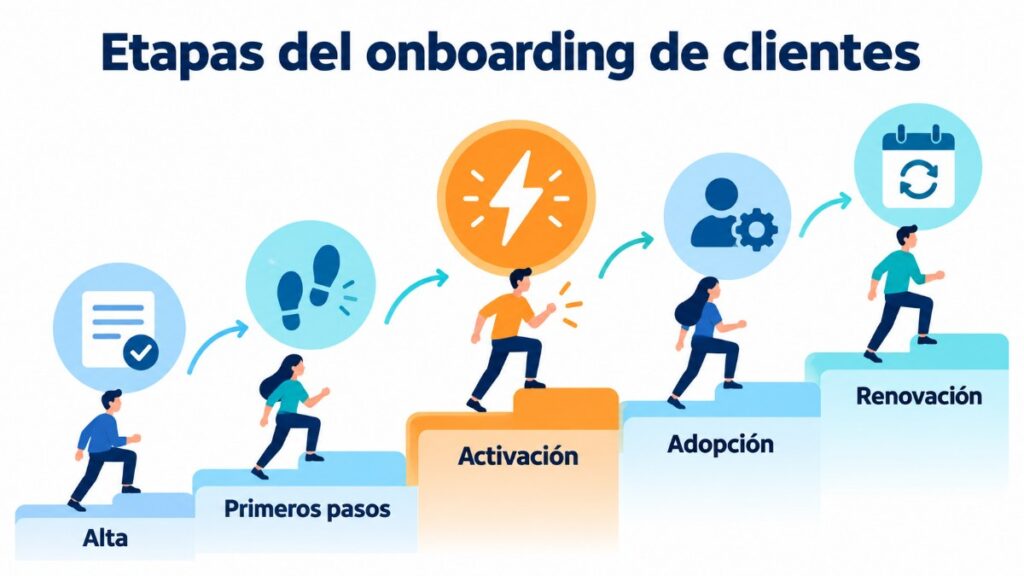
Stages of customer onboarding
1. Signup. The customer signs up or makes a purchase. They receive the confirmation and the welcome message.
2. First steps. They set up their account or prepare what they need. Many customers are lost here if nobody guides them.
3. Activation. They get their first result: they send their first campaign, use the product for the first time or receive the service. This is the most important moment.
4. Adoption. They start using other features or buying again.
5. Renewal. They pay again, upgrade their plan or recommend your brand.
Which emails should you send during onboarding?
A simple sequence for the first few days:
| When | Goal | |
|---|---|---|
| Day 0 | Welcome with a single first step | Get off to a good start |
| Day 1 | Quick guide or short video | Sort out the setup |
| Day 3 | Reminder if they have not completed the first step | Win back those who get stuck |
| Day 5-7 | Case study or advanced tip | Show what they can achieve |
| Day 10-14 | Offer of personal help | Prevent drop-off |
| Day 30 | Summary of what they have achieved and next step | Move on to adoption |
What works best is a sequence driven by behavior. If the customer has already completed a step, do not remind them of it: move on to the next one.
To set it up, you need an autoresponder or a mailing automation system that sends each email based on each contact’s signup date and actions.
Automate your customer onboarding
Welcome and activation sequences with automations and statistics for every send.
Examples by type of business
Software or app (SaaS). The goal is for the customer to complete the setup and use the main feature. Each email shows a single step, with a button that takes them straight to that screen.
Online store. After the first purchase, onboarding explains shipping, how to use the product and which products go well with it. The goal is the second purchase.
Professional services. A consultancy, a school or a gym explains what will happen in the first few weeks, what they need from the customer and who to contact. The goal is for the customer to feel that the service has already begun.
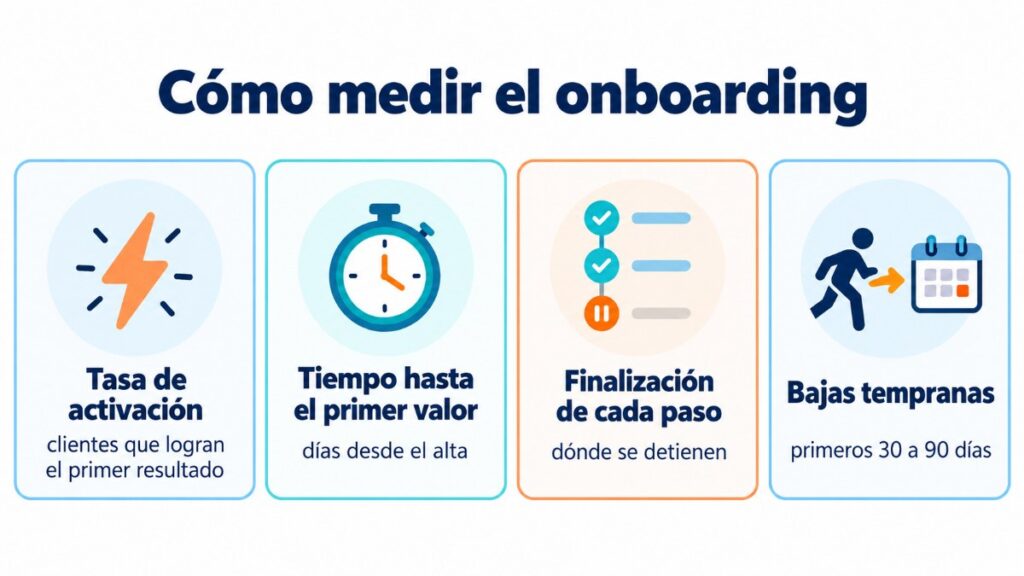
Metrics to measure customer onboarding
Activation rate. Customers who reach their first result out of total signups.
Time to first value. Days between signup and activation. The shorter, the better.
Step completion. Which part of the sequence makes customers stop.
Early cancellations. Customers who leave within the first 30 or 90 days. This is the part of the churn rate that depends most on onboarding.
Clicks per email. Which messages really help and which ones can be removed.
Common mistakes
Explaining everything in the first email. A new customer cannot learn ten features at once. One step per email is enough.
Sending the same sequence to everyone. Someone who has already started does not need the same reminders as someone who has never logged in.
Selling too soon. Before you offer a higher plan, the customer needs to have seen the value of the one they already have.
Not leaving a human way out. A link to support or a direct reply to the email prevents many cancellations.
Not reviewing the sequence. Every few months, check where customers stop and adjust that email.
How Mailrelay helps you
With Mailrelay, you create the onboarding sequence with automations, segment customers based on what they have done and see the opens and clicks of each email. That way, you know which step needs a better message.
The free account includes up to 80,000 emails a month and 20,000 contacts, with human support by chat, ticket and phone. If you then want to keep those customers, read our post on customer loyalty.
Start your onboarding sequence for free
Up to 80,000 emails a month and 20,000 contacts, with human support in English.
Frequently Asked Questions
These are the most common questions about onboarding new customers.
What is customer onboarding?
The process that guides a new customer from signup until they get their first result with your product or service.
What does onboarding mean?
Bringing a new customer on board and welcoming them. It comes from the phrase on board.
How many emails should an onboarding sequence have?
Four to six in the first month is usually enough. What matters is that each one has a single goal.
What is the difference between onboarding and a welcome email?
The welcome email is a single message sent after signup. Onboarding is the full sequence until the customer gets value.
How do you know if onboarding is working?
Measure the activation rate, the time to first result and cancellations in the first few months.