Snippet: what it is, its parts and the types of snippets on Google
The result you see on Google before clicking, and how to get people to choose yours
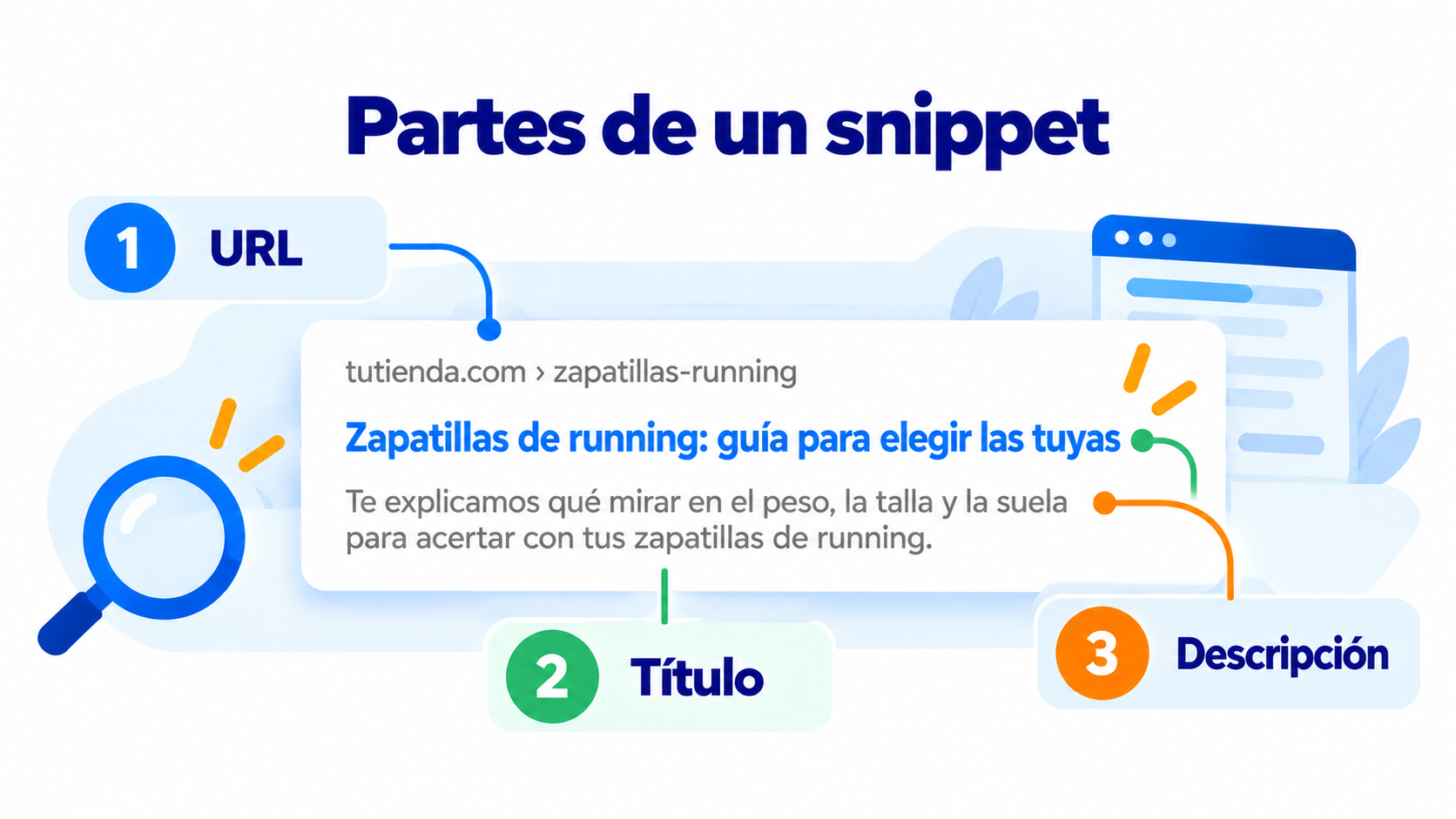
In the context of search engines, snippets are the short pieces of text we get when we run a search. Each result is shown as a block made up of three elements:
- The URL of the web page that matches the search.
- The page title, in blue and in a larger font.
- The description, a summary of what we will find when we visit the page.
There are also rich snippets, which offer more appealing, visual content, and which we will look at later on.
Parts of a snippet
A snippet has the following elements. The search engine takes this information from the page’s own HTML:
- URL or website address. It shows the address you go to when you click the result’s title.
- Page title. It is taken from the
<title>tag and is used to create the result’s title. For example:<title>Mailrelay - Email marketing y campañas efectivas</title>. It should be between 40 and 60 characters long and include the keyword you want to rank for. When users click the title, they go to the page. - Description or summary of the page. It is a short text that tells users what they will see when they visit the page. It is usually taken from the meta description tag, for example:
<meta name="description" content="En esta página tienes trucos y consejos para tu marketing digital.">. Google does not set a limit, but it cuts the text off at around 155-160 characters, so it is best to write between 120 and 155. The words that match the search appear in bold.
The description is the part that does the most to convince users to click, so it is worth working on.
If there is no meta description, or if Google thinks another text on the page answers the search better, it builds the snippet with that text. That is why the same result can show different descriptions depending on what is searched for.
Your emails have a snippet too
The subject line and the preview text decide whether your email gets opened. Test them with A/B tests in Mailrelay. Start for free.
Rich snippets or rich results
Besides regular snippets, there are rich snippets, also called rich results.
Rich snippets contain visual elements that make them more appealing. They catch the user’s attention sooner, which is why they usually get a higher CTR than regular ones.
Regular snippets are generated from the title and description tags. Rich snippets, on the other hand, are generated from the page’s structured data markup.
Some of the types of data Google uses to create rich snippets are: articles, books, courses, reviews, authors, products, organizations, recipes, events, podcasts and music.
Since August 2023, Google only shows FAQ results for authoritative government and health websites, and it stopped showing “how-to” (HowTo) results.
Types of snippets on Google
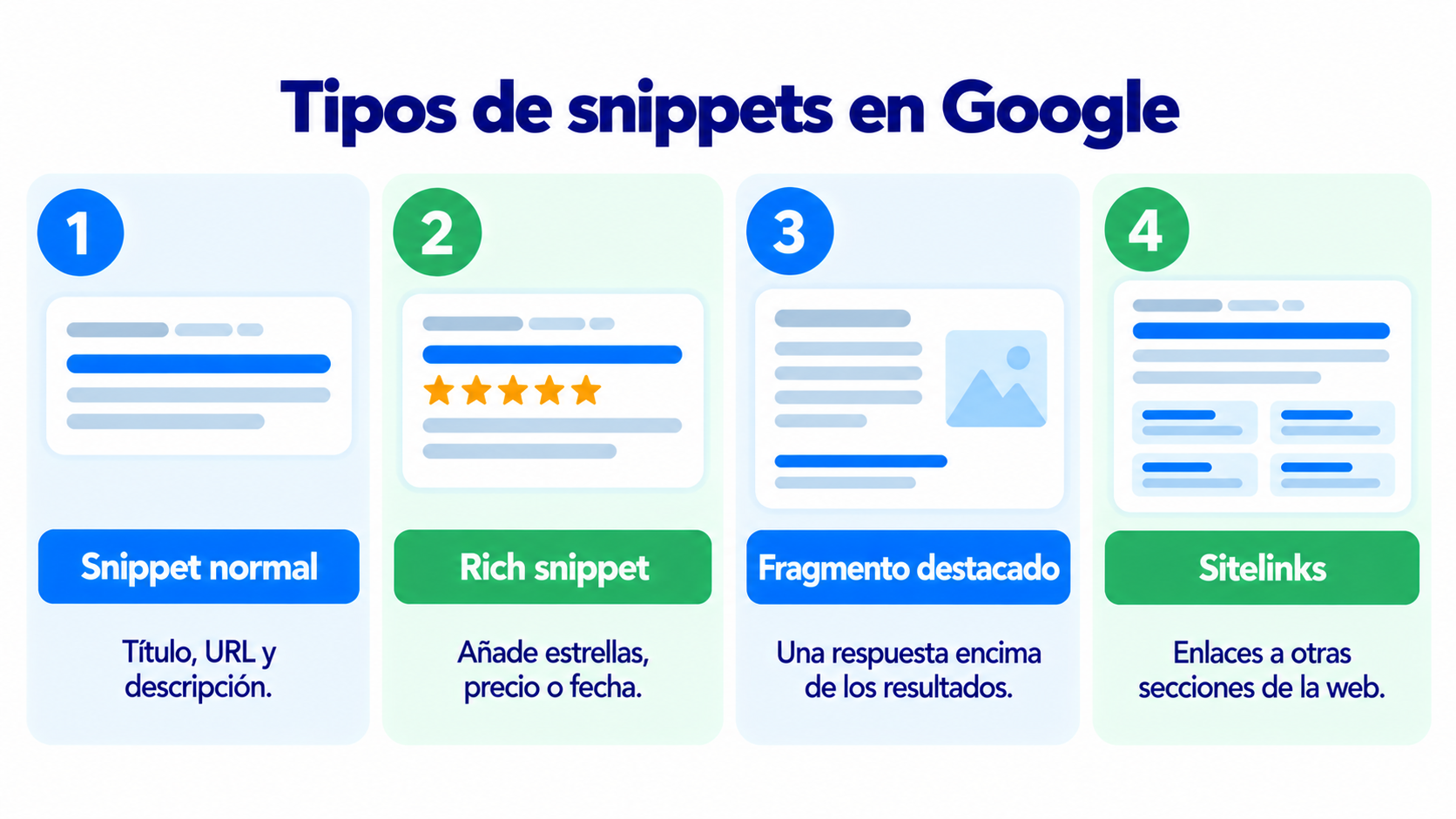
| Type | What it shows | What generates it |
|---|---|---|
| Regular snippet | Title, URL and description | The title tag, the meta description and the page text |
| Rich snippet (rich result) | Also stars, price, date, author or image | The page’s structured data |
| Featured snippet | A paragraph, list or table above the results | The page text that best answers the search (see position zero) |
| Sitelinks | Links to other sections of the same website | The website’s structure and internal links |
How to improve your snippet
- Write a title with the keyword at the beginning and under 60 characters.
- Write a meta description that invites people to click. It should explain what they will find and be between 120 and 155 characters long.
- Use a short, clear URL, with words instead of numbers.
- Answer the question early in the page text. That way Google has a good snippet to show.
- Add structured data if you have products, events, recipes or reviews.
- Check the CTR in Google Search Console. If a page ranks well but gets few clicks, change its title and description.
The snippet of an email
In the inbox, each email is also shown with its “snippet”: the sender, the subject line and the preheader (the preview text). Just like on Google, those three things decide whether the subscriber opens the email or moves on to the next one.
| On Google | In the inbox |
|---|---|
| Title | Subject line |
| Meta description | Preheader |
| URL | Sender name and address |
How Mailrelay helps you
With Mailrelay you can take care of each email’s “snippet”:
- Preview text field to write the preheader for each campaign.
- A/B tests to compare two subject lines and keep the one that gets more opens.
- Editor with an AI assistant to improve the subject line and the copy.
- Open and click statistics on the free account and on Enterprise.
The free account includes 80,000 emails a month and up to 20,000 contacts.
Get your emails opened
Test subject lines and preheaders with A/B tests and send up to 80,000 emails a month for free with Mailrelay.
Frequently asked questions
What is a snippet?
It is the result Google shows for each page: the title, the URL and a short description. It is what users see before deciding whether to click.
What does the word snippet mean?
It means a small piece or fragment. In SEO, it refers to the piece of text that the search engine shows for each page.
What is the difference between a snippet and a rich snippet?
A regular snippet shows the title, URL and description. A rich snippet adds information, such as stars, price or date, thanks to the page’s structured data.
Can I choose the text Google shows?
You can suggest it with the title and the meta description, but Google decides. Sometimes it shows another text from the page if it thinks it answers the search better.
What is a snippet in an email?
It is what you see of the email in the inbox before opening it: the sender, the subject line and the preheader.