WhatsApp: what it is, what it's for and how it works
The world's most used messaging app: what it means, what you can do with it and how businesses use it
WhatsApp is a messaging app from Meta that lets you send messages, voice notes, photos and documents, and make voice and video calls for free over the internet.
It is the most widely used messaging app in the world. In April 2025, Meta announced that it has more than 3 billion monthly users.
In Spain, 94.6% of internet users use it regularly, according to the CNMC household panel for the fourth quarter of 2025. Far ahead of Telegram.
What is WhatsApp and what does its name mean?
It is a free mobile app that uses your phone number as your identifier. You don’t need to create a username or password: if someone has your number saved and uses the app, they can message you.
The name is a play on the English expression what’s up?, which means “what’s going on?” or “how are you?”. The original idea was to share a status, just as you share a phrase or a photo on your profile today.
It works on Android and iPhone, and also on your computer with WhatsApp Web or the desktop app.
What is WhatsApp used for?
It lets you communicate with anyone who has the app, wherever you are, without paying for each message. These are its most common uses:
- Chat with text, emojis, stickers and GIFs.
- Send voice notes, photos, videos, documents and your location.
- Make one-to-one or group voice and video calls.
- Talk in groups of up to 1,024 people and in communities that bring several groups together.
- Follow channels from brands, media outlets or public figures.
For businesses, it is also a direct channel with their customers. We’ll cover that further down.
How does WhatsApp work?
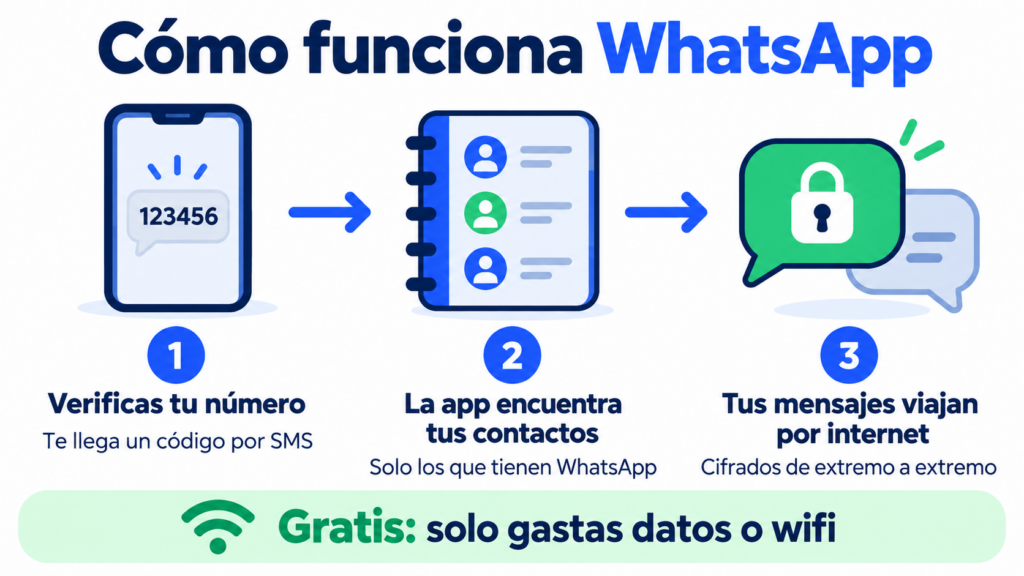
You download the app, verify your number with a code sent by SMS, and the app checks your contacts to see which of them use it.
From then on, everything travels over the internet, using mobile data or Wi-Fi.
That’s why sending a message to another country costs nothing. You only use data, just like when you browse the web.
Messages and calls have been protected with end-to-end encryption since 2016. Only the sender and the recipient can read them; not even the company itself has access to their content.
What are WhatsApp’s main features?
The app has added features over the years. These are the most used today:
| Feature | What it’s for |
|---|---|
| Chats and groups | One-to-one conversations or with up to 1,024 people |
| Voice notes | Audio messages that can be transcribed |
| Voice and video calls | Talk for free over the internet, in groups too |
| Status | Photos, videos or text that disappear after 24 hours |
| Communities | Bring several related groups together under one umbrella |
| Channels | Follow updates from brands or media, one-way only |
| Disappearing messages | Chats that delete themselves after a set time |
| WhatsApp Web | Use your account from your computer |
Keep one thing in mind: features change often, and some reach certain countries before others.
What is the history of WhatsApp?
Jan Koum and Brian Acton, two former Yahoo employees, created the app in 2009. It started as a way to show a status and soon became a free alternative to SMS.
In February 2014, Facebook (now Meta) bought it for around $19 billion. In 2016, end-to-end encryption arrived for all users.
The business version launched in 2018, and channels followed in 2023.
Today it has largely replaced SMS between individuals, although SMS is still alive in SMS marketing, business notifications and verification codes, such as the OTP. Its successor in the phone’s built-in messaging app is RCS messaging.
What is the difference between WhatsApp, WhatsApp Business and the API?
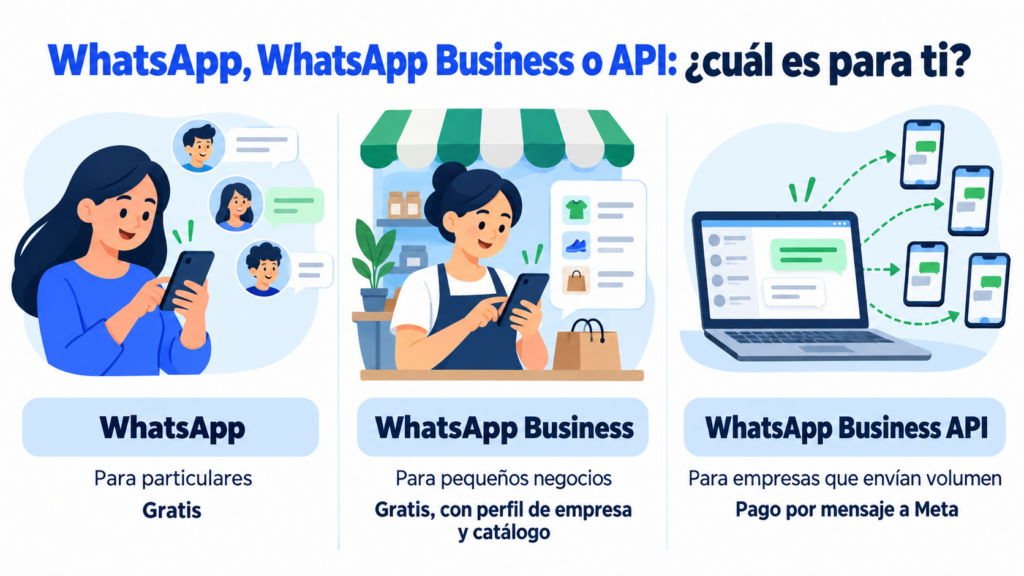
There are three ways to use WhatsApp, and each one meets a different need.
| WhatsApp Business | WhatsApp Business API | ||
|---|---|---|---|
| Who it is for | Individuals | Small businesses | Companies sending at volume |
| How it’s used | Mobile app | Mobile app | From a platform or a CRM |
| Sending to multiple contacts | Broadcast lists | Broadcast lists | Campaigns to contact groups |
| Price | Free | Free | Per-message fee paid to Meta |
If you have a small business, start with WhatsApp Business. When you need to send to many contacts or automate notifications, the next step is the WhatsApp Business API.
Do you use WhatsApp in your business?
Send WhatsApp campaigns to your customers from the same dashboard as your emails and SMS.
How do businesses use WhatsApp?
Businesses use it to answer questions, confirm orders, send reminders about appointments or an abandoned cart, and send offers to people who have given their permission. All of this is part of WhatsApp marketing.
With the app, sending to multiple customers is done with broadcast lists of up to 256 contacts. To handle a large number of queries, you can connect a chatbot.
With the API, you launch campaigns using templates approved by Meta and measure deliveries and reads.
Permission is mandatory. Just like with email, the GDPR requires consent for commercial communications. You can collect it in your subscription form.
It works best alongside other channels. Email marketing and the newsletter share news at a relaxed pace, SMS reaches people without mobile data, and WhatsApp opens the conversation.
Coordinating them is the foundation of omnichannel and conversational marketing.
How does Mailrelay help you?
With Mailrelay, you can send WhatsApp campaigns from the same dashboard as your emails and SMS. You connect your number to Meta, and your WhatsApp Business account keeps working on your phone.
You create templates with images, text and buttons, choose your subscriber groups and see how many messages are delivered and read.
WhatsApp sending is included in the Standard and Enterprise plans. The free account includes a 10-day trial; after that, WhatsApp sending costs €9.95 per month, according to the pricing page.
Meta’s per-message fees are not included: you pay them directly to Meta.
Email, SMS and WhatsApp in a single tool
Create your free account and try WhatsApp sending for 10 days.
Frequently Asked Questions
These are the most common questions about WhatsApp.
Is WhatsApp free?
Yes. The app is free and doesn’t charge for messages or calls. You only use your plan’s data or Wi-Fi.
What does WhatsApp mean?
It comes from the English expression what’s up?, which translates as “what’s going on?” or “how are you?”.
Is WhatsApp safe?
Messages and calls have end-to-end encryption, so only the sender and the recipient can see them. Even so, watch out for suspicious links: phishing also arrives via WhatsApp.
Who owns WhatsApp?
Meta, the company that also owns Facebook and Instagram. Meta bought it in 2014.
Can you use WhatsApp on a computer?
Yes, with WhatsApp Web or the desktop app. You link your computer by scanning a QR code from your phone.