WhatsApp Business: what it is, what it's for and how it differs from WhatsApp
The free app to serve your customers with a business profile, catalog and automated replies, and when it falls short
WhatsApp Business is Meta’s free app that lets small businesses serve their customers on WhatsApp with a business profile, a catalog and automated messages.
It works just like the WhatsApp app you already know.
The difference lies in the tools for selling and customer service: business hours, saved replies, labels to organize chats and a showcase for your products.
What is WhatsApp Business?
Meta launched WhatsApp Business in January 2018 for Android and iOS. By June 2023 it had more than 200 million monthly active users, according to the company itself.
It is designed for shops, restaurants, clinics, schools and professionals who serve customers from their phone. It is the first step in conversational marketing: your customer asks a question and you answer in the same chat.
For higher volumes there is another tool, the WhatsApp Business API. We’ll cover it below.
What is the difference between WhatsApp and WhatsApp Business?
Both apps are free and look almost the same. What changes is what you can do as a business.
| WhatsApp Business | ||
|---|---|---|
| Who it is for | Personal use | Businesses and professionals |
| Profile | Name, photo and info | Business profile with address, hours, website and category |
| Catalog | No | Yes, up to 500 products or services |
| Automated messages | No | Greeting, away messages and quick replies |
| Organization | Chats and lists | Labels by customer or order status |
| Devices | Phone and linked devices | Phone and up to 4 linked devices |
| Price | Free | Free (with optional paid extras) |
Keep one detail in mind: the same number can’t be on WhatsApp and WhatsApp Business at the same time.
If you want to use your current number for your business, you can move it to Business and keep your chats.
What is WhatsApp Business used for?
It gives your customers a direct, fast channel without them having to install anything new. These are the most commonly used features:
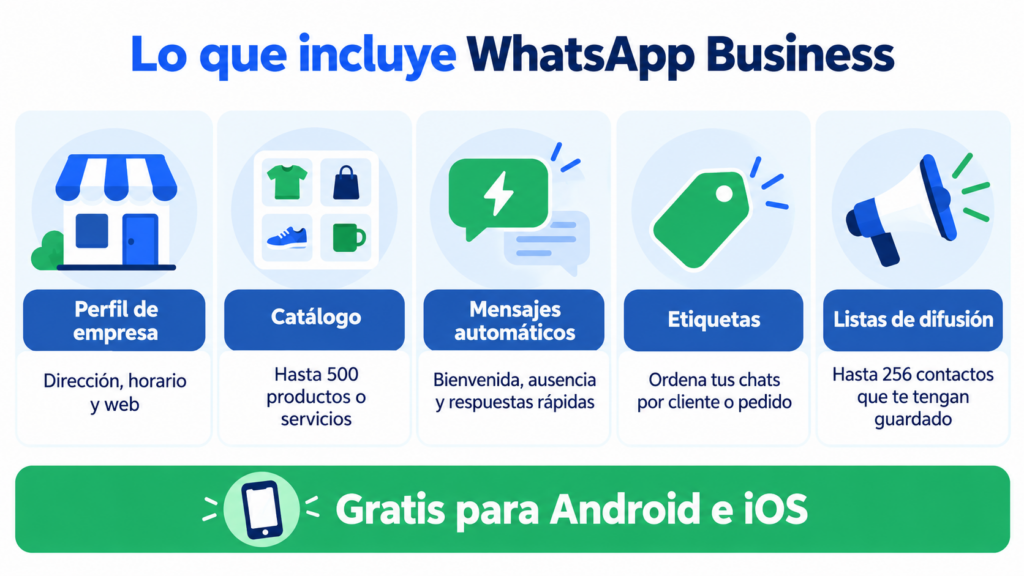
- Business profile: address, hours, website, email and a short description.
- Catalog: photos, prices and descriptions of up to 500 items that customers can browse without leaving the chat.
- Automated messages: a greeting, an away message outside business hours and up to 50 quick replies you insert with “/”.
- Labels: to tag chats as “new customer”, “pending order” or “paid”.
- Broadcast lists: the same message to up to 256 contacts, who only receive it if they have saved your number.
Imagine a bakery. It posts its cakes in the catalog and uses a quick reply to answer anyone who asks about orders. The away message lets customers know it’s closed on Sundays.
How much does WhatsApp Business cost?
The app is free. You don’t pay to download it, to send messages or to use the catalog or automated replies.
Separately, Meta offers an optional subscription, Meta Verified, with a verification badge and more linked devices. It is only available in some countries and its price varies by market.
What does cost money is the WhatsApp Business API. Meta charges for each template message delivered, based on the category and the recipient’s country.
How do you get started with WhatsApp Business?
Setting up your account takes just a few minutes. These are the steps:
- Download the app from Google Play or the App Store.
- Verify your number with the code you receive by SMS or phone call.
- Complete your business profile with your name, category, hours and website.
- Set up your greeting, away message and first quick replies.
- Upload your catalog and share your account’s short link or QR code.
Ask for permission before messaging anyone. Just like with email, the GDPR requires consent for commercial communications.
A checkbox on your subscription form takes care of that, and double opt-in confirms it.
Is WhatsApp Business no longer enough for you?
Send campaigns to all your contacts from the same dashboard as your email and SMS.
What are the limits of the WhatsApp Business app?
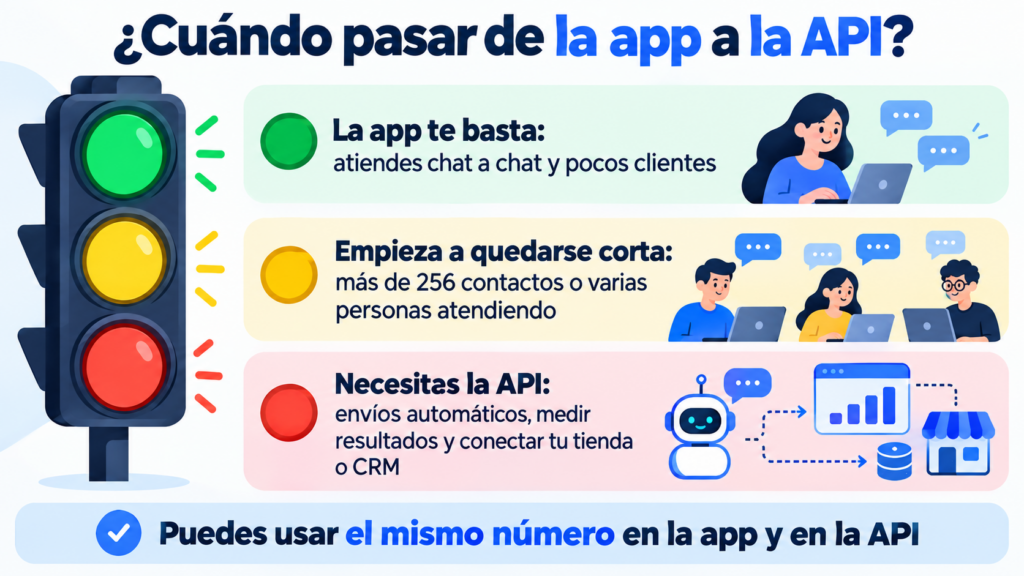
The app works well as long as you’re replying by hand. Problems start when your number of customers grows.
Broadcast lists are capped at 256 contacts and only reach people who have saved your number. There are no campaign statistics either.
You can’t connect the app to your online store to send, for example, an abandoned cart reminder. And at most five devices can use it at the same time.
Those are the signs that it’s time to move to the API. With it, you send campaigns with approved templates, automate order notifications and see how many messages are delivered and read. You can also connect a chatbot.
You don’t have to give up the app. Meta lets you use the same number in the app and the API at the same time, although while they’re connected the app loses its broadcast lists.
How can you use WhatsApp Business in your marketing strategy?
WhatsApp is a personal channel, so you need to watch your tone and frequency. It works better for conversations, useful notifications and occasional offers than for long messages.
Combine it with email. Your newsletter shares news at a relaxed pace, and the welcome email introduces your brand. WhatsApp answers questions or sends appointment reminders.
SMS reaches people who don’t have mobile data at that moment, and RCS messaging is the alternative in the phone’s messaging app.
You’ll find the basics in WhatsApp marketing and practical examples in how to sell on WhatsApp.
To choose your tools, check out this guide to communication software for SMEs. Coordinating your channels is the foundation of omnichannel marketing.
How does Mailrelay help you?
When the app falls short, Mailrelay lets you send WhatsApp campaigns from the same dashboard as your email and SMS. You connect your number to Meta, and your WhatsApp Business account keeps working on your phone.
You create templates with an image, text and buttons, choose your subscriber groups and send. You can import contacts from a CSV file and segment them by interests.
Afterwards, you can see how many messages were delivered and read, and read the replies.
WhatsApp sending is included in the Standard and Enterprise plans. The free account includes a 10-day trial; after that, WhatsApp sending costs €9.95 per month, according to the pricing page.
Meta’s per-message fees are not included: you pay them directly to Meta.
Email, SMS and WhatsApp in a single tool
Create your free account and try WhatsApp sending for 10 days.
Frequently asked questions
These are the most common questions about WhatsApp Business.
Is WhatsApp Business free?
Yes. The app is free for Android and iOS. You only pay if you subscribe to Meta Verified or if you send messages with the WhatsApp Business API.
Can I have WhatsApp and WhatsApp Business on the same phone?
Yes, as long as each app uses a different number. Many dual-SIM phones let you keep your personal number on WhatsApp and your business number on WhatsApp Business.
How do I set up an away message?
In the app, go to Business tools and open Away message. Write the text and choose when it’s sent: always, outside your business hours or on the dates you select.
How many contacts fit in a broadcast list?
Up to 256 per list. And only people who have your number saved in their contacts receive the message.
When do I need the API instead of the app?
When you want to send to many contacts, automate notifications, measure results or connect WhatsApp to your store or CRM.