How to create a poll in WhatsApp: step by step on mobile, PC, groups and channels
How to create one in a minute, who sees the votes and what to do if you want to ask all your customers at once

How to create one in a minute, who sees the votes and what to do if you want to ask all your customers at once
Shall we meet on Thursday or Friday? Which cake flavor should we order? What time do your customers prefer for the workshop?
Asking in a group and reading forty scattered replies is chaos. A WhatsApp poll solves it in a single message: each person taps their option and you see the result instantly.
In this guide you’ll find how to create a poll in WhatsApp on Android, iPhone and computer, who sees the votes in chats and groups, and poll ideas for your business.
And finally, what to do if you want to ask your whole customer list, not just a group.
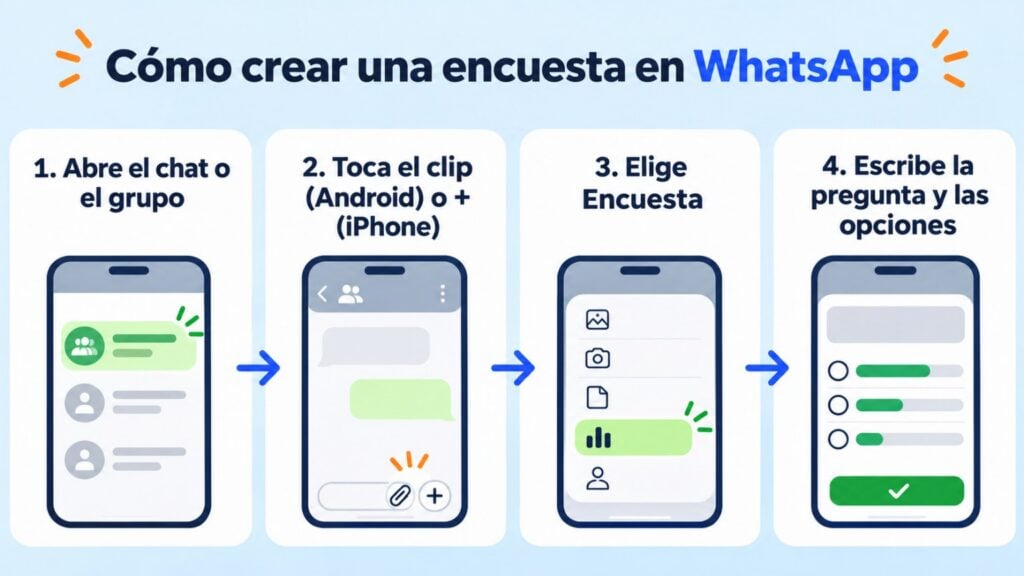
You don’t need to install anything to create a poll in WhatsApp: the feature is in the same menu you use to send photos or documents. It works the same in the regular app and in WhatsApp Business:
| Where | How to open it | Then |
|---|---|---|
| Android | Paperclip icon (📎) in the message bar → “Poll” | Type the question and the options, then tap “Send” |
| iPhone | “+” button to the left of the message bar → “Poll” | Type the question and the options, then tap “Send” |
| WhatsApp Web and desktop | “+” button next to the message bar → “Poll” | Type the question and the options, then click send |
When you create it, you need to decide three things:
Menu names may vary slightly depending on the app version, but this is the path to create a poll in WhatsApp.
Ask your whole list on WhatsApp
Templates with quick reply buttons and your contacts’ replies in the same dashboard.
The votes of a WhatsApp poll appear in the poll itself, with a bar for each option that updates in real time. From the poll you can open the vote details.
Mind the privacy: in chats and groups, participants can see who voted for each option. It’s not a secret ballot.
This is how it changes depending on where you post it:
| Where | Who can vote | Can you see who votes? |
|---|---|---|
| Individual chat | You and the other person | Yes |
| Group | Group members | Yes, for participants |
You can also post polls in a WhatsApp channel to ask your followers.
If you need anonymous answers in a group, the built-in poll won’t work. For that, an external form such as Google Forms is a better option: just share the link.
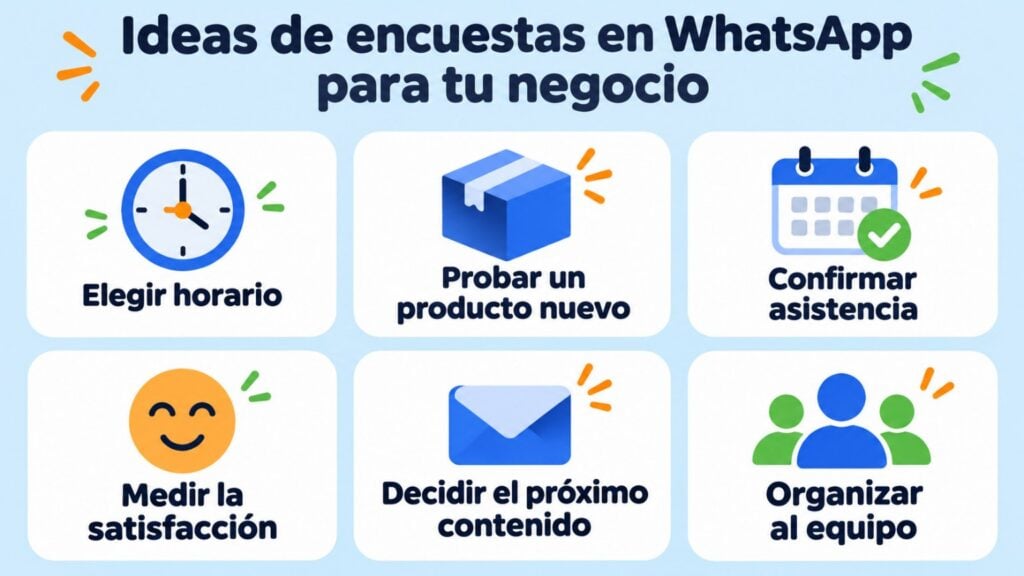
A WhatsApp poll works very well for quick decisions with customers who already know you. Some ideas:
Best practices:
If you’re writing the message that goes with the poll, it helps to use WhatsApp text formatting so the date or the question stands out.
The built-in poll works inside a chat, a group or a channel. It has limits when you want to ask hundreds of customers at once. If you put your customers in a group, they all see each other’s numbers. And with a channel you only reach those who follow you.
With a WhatsApp campaign tool, you can send the question to the contacts on your list who have agreed to receive your messages, each one in their own private chat. And to get them to message you, add a WhatsApp link to your emails and your website.
Mailrelay doesn’t send WhatsApp polls like the ones in the app, but you can do something similar:
For long questions, rating scales or several questions in a row, use an external form and send the link. Here’s how to create a satisfaction survey with Google Forms or measure loyalty with NPS.
Not sure which channel to use? Here’s when email, SMS or WhatsApp fits best.
With Mailrelay you can take your questions to your whole list, through the channel each customer prefers:
WhatsApp is included in the Standard and Enterprise plans, with a 10-day trial on the free account. Meta’s per-message fees are paid separately.
Try WhatsApp campaigns free for 10 days
Create your free account and combine email, SMS and WhatsApp in a single tool.
Three common questions before launching your first WhatsApp poll.
Not in chats and groups: participants see who voted for each option. If you need anonymous answers, use an external form and share the link.
Up to 12. Even so, with three or four options people reply faster and the result is easier to read.
The most practical option is to delete it and send a new one with the changes. Do it early, before there are many votes.
WhatsApp text formatting
Bold, italics, strikethrough and lists to make your messages easier to read.
Email, SMS or WhatsApp?
Which channel to use for each of your business messages.
Satisfaction survey
Sample questions and how to create one for free with Google Forms.
WhatsApp Business
What it is, how it differs from WhatsApp and how to use it in your business.

Jose Argudo
CMO at Mailrelay. Writes about email marketing, copywriting and conversion for small businesses and entrepreneurs.