
We create content because we like it, we like expressing ourselves, putting ideas out there and showing people what we think, but we also do it so that people become interested in what we have to say to them; in other words, we make content for our audience.
We could say that the “what we want to say” is for us and the “how we have to say it” is for our audience; we are probably always sure about the former, but what about the latter? Have you ever stopped to think about how happy your audience is?
That is precisely what the satisfaction survey is for, a wonderful tool that will help you find out what your audience thinks about what you have told them.
Why is this important? Why do you need to know what your consumers think?
How can a satisfaction survey help you? How can you create one? And just as important, can a satisfaction survey bring traffic to your website?
And if so, how? Well, all of this is exactly what I am here to tell you about today. It is a fairly interesting and important topic that we often overlook or, more precisely, do not know how to make the most of, so let’s get started.
· What Are Satisfaction Surveys?
Well, let’s start with the basics: what are satisfaction surveys?
As the name suggests, a satisfaction survey is precisely a survey whose questions aim to determine the level of satisfaction our consumers or users have with our brand.
This level of satisfaction depends on many factors, which in turn are tied to the service we provide and the impression we make as a brand on our audience.

· What Is a Satisfaction Survey For?
The strength of this type of survey is that it allows us, broadly speaking, to get an objective view of the impression our audience has of us.
With a satisfaction survey you can:
- Learn the impact our marketing strategies have
- Find out what our consumers think of our services or products
- Objectively analyze the ROI of your strategies based on your customers’ satisfaction
- Find out what you are doing wrong or what you are doing right
- Gain a better understanding of how your consumers think
- Get to know your audience in general, from what attracts them to your company to what they dislike
- Objectively identify the strengths of your services and/or products, as well as of your strategies
- Interact with your audience
- Make your consumers feel like part of your business and that they are heard, so you can improve the quality of the service they receive

· What Benefits Does a Satisfaction Survey Bring to Your Business?
In addition to the points mentioned above, a satisfaction survey also offers your business a number of benefits; it is not simply data collected through a series of questions that you will not need afterwards.
The data you collect becomes very important information that helps you, among other things, to:
- Complement or redesign your current marketing strategies based on the response you get from your audience
- Supplement the areas of your business that you can improve
- Change the aspects that are failing
- Reinforce the positive points of your business
- Put new marketing strategies into practice based on the information you have about your subscribers
- Build your work around your customers
- Find out what satisfies your customers and what you should avoid
In addition, it has a super important benefit: satisfaction surveys are an excellent way to retain your current customers and even to attract potential ones.
You can use them in many ways to do so, one of the most common being newsletters, but we will talk about that later.

· How Do You Create a Satisfaction Survey with Google, Step by Step?
Luckily for us, technology and the Internet make life much easier, and there are options that let us create surveys very easily; one of them in particular is widely used for its efficiency and convenience.
It is none other than “Google Forms”. A simple and efficient method for creating all kinds of surveys that is within everyone’s reach, and here I will show you how to create a satisfaction survey with Google.
The first thing you should know is that, although you need a Google account to create this survey, you do not need one to answer it, which gives you a wide reach when choosing the people you will send the survey to, since they do not need an account on this platform to respond.
1. Go to “Google
Forms”
The first thing we will do is go to the Google Forms page. You can do it by clicking this link: “Google Forms”.
You will arrive at the following page:

Once there, click on “Go to Google Forms”. This will take you to the following page:
2. Choose a template or start from scratch
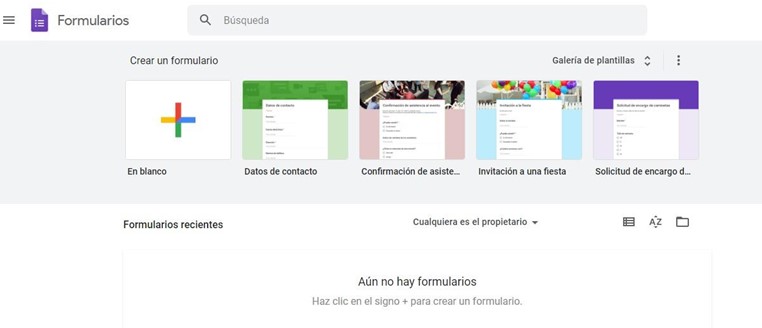
Once on the “Create a form” screen, you will find several pre-designed templates to choose from and an option to start from scratch. You can see more by clicking on the template gallery (blue box):
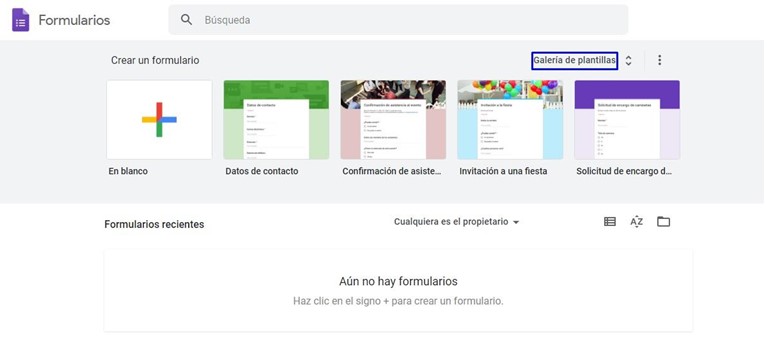
At the bottom of the page you will see a section that says “Recent forms”, where you can basically see all the forms you have made before.
To continue with the guide I will choose a ready-made template, the “Contact Information” one.
3. Start creating the form
Once you have chosen the template, you will be taken to the following page, where you will start creating your form:
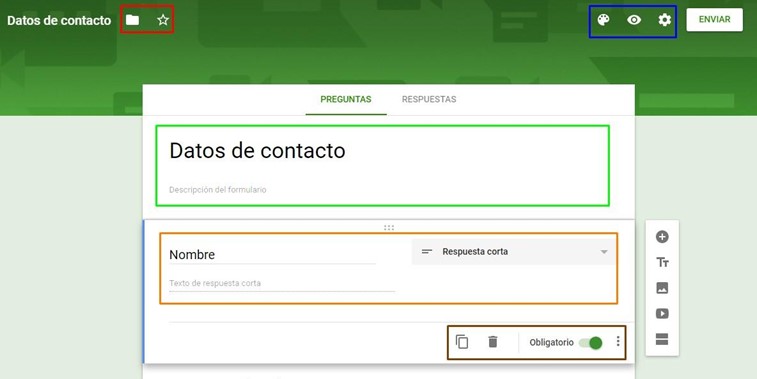
At first glance, you have a lot of options, so let’s start from the top. As you can see, you have a sort of cover that in this case is preselected and green. You can change it using the options I have framed in the blue box at the top right, while at the top left you have the option to add the survey to favorites or move it to a folder.
Further down, inside the green box, you can see it says “Contact information”. That is the survey’s title section, and below it you can see its description; you can edit both as you like.
After the title section, the survey questions begin. As you can see in the brown box, you can delete questions and mark whether or not they are required to be answered.
4. Customize the survey the way that suits you best
Now, to customize the survey to your liking, you have the side menu that I have marked in red in the following screenshot:
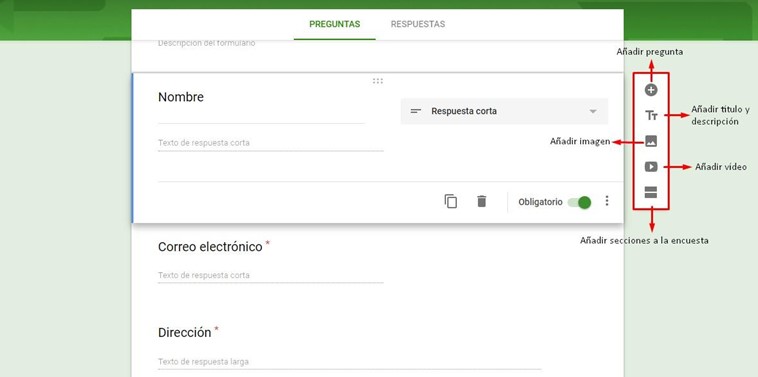
With this menu you can basically adapt the survey to whatever you need, using the options I have identified in the screenshot.
5. Edit the questions you are going to ask
Once you have structured your survey, it is time to write the questions. You can add as many questions as you want and change the title and the type of answer you want to receive using the dropdown menu to the right of the question:
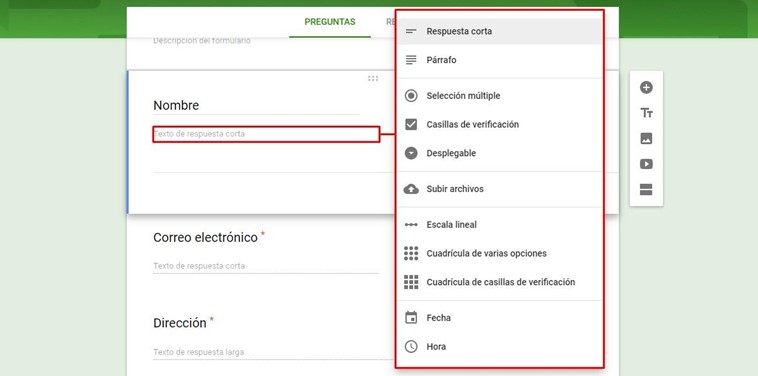
You have many options to add to your survey, with a wide range of possibilities you can take advantage of.
6. Send the survey
As you create your survey, Google automatically saves the changes you make, so when you finish you only need to send it.
To do so, click the “Send” button in the top right menu:
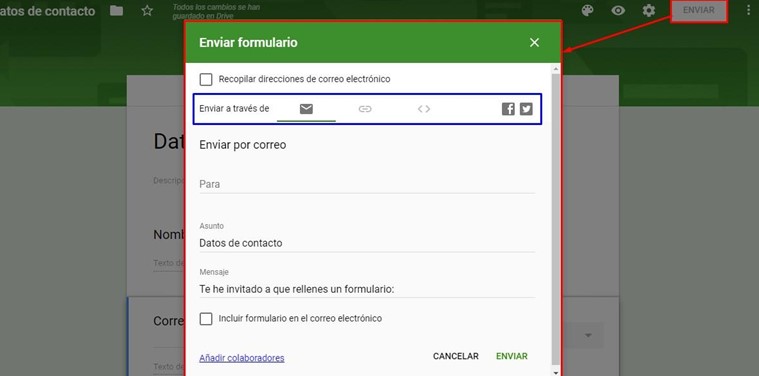
There you have 5 options for sending your survey, the ones in the blue box.
You can send it directly by email, get a link that you can then send to whoever you want, add it to your website with the embed code, or share it on Facebook or Twitter.
In any case, your survey will be done, and you will only have to wait for your respondents to send you their answers.
· How Can Google Surveys Bring Traffic to My Website with My Newsletters?
We have already talked about the benefits that satisfaction surveys can bring you, and one of them is precisely that they can be an excellent way to attract customers.
And this is where you are probably wondering: how can Google surveys bring traffic to my website?
Well, don’t worry, because next I will show you how you can use this excellent tool to bring visits to your site.
The first thing you should know is that the methods I will show you below depend on your newsletter, so for them to be effective you first need a base of subscribers to your newsletters, so that you have somewhere to send these surveys.
Now, these subscriber lists must not be purchased, since purchased lists are not very effective at attracting traffic to your website.
You can also use other distribution channels besides your newsletters, but you will need to make some adjustments first for them to be effective.
⮚ Try to redirect your surveys to your website
This is the simplest method: your surveys should redirect to your website one way or another. Another excellent option is to place the survey directly on your website instead of leaving it on Google Docs, so your subscribers will need to visit your website to answer it.
Of course, it is very important that you make your newsletters as eye-catching as possible to encourage your subscribers to answer the survey; later I will show you some ways to do it.
But remember that content will always be what matters, so you need your content to be interesting and compelling, and to capture your audience’s attention and interest in the shortest time possible.
⮚ Don’t create surveys so long that they become annoying
This is perhaps less a method than a piece of advice I want to give you: many times we get carried away and start writing question after question without end.
This is a terrible mistake. How many times has it happened to you that you are asked to answer a survey and no matter what you answer, it never seems to end?
If it has happened to you, you surely know how annoying a very long survey can be, especially one you are not even being paid to answer; your respondents will surely think the same, which is why avoiding very long surveys is essential.
When creating your surveys, don’t make them excessively long: it is better to create dynamic, concise surveys, since they will bring you more visits.
You have to try to get as much information as possible with as few questions as possible. Believe me, this will increase the number of completed surveys you receive, and you will also have a better chance of getting new visitors through your surveys.

⮚ Create surveys whose goal is to interact with your audience
This method is quite peculiar, and you have surely seen it around. It turns out that human beings are quite curious by nature, and we can very easily spend 5 minutes answering a “what animal are you?” survey. See where I am going with this?
Although it may not seem so, this kind of survey, in which you interact with your consumers in a fun way, is an excellent way to capture their attention.
Come on, on a boring afternoon more than once we have all taken one of these surveys just to distract ourselves or out of sheer curiosity to see what kind of person we were in a past life.
Create surveys of this kind, whose only goal is to interact with your audience for entertainment, and then at the end you can redirect them to your website or, why not, to a page with similar surveys.
There are many ways to apply this type of survey to get people to visit your page. That said, try to make it as unobtrusive as possible, since people prefer a simple:
“Click here to find out your answer” over a:
“Subscribe, share, like and leave a comment to find out your answer”.
One of the mistakes we tend to make is sending the same type of content to all our subscribers, and in the long run this causes us problems such as low engagement with our newsletters; this is where satisfaction surveys come in.
Through satisfaction surveys or, in this case, Google surveys, we can get very important information directly from our subscribers, information that will help us segment the type of content we send to each group of subscribers.
This not only improves the open rate of our newsletters, but also makes our subscribers feel taken into account, which increases the chance that they will visit our website through the links in the newsletters.
While the starting point is the newsletters, why confine your surveys exclusively to this channel?
For a survey to go viral, it is essential that it can spread across the media, so let your subscribers be the ones to do it.
When sending your surveys, let recipients share them afterwards on their favorite social networks. This can be extremely useful, especially when you work with surveys like the ones we mentioned at the beginning, since they can go viral practically on their own, without you having to lift a finger.
This is a convenient and effective way to have your subscribers bring you more traffic and basically without you having to ask them, since they will do it of their own accord.
Also, keep in mind that if a survey does go viral, the amount of traffic you can capture is simply enormous.
⮚ Offer something in return
Why lie to ourselves? People show more interest in things when they get something in return.
If you have an eCommerce store or offer a service online, take the opportunity to offer discounts or promotions as an incentive for people to answer your surveys.
This will give you two benefits: the first is that you will get the answers you are looking for with your surveys, and the second is that respondents will be interested in visiting your website once the survey is over to see what promotion or offer you are giving.
This is one of the most direct and effective methods to get web traffic through your surveys.
It also increases people’s interaction with and interest in your brand, so it is recommended to make this kind of offer whenever you can.
Over time, users will gain enough interest to regularly open your newsletters or even visit each URL on your website every time, just to see whether you have new offers.
⮚ Exclusive benefits
Just like the benefits you get from subscribing to a newsletter, you can offer certain benefits every time your subscribers answer a survey.
This is another direct and very efficient method to encourage your users to answer the surveys you send and to visit your website.
In addition, your users will feel special and feel that you give them special treatment, something that is especially effective for getting positive results in future interactions and even sales.
These are just some of the methods you can use. Remember that on the Internet nothing is absolute and things can change overnight, just as new methods for attracting traffic with Google surveys may emerge. What about you? What methods do you know?
You can share them in the comments box.