SMS sending platform: what it is, what it should include and how to choose one
What good SMS software should include and how to compare options before signing up
An SMS sending platform is an online program that lets you send text messages to many mobile phones at once from your computer, without using a phone. It is also called SMS software, an SMS program or an SMS sending service.
From a web dashboard you import the numbers, write the message, choose the sender and send it or schedule it. Afterwards you can see how many SMS were delivered.
What is an SMS platform used for?
Businesses use it for two types of messages:
| Type | Used for | Example |
|---|---|---|
| Promotional | Selling or promoting an offer. Requires the customer’s consent | “Today only, 20% off the whole store with the code AUTUMN” |
| Transactional | Notifying the customer of something they are expecting | “Your order 4512 ships today. It will arrive on Thursday” |
Promotional messages are part of SMS marketing. Transactional messages include confirmations, appointment reminders and verification codes or OTPs. You can find more details in our entry on transactional SMS.
Some platforms handle both types. Others are designed for automated sending from an application and barely have a dashboard.
What features should an SMS sending platform have?
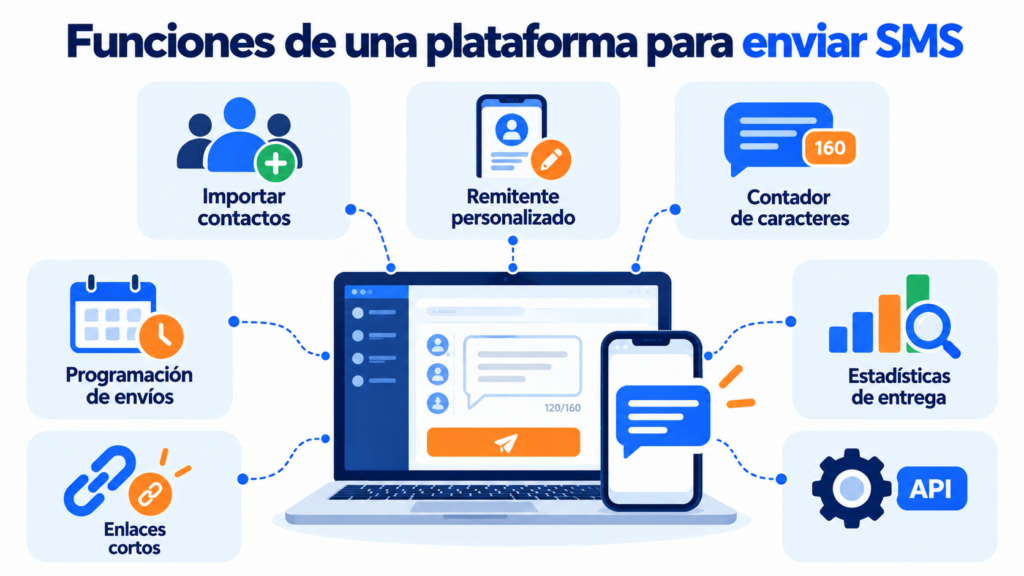
These are the features worth looking for:
| Feature | What it lets you do |
|---|---|
| Import contacts | Paste a list, upload a file or use the mobile numbers in your email lists |
| Custom sender | Have the message arrive under your company name, from 3 to 11 characters |
| Editor with character counter | See whether the text goes over 160 characters, or 70 with emojis, and will be charged as several SMS |
| Personalization | Include each contact’s name or other details |
| Scheduling | Set up the send in advance for a specific date and time |
| Short links | Add a link without using up characters and track the clicks |
| Statistics | See delivered messages, failed messages and clicks |
| Unsubscribe management | Remove anyone who no longer wants to receive messages from the list |
| API | Send automated SMS from your website, your store or your app |
Not every platform has everything. For one-off campaigns, a simple dashboard is enough. If you want to send automated notifications, you will need an API or an integration.
Looking for one platform for your SMS and your emails?
Send your SMS from the same dashboard as your newsletters, using the mobile numbers in your contact lists.
How to choose an SMS platform
Before signing up, compare several providers using these criteria:
- Coverage and price per country. The cost of each SMS varies depending on the destination. Also ask whether credits expire.
- Payment model. Some sell credit packs and others charge a monthly fee. Check whether there is a minimum commitment.
- Delivery rate. Ask to see their delivery reports and run a test before a large send.
- Integrations. Check whether it connects to your CRM, your online store or your email marketing tool.
- Ease of use. If you are going to send campaigns yourself, try the dashboard before deciding.
- Support in your language. Find out which channels they offer support through and during what hours.
If you want to compare prices and steps for a large send, check out our guide to mass SMS.
SMS and email from the same platform
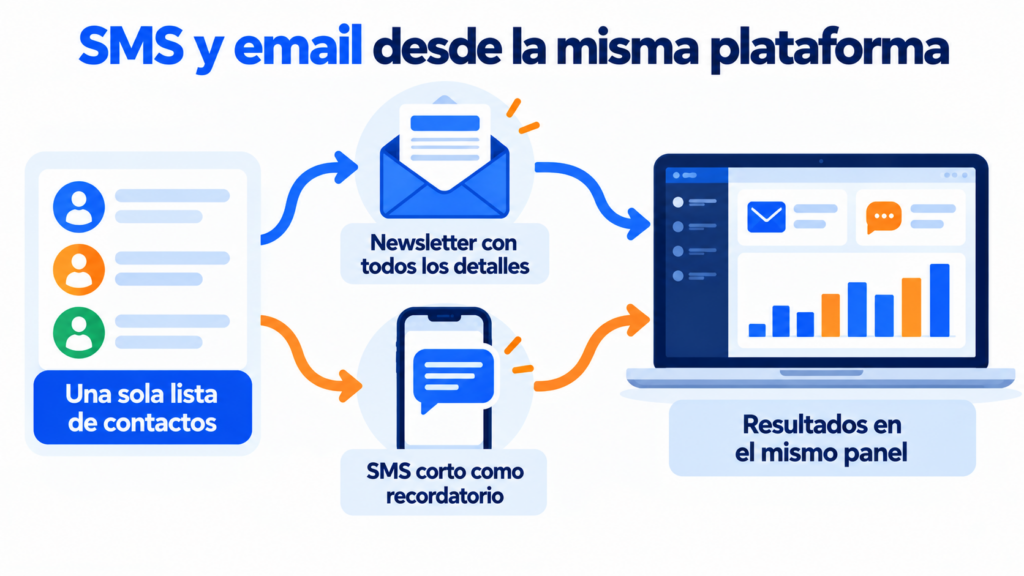
Using the same tool for email and SMS has clear advantages:
- You work with a single contact list, without exporting or duplicating data.
- You can combine both channels: the newsletter with all the details and a short SMS to remind people of the offer on the last day.
- You see the results of all your sends in the same dashboard.
We explain this in more detail in the entry on multichannel automation.
What you need to send SMS to your customers
In Spain, the LSSI prohibits sending commercial communications by electronic means, such as SMS, to anyone who has not requested or authorized them. The exception is customers to whom you have already sold something similar, as long as they can easily unsubscribe.
So, before your first send, keep the following in mind:
- Get each contact’s consent and keep a record of when and how they gave it.
- Identify yourself as the sender in every message.
- Offer an easy way to unsubscribe and respect it.
- Check the Robinson List if you are going to contact people who are not yet customers.
How Mailrelay helps you
Mailrelay includes an SMS sending service in the same dashboard as your newsletters.
You can paste your list of mobile numbers or use the numbers in your email lists. The editor supports text, emojis and links, and warns you in real time if the message is so long that it will be sent as several SMS.
After sending, the statistics show you how many messages were delivered.
SMS are paid for with credit packs, with no minimum commitment. In Spain they cost from €0.0345 per message, excluding VAT, depending on the pack size. You can find the details in our mass SMS pricing. For email, the free account lets you send up to 80,000 emails a month to 20,000 contacts.
Send your first SMS campaign with Mailrelay
SMS packs with no minimum commitment and a free account for your emails, with support via chat, ticket and phone.
Frequently asked questions about SMS platforms
What is an SMS platform? It is an online program for sending text messages to many mobile phones at once from your computer, with tools to import contacts, schedule sends and view statistics.
What is the best platform for sending SMS? It depends on how you will use it. For campaigns, look for a simple dashboard and clear prices per country. For automated notifications, a good API and delivery statistics.
Can I send SMS from my computer? Yes. With an SMS platform you write and send the message from your browser, and it reaches your contacts’ phones as a regular SMS.
How much does an SMS sending platform cost? Most charge per message sent, with prices that drop the more you buy. At Mailrelay, an SMS to Spain costs between €0.0345 and €0.0357 plus VAT.
What is the difference between a promotional SMS and a transactional one? A promotional SMS aims to sell and requires the customer’s consent. A transactional SMS notifies the customer of something they are expecting, such as an order or an appointment.