RCS messaging: what it is, what “read” means and benefits for businesses
SMS with photos, buttons and read receipts
RCS messaging (Rich Communication Services) is an evolution of traditional SMS, offering users an enriched messaging experience, closer to the instant messaging apps we already know, like WhatsApp or Telegram.
With technological advances and the growing need for more interactive and personalized communication, RCS emerges as a revolutionary option for companies looking for new ways to connect with their customers.
As an evolution of SMS, RCS messaging not only allows text sending but also includes advanced features such as the ability to send high-resolution images, videos, files, interactive buttons, and much more.
Additionally, RCS messages can be customized with a brand’s visual identity, allowing companies to offer a much more attractive communication experience aligned with their corporate image.
Unlike SMS, RCS shows when a message has been read, when the recipient is typing a reply, and offers greater security in interactions.
This type of messaging is becoming a key pillar in business marketing and communication strategies due to its ability to improve interaction and engagement with users.
What does “read RCS message” mean?
When you see “Read” under a message in your phone’s messaging app, it means the other person has opened the conversation and seen your message. It’s the RCS read receipt, similar to WhatsApp’s blue double check.
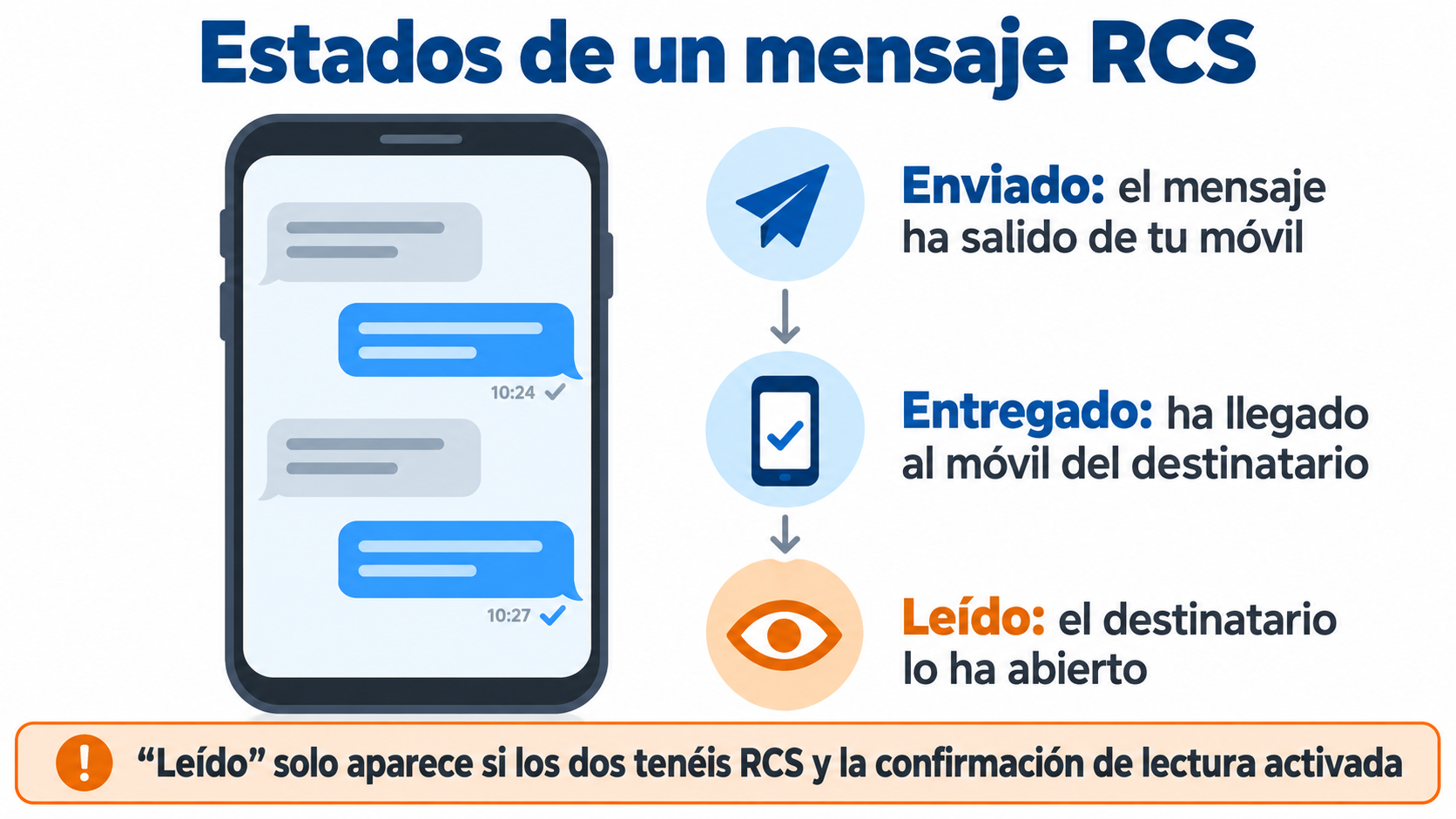
An RCS message goes through three statuses:
- Sent: the message has left your phone.
- Delivered: it has reached the recipient’s phone.
- Read: the recipient has opened it.
The “Read” notice only appears if you both have RCS turned on and read receipts enabled. Each person can turn it off in their messaging app’s settings. If the message is sent as SMS, there is no read receipt.
Reach your customers’ phones with SMS
Send bulk and automated SMS from the same panel as your emails.
How does RCS messaging work?
The operation of RCS messaging is similar to that of the instant messaging apps mentioned earlier.
The main difference lies in the fact that no additional app needs to be downloaded to use it, as most smartphones that support this technology have the capability integrated by default.
This means that both the sender and the receiver can enjoy a rich messaging experience without relying on third-party applications.
When a company sends an RCS message, it reaches the customer through their carrier’s network, like a traditional SMS, but with advanced features.
If the customer has RCS messaging enabled on their device, they will receive the full message with all the interactive functionalities, such as the ability to click buttons, view images and videos, or even complete transactions directly within the message.
Moreover, one of the most notable aspects of RCS messaging is the ability to include interactive buttons that facilitate user actions, such as responding to surveys, scheduling appointments, or even making purchases within the message.
This makes RCS a powerful tool for conversational marketing and mobile commerce, as it removes friction and shortens the user’s journey.
RCS, SMS and WhatsApp: how do they differ?
| RCS | SMS | ||
|---|---|---|---|
| How it arrives | Over mobile data or wifi, in the phone’s messaging app | Over the carrier’s mobile network | Over the internet, in the WhatsApp app |
| What you need | A compatible phone and carrier, with RCS turned on | Just a mobile phone number | The app installed |
| Read receipts | Yes | No | Yes |
| Content | Text, high-quality photos and videos, buttons and carousels | Text only, 160 characters per SMS | Text, photos, videos and buttons |
| Business sender | Name, logo and verification checkmark | Number or alias | Business profile |
If the recipient’s phone doesn’t have RCS, the message is usually sent as SMS. It still arrives, just without the advanced features. You’ll find more details about SMS in the text messages entry.
Advantages of RCS messaging for companies
Companies that adopt RCS messaging gain a series of benefits that allow them to improve the communication experience with their customers.
Here are some of the most important advantages:
Enhanced interactivity
RCS allows brands to send interactive messages, which means they can include elements such as call-to-action (CTA) buttons, videos, images, and interactive forms.
This feature is perfect for encouraging customer interaction without redirecting them outside the message, which significantly improves the conversion rate.
Increased personalization
Unlike SMS, RCS messaging lets you personalize not only the content but also the visual appearance of messages.
This means that brands can tailor messages to their corporate image, using colors, logos, and other visual elements to offer a more consistent and appealing experience for the customer.
Improved delivery and reception
RCS messages can include read receipts and real-time notifications about the recipient’s availability to respond.
This is crucial for companies that want to measure the impact of their campaigns and adjust their strategies based on customer behavior.
Frictionless experience
Since it doesn’t require downloading a specific application, RCS removes barriers to entry.
Users simply receive the message in their native messaging app, which significantly reduces friction and facilitates interaction.
Enhanced security
RCS messaging provides greater security than traditional SMS because messages can be verified and authenticated, which reduces the risk of fraud and identity theft.
This is especially important in sectors like banking and e-commerce, where communication security is essential.
RCS for business: what a message can include
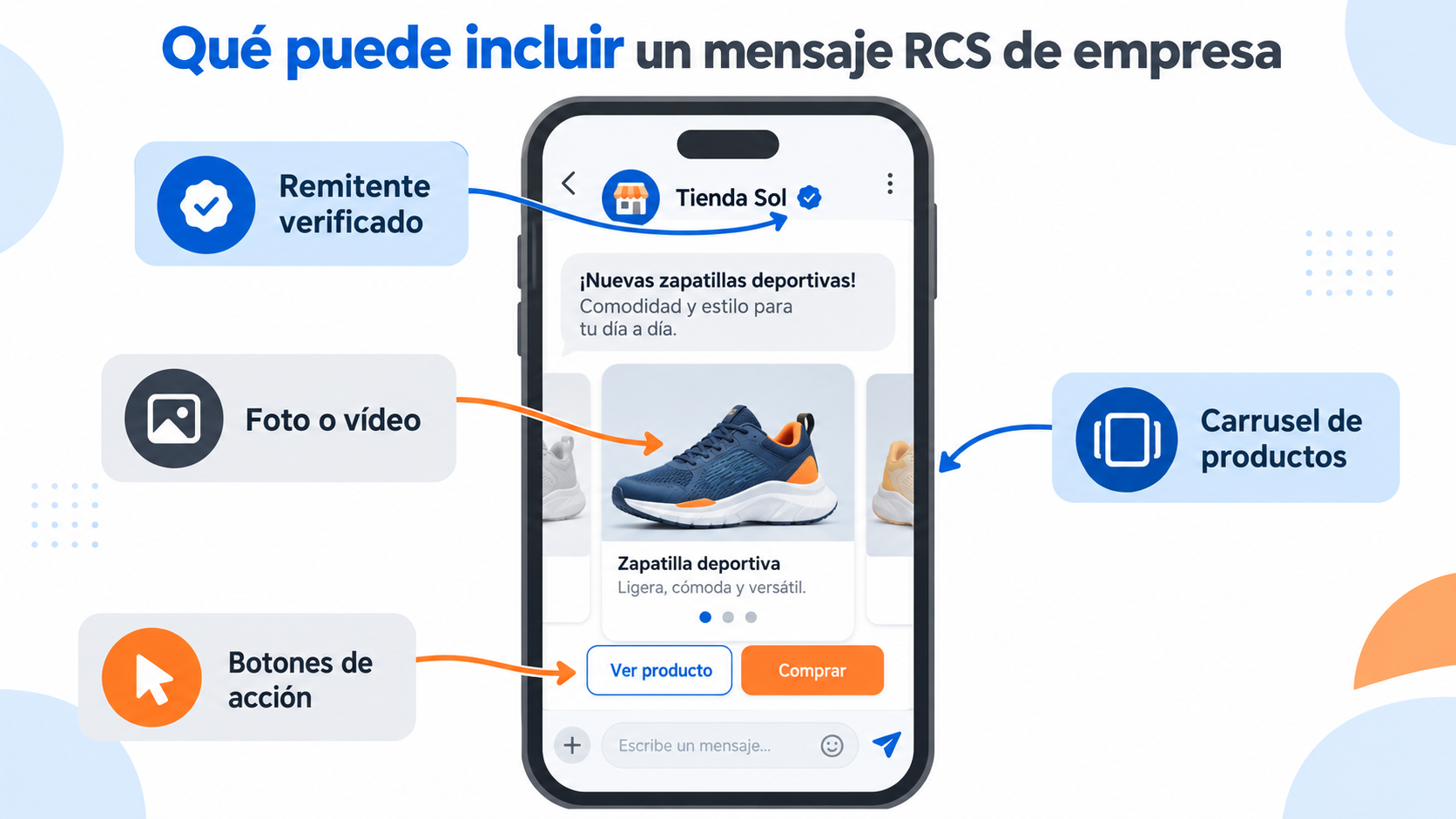
RCS marketing uses the business version of RCS (RCS Business Messaging) to send branded messages. A business message can include:
- Verified sender, with the brand’s name and logo and a verification checkmark. It helps prevent impersonation.
- Photos, videos and carousels of products that the customer can swipe through.
- Buttons and suggested replies, such as “Confirm appointment”, “View order” or “Call”.
For example, a clinic can send an appointment reminder with a button to confirm it, and a store can send a carousel with the week’s new arrivals. To send business RCS you need to sign up with a provider and verify your brand.
Does it work on every phone? On Android it works with the Google Messages app on most recent phones. On iPhone it arrived with iOS 18, in September 2024, and business messages with iOS 18.1. In both cases it depends on the carrier having it enabled.
How Mailrelay helps you
If you want to reach all your customers’ phones today, SMS is still the channel that works on any phone. With Mailrelay you can send bulk SMS from the same panel as your newsletters, with a character counter and delivery statistics.
You can also combine email and SMS in your automations: for example, a reminder email and an SMS on the day of the appointment. With the free account you can send up to 80,000 emails per month.
Start for free with Mailrelay
Email and SMS in a single tool, with human support.
Frequently asked questions
What is RCS on a phone?
It’s the messaging system that replaces SMS in the phone’s messaging app. It lets you send photos, videos and long messages, and see whether your message has been read, without installing any app.
What does “read RCS message” mean?
That the recipient has opened your message. You can only see it if you both have RCS and read receipts turned on.
Does RCS use data?
Yes. RCS works over mobile data or wifi. If there is no connection, the message may be sent as SMS.
Does RCS work on iPhone?
Yes, since iOS 18, as long as the carrier has it enabled. Business messages arrived with iOS 18.1.
Is RCS the same as WhatsApp?
No. WhatsApp is an app you have to install; RCS is built into the phone’s messaging app and uses your phone number, like SMS.