
Is it mandatory to have a CRM for your business? When is it worth it and when can it be a useless expense?
Like any tool for your business, it all depends on how much you get out of it.
If it offers utility, it makes sense; if it only represents an expense, it does not.
The question then would be:
- Does your system need a complex sales funnel with customer status management? Or would email sales communication be enough?
If you mainly need to build a relationship with contacts, nurture leads, and sell via email, Mailrelay would be more than enough for you.
Without unnecessary complexity, just what you need.
Why an email marketing tool?
Remember that emails will sell. Email marketing remains one of the marketing tools with the best ROI.
If an email marketing tool, like Mailrelay, allows you to manage your contacts and convert them into customers, you might not need anything else.
CRM vs Email marketing software
CRM (Customer Relationship Management) is the tool or software that allows you to manage customer relationship processes, but also the strategy itself.
It is a system that helps manage interactions with current and potential customers.
The objective is twofold.
To convert potential customers into customers.
And to maintain contact with current customers so they buy again.
Although in reality, a CRM covers more diverse functions:
- Sales
- Marketing
- Customer service
- And digital commerce
The ultimate goal, of course, is to sell.
And email marketing?
Email marketing is also used to store contacts and maintain communication with them.
In those aspects, an email marketing tool is similar to a CRM.
We can look at it more or less like this:
- A CRM organizes sales opportunities, tasks, and commercial follow-up.
- An email marketing tool organizes contacts, segmentation, automation, and creates reports, to improve email campaigns.
Perhaps the most important difference is commercial follow-up.
An email marketing tool usually doesn’t place as much emphasis on this part.
Signs that make it obvious you need a powerful sales CRM
There are situations where a CRM is essential.
Because otherwise, you would lose some traceability of contacts and some control over their evolution in the sales funnel.
What are these signs?
- Multiple people manage leads at the same time and there are frequent reassignments.
- A lead will go through different phases that require different specific treatments
- You need to be able to schedule tasks like calls, meetings, and reminders for each contact
- You need to measure performance by salesperson, channel, or stage
If all this is part of your business’s regular operations, you probably need a complete CRM software, as they usually offer features to manage these processes.
But, and this is important.
A CRM needs communication to happen; if leads don’t receive messages, they won’t advance in the funnel.
That is why, even with a sales system, email marketing is still necessary.
The CRM would allow you to extract the specific segment of contacts that are in a certain phase of the funnel, and the email marketing tool to send a campaign to those contacts.

When would an email marketing tool be enough for you?
As we have seen, a CRM would be useful in very specific needs.
If what you need most is the communication part, an email marketing tool could be more than enough in many cases:
- The type of list, mainly focused on contacts, subscribers, and customers. That is, there are no blurrier separations, like a highly interested potential customer.
- Your sales process doesn’t depend on a large sales team. But on content and recurrently contacting potential customers.
- Fairly linear actions (no tracking of contacts moving back and forth in the funnel): newsletters, launches, funnels, nurturing, and reactivation.
In other words, you mainly need to manage contacts and send them relevant messages.
There is no complex process where potential customers move forward and backward.
An email marketing tool is normally all you need if:
- What you need is to sell using email marketing
- It’s enough to know what emails a contact has received and what they’ve done with them (open, click)
- It is enough to create simple automations
- You don’t need multiple salespeople to manage the evolution of the same contact
- If knowing open rates and CTR is enough for you
In these cases, an email tool will serve you perfectly.
That doesn’t mean you can’t combine both tools, a CRM and an email marketing service.
In fact, in many cases, using both will be the best solution.
Email marketing usually has a very high ROI, so mass email campaigns, well-segmented with a CRM, can be very profitable.

How to use Mailrelay as a CRM focused on email marketing
Mailrelay is an email marketing tool, yes.
But it allows you to perform the basic actions you would expect from a simple CRM:
- Manage contact lists
- Segment by different conditions
- Automate funnels
- And get statistics
What are we going to do?
Use Mailrelay in a way that allows you to segment, create funnels, and send personalized emails.
· First step: create basic groups
In your Mailrelay panel you can go to the Subscribers – Groups menu and create the groups you need; I will give you a basic example:
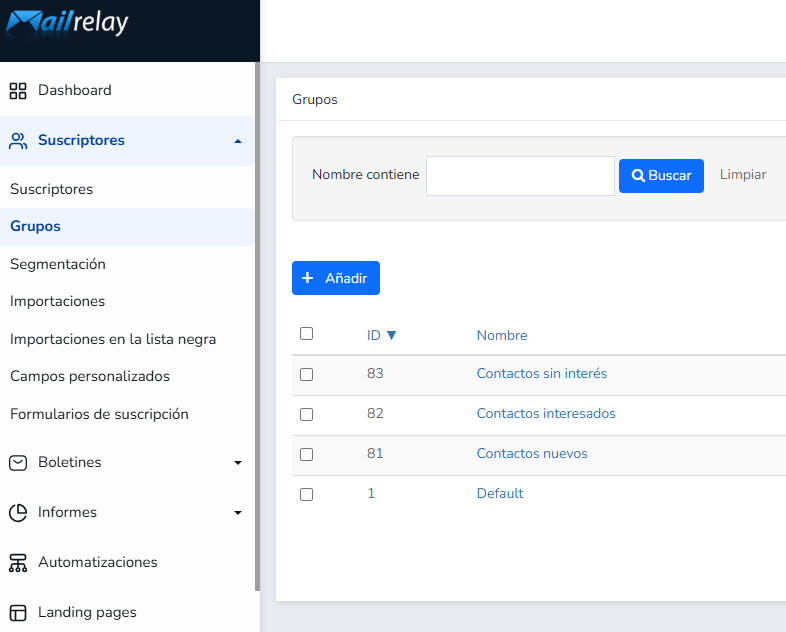
Here we are making a basic division by situation in a hypothetical sales funnel:
- New contacts: these would be the contacts that just registered, those entering the funnel
- Interested contacts: could be those who have clicked on a specific link in one of your campaigns
- Uninterested contacts: could be the contacts who haven’t clicked on a specific link
This is a basic division, as a simple example.
You can create many more groups that respond to different segmentations you already have or plan to do.
These groups would be like a sort of list where contacts are stored so you can work with them later.
· Expand information with custom fields
Groups allow you to create basic divisions.
But you can expand on more information with custom fields in the Subscribers – Custom fields menu.
Like before, I’ll give you a basic example:
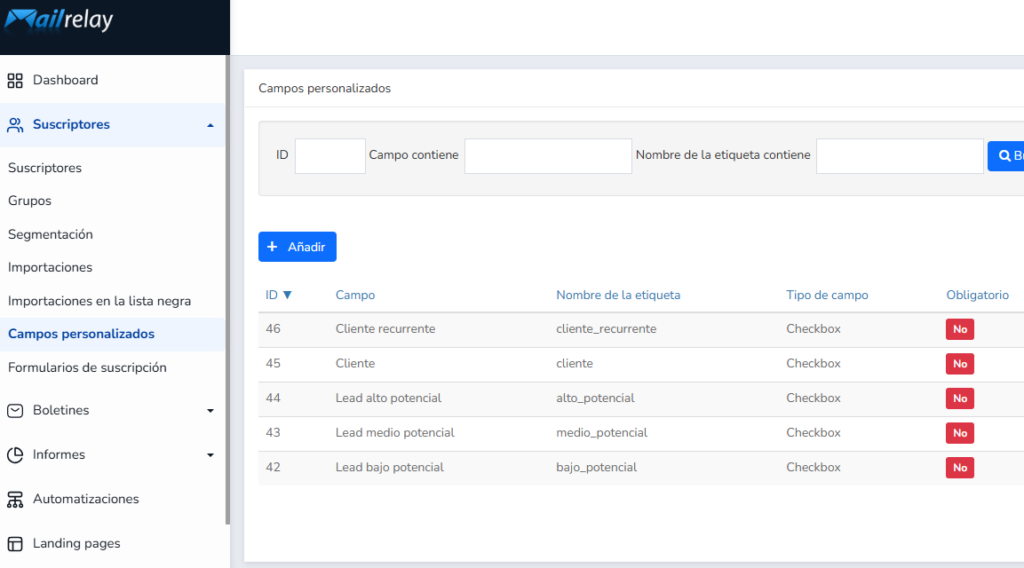
In this case we have created five checkbox-type custom fields:
- Recurring customer
- Customer
- High potential lead
- Medium potential lead
- Low potential lead
These are fields that will allow you to label contacts and their status.
For example, if there is a contact you value as a ‘high potential lead’ you can edit and mark them that way:
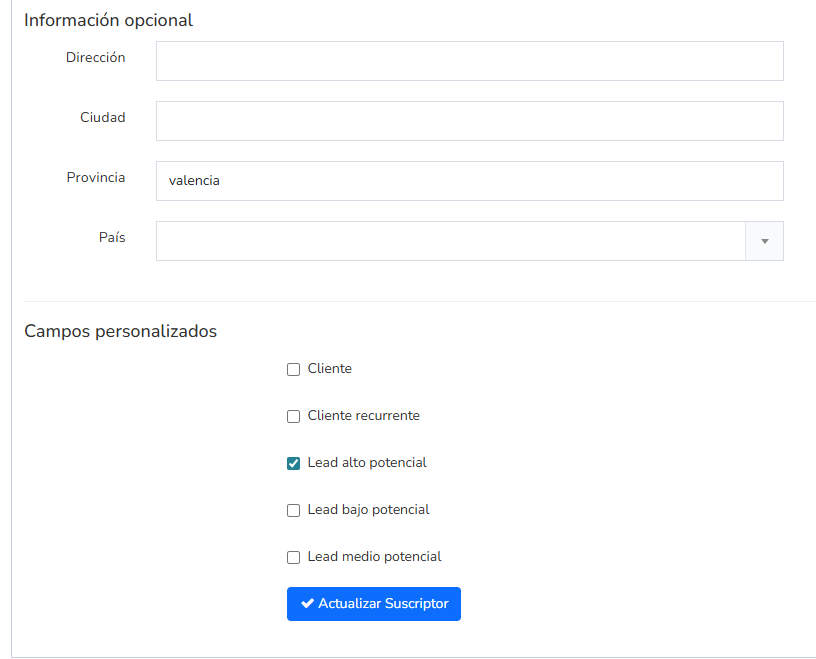
This way this contact would be marked with that value.
What could you do with this data?
The next step.
· Segment your list based on the value of custom fields
In the Subscribers – Segmentation menu you will find the Mailrelay segmentation tool.
Perhaps not as powerful as a dedicated CRM, but it will serve to segment your contacts perfectly for email campaigns.
For instance
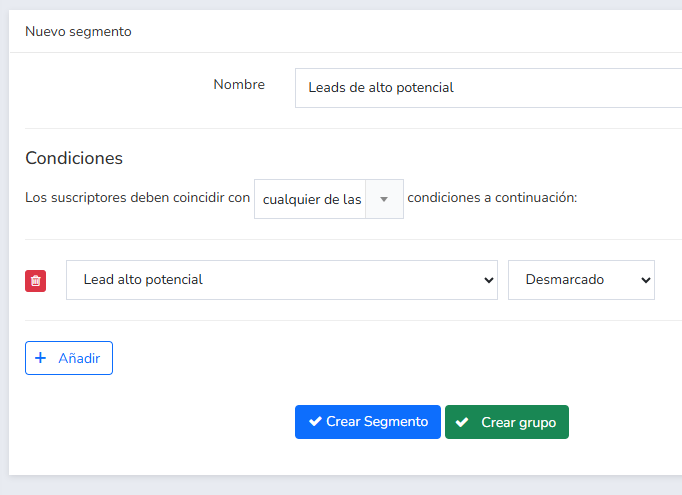
This tool allows you to create a segment, or a group, based on certain conditions.
What is the difference?
- A segment is dynamic; contacts that meet the condition will automatically enter the segment. Those who stop meeting it will be removed.
- In the case of groups, they are static; they will include the contacts that meet the condition at the moment you click ‘create group’.
In both cases, it allows you to select and work with the contacts that meet the condition, or conditions, you have set.
This is how you can create completely personalized campaigns.
· You can also import contacts with these custom fields
You may already have an external contact list with these custom fields.
For example, if you have a CRM, you may be able to generate a CSV file with the fields you need and their values, and import that file directly into Mailrelay.
From the Subscribers – Imports menu.
The next step could be preparing a newsletter that contains a link that, if clicked, allows you to detect the contacts’ interest.
For instance
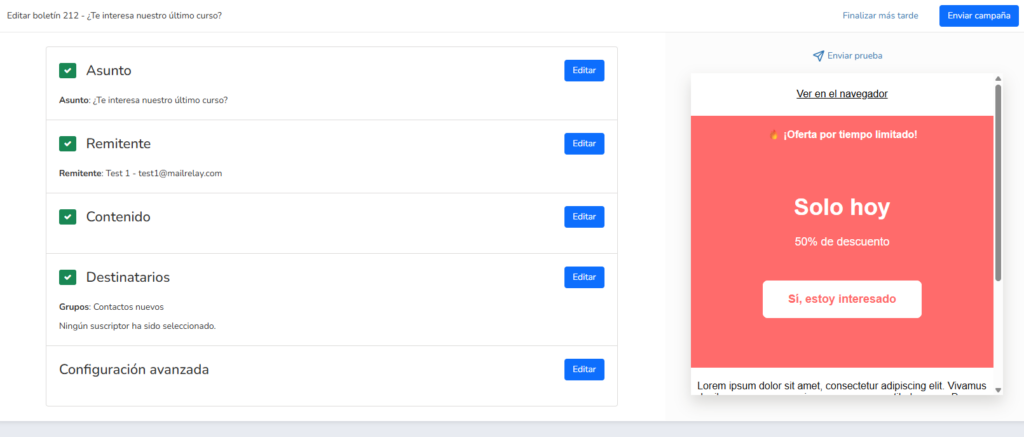
In this case it is a simple newsletter, which would be sent to our example group ‘new contacts’ and includes a link.
We can again create a segment that checks for contacts who have clicked on the link demonstrating their interest:
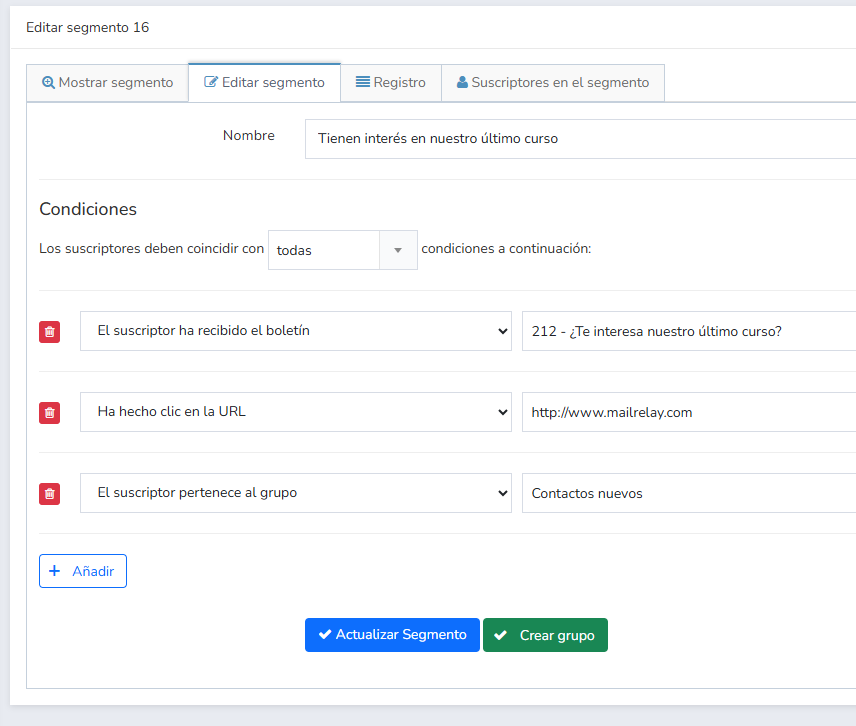
In this case we have several conditions, and we want ‘all’ of them to be met:
- That the subscriber has received a specific newsletter
- Considering the group they belong to, for more security
- And that they have clicked
This way you would have exactly those contacts.
· Can a funnel be automated to classify contacts?
Yes, you can also automate this process we have been looking at.
It would be, simplifying, something like this:
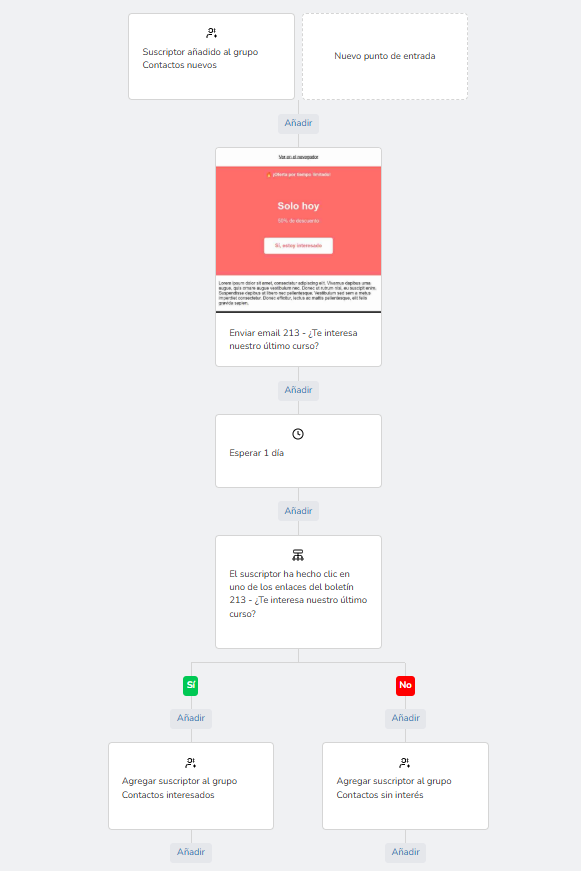
What does this automation do?
- It triggers when a contact is added to the ‘new contacts‘ group
- It sends an email ‘Are you interested in our latest course?’
- Wait one day (so contacts have time to react to the emails)
- And check if they clicked on the link we are interested in or not
- If it is ‘yes‘ it adds them to the ‘Interested contacts‘ group
- If they haven’t clicked, it adds them to the ‘Uninterested contacts‘ group
This way contacts are added to the determined groups, and thus you can work with them in other phases of the sales funnel.
It’s not exactly a CRM but you can do a lot of things.
You can automate many things:
- Welcome automations
- Step-by-step funnels
- Cart recovery (WooCommerce)
- Birthday emails
- Etc.
· Don’t forget to check the statistics
From all your email campaigns you can learn important data such as:
- Open rate
- Click-through rate
- Best performing links (heat map)
- Bounced emails (to automatically keep your list clean)
- Number of unsubscribes
- Spam complaints
All this statistical information keeps your list as healthy as possible, so its effectiveness doesn’t drop, and your results are the best possible.
In addition, you will know which calls to action are effective, which links are visible enough, which subject lines work and which don’t.
Truly useful information for creating email campaigns that sell.
· Use a visual drag and drop editor
Mailrelay’s email editor is very simple to use, just drag and drop the elements where you want them.
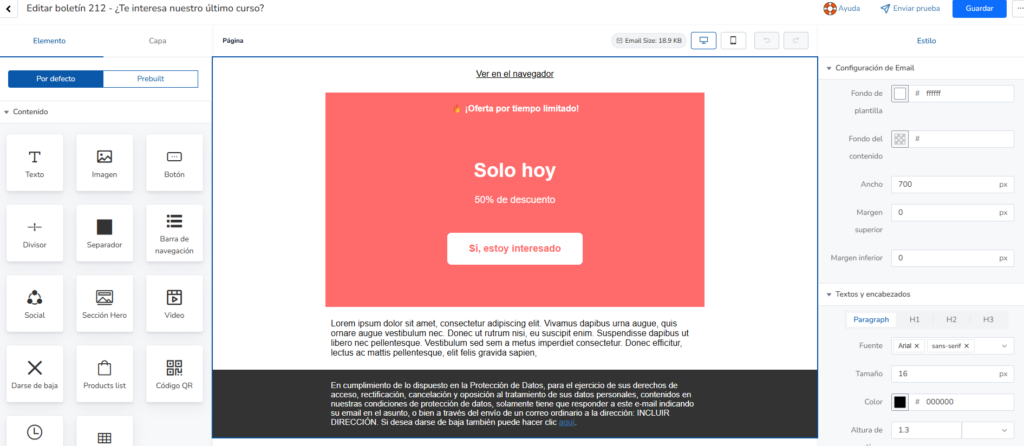
This editor is probably more powerful than what you have in a normal CRM.
In fact, it even allows you to have conditional zones based on variables, as we could see here.
At the end of the day, the quality of the email determines how easy it is to convince contacts.
An editor with the power to create better emails will help you sell.

Practical comparison: Mailrelay vs. other email marketing options
In this mini comparison of email marketing tools we are going to look at a key point:
- The number of emails that can be sent for free
It is a very simple comparison:
· Mailrelay:
It allows you to send up to 80,000 emails per month for free, to up to 20,000 contacts, every month.
With free support always available, via chat, ticket and email.
· Mailjet:
up to 6,000 emails per month, with a maximum of 200 per day. In addition, they indicate free ticket support during the first 30 days.
· MailerLite:
250 subscribers and up to 2,500 emails per month on the free plan (since June 2026).
· Acumbamail:
2,000 emails per month in the free account. To a maximum of 250 subscribers.
· Brevo:
300 daily emails.
· Mailchimp:
Up to 250 contacts and 500 messages per month, with a daily limit.
Support, only by email and only during the first 30 days, then only available for paid accounts.
· Klaviyo:
Up to 500 emails per month in the free account and support for 60 days.
How can these limits affect your company?
A low daily limit, for example, can prevent a launch or a newsletter at the most needed time.
The same goes for the lack of support, which always becomes evident when it is most needed.

Frequently asked questions to decide if you need a CRM
Before we finish, we will emphasize this key point: email marketing software or CRM?
Can Mailrelay replace a CRM?
In reality, it can cover the needs that most SMEs encounter on a daily basis:
- Database
- Contact list management
- Segmentation
- Automation
- Email follow-up
And if I already have a sales CRM, does it make sense to use Mailrelay?
Yes, if you want to professionalize your email marketing strategy.
You can use your sales tool to segment and Mailrelay to send emails.
What type of business usually uses Mailrelay as an “email marketing CRM”?
Businesses whose sales strategy requires multiple impacts, with various types of content.
What do I need to start my database in Mailrelay?
A list, even a small one, and two or three useful fields to help segment it.
Then you segment as we have seen in this article and create an automated welcome.
What do I gain with a CRM approach applied to email marketing?
You gain relevance and repetition.
Most sales don’t happen on the first interaction.
More impacts are necessary.
Email marketing allows you to do that: impact, interact, convince.
Would any email marketing tool work?
Before you decide, I recommend you review this article where we evaluate the savings and advantages of migrating to Mailrelay.