We live in a new era in which marketers and sales reps work together.
We live in the era of inbound marketing.
Inbound marketing consists of doing marketing to collect the emails of potential customers, so you can send them email marketing campaigns, then continue the conversation through a CRM once they show interest, and finally sell them our product or service.
So in this article I want to walk you through, step by step, how we do it ourselves at our company (SumaCRM), so that you can draw some inspiration from our process if it’s useful to you.
1. Marketing to collect potential customers’ emails
We currently have 100,456 users visiting our website every month.
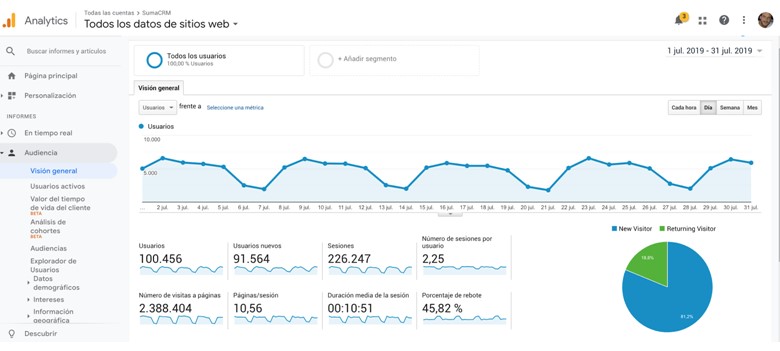
That translates into between 700 and 1,000 sign-ups a month from potential customers.
Reaching these great numbers is the result of 4 years spent testing every possible marketing channel, keeping only the ones that are most profitable
· SEO: SEO brings us 30% of our customers. It consists of writing an article for every search your potential customers are currently making on Google. If you want to learn SEO, I recommend Romuald Fons’ SEO course.
· Blog: 50% of our customers come from our blog. On the blog we share, 100% openly and with real data, what we ourselves are doing to reach €100,000/month in revenue. This is a broader topic than talking about CRM, but since anyone who wants to learn to manage their business better and sell more is very likely to need a CRM as well, it’s a spectacular marketing channel.
· Sales course: 10% comes from the sales course. We’ve created a free sales course: if you sign up with your email, you get one lesson every 2 days with everything we ourselves have learned about sales on our way to €100,000/month in revenue with one of our companies.
· Press releases: We send 1 press release a month through the agency techsales. They don’t generate sign-ups directly, but from experience we see that when we do press releases, we build our brand and the sign-up rate goes up in the rest of the channels.
· Adwords and Facebook ads: We invest €2,000/month. It doesn’t account for a significant share of sign-ups, but above all it lets us do remarketing, so that everyone who arrives through the channels above keeps seeing one of our banners and the sign-up rate goes up.
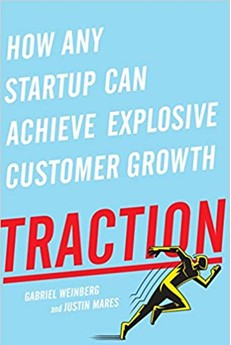
If you’re not very well versed in marketing, I recommend this book, which covers all the marketing channels in a very simple yet complete and clear way:
Done! You now have lists of potential customers’ emails you can send email marketing campaigns to. On to step 2…

2. Sending Email Marketing campaigns
In our case, every Tuesday I send them a new post to remind them to come back and visit SumaCRM. Thanks to that, I have a better chance of them asking to buy our tool and moving on to step 3 🙂 But first…
I send it from Mailrelay. The reason for using an email marketing tool is that the deliverability of my emails is much higher than if I sent them with my own SMTP.
Also, running a campaign with an Email Marketing tool is very easy.
The steps are:
- You upload your email database
- You write the email
- You hit send 🙂
A picture is worth a thousand words:

And now, we wait! Once the email is sent, the idea is that if they reply, you continue the conversation through a CRM, so you can sell them our product or service when they ask for it.
3. Continuing the conversation with a CRM
In our case, we use SumaCRM ourselves, but of course feel free to use another CRM.
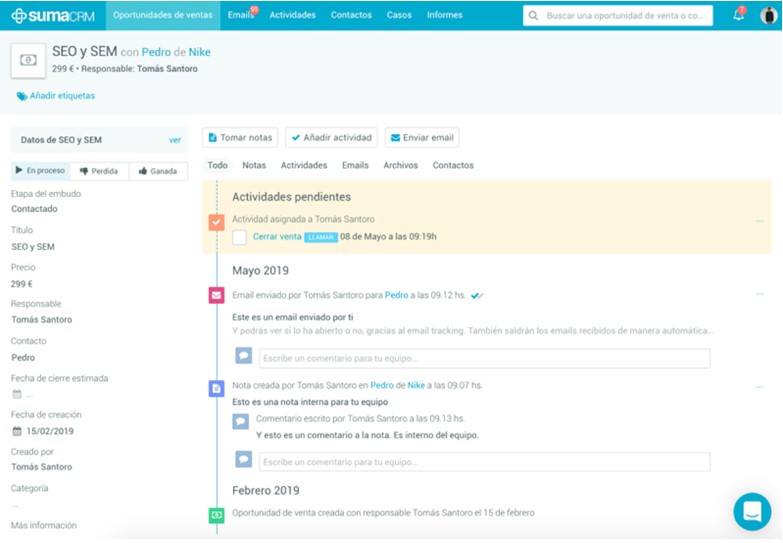
The key, though, is that the CRM you choose has a built-in email manager, so that when a potential customer replies to you, the reply automatically shows up on that potential customer’s record.
That way, any sales rep can see whether a potential customer is showing interest and can reply, call them, add notes and assign activities so that no potential sale is ever left without follow-up. And not only that: you follow up without losing a second, since everything is noted on a record that is shared with everyone in the company. For example:
If you want the mailing to show up in SumaCRM too, it’s very easy: you just need to integrate Mailrelay and SumaCRM, and send the mailing from SumaCRM.
► How to integrate Mailrelay and SumaCRM?
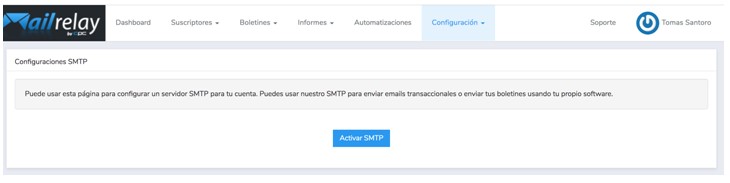
1. Get Mailrelay’s SMTP in your account: You just need to go to https://youraccount.ipzmarketing.com/admin/smtp_settings and click the “Activate” button
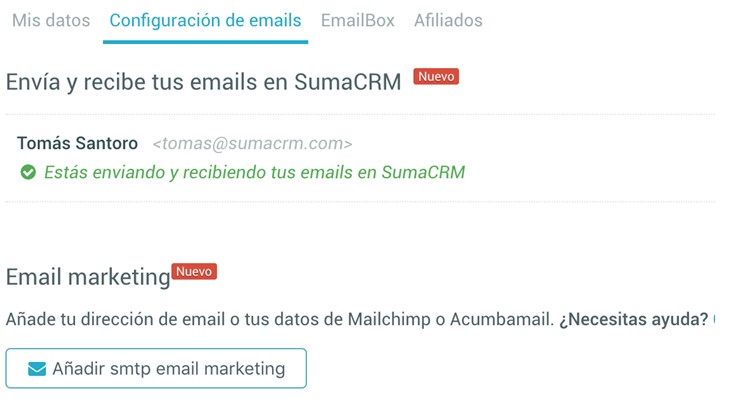
2. In SumaCRM, add Mailrelay’s SMTP for your email marketing mailings: You just need to go to “My account > Email settings” and click the “Add” button:
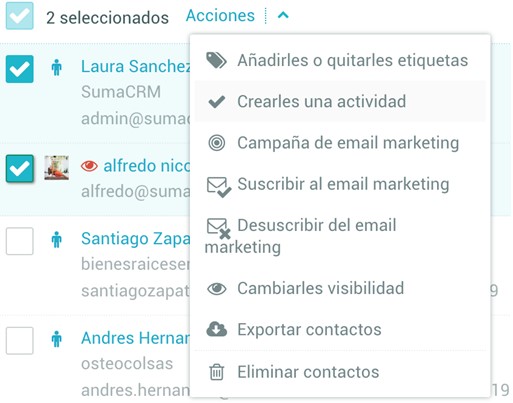
3. Send from within SumaCRM: Go to contacts, select the contacts and then click “Bulk actions > Email marketing campaign” and you’ll be able to write the email and hit send 🙂
It takes a little more work, but it’s well worth it if you want to follow up with those who don’t reply. What I do myself is put a tag on them in SumaCRM before sending, and remove it from those who reply to me, and that way I email the rest again 🙂 In case it’s useful, here’s an article with my own cold email sequence.
I hope this article has helped you learn how to use email marketing with a CRM, so that marketing and sales teams work together to win more customers 🙂
Want to skyrocket your sales?
Your turn!
Sign up for Mailrelay and SumaCRM and try this strategy today.
If you have any questions, leave a comment!
This strategy is part of lead generation, and if you want to dig deeper into how to capture leads, we have a guide on techniques and strategies for getting effective leads.