CRM and email marketing: how to integrate them step by step (with 6 workflows to copy)
What data to sync, how to connect them without coding and which workflows to set up so sales and marketing work with the same information

What data to sync, how to connect them without coding and which workflows to set up so sales and marketing work with the same information
Has this ever happened to you: a customer unsubscribes from your newsletter and, a week later, a sales rep emails them offering the same thing?
It happens more often than you’d think. It happens when the CRM and email marketing each live in their own world.
The CRM knows who each contact is and where they are in the sale. The email tool knows who opens, who clicks and who has unsubscribed.
On their own, each one only sees half the picture. Bringing CRM and email marketing together gives you the whole picture.
In this guide you’ll see how to connect the two and what data should flow from one to the other. You’ll also see which CRMs fit best.
And at the end you’ll find 6 CRM and email marketing workflows you can set up this very week.
A CRM organizes your relationship with each customer: data, opportunities, calls and tasks. An email marketing tool sends messages to many contacts at once and measures what they do with them.
When they work together, you gain three things.
Less manual work. Nobody exports an Excel file every Monday to upload the new leads to the list.
Better-timed messages. A contact who becomes a customer stops receiving acquisition emails and starts receiving welcome emails.
Better sales follow-up. The sales rep knows which contacts clicked in the latest campaign and who to call first.
Integrating CRM and email marketing doesn’t have to be complicated. These days you can set it up in an afternoon without coding.
Before connecting anything, decide what information you need on each side. Syncing everything fills contact records with fields nobody uses.
This table sums up the most useful data and which way it should travel.
| Data | Direction | What it’s for |
|---|---|---|
| Email, name and company | CRM → email marketing | Personalize the greeting and the subject line |
| Funnel stage (lead, opportunity, customer) | CRM → email marketing | Send each contact the message for their stage |
| Industry, product of interest or city | CRM → email marketing | Segment campaigns |
| Sign-up date or last purchase date | CRM → email marketing | Welcome, anniversary and reactivation emails |
| Unsubscribes from the list | Email marketing → CRM | Stop sending marketing to people who don’t want it |
| Clicks on specific links | Email marketing → CRM | Spot interest and alert the sales rep |
| Bounces | Email marketing → CRM | Fix addresses that no longer exist |
In Mailrelay, CRM data is stored in custom fields.
The funnel stage usually works better as a subscriber group, because automations are triggered when someone joins a group.
One simple rule avoids a lot of trouble when bringing CRM and email marketing together: each piece of data has one owner.
The CRM is in charge of the stage and the sales data. The email tool is in charge of unsubscribes and sending activity.
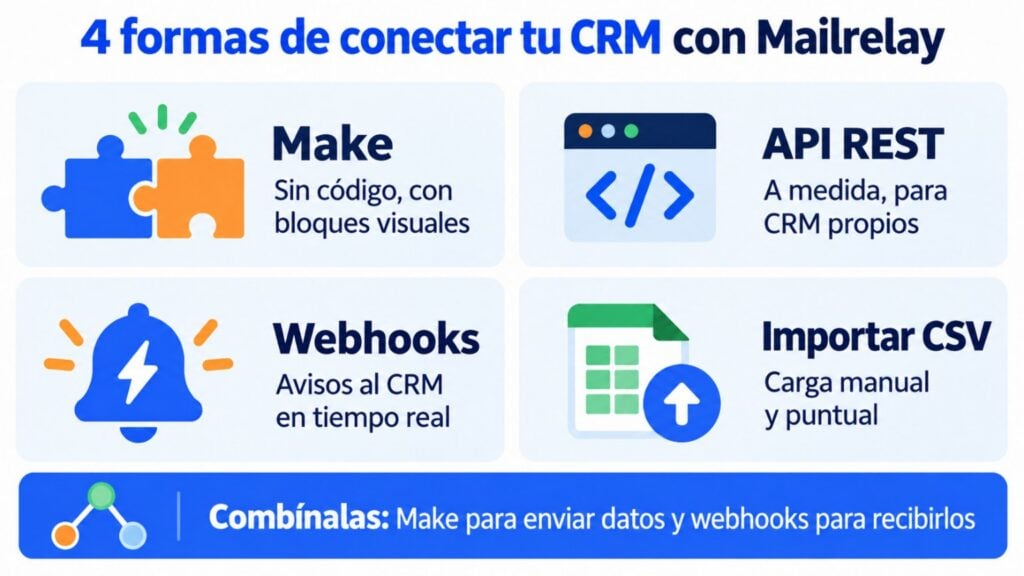
There are four ways to connect a CRM to Mailrelay. You can combine them.
Make is a no-code automation platform. You connect two apps with visual blocks: “when this happens in the CRM, do this in Mailrelay”.
The Mailrelay app on Make has 11 modules. With them you can create or update subscribers, create and manage groups, look up a contact or resend the confirmation email.
And if you need something else, there’s a module to make any API call.
Make also has modules for the most widely used CRMs, such as HubSpot, Pipedrive, Salesforce and Zoho CRM. That’s why it’s the fastest way to connect your CRM to email marketing.
There’s even a ready-made template that creates a subscriber in Mailrelay every time a new contact is added in HubSpot.
Keep in mind: the Mailrelay app on Make only has actions, not triggers.
For the way back (from Mailrelay to the CRM) you use webhooks, which you’ll see in option 3.
Mailrelay’s API lets another program read and write almost everything in your account. It authenticates with a key you create in your account settings.
For a CRM integration, the most useful resources are subscribers, groups, tags and custom fields. You can also check sent campaigns, unsubscribes and bounces.
The API allows up to 250 requests every 5 minutes on all plans. For large syncs it has a batch function that groups up to 500 operations into a single call.
It’s the logical choice if your CRM is custom-built or an ERP, or if you already have someone technical on the team. Also when you want the connection between your CRM and email marketing to do something Make doesn’t cover.
A webhook is an automatic notification Mailrelay sends to another system when something happens. You set them up in Settings > Event subscriptions.
You can get notifications for sign-ups, unsubscribes and SMS status. That way, when someone unsubscribes from a newsletter, your CRM knows at that very moment. It’s the piece that closes the loop between CRM and email marketing.
The notification can go straight to your CRM or to a Make scenario, which then updates the contact record.
You’ll find the step-by-step instructions in our guide to webhooks for connecting your subscribers to your CRM.
Mailrelay automations can also fire a webhook as one of their steps. This opens the door to workflows like “if they click, notify the CRM”.
The simplest one. You export the contacts from the CRM to a CSV file and import it into Mailrelay, mapping each column to its field.
It’s useful for the first load from your CRM into email marketing, or if your database rarely changes. But it isn’t an integration: each import is a snapshot, and unsubscribes don’t flow back to the CRM on their own.
Some CRMs let you send one-to-one emails from the customer record using an external SMTP server. You can use Mailrelay’s SMTP so those emails get good deliverability.
Note: those are transactional emails or one-to-one emails, not campaigns. For newsletters and sequences, the CRM and email marketing integration you’re after is one of the first three options.
There’s no single best CRM for everyone. To combine CRM and email marketing, good connection options matter more than a long list of features.
This table sums up the most common options for small and medium-sized businesses and how they connect to Mailrelay.
| CRM | Who it suits | How to connect it to Mailrelay | Keep in mind |
|---|---|---|---|
| HubSpot | Small businesses that want to start for free and grow module by module | Make (ready-made template available) or API | Many marketing features are on paid plans |
| Pipedrive | Sales teams that work with a pipeline | Make or API | Its campaign tool is a paid add-on |
| Salesforce | Medium and large companies with complex processes | Make or API, often with technical help | The real cost includes implementation and administration |
| Zoho CRM | Small businesses already using other Zoho apps | Make or API | It’s worth organizing your fields properly before syncing |
| In-house CRM or ERP | Businesses with custom-built software | API and webhooks | You need someone technical |
| No CRM | Small businesses with few customers | Mailrelay groups and fields | A lightweight CRM inside your email tool may be enough |
If you’re still choosing, in this guide we explain how to choose a sales CRM based on your sales process. If you’d rather start at no cost, here are 8 free CRM options and their limits.
And if you have few customers, you may not need one. See how to use Mailrelay as an email-marketing-focused CRM with groups, fields and segments.
Connect your CRM to a free email tool
Up to 80,000 emails a month and 20,000 contacts, with API, webhooks and Make integration on the free plan. No credit card required.
These are the CRM and email marketing workflows that deliver the best results. Each one shows what triggers it, what it does and which option you build it with.
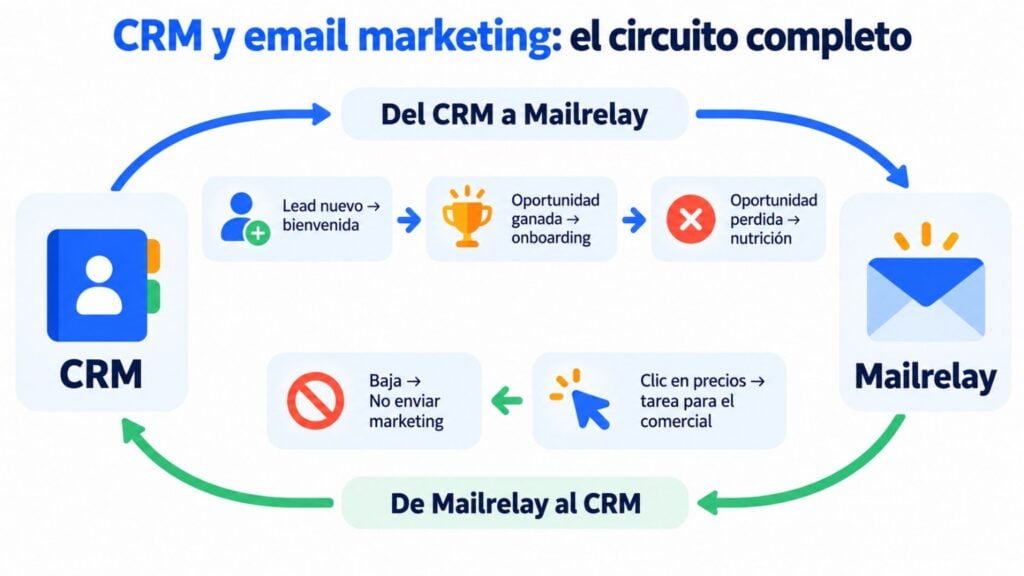
The lead gets your welcome within minutes, not days later. When a new contact is added to the CRM, Make creates it in Mailrelay in the “New leads” group.
That group triggers an automation with a welcome email and, a few days later, one or two emails with your best content.
Someone who has just bought shouldn’t keep receiving acquisition emails. When the sales rep marks the opportunity as won, Make removes the contact from the “Leads” group and adds them to “Customers”.
Joining that group starts a customer onboarding sequence: first steps, resources and who to ask for help.
Unsubscribes come first, and the CRM needs to know about them. Set up an unsubscribe webhook that updates the contact record with a “Do not send marketing” field.
That way no sales rep adds them to a campaign from another tool.
This is what prevents the situation at the start of this guide and helps keep your unsubscribe rate low and your reputation high.
A click on “See pricing” is a buying signal. Create an automation in Mailrelay: send the email, wait a day and check whether the contact clicked that link.
If they did, the automation adds them to the “Interested” group and fires a webhook. The CRM receives the notification and creates a call task. It’s a simple version of lead scoring.
This workflow needs click tracking. In Mailrelay it’s included in the free plan and in Enterprise, but not in Standard.
Winning back a customer costs less than getting a new one. If your CRM stores the date of the last purchase, Make can pass it to a Mailrelay custom field.
With that field you create a segment of inactive customers and send them a reactivation campaign with a reason to come back.
A “not now” isn’t always a “never”. When an opportunity is lost because of budget or timing, the contact moves to the “Nurturing” group.
There they receive your monthly newsletter with case studies and news. It’s effortless lead nurturing for the sales team. If they show interest again, workflow 4 picks it up.
Connecting your CRM to email marketing is half the job. The other half is using the data well.
Ask for permission before syncing. A contact being in your CRM doesn’t mean they’ve agreed to receive your campaigns.
Only sync people who gave their consent, ideally with double opt-in. Review the GDPR and LSSI rules for email marketing if you have any doubts.
Only sync what you’re going to use. Five well-filled fields are worth more than thirty half-empty ones. If a piece of data doesn’t change any email, leave it in the CRM.
Personalize wisely. Using the name and company works. But mentioning data the contact doesn’t remember giving you makes them uncomfortable. You’ll find ideas in our post on personalization in email marketing.
Segment by stage, not just by data. A lead, an open opportunity and a customer need different messages. Segmentation by stage is the main advantage of bringing CRM and email marketing together.
Respect unsubscribes in both directions. If someone unsubscribes, make sure they don’t get back on the list with the next sync.
Mailrelay’s suppression list protects you from that mistake.
Test with a few contacts. Before turning on a workflow for your whole database, run it with ten test contacts and check that the data arrives correctly.
Mailrelay is a tool designed to bring your CRM and email marketing together, or to act as a lightweight CRM if you don’t have one yet.
If you want to go a step further, you can also connect Mailrelay to ChatGPT and Claude and ask for your account data in natural language.
You’ll find the rest in Mailrelay’s features and on the pricing page.
You don’t need to set up all the CRM and email marketing workflows at once. Start with 1 and 3: automatic welcome emails for new leads and unsubscribes that flow back to the CRM.
With those two, your CRM and email marketing already talk in both directions. Once they’re working, add the rest.
Set up your first CRM and email marketing workflows this week
Create your free account and start with the automatic welcome and synced unsubscribes, with human support on every plan.
These are the most common questions when integrating CRM and email marketing.
It’s the combination of a CRM, which manages the relationship with each customer, and an email marketing tool connected to it.
The CRM provides each contact’s data and stage, and the email tool sends the campaigns and sends back the activity.
A CRM is used to manage contacts, opportunities and sales tasks, almost always one at a time.
An email marketing system is used to send campaigns to many contacts at once and measure opens, clicks and unsubscribes. That’s why the usual approach is to use a CRM with email marketing connected, rather than choosing one or the other.
Pass the funnel stage and two or three useful pieces of data to email marketing, such as industry or last purchase date.
With them you can segment, send different messages to leads and customers, and win back people who haven’t bought in a while.
Yes. With Make you connect HubSpot, Pipedrive, Salesforce, Zoho CRM and many more using visual blocks. For the way back, Mailrelay webhooks are set up from the dashboard, with no code.
Yes, if your CRM lets you use an external SMTP server.
On the free plan, transactional sending via SMTP and API comes with a 30-day trial and then costs €14.95 a month. On Standard and Enterprise it’s included.