Free CRM in Spanish: 8 options and what each plan really includes
How many users and contacts each one gives you, what it lacks and when it is worth paying

How many users and contacts each one gives you, what it lacks and when it is worth paying
Do you keep track of your customers in a spreadsheet and are starting to lose the thread? That is the moment when almost every small business looks for a free CRM. The good news is that there are serious options. The bad news is that “free” doesn’t always mean the same thing.
Some free plans are free forever. Others are a 14-day trial. And almost all of them limit users, contacts or automations.
In this guide you’ll find 8 free CRM options you can use in Spanish. You’ll see what each one includes, what it lacks and how much it costs to move up to the first paid plan. The data is from October 2026.
Yes, but it helps to distinguish three kinds of “free”:
Free-forever plan. You use it without paying and with no expiry date, with limits on users, contacts or features. This is the case with HubSpot, Zoho and Bitrix24.
Open source. The software is free, but you install it on your own server. You pay for hosting and maintenance. This is the case with EspoCRM and SuiteCRM.
Free trial. You use the full plan for a few days and then pay. It is not a free CRM, even though it is sometimes advertised as one. Pipedrive, for example, offers a 14-day trial.
If you’re still not sure whether you need one, review what a CRM is and when it’s worth it.
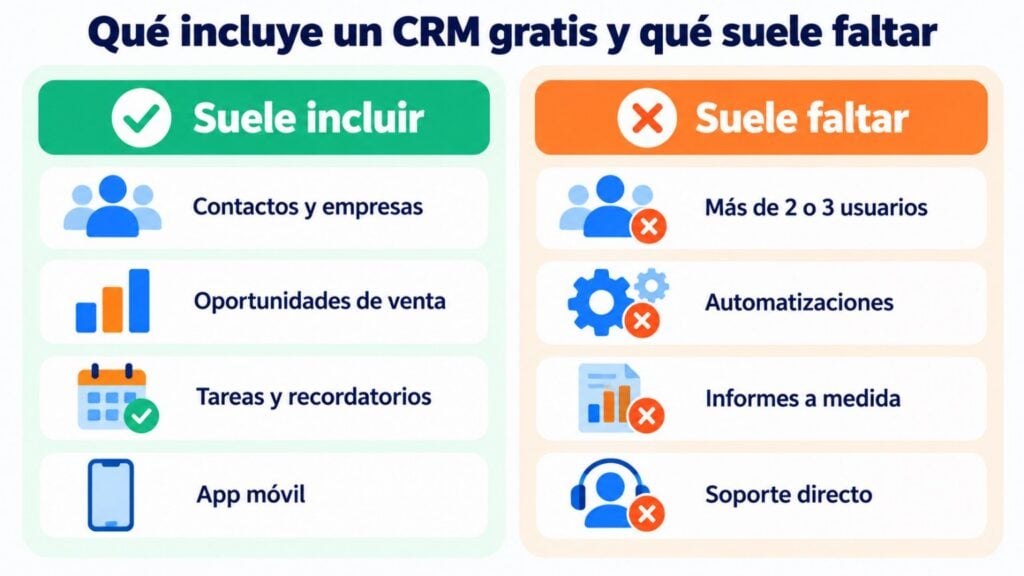
Free plans are quite similar in what they cut back:
For a freelancer or a small team, these limits are usually enough for months.
This table summarizes what each free CRM offers in its no-cost version. Prices are approximate and may change.
| CRM | Type of free | Free users | What the free plan lacks | First paid plan |
|---|---|---|---|---|
| HubSpot CRM | Free-forever plan | 2 | Automations, custom reports | Starter from $20 per user per month |
| Zoho CRM | Free-forever plan | 3 | Bulk email, multiple pipelines, AI | Standard from €14 per user per month (annual) |
| Bitrix24 | Free-forever plan | Unlimited | Storage (5 GB) and advanced features | Basic from $49 per month for 5 users (annual) |
| Brevo | Free-forever plan | 1 | More than 300 emails per day | Starter from $9 per month |
| Odoo CRM | One free app | Depending on Odoo’s terms | Other apps (invoicing, inventory) | From €19.90 per user per month |
| EspoCRM | Open source | Unlimited (on your server) | Hosting and support | Cloud from about $15 per user per month |
| SuiteCRM | Open source | Unlimited (on your server) | Hosting and support | You only pay for hosting or support |
| Mailrelay | Free-forever plan (email marketing) | Multiple users | Sales opportunity management | Paid plans based on sending volume |
These are the options that make the most sense for a Spanish-speaking small business. For each one you’ll see what the free plan includes, who it suits and what to look out for before choosing it.
The best-known free CRM. HubSpot lets you manage contacts, companies, deals and tasks, with a clear interface available in Spanish.
Free plan: up to 2 users. It includes limited marketing email, with HubSpot branding, and only predefined reports. It has no automations or sequences.
Ideal for: small businesses that want to start for free and grow module by module. It integrates with hundreds of tools, including email marketing ones. Watch out: paid plans get expensive quickly when you add marketing or more users.
Very complete for a free version. Zoho CRM offers a free edition for up to 3 users, with contact management, reminders, email templates and mobile apps.
Free plan: about 5,000 records, limited automation and restricted exports. It does not include bulk email sending, multiple sales pipelines or its AI assistant.
Ideal for: small teams that already use other Zoho apps. The Standard plan costs about €14 per user per month, billed annually.
Unlimited users on the free plan. Bitrix24 combines CRM, tasks, internal chat and calendars on a single platform.
Free plan: no limit on users and 5 GB of storage, but with a basic CRM. Many advanced features are only available on paid plans.
Ideal for: teams that want CRM and collaboration tools together. Watch out: it has so many features that the learning curve is steeper.
Email marketing with a sales CRM included. Brevo (formerly Sendinblue) adds a basic CRM for contacts, deals and meetings to its campaigns.
Free plan: 300 emails per day and a simple sales CRM. To send more or remove its branding, you have to pay.
Ideal for: businesses that want email and CRM in the same place. Its daily limit means a newsletter to a large list takes several days to go out. The Starter plan starts at $9 per month.
Free if you only use one app. Odoo is a modular system (CRM, invoicing, inventory, website). If you only activate the CRM app, you can use it without paying.
Free plan: the CRM app with its sales pipelines and activities. As soon as you add a second app, you move to the paid plan.
Ideal for: companies that may later want to bring together sales, invoicing and warehouse. The standard plan costs about €19.90 per user per month.
Open source, lightweight and in Spanish. EspoCRM is a simple CRM you can install for free on your server, with a Spanish translation.
Free plan: the Community edition, with no limit on users. You pay for hosting and take care of the updates.
Ideal for: companies with someone technical who want full control of their data. If you’d rather not install anything, its cloud version costs about $15 per user per month.
The open alternative to the big CRMs. SuiteCRM is a complete open source CRM, with sales, marketing and customer service.
Free plan: the whole software, with no licenses. You need a server and technical knowledge to install and maintain it.
Ideal for: mid-sized organizations with a technical team. Watch out: the software is free; the maintenance time is not.
For those who need to organize contacts, not a sales pipeline. Many small businesses don’t need a full CRM. They need to know who each contact is, what they are interested in, and send them the right message.
With Mailrelay you store your contacts with custom fields, organize them into groups, segment them and trigger automations based on their behavior. We explain it in “Do you need a CRM? Mailrelay could be it“.
Free plan: 80,000 emails per month and 20,000 contacts, no credit card required. Watch out: it does not manage sales opportunities or sales tasks.
Organize your contacts and email them for free
Custom fields, groups, segments and automations, with 80,000 emails per month and 20,000 contacts on the free account. No credit card required.
Pipedrive is one of the most widely used sales CRMs, but it only offers a 14-day trial. Its most basic plan costs about $14 per user per month, billed annually.
Freshsales used to have a free plan for up to 3 users. Several industry sources say it was withdrawn in 2026, so check its website before counting on it.
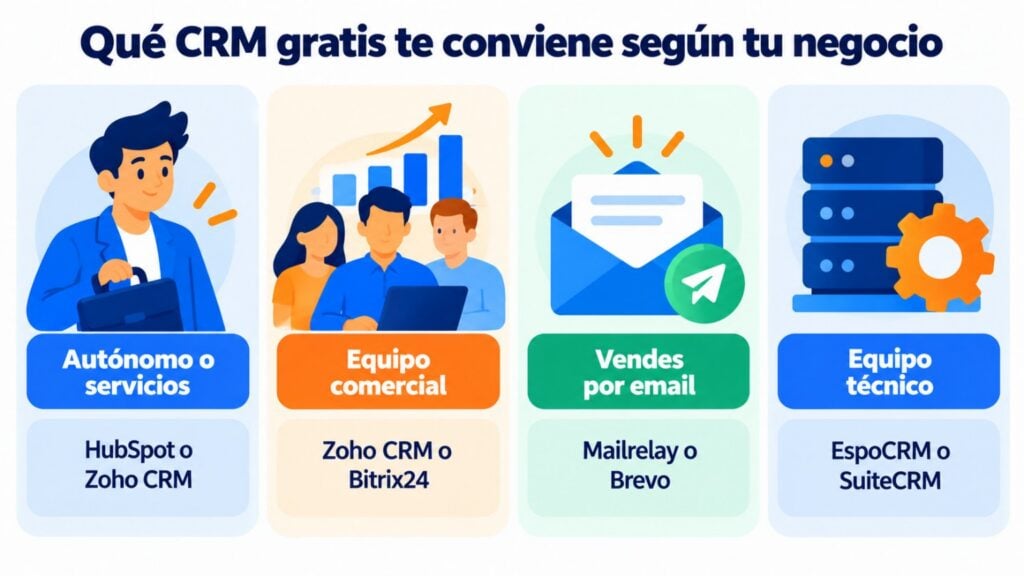
There is no single free CRM that is best for everyone. It depends on what you sell and who is going to use it.
| Your case | Recommended option | Why |
|---|---|---|
| Freelancer or service business | HubSpot or Zoho CRM | Easy, in Spanish and enough to get started |
| Small business with a sales team | Zoho CRM or Bitrix24 | More free users and task management |
| Business that sells by email | Mailrelay or Brevo | Contacts, segments and campaigns in the same place |
| Company that wants to grow on a single system | Odoo | It can add invoicing and inventory later on |
| Technical team that wants to keep its data in-house | EspoCRM or SuiteCRM | Open source, no licenses |
If your sales process is more complex, our guide to choosing a sales CRM will help you.
Before comparing features, answer these questions. They will save you a migration a few months down the line.
How many people will use it? If there are three or more of you, rule out plans limited to one or two users. Zoho CRM and Bitrix24 give you more room.
How many contacts do you have today and how many will you have in a year? Some free plans fall short as soon as your database grows. Plan for double what you have.
What process do you want to organize? If you sell through a stage-based sales funnel, you need deal management. If you mainly communicate with your customers, well-segmented contacts are enough.
What other tools does it need to talk to? Check whether it connects with your website, your store and your email marketing, directly or through its API.
Who is going to maintain it? An open source CRM is free, but someone has to install it, update it and make backups.
With these answers, the list of candidates usually narrows down to two. And for the rest of your software stack, see our guide to digital marketing tools.
A free CRM works well at first. These are the signs that it’s time to pay or switch:
You need more users. Your sales team is growing and the limit of two or three accounts is not enough.
You want to automate follow-up. Assigning leads, creating tasks or sending reminders by hand eats up hours. And scoring each contact with lead scoring is no longer feasible.
You’re missing reports. You need to know how much each channel or each sales rep sells, and the predefined reports don’t tell you.
Your data is scattered. The CRM doesn’t talk to your store, your website or your email tool, and you copy data from one place to another.
This last point can be solved without paying more: connect the CRM to your email marketing. We explain how in our guide to CRM and email marketing, with tools like Make or webhooks.
Before choosing, get your data in order. Export your contacts to a CSV file, remove duplicates and decide which fields you really need: name, email, company, stage and source.
Then try two options with real data for a week. See which one your team uses without complaining: that’s the one that will work.
And a legal warning: having a contact in your CRM doesn’t mean you can send them advertising. For email marketing you need their consent, and anyone who unsubscribes must stay on your suppression list. Review the GDPR and LSSI rules.
If your priority is communicating with your customers, Mailrelay can act as a lightweight CRM or complement the CRM you choose.
All with human support on every plan. You’ll find the details in what is Mailrelay and on the pricing page.
The free complement to your CRM
Connect Mailrelay to your CRM through Make, API or webhooks and send your campaigns from a free account, with human support on every plan.
These are the most common questions when looking for a free CRM.
It depends on how you’ll use it. HubSpot is the easiest to get started with, Zoho CRM allows more users with solid features and Bitrix24 doesn’t limit users. If what you need is to communicate with your contacts by email, Mailrelay or Brevo are more practical.
Yes. HubSpot, Zoho CRM, Bitrix24, Brevo and Odoo have their interface in Spanish. EspoCRM and SuiteCRM can also be used in Spanish with their language packs.
Yes, it has a free-forever plan for up to 2 users, with basic CRM features. Automations, custom reports and more email sending require the paid plans.
It has a free edition for up to 3 users and about 5,000 records. For bulk email sending, multiple pipelines or its AI, you have to move to the Standard plan or higher.
Almost all of them can be connected to an email tool through Make, Zapier or their API. Brevo includes email and CRM together, and Mailrelay can work as a lightweight CRM or connect with the CRM you already use.

Jose Argudo
CMO at Mailrelay. Writes about email marketing, copywriting and conversion for small businesses and entrepreneurs.