Digital marketing tools: the best by category (and which have a free plan)
Email, CRM, social media, SEO, analytics, design, web, automation and AI: what to use for each task and how much it costs to get started

Email, CRM, social media, SEO, analytics, design, web, automation and AI: what to use for each task and how much it costs to get started
How many tabs do you have open right now to manage your marketing? One for social media, another for email, another for stats… And you’re probably paying for a tool you barely use.
You don’t need all of them. You need to pick one or two good ones for each task and make them work together.
This guide covers 27 digital marketing tools sorted into 9 categories. All of them are still active in October 2026, and for each one you’ll see what it’s for, whether it has a free plan and how much the first paid plan costs.
Digital marketing tools are online software and services that help you attract customers, communicate with them and measure what works. They cover tasks such as sending emails, scheduling posts, ranking your website or analyzing traffic.
They are part of any digital marketing strategy, from a freelancer’s to a large team’s. If you’re not sure about yours yet, start with these digital marketing strategies for SMBs.
Traditional marketing relied on brochures, press ads and leaflet drops. They worked, but it was hard to know who saw them and what results they brought.
Digital marketing tools change that in four ways:
| Aspect | Traditional tools | Digital marketing tools |
|---|---|---|
| Measurement | Estimated (print run, audience) | Exact: opens, clicks, visits, sales |
| Cost to get started | High (printing, ad space) | Many have a free plan |
| Personalization | The same message for everyone | Messages based on each contact’s data |
| Speed | Weeks to change a campaign | Changes in minutes and A/B tests |
That’s why an SMB can compete today on a small budget. What matters is measuring and adjusting.
This table sums up the 27 digital marketing tools in this guide. Prices are for the first paid plan as of October 2026 and may change; always check each tool’s website.
| Category | Tool | Free plan? | Paid plan from |
|---|---|---|---|
| Email marketing | Mailrelay | Yes, 80,000 emails and 20,000 contacts | See Mailrelay pricing |
| Email marketing | Brevo | Yes, 300 emails a day | $9 a month |
| Email marketing | MailerLite | Yes, 250 subscribers | $12 a month |
| CRM | HubSpot CRM | Yes, 2 users | $20 per user a month |
| CRM | Pipedrive | No, 14-day trial | €14 per user a month (annual) |
| CRM | Zoho CRM | Yes, 3 users | €14 per user a month (annual) |
| Social media | Metricool | Yes, 1 brand | €16 a month (annual) |
| Social media | Buffer | Yes, 3 channels | $5 per channel a month |
| Social media | Meta Business Suite | Free | — |
| SEO | Google Search Console | Free | — |
| SEO | Semrush | Limited free account | $139.95 a month |
| SEO | Ahrefs | Free for your verified website | $129 a month (Lite) |
| Analytics | Google Analytics 4 | Free | — |
| Analytics | Data Studio (formerly Looker Studio) | Free | $9 per user and project (Pro) |
| Analytics | Microsoft Clarity | Free | — |
| Design and video | Canva | Yes | €110 a year (Pro) |
| Design and video | Adobe Express | Yes | $9.99 a month |
| Design and video | CapCut | Yes | Pro (price varies by country) |
| Website and store | WordPress | Free software (you pay for hosting) | $4 a month on WordPress.com (annual) |
| Website and store | Shopify | No, free trial | €24 a month (annual) |
| Website and store | Mailrelay landing pages | Yes, included in the free account | — |
| Automation | Make | Yes, 1,000 credits a month | $9 a month (annual) |
| Automation | Zapier | Yes, 100 tasks a month | $19.99 a month |
| Automation | n8n | Free if you self-host it | €20 a month in the cloud (annual) |
| AI | ChatGPT | Yes | €8 a month (Go) |
| AI | Claude | Yes | $20 a month (Pro) |
| AI | Gemini | Yes | €4.99 a month (Google AI Plus) |
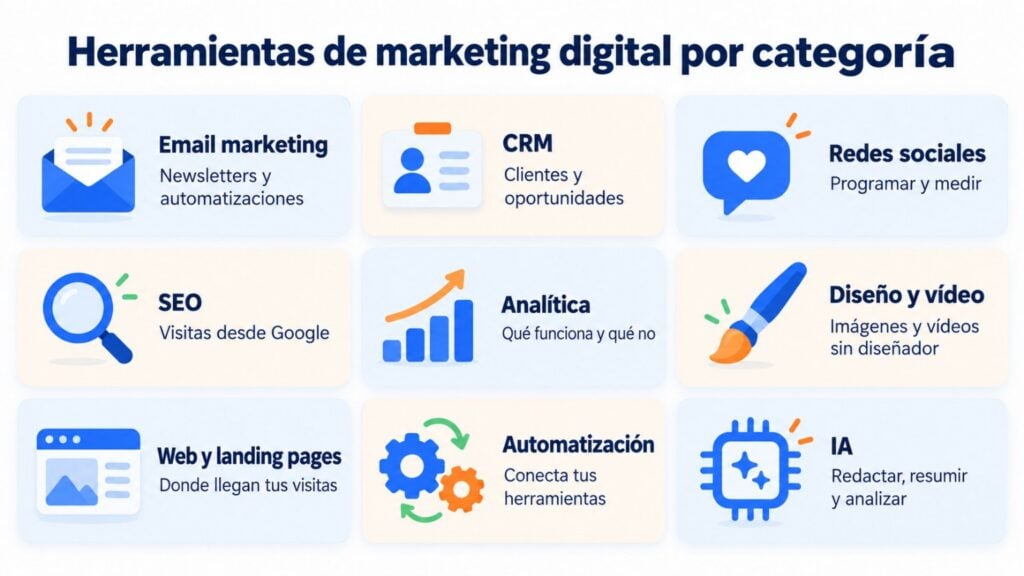
Of all digital marketing tools, email is the one that converts best for many SMBs, because the list is yours and doesn’t depend on an algorithm. If you want to dig deeper, there’s a guide to email marketing tools.
80,000 free emails a month. Mailrelay lets you send newsletters, automations, SMS and transactional emails from a single account, with a drag-and-drop editor and real-time stats.
Its free plan includes 80,000 emails a month and 20,000 contacts, with no credit card and no expiry date. It offers human support on every plan and connects with your CRM, your store or your AI assistant.
Email, SMS and WhatsApp on a French platform. Brevo (formerly Sendinblue) combines campaigns, automations and a simple CRM.
Its free plan limits sending to 300 emails a day. The Starter plan starts at $9 a month.
Simple and well designed. MailerLite is easy to learn and includes landing pages and a basic website.
Since June 2026, its free plan is capped at 250 subscribers and 2,500 emails a month. Its first paid plan starts at $12 a month.
Among digital marketing tools, a CRM is the one that keeps track of your relationship with each customer: data, deals and sales tasks. Connected to your email, it multiplies the value of both tools. We explain how in our guide to CRM and email marketing. And if you’re looking for one at no cost, compare these free CRMs and what each plan includes.
The best-known free CRM. HubSpot offers a free CRM for 2 users, with contact, company and deal management.
It grows by modules (marketing, sales, service). The Starter plan has a list price of $20 per user a month, with occasional lower offers.
Designed for sales teams that work with a pipeline. Pipedrive shows each deal as a card that moves through stages, which makes day-to-day sales work very visual.
It has no free plan, but it does offer a 14-day trial. The Lite plan starts at €14 per user a month, billed annually.
A good option if you already use other Zoho apps. Zoho CRM has a free edition for 3 users and highly configurable plans.
The Standard plan starts at €14 per user a month, billed annually. If you’re choosing one, our guide to choosing a sales CRM will help.
Scheduling ahead and measuring which posts work saves you hours every week. These three cover almost everything an SMB needs.
Scheduling and analytics in a single tool, available in Spanish. Metricool brings together planning for Instagram, Facebook, LinkedIn, TikTok and other networks, with reports and competitor analysis.
The free plan includes 1 brand and 20 scheduled posts a month. The Starter plan starts at €16 a month, billed annually.
The simplest way to schedule. Buffer has a clean interface and an extension for saving ideas while you browse.
Its free plan allows 3 channels and 10 scheduled posts per channel. Paid plans are charged per channel, starting at about $5 a month.
Meta’s official free tool. With Meta Business Suite you schedule Facebook and Instagram posts and stories, reply to messages and see your stats.
It’s free. You only pay for ads if you decide to boost posts.
SEO brings in traffic you don’t pay for per click. These digital marketing tools tell you what your audience searches for and how Google sees you. It helps to review what keyword research is.
What Google knows about your website, for free. Search Console tells you which searches you appear for, in what position and how many clicks you get. It also flags indexing errors.
It’s free and should be the first SEO tool for any website.
The most complete SEO suite. Semrush analyzes keywords, competitors, links and technical audits, and now also your visibility in AI answers.
It has a free account with 10 queries a day. The Pro plan costs $139.95 a month, with a 7-day trial.
The go-to tool for studying links and competitors. Ahrefs stands out for backlink analysis and its keyword explorer.
Its free access (formerly Ahrefs Webmaster Tools) only analyzes websites you verify as your own. The Lite plan costs $129 a month, and there’s a more basic Starter plan.
Without data, no digital marketing tool can tell you which campaigns work. Define your KPIs first, then choose where to measure them.
The standard for measuring your website. Google Analytics tracks visits, traffic sources, conversions and each user’s journey.
It’s free. Only large companies need the paid version, Analytics 360.
Visual reports with data from many sources. In April 2026, Google brought back the Data Studio name for its reporting tool. It connects Analytics, Search Console, spreadsheets and other sources in dashboards that update themselves.
The individual version is free. Data Studio Pro costs $9 per user and project a month.
Free heatmaps and session recordings. Clarity shows you where users click, how far they scroll and where they leave a page.
It’s free, with no known traffic limit. Very useful for improving landing pages and forms.
A polished image multiplies attention on social media and in email. These three digital marketing tools don’t require any design skills.
Easy design with thousands of templates. Canva works for posts, presentations, posters or newsletter headers, with AI features to generate or edit images.
The free plan is very complete. Canva Pro costs €110 a year in Spain.
Adobe’s alternative for creating quickly. Adobe Express includes templates, photo and short video editing, and image generation with its Firefly AI.
It has a free plan with 5 GB. Premium costs $9.99 a month.
Video editing for social media, from your phone too. CapCut is widely used for TikTok, Reels and Shorts, with automatic captions and effects.
The free plan exports up to 1080p. CapCut Pro is paid and its price varies by country.
Your website is the hub of everything else: it’s where the traffic generated by the rest of your digital marketing tools lands.
The world’s most widely used content management system. WordPress works for blogs, corporate websites and, with WooCommerce, online stores.
The WordPress.org software is free; you pay for hosting and the domain. WordPress.com has plans from $4 a month, billed annually.
An online store ready to sell. Shopify handles payments, shipping and inventory without installing anything, with thousands of apps.
It has no free plan, but it offers a trial. The Basic plan starts at about €24 a month, billed annually.
Lead capture pages connected to your list. With Mailrelay’s landing page creator you design a landing page with a form without touching any code.
Every sign-up goes into your list and can trigger a welcome automation. It’s included in the free account.
No-code automation tools connect your digital marketing tools to each other so data flows on its own. For example, from a form to your CRM and from there to your email list.
Visual, powerful automations. Make connects thousands of apps with block-based scenarios and has a Mailrelay integration.
The free plan includes 1,000 credits a month and 2 active scenarios. The Core plan starts at $9 a month, billed annually.
The best known and easiest to get started with. Zapier has the largest integration catalog and AI assistants for building automations.
The free plan allows 100 tasks a month with 2-step workflows. Professional starts at $19.99 a month.
Open source for technical teams. n8n can be installed on your own server at no cost and with no execution limit.
If you prefer the cloud version, the Starter plan costs €20 a month, billed annually.
Artificial intelligence is now an everyday digital marketing tool: writing, summarizing, analyzing data or brainstorming campaign ideas.
The most popular AI assistant. ChatGPT writes copy, generates images and analyzes files. You’ll find ideas for your campaigns in our guide to using ChatGPT for email marketing.
It has a free plan. ChatGPT Go costs €8 a month and Plus €23 a month.
Long-form writing, analysis and connections to your tools. Claude, by Anthropic, stands out for writing, document analysis and working with your own apps through connectors.
With the Mailrelay MCP server, now in beta, you can ask it for your account data in natural language. You’ll find the step-by-step instructions in our guide to connecting Mailrelay with ChatGPT and Claude.
It has a free plan. Claude Pro costs $20 a month in the United States, with local pricing in each country.
Google’s AI, built into Gmail and Docs. Gemini summarizes emails, drafts replies and searches for information with Google’s data.
It has a free version. Google AI Plus costs €4.99 a month and Google AI Pro €21.99 a month.
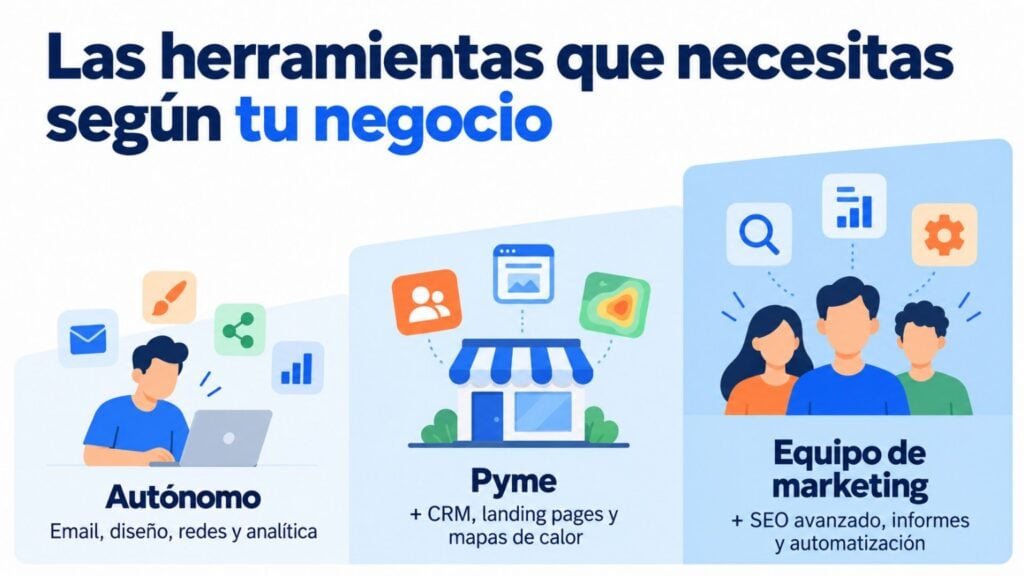
You don’t need all 27 digital marketing tools. What matters is covering each task with a tool you actually use and that connects with the others.
| Profile | The minimum | As you grow |
|---|---|---|
| Freelancer or new business | Mailrelay, Canva, Meta Business Suite, Search Console and Analytics | Metricool and an AI assistant |
| SMB with a website or store | All of the above + HubSpot CRM or Zoho CRM, landing pages and Clarity | Make to connect your CRM, store and email |
| Marketing team | All of the above + Semrush or Ahrefs, Data Studio and a paid CRM | n8n or Zapier for complex workflows |
If you run an SMB, you may also be interested in our selection of marketing tools for small businesses. And if you want to see how they all fit together into one system, read our guide to the digital stack.
Start your stack with a free email tool
80,000 emails a month and 20,000 contacts, with landing pages, automations and Make integration on the free plan. No credit card required.
Mailrelay is the email marketing tool in your stack, and it’s designed to connect with the rest.
You’ll find all the details in what is Mailrelay and on the pricing page.
The best digital marketing tools aren’t the most expensive ones, but the ones you use every week. Start with one from each category you need, make the most of free plans and connect the pieces before adding another.
A good rule: if a tool hasn’t given you useful data within a month, drop it.
The email piece of your digital marketing, ready in minutes
Create your free account and connect Mailrelay with your website, your CRM or your AI assistant, with human support on every plan.
These are the most common questions when choosing digital marketing tools.
The ones that cover the basic tasks. You need an email marketing tool, a CRM and one for social media. To measure, Search Console and Analytics. And to create, Canva and an AI assistant. With that, an SMB has the basics covered.
It depends on the task. For email, Mailrelay, Brevo or MailerLite; for CRM, HubSpot or Pipedrive; for social media, Metricool or Buffer; for SEO, Search Console and Semrush; and for AI, ChatGPT, Claude or Gemini.
Metricool and Buffer to schedule and analyze several networks, and Meta Business Suite for Facebook and Instagram. To create content, Canva and CapCut.
Yes. Search Console, Google Analytics, Data Studio, Microsoft Clarity and Meta Business Suite are free. And many others have a free forever plan, such as Mailrelay, HubSpot CRM, Canva or Make.
Between five and eight are usually enough: email, CRM, social media, analytics, design and website, plus an automation tool as volume grows. More tools don’t mean better results.

Jose Argudo
CMO at Mailrelay. Writes about email marketing, copywriting, and conversion for SMBs and entrepreneurs.