Barracuda: what it is and how its antispam filter and blacklist work
The filter that protects email for thousands of companies and the blacklist that can stop your sends: what each one does and how to avoid being blocked
If an email of yours has ever bounced with a message that mentions Barracuda, it is not an error in your email program. It is the recipient’s security filter, which has decided not to accept your message. Understanding how it works helps you know why it happens and what to do so it doesn’t happen again.
What is Barracuda in IT?
Barracuda is Barracuda Networks, a US cybersecurity company founded in 2003 in Campbell, California. It is best known for its email filters, which many companies, universities and public bodies place in front of their mailboxes to stop spam, phishing and malware. In 2022 it was acquired by the investment firm KKR.
In the context of email, the name usually refers to one of these two things:
- Its antispam filter, which checks the email coming into an organization.
- Its blacklist, the Barracuda Reputation Block List (BRBL), which records the IPs that send spam.
How does Barracuda’s antispam filter work?
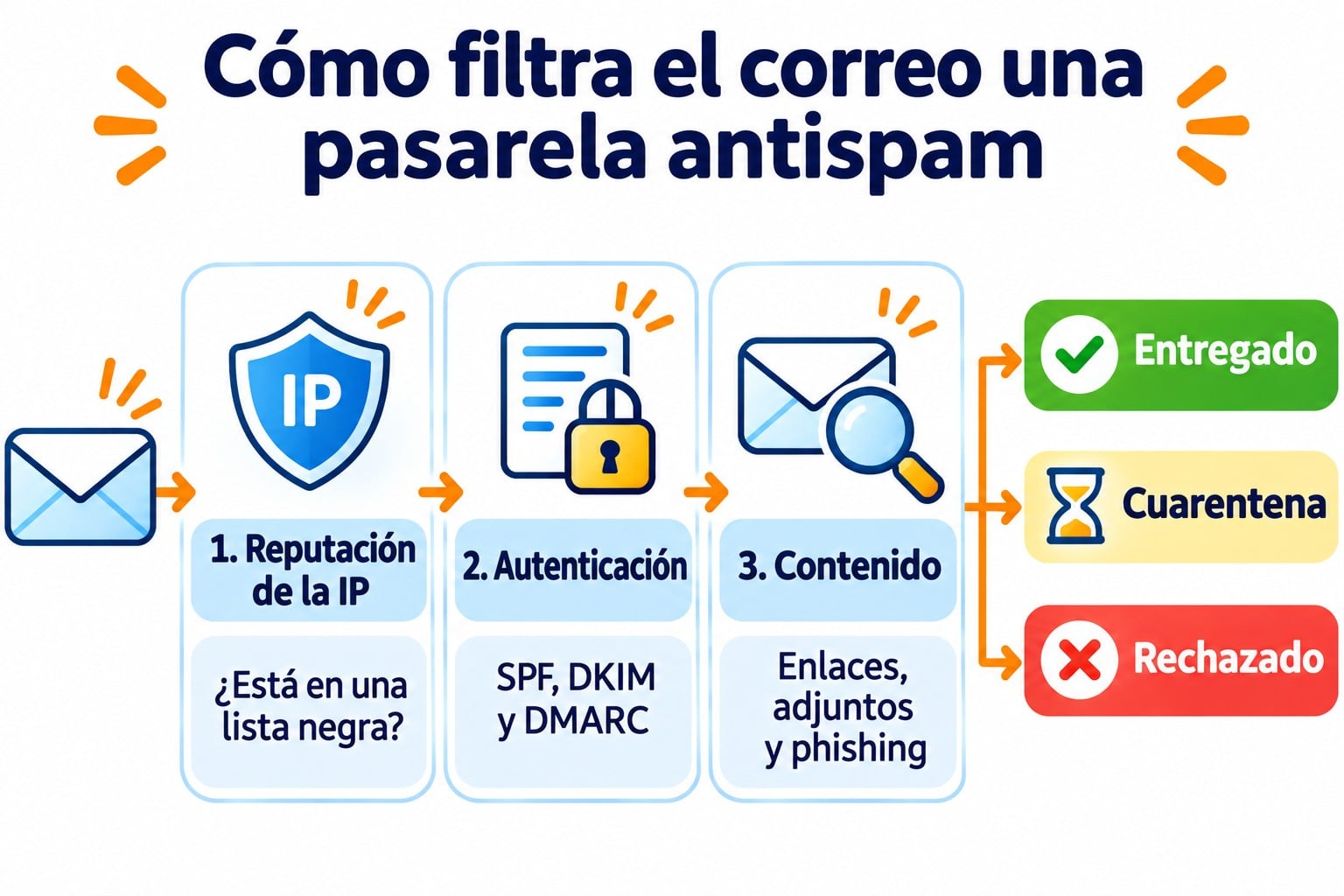
The filter is installed as a gateway between the internet and the company’s mail server. Everything that arrives goes through it first, and it applies several layers of analysis before letting it in:
- IP reputation. It checks its own blacklist and other public blacklists.
- Authentication. It checks whether the message passes SPF, DKIM and DMARC.
- Content. It looks for dangerous links, attachments with malware and typical spam or phishing patterns.
- Decision. The email is delivered, quarantined or rejected with a bounce.
Current versions run in the cloud and integrate with Microsoft 365 and Google Workspace. They also use artificial intelligence to detect impersonation.
Get your emails past company filters
Double opt-in sign-ups, SPF and DKIM from the dashboard and bounces that are removed automatically. The free account lets you send 80,000 emails a month to 20,000 contacts.
What is the Barracuda blacklist (BRBL)?
The BRBL is a free, public RBL. The company feeds it with the data its filters collect around the world. When an IP sends spam or sends email to spam traps, it is added to the list, and the servers that check it reject its messages.
| Blacklist | Who maintains it | How to get delisted |
|---|---|---|
| BRBL | Barracuda Networks | Free request on its website, after fixing the cause |
| Spamhaus | The Spamhaus Project | Removal form, depending on the list |
| UCEPROTECT | UCEPROTECT-Network | Automatic expiry at level 1 |
The BRBL is not the filter’s only rule. A filter can block your email even if your IP is not on the list, for example if authentication fails or the content looks suspicious.
Why does Barracuda block your emails?
These are the most common causes:
Your IP is on the BRBL. This happens if you share an IP with someone who sends spam or if your sends have hit spam traps. The bounce usually mentions “Barracuda Reputation” or “blocked using b.barracudacentral.org”.
Your domain is not authenticated. Without SPF, DKIM and DMARC set up correctly, the filter distrusts you.
Your list has bad addresses. Lots of bounces and complaints damage your sender reputation.
The content looks like spam. Untrustworthy link shorteners, executable attachments or misleading subject lines raise the risk score.
How do you get off the Barracuda blacklist?
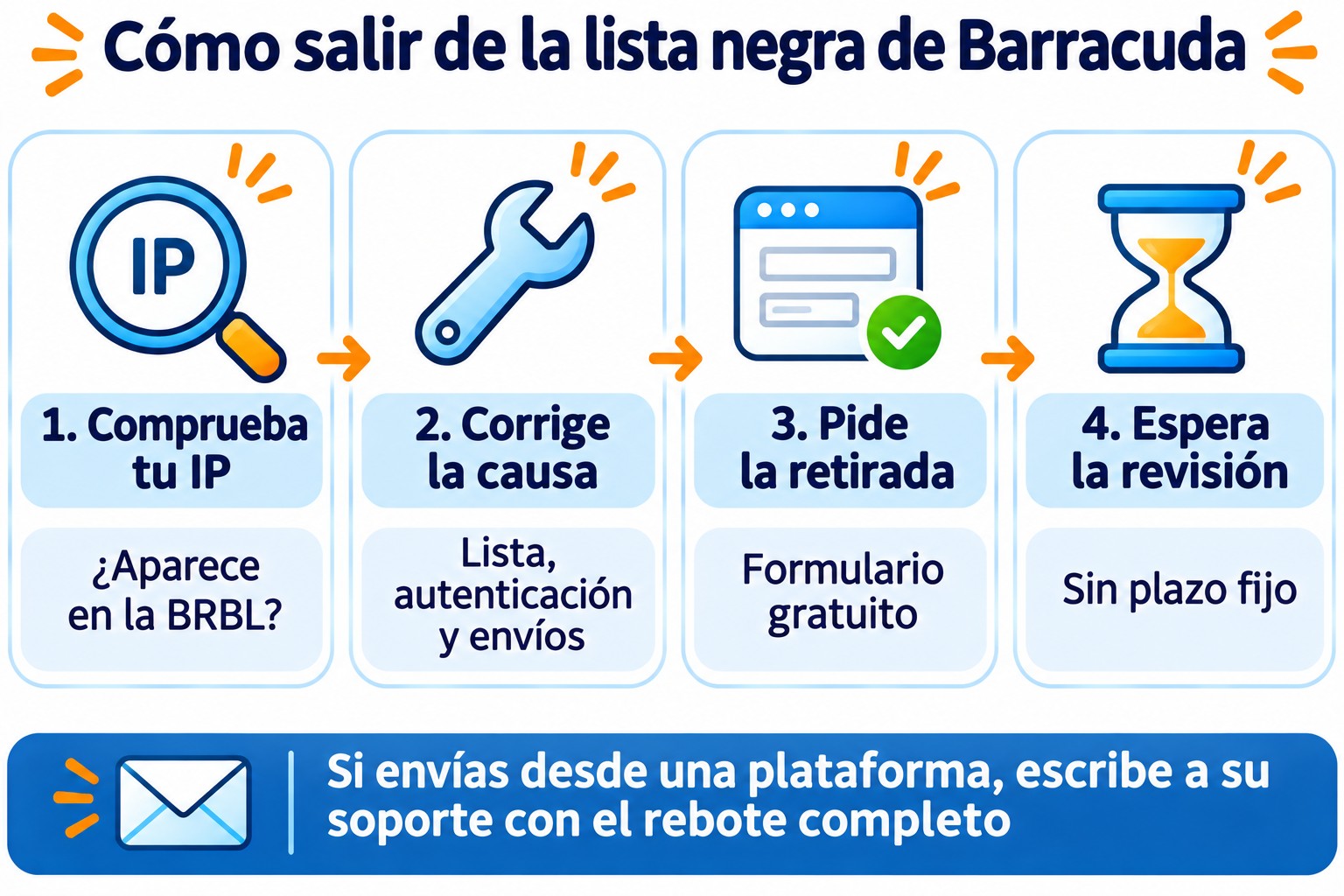
If the bounce points you to this list, follow these steps in order:
- Check your IP in the Barracuda Central lookup tool or in a blacklist checker.
- Fix the cause before requesting anything: clean your list, review your authentication and stop suspicious sends.
- Request removal using that same form. It is free and will ask you for the IP, a contact email and the reason.
- Wait for the review. There is no fixed timeframe and, if the problem continues, the IP goes back on the list.
If you send from an email marketing platform, the IP is not yours. In that case, write to its support team with the full bounce.
How Mailrelay helps you
At Mailrelay all sign-ups use double opt-in, so your list fills up with people who really asked for your emails. Addresses that hard bounce are marked as bounced and stop receiving sends. This way you reduce two of the signals these filters look at most.
You can set up your domain with SPF and DKIM from the dashboard and, if your volume justifies it, use a dedicated IP with support to warm it up. The free account lets you send 80,000 emails a month to 20,000 contacts, and you have human support on every plan if a bounce mentions Barracuda.
Send with a reputation that filters respect
Double opt-in, a dedicated IP if you need one and human support on every plan.
Frequently Asked Questions
Is Barracuda an antivirus?
Not exactly. It is a cybersecurity company, and its best-known product is an email filter that includes antivirus, antispam and phishing protection.
How long does it take for an IP to get off the BRBL?
There is no published timeframe. It is usually resolved quickly if the cause has been fixed, but the IP can be listed again if the spam signals continue.
Does being on the BRBL affect Gmail or Outlook?
Not directly. Gmail and Outlook use their own systems. The BRBL affects the servers that check it, mainly those of companies that use this or other security gateways.
Key takeaways about Barracuda
This name covers both an antispam filter widely used by companies and a public blacklist. If it blocks you, the bounce will tell you why. Authenticating your domain, sending only to people who have given you permission and looking after your list prevents almost every problem.