WhatsApp Business API: what it is, how it works and how much it costs
How companies send bulk and automated WhatsApp messages, what Meta charges and what you need to get started
The WhatsApp Business API is Meta’s official interface that lets a company send and receive WhatsApp messages from its own software, at scale.
With the WhatsApp app, you write from your phone, one chat at a time. With the WhatsApp API, messages are sent from a platform, a CRM or your online store.
You can use it to send an order update, send a code or launch a campaign to thousands of contacts who have given their permission.
What is the WhatsApp Business API?
Meta now calls it the WhatsApp Business Platform. It’s the option for companies that need multiple agents, integrations and bulk sending.
It only comes in one version, the Cloud API, hosted on Meta’s servers. The old On-Premises version stopped working on October 23, 2025.
The WhatsApp API has no interface of its own. That’s why almost every company uses it through a provider, which adds the dashboard, templates and statistics.
How is it different from the WhatsApp Business app?
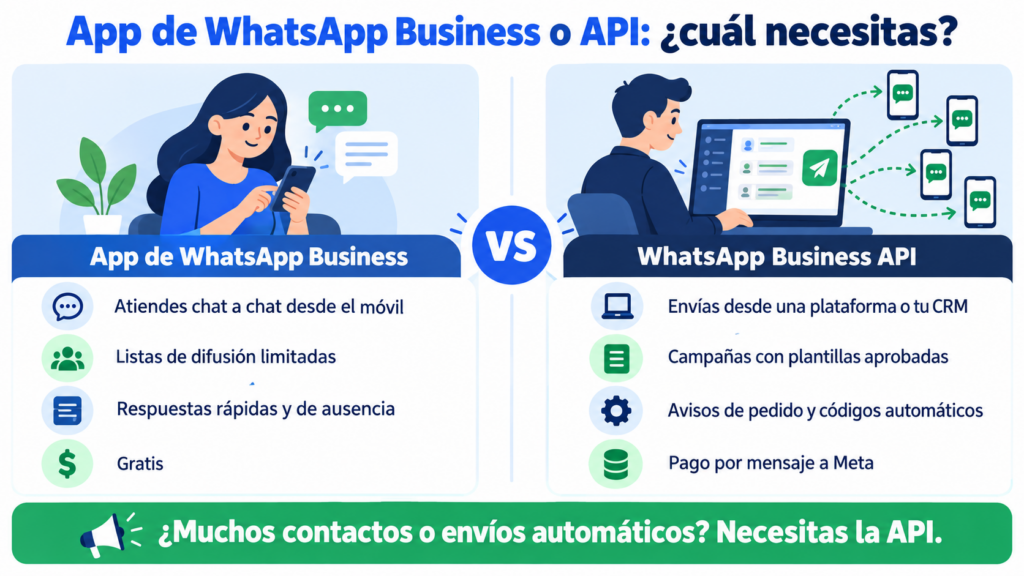
The WhatsApp Business app is free and suits businesses that handle chats manually. The WhatsApp Business API is designed for sending at volume, automating and integrating WhatsApp with other tools.
| WhatsApp Business app | WhatsApp Business API | |
|---|---|---|
| Use | Phone or WhatsApp Web | Platform, CRM or in-house system |
| Bulk sending | Limited broadcast lists | Campaigns to contact groups |
| Business-initiated messages | Free-form, one by one | Approved templates only |
| Automation | Quick replies and away messages | Flows, chatbots, notifications and codes |
| Statistics | Basic | Sent, delivered, read and replies |
| Cost | Free | Per-message price plus provider fee |
That said, you no longer have to choose. Since 2025, Meta lets you use the same number in the app and in the API (known as coexistence). While it’s active, the app loses features such as broadcast lists.
How does the WhatsApp API work?
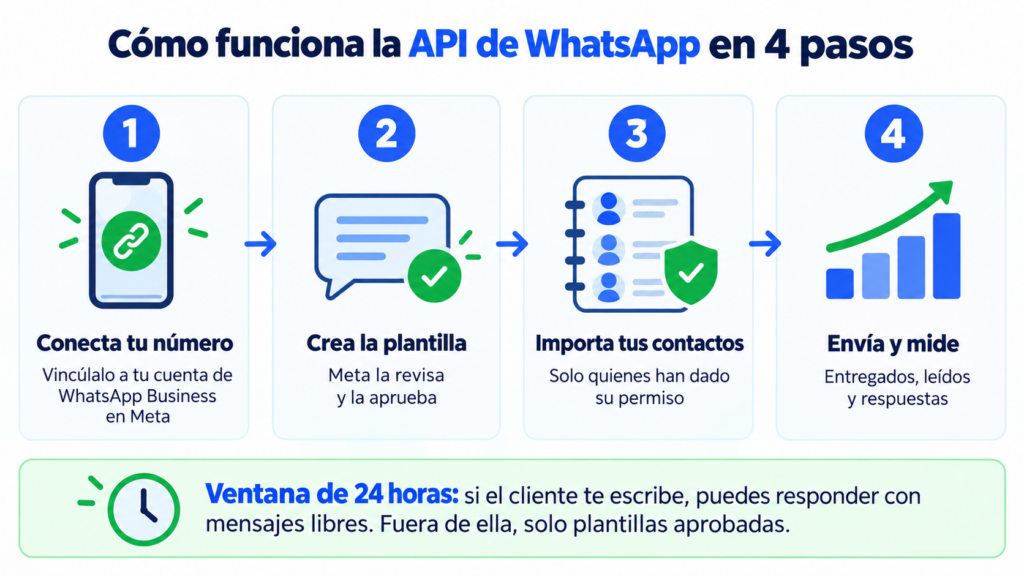
Imagine a sports store that wants to announce its sale. With the WhatsApp Business API, the process looks like this:
- It connects its number to a WhatsApp Business account in its Meta business portfolio.
- It creates a template with text, an image and a button, and submits it to Meta for approval.
- It imports its contacts who have a mobile number and permission to receive WhatsApp messages.
- It launches the campaign and tracks deliveries, reads and replies.
There’s one rule worth being clear about: the 24-hour customer service window. When a customer messages you, you can reply with free-form messages for the next 24 hours.
Outside that window, any message you initiate has to be an approved template.
What types of messages can you send?
Meta assigns each template to a category. The rules and the price depend on it.
| Category | What it’s for | Example |
|---|---|---|
| Marketing | Promotions, news, carts | “Get 20% off everything in store today” |
| Utility | Information about an order or service | “Your order 4512 has shipped” |
| Authentication | One-time codes | “Your code is 482910” |
| Service | Free-form replies within the 24-hour window | Answering a customer’s question |
If a template mixes an offer with an order update, Meta classifies it as marketing. It’s better to send two separate messages.
How much does the WhatsApp Business API cost?
Since July 1, 2025, Meta charges for each template message delivered. The price depends on the category and the recipient’s country. Messages that customers send you are free.
Marketing messages are the most expensive. Utility and authentication messages cost less and get cheaper as your monthly volume grows.
Meta reviews its rates several times a year and has announced changes to what it charges within the 24-hour window. Before budgeting a campaign, check Meta’s current pricing table for your country.
On top of that comes the provider’s fee. Work out what each sale costs you, not just each message.
What do you need to get started?
If you work with a provider that guides you through connecting to Meta, the requirements are simple:
- A Meta business portfolio and, to scale up, a verified business.
- A number that can receive a verification SMS or call.
- Contacts who have agreed to receive your messages on WhatsApp.
- Approved templates and a display name for your brand.
Permission is no minor detail. Just like with email, the GDPR requires consent for commercial communications.
You can ask for it with a checkbox on your subscription form and confirm it with a double opt-in.
How many messages can you send?
Meta sets a messaging limit per portfolio. A new account starts with 250 unique recipients every 24 hours.
After verification, it goes up to 2,000. After that, it only grows if your quality is good and you use at least half of your limit for seven days.
And what is quality? How your contacts react. If many of them block or report you, your limit stops going up.
It’s the same with the suppression list and sending limits in email: only send to people who want to hear from you.
Want to send WhatsApp campaigns?
Connect your number to Meta and send from the same dashboard as your emails and SMS.
What do companies use the WhatsApp API for?
The message lands where people talk to their family, and that’s why it gets read so much. Companies use the WhatsApp API on three fronts:
- Marketing: offers, launches, abandoned cart reminders and invitations.
- Transactional notifications: orders, shipments, appointments or payments, like a transactional email or a transactional SMS.
- Security and support: OTP codes, customer support and chatbots.
WhatsApp works best when combined with other channels. Email is still the home of the newsletter, and SMS reaches people who have no mobile data.
Coordinating them is the foundation of multichannel automation and WhatsApp marketing. If you sell through this channel, you’ll find more ideas in how to sell on WhatsApp.
How does Mailrelay help you?
With Mailrelay, you can send WhatsApp campaigns from the same dashboard as your emails and SMS. You connect your number to Meta, and your WhatsApp Business account keeps working on your phone.
You create templates with a header (which can also include an image or video), body, footer and buttons, in the marketing, utility or authentication categories. You choose the contact group and send.
Then you see how many messages were sent, delivered and read, and you read the replies.
You can reuse your subscriber groups and import contacts from a CSV file.
If you code, the Mailrelay API manages numbers, templates and campaigns, and sends transactional WhatsApp messages.
WhatsApp sending is included in the Standard and Enterprise plans. The free account includes a 10-day trial; after that, WhatsApp sending costs €9.95 per month, according to the pricing page.
Meta’s per-message fees are not included: you pay them directly to Meta.
Email, SMS and WhatsApp in a single tool
Create your free account and try WhatsApp sending for 10 days.
Frequently Asked Questions
These are the most common questions about the WhatsApp API.
Is the WhatsApp API free?
No. The Cloud API has no access fee, but Meta charges for each template message delivered. And you pay separately for the provider you use to send.
What’s the difference between the WhatsApp API and the Cloud API?
Today they’re the same thing. The Cloud API has been the only version of the WhatsApp Business API since Meta retired On-Premises in October 2025.
Can I use my WhatsApp Business number with the API?
Yes. With coexistence, the same number works in the app and in the API. Some app features, such as broadcast lists, are turned off while it’s connected.
Can I send bulk WhatsApp messages without templates?
No. Any message your business initiates outside the 24-hour window needs a template approved by Meta. This prevents spam and protects your number’s quality.
Do I need to know how to code to use the API?
No, not if you use a platform like Mailrelay, with its dashboard for templates and campaigns. You’ll only need to code if you connect it directly to your own system.