Read receipts: what they are and how to know if your email has been read in Gmail and Outlook
How to request one step by step, why it doesn't always arrive and how to measure your newsletter opens
A read receipt is an automatic notification you get when the recipient opens the email you sent them, as long as they agree to send it. You request it while writing the message, and it arrives as another email with the date and time it was opened.
It’s useful for important emails: a quote, a document delivery or a notice with a deadline. But it has a limit: the recipient decides whether to send it or not.
What is a read receipt?
It’s a request that travels hidden inside your email. When the recipient opens it, their email program asks them whether they want to let you know, or notifies you directly if it’s set up to do so.
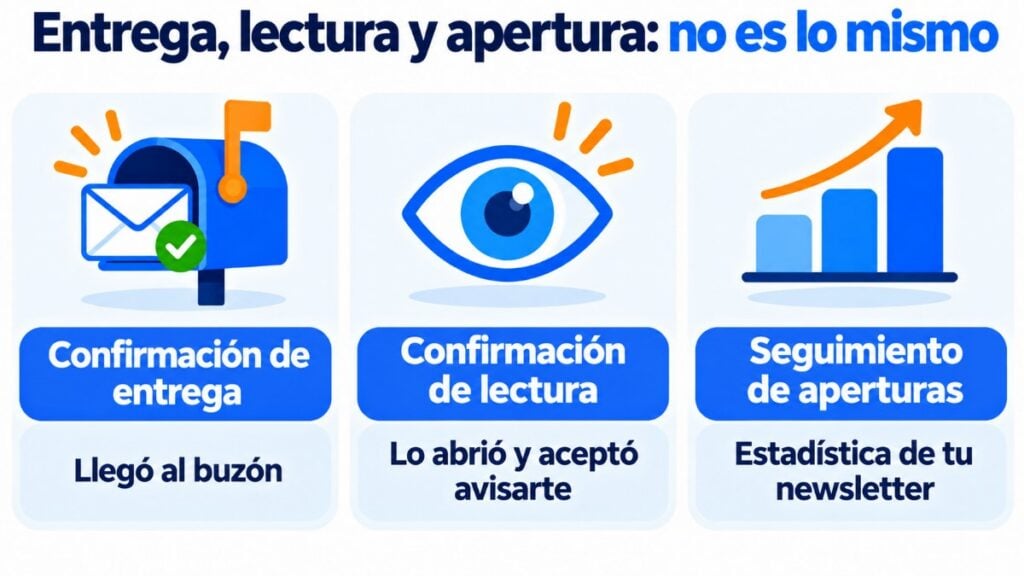
Don’t confuse it with other similar notifications:
| Notification | What it confirms | Who controls it |
|---|---|---|
| Delivery receipt | That the email reached the mailbox | The recipient’s server |
| Read receipt | That the email was opened | The recipient |
| Open tracking | That the email’s images were loaded | The sending tool |
The first two are for individual emails. The third is the one email marketing tools use to measure newsletters.
How to request a read receipt in Gmail
In Gmail, only work or school accounts on Google Workspace can request one. It isn’t possible with a personal @gmail.com account.
The company’s administrator also has to have turned it on. If it’s on, follow these steps on your computer:
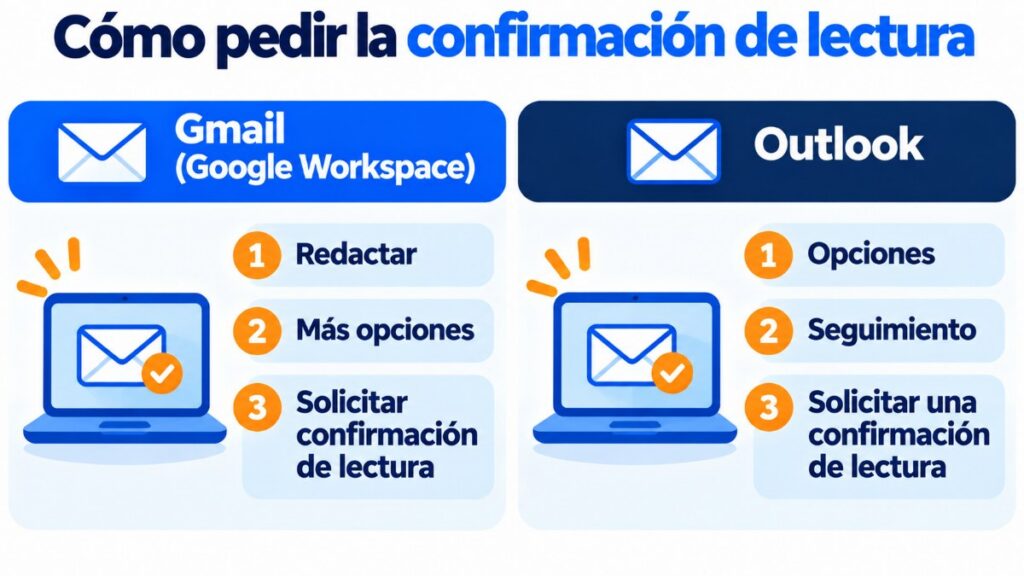
- Open Gmail and click Compose.
- Write the message as usual.
- At the bottom right, click More options (the three dots).
- Choose Request read receipt.
- Send the email.
Gmail doesn’t send read receipts to mailing lists, groups or aliases. And Google itself warns that they shouldn’t be used to certify delivery.
How to request a read receipt in Outlook
The steps depend on the version of Outlook you use:
- New Outlook for Windows: while writing, go to the Options tab and, under Tracking, check Request a Read Receipt. If you don’t see it, look for it under More options at the end of the ribbon.
- Outlook on the web: while writing, click Message, then More options and choose Request a read receipt.
- Classic Outlook: in the message, go to Options and check Request a Read Receipt. To request one for all your emails: File > Options > Mail > Tracking.
In the same options you can also request a delivery receipt.
There are two important exceptions. You can’t request one from Outlook.com: Microsoft says you have to do it from Outlook for Windows. And it doesn’t work with IMAP or POP accounts added to Outlook, such as Gmail, Yahoo or iCloud accounts.
Why doesn’t the read receipt always arrive?
Because it depends on the recipient and their email program. It won’t arrive if:
- The recipient declines it. Outlook lets them never send it, and Gmail lets them postpone it.
- Their program doesn’t support it. Many email clients and mobile apps ignore it.
- They read the email in the preview pane or mark it as read without opening it.
- Their company blocks it for emails coming from outside.
And the other way round: a receipt can arrive even if nobody has read the message carefully. That’s why it’s an indication, not proof. Nor does it have legal value to prove that someone received a notice.
Use it sparingly. Requesting one on every email is annoying, and for a follow-up email a direct question usually works better.
Know who opens your newsletters
Mailrelay records each subscriber’s opens and clicks without asking for receipts. Free for up to 80,000 emails a month.
Bulk sends don’t use read receipts. Email marketing tools include an invisible image in each email: when it loads, they count an open.
That’s how the open rate is calculated, although today it’s an approximate figure:
- If the reader blocks images, the open isn’t counted.
- Apple Mail downloads images automatically to protect privacy, which adds opens that aren’t real.
That’s why it’s worth looking at clicks too, since they do show real interest.
How to see who opens your emails with Mailrelay
With Mailrelay you don’t need to request receipts. Each campaign records who opened it, when, and which links they clicked.
With that data you’ll know which topics interest each subscriber and you’ll be able to segment your list to send each group what interests it most. All the figures are explained in this guide to email marketing metrics.
With the free account you can send up to 80,000 emails a month to 20,000 contacts, with human support on every plan.
Measure what really matters
Opens, clicks and bounces for each campaign, in real time. Start free with 20,000 contacts.
Frequently asked questions about read receipts
These are the most common questions.
Can you request a read receipt in free Gmail?
No. It’s only available in Google Workspace work or school accounts, and the administrator has to turn it on.
What’s the difference between a delivery receipt and a read receipt?
A delivery receipt shows that the email reached the mailbox. A read receipt shows that the recipient opened it and agreed to let you know.
Does the recipient know I’ve requested a read receipt?
Yes, usually. Their program asks them whether they want to send it, unless it’s set up to always reply automatically.
Is a read receipt legally valid?
It doesn’t serve as proof of receipt. For that, there are certified email and electronic registered mail services.
How can I know if my email has been read without a read receipt?
With an individual email, only if they reply. With a newsletter, through the open and click statistics of your email marketing tool.