No-code automation: how to connect your tools and automate your email without coding
Welcomes, carts and store data running on their own, built with visual blocks and without relying on a developer
No-code automation means building workflows between apps with a visual editor, without writing a single line of code.
You choose what starts it, which conditions have to be met and what should happen next, and the tool repeats it every time.
In email marketing, it’s what lets a new subscriber get their welcome, or an order from your store reach your list, without anyone copying data by hand.
What is no-code automation?
Short answer: it means automating tasks with visual blocks instead of programming. It’s often shortened to just no-code.
For years, connecting two apps required a developer to write code against their APIs.
No-code platforms do that work for you with ready-made modules.
All you do is drag pieces, fill in fields and test the result.
That’s why no-code automation has put tasks that used to depend on the tech department in the hands of marketing teams.
How a no-code workflow works
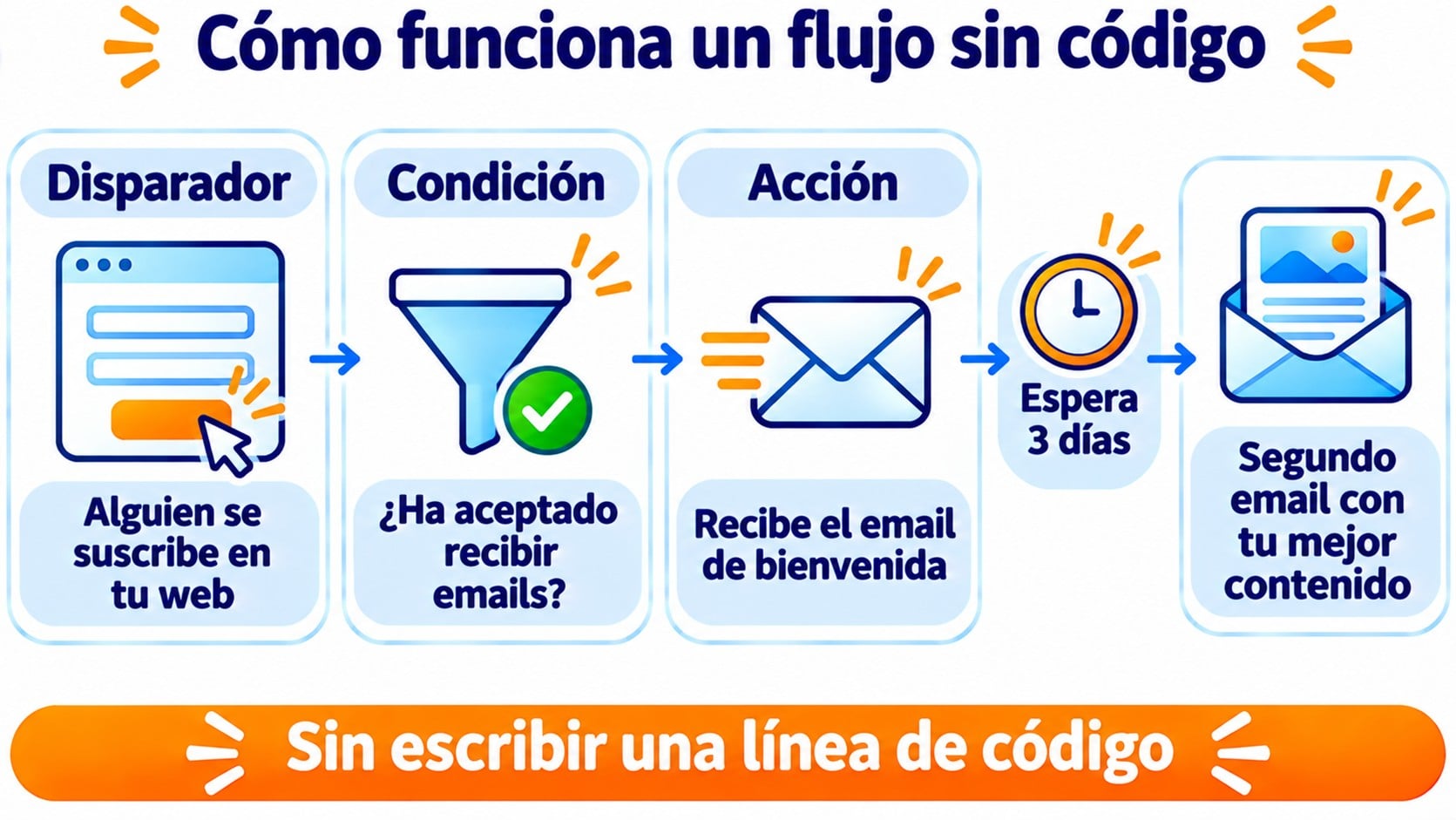
Almost every no-code tool follows the same three-part logic.
The trigger is the event that starts the workflow. It can be a form sign-up, a new order or a specific date.
Conditions filter the cases. For example, the order is above a certain amount or the contact is from a particular country.
Actions are what happens at the end: adding the contact to a list, sending an email or creating a record in your CRM.
Between one action and the next, you can add waits of hours or days.
No-code, low-code or code
No-code automation isn’t the only option. This table sums up how it differs from the alternatives.
| Approach | How you work | Who uses it | When it makes sense |
|---|---|---|---|
| Without code (no-code) | Visual editor with ready-made modules | Marketing, sales, SMBs | Common workflows between well-known apps |
| Low-code | Visual editor with snippets of code when needed | Somewhat technical profiles | Cases with unusual logic or data |
| Custom code | Programming directly against the API | Developers | High volumes or integrations with specific needs |
In practice, they’re combined. A marketing team builds its workflows without code and, when a case gets complicated, a developer adds the missing piece.
Your first automations, no coding needed
Welcome, birthday and abandoned cart emails with a visual editor, included in the free account.
No-code automation examples in email marketing
These are the workflows that come up most often in an email strategy.
Welcoming a new subscriber
Someone subscribes through your form and instantly receives your welcome email.
A few days later, they get a second message with your best content, in a short drip campaign. It’s the foundation of lead nurturing.
From your store or CRM to your list
Every customer who buys from your WooCommerce store is added to your list and to a customer group.
That way, your campaigns reach the right people without exporting files every week.
Birthdays and special dates
If you store the date of birth in a custom field, the workflow sends the birthday email on the exact day, year after year.
Abandoned cart
When someone leaves products in their cart, the automation sends them a reminder. It’s one of the abandoned cart emails that recover the most sales.
Data from your ERP
You can also connect email with your ERP. When a purchase is recorded, the workflow adds the customer to a post-sale group and later sends them a satisfaction survey.
Tools for automating without code
The first one is inside your own email tool. Mailing automations cover welcomes, birthdays or carts without leaving the dashboard.
To connect different apps, there are integration platforms. The best known are Make, formerly called Integromat, and Zapier.
There’s also n8n, which you can install on your own server.
They all work the same way: you choose a trigger in one app and an action in another.
Before choosing, check that your email tool has an official integration on that platform.
A third option is webhooks. They notify another app the moment something happens, such as an unsubscribe, and the integration platform turns it into an action.
How to get started without coding
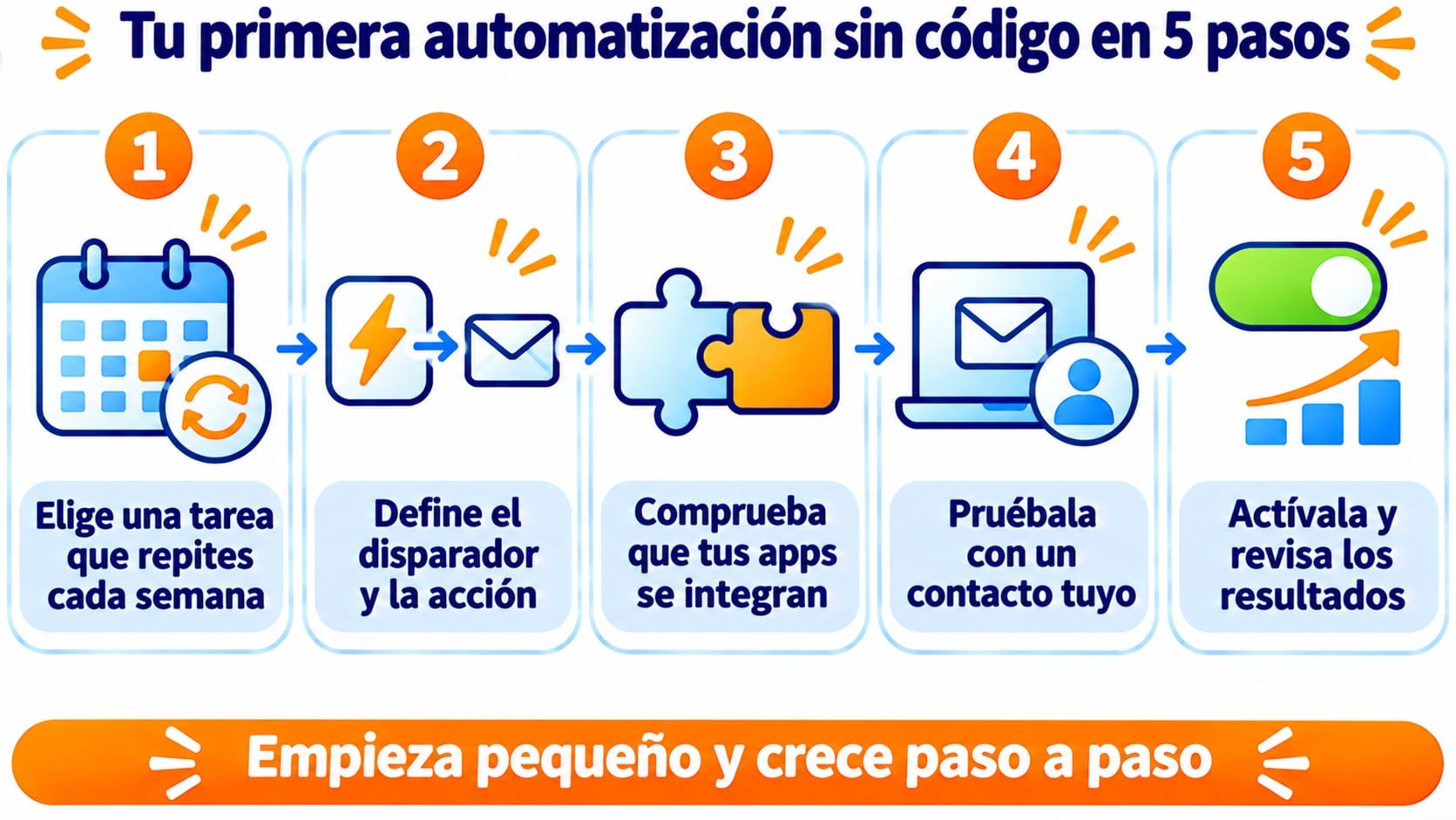
The most useful approach is to start with a small workflow that genuinely saves you work. These steps will help you with your first one.
- Pick a task you do by hand every week.
- Write the trigger and the action in one sentence.
- Check that your apps have an integration on the platform.
- Build the workflow and test it with one of your own contacts.
- Turn it on and review the first results.
Once that workflow works, add conditions or a second step. Growing little by little avoids automations nobody understands.
Limits of no-code automation
No code doesn’t mean no effort. A poorly designed workflow sends the wrong email to hundreds of contacts in minutes. Always test it before turning it on.
Integration platforms usually charge per operation or task. If your volume grows, check the cost before multiplying workflows.
Each workflow depends on several apps at once. If one changes, the workflow can break, so you need to keep an eye on error alerts.
And personal data is still your responsibility. When a workflow moves contacts between tools, all of them must process that data in line with the GDPR and with the subscriber’s consent.
How Mailrelay helps you
In Mailrelay, you create automated emails from the Automations menu, with a visual editor.
You choose the entry point, for example when a subscriber is added to a group, their birthday or an abandoned cart, and add emails and waits.
Automations are included in the free account. You’ll find 7 ready-to-use examples in the tutorial on automating your emails.
To connect other apps, Mailrelay integrates with Make, which has a verified Mailrelay integration.
With it, you create or update subscribers and assign them to groups when something happens in your store, your CRM or a form.
The free account lets you send 80,000 emails a month to 20,000 contacts, with human support on every plan.
Connect your store and CRM to your campaigns
Verified Make integration, automations included and human support on every plan.
Frequently asked questions
These are the most common questions about no-code automation.
What does no-code mean?
It means “without code”. The term is used for tools that let you build apps or automations with visual editors, without programming.
Do I need to know how to code to connect Mailrelay with other apps?
No. With Make, you connect Mailrelay to your store, CRM or forms from a visual editor. The Mailrelay API is there for anyone who prefers to code their own integration.
Is it the same as marketing automation?
Not quite. Marketing automation is the strategy of automating communications with customers. No-code automation is one way to set it up without developers.
Key takeaways on no-code automation
No-code automation lets you connect your tools and repeat tasks without coding. Start with a small workflow, test it with one of your own contacts and grow from there.
Related articles
No-code automation touches several parts of email marketing. These articles explain each of them.