Email automation involves using tools that, once set up, can carry out certain email sending actions autonomously.
If you want to see every type of flow, the metrics worth tracking and the most common mistakes, check out the complete guide to email marketing automation.
Requiring little to no supervision.
A classic example would be follow-up emails after a subscription.
A contact subscribes, and automatically receives a welcome email, or a series of emails, a funnel.
In general, automations let you:
- Spend more time on other tasks
- Avoid mistakes
- Scale your business without needing to spend more time or resources
They are therefore a very useful tool in a business’s email marketing arsenal.
Especially if, as with Mailrelay, they’re easy to set up, which helps you save time without any hassle.
But to appreciate this feature at its true value, let’s first look at the advantages.
Advantages of email automation for your business
Some of the advantages are obvious, but let’s go over them to better pin down the benefit of automating certain processes and not miss anything.
· Time and effort savings:
This one is clear.
By automating certain actions, you no longer have to do them manually, so you save time.
Besides, certain actions, like sending welcome emails, would be impossible to do by hand once your subscriber list starts growing.
Sending a couple of welcome emails is tedious; sending hundreds is truly impossible.
You don’t just save time — you make certain actions viable that otherwise wouldn’t be, allowing your business to grow or use strategies it otherwise couldn’t.
· Personalization at scale:
Is it possible to automate and personalize at the same time?
Of course it is.
We already covered this topic in an earlier article, which you can find here.
Mailrelay’s automation tools let you, as we’ll see:
- Automate
- Personalize
- Segment
All this will help make the messages you send more effective, and if you craft the copy well, they’ll feel more human even though they were sent automatically.
· Greater engagement and conversions:
On one hand, it’s clear that automation “dehumanizes” communication.
No matter how well it’s done, this is normal.
You can almost always tell when an email is automated — human perception can pick up on it.
But on the other hand, a lack of communication is far worse.
In other words, if a contact subscribes to your list and doesn’t receive any email from you for weeks, that’s worse than receiving an automated email.
Regular, frequent and useful communication is best.
And for that, you’ll need to automate certain processes.
· Trouble-free scalability:
We touched on this before, and it’s one of the most obvious aspects.
There are actions that, due to their sheer volume or nature, simply can’t be done manually, and need to be automated.
Other times it’s simply for convenience, so you can increase the volume of other actions.
If your business needs to sell — and every business does — automating a sales funnel, for example, can be very useful.

Examples of automations with Mailrelay
Mailrelay has many automations — it’s hard to cover every option, but we’ll look at some of the most interesting ones, though keep in mind that many of them can be combined.
Automations are included in the free account, so you can try them out without any issue.
· Welcoming new subscribers:
This is one of the most common automations in email marketing tools.
Someone subscribes to your list and automatically receives a welcome email.
With Mailrelay, it’s very easy to set up.
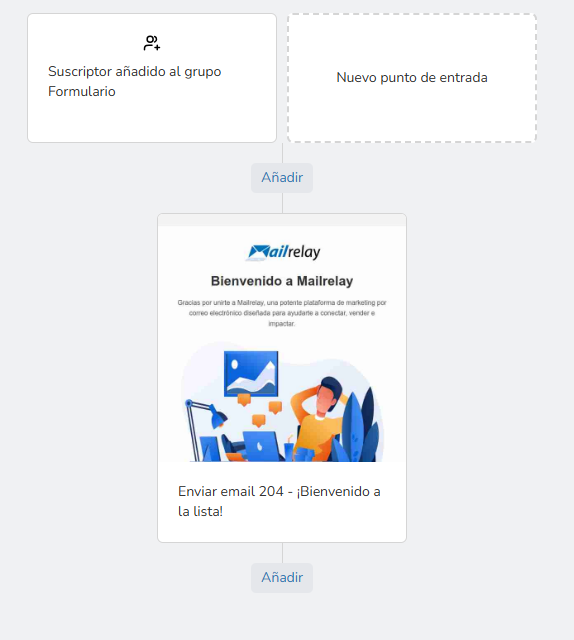
In this email you can introduce yourself, link to important pages on your website, offer a discount or another lead magnet you’ve used, and so on.
And whenever a contact is added to the group — whether through an import, a form, or added manually — the automation will trigger.
· Drip campaigns:
We could see this as an extension of the previous automation.
It would be a series of emails sent over time.
For example, you can send the welcome email, set a one-day pause, send the next email, set another pause, and so on.
It’s useful for creating sales funnels.
Let’s look at an example:
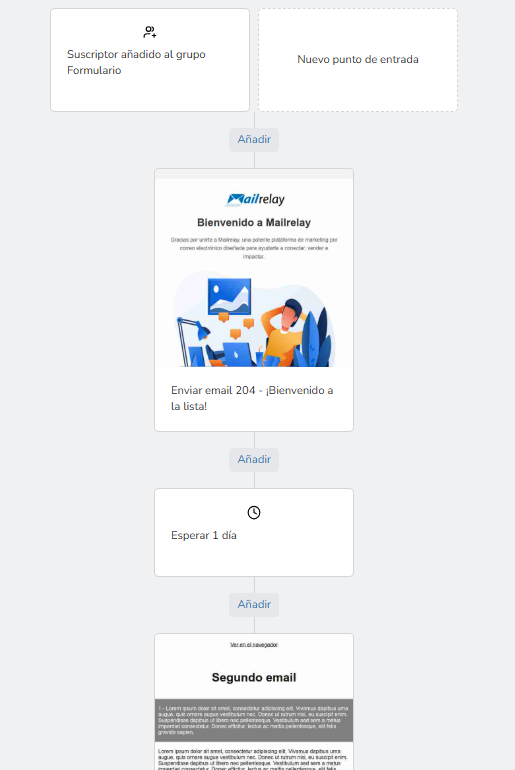
You could of course keep extending this automation with more days.
In fact, you could create a small sales funnel with a series of consecutive emails, gradually building up your contacts’ interest, while addressing the most common doubts and objections.
This is one of the most common uses of this type of automation.
· Reactivating inactive users:
This is possible because Mailrelay builds up a “reputation” system, or contact rating, based on their activity.
In other words, whether they react to the emails you send them, whether they open them, whether they click.
Mailrelay gives good scores to contacts who open and click your emails when they receive them, and bad scores to those who don’t.
It’s not immediate, of course.
It’s a process that takes time, so if a contact has a bad score, you know it’s a contact who has gone a while without reacting to your emails.
You could, for example, create this segment (in the Subscribers – Segmentation menu):
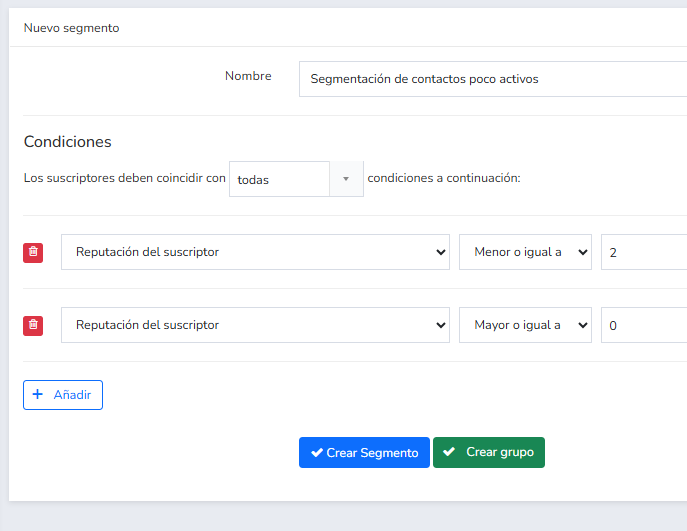
These conditions (all of which must be met) will select contacts with a reputation of 1 or 2, meaning very inactive contacts.
How could you start a flow focused on this segment?
You could create an automation like the previous one, whose entry point would be something like this:
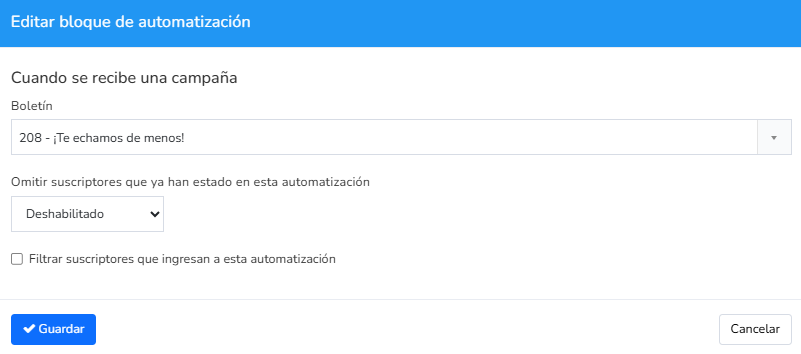
This would be the entry point, and then we could continue:
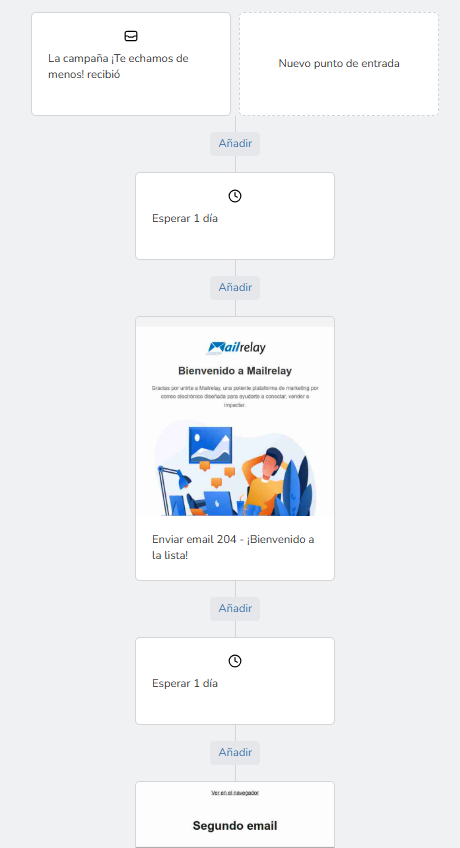
This automation checks contacts who have received a specific email, waits a day, and sends another, continuing the flow.
What triggers the automation is the receipt of that first email, which you’d send to the segment of inactive contacts we saw earlier.
Could it start at a different point than receipt?
Sure:
- When the email is opened
- Or when it’s clicked
Among other options.
But this fits better in the next section.
· Automations based on specific actions:
We can go back to the previous case and imagine that, once we’ve sent the mailing to inactive contacts, we want to distinguish those who opened it from those who didn’t, to send them different content.
This is also very easy to do. Below is an example of a conditional block:
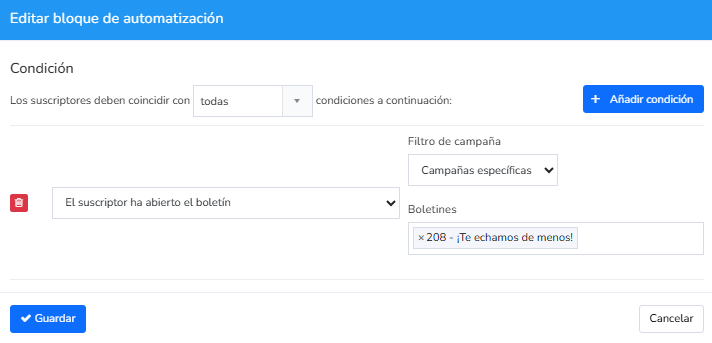
This block checks whether the contact opened the email they received or not.
And what do we do with this check?
Generate two paths: one for those who opened it, and another for those who didn’t:
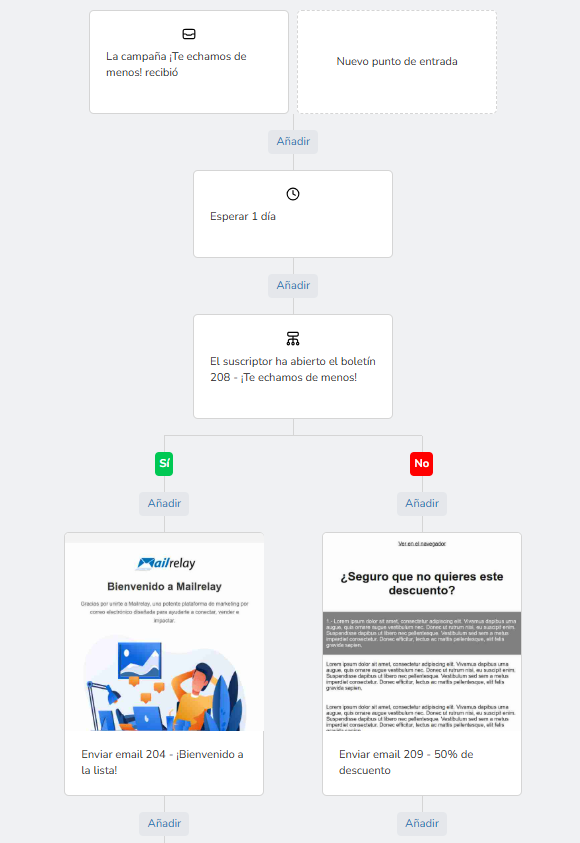
This lets you have one email flow for those who open it, and another for those who don’t, giving you different emails for each case.
You can also check whether they’ve clicked a specific link:
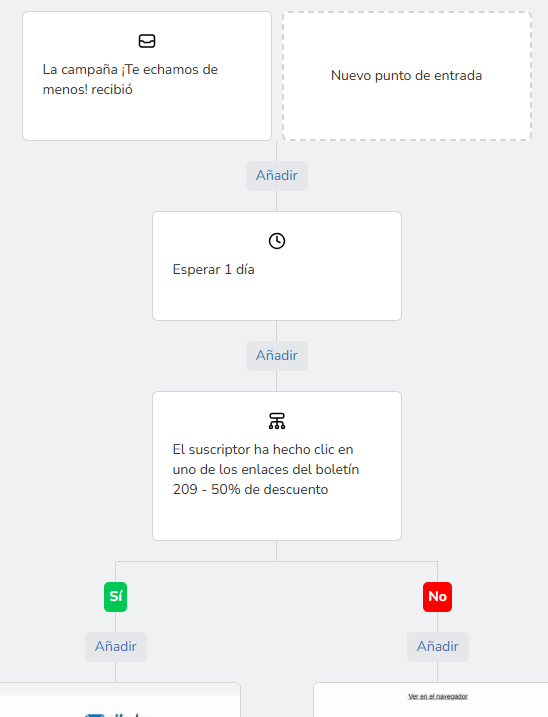
Inside the block, you can set the exact link to check.
Important! You need to create a wait block at the start to give contacts time to complete the action; otherwise, it will always validate as negative, since they won’t have had time.
· Birthday greetings:
This is another way to start an automation process, if you have the contact’s birthday data (you can import it if you have it):
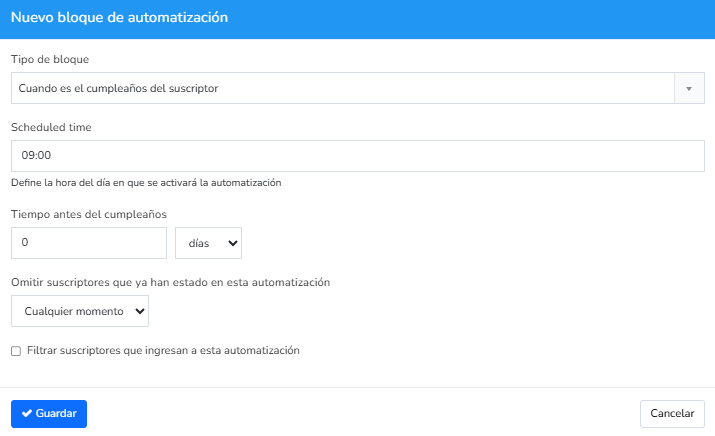
From this entry point, which triggers the automation, we can continue with a flow like in the previous cases.
· Abandoned cart recovery:
As of this article, only available for WooCommerce.
If a cart is abandoned, Mailrelay can start an automation flow once the time you set has passed.
· Group change automation:
Within automation flows you can perform other actions with contacts, such as adding them to a new group, for example:
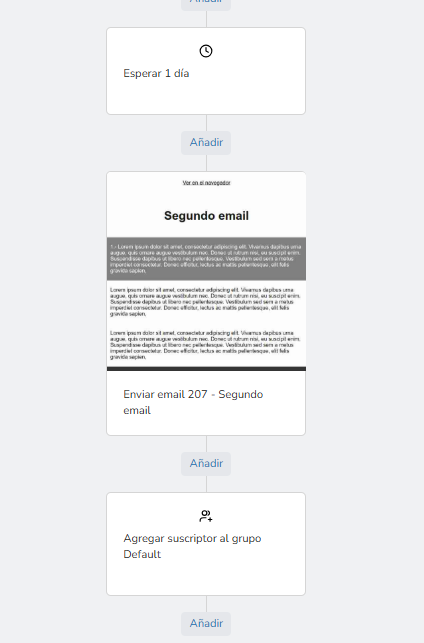
Or removing them from a group.
This lets you, for example, after a reactivation campaign, move contacts who reacted to a group of active contacts, and those who didn’t to a group of inactive ones.
You also have other options available:
- Sending SMS
- Webhooks
- Etc.
The best thing to do is create your free account and take a look at all the available options.
You can create anything from simple automations that just send an email, to complex automated flows with various conditions and actions.
All of it easily.

How to start setting up automations in Mailrelay
As you’ve seen, creating and working with automations is very simple.
Basically:
- You choose an entry point: the action that will trigger the automation.
- Click add: to add new conditions, actions, and so on.
This way you build whatever you need.
Just by clicking add and placing more elements.
The process is simple, so what should you keep in mind?
· Define your goals:
The first thing is to be clear about what kind of automation you’re going to build, and what you’ll use it for.
Why?
Because if they’re going to be “one-off” actions, you might be able to handle them more easily with a segment than with an automation.
Every tool has its use.
· Choose a trigger and design the sequence:
We’ve seen some examples, like when a contact is added to the group, or receives an email.
These are the most common ones, and from here you can easily build the whole sequence as we’ve seen in the other points, adding the elements you want.
· Set up the logic and conditions:
As we’ve seen, you can create conditions that split the flow, depending on whether they’re met or not.
· Activate and test:
Once you’ve created the automation, don’t forget to activate it and run a test.
Important!
If you activate the automation and contacts start entering it, any changes you make to the automation won’t apply to contacts already “midway through” it — only to new contacts who enter after you make the changes.
Keep this in mind.

Mailrelay: the leading free email marketing plan
Everything we’ve covered in this article you can do with Mailrelay’s free account without any problem — no feature is restricted.
Plus you can send up to 80,000 free emails every month to up to 20,000 contacts.
What else will you find in the free account?
· Segmentation tools:
Mailrelay lets you segment your contact list with precision.
You can even add custom fields and use them for these segments.
As you can see in the example below:
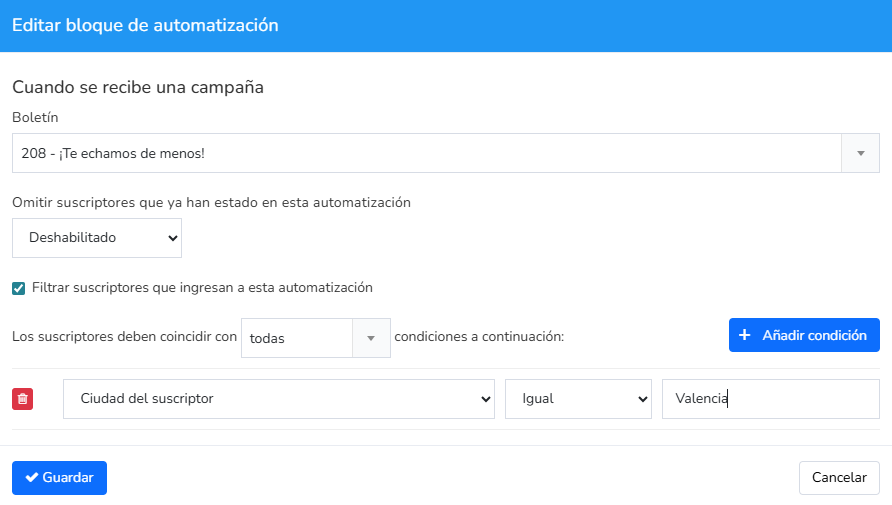
This way, both your mass mailings and your automations can target very specific segments.
· Conditionals and business logic:
Segmentation options can also be added to the conditionals we saw in the automations.
So in a condition, besides whether they’ve opened or clicked, you could also check a specific value of a custom field.
Mailrelay includes an intuitive drag-and-drop editor.
It also has artificial intelligence features so you can create an email in minutes.
Below you can see the panel where you can request an AI-generated template:
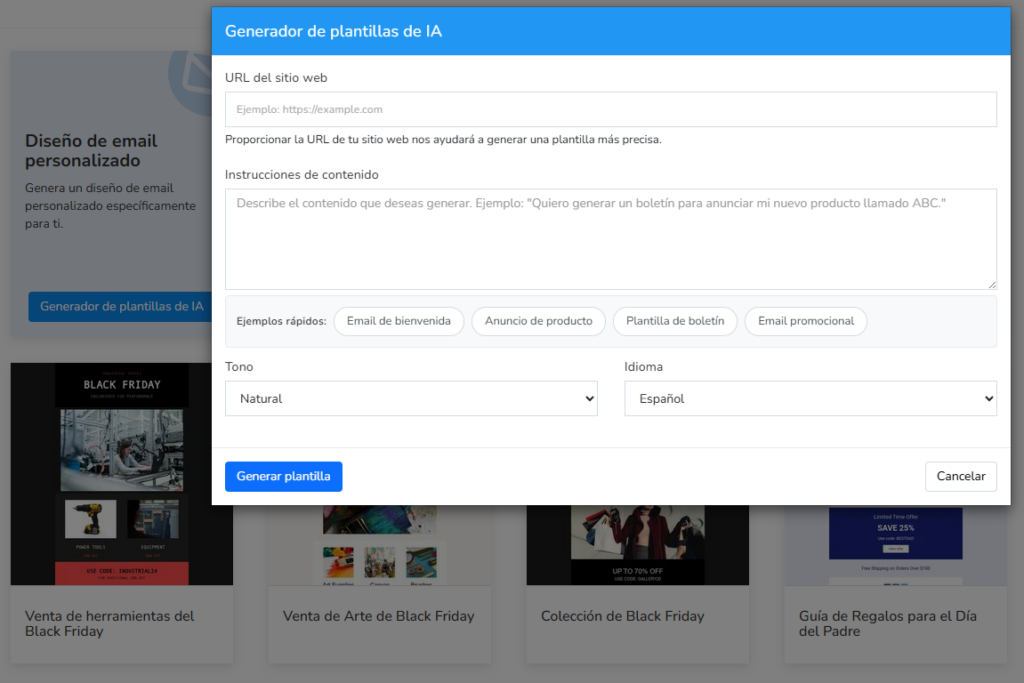
Just ask for what you want and the AI will make it for you.
· A/B testing:
You can test two variants of the subject line or sender for the same campaign.
The most effective version is sent to the rest automatically if you want, or manually if you’d rather wait and see the data.
This way you can send the best version and get the best results.
· Multichannel automation:
Besides emails, you can send SMS messages within automations, reaching your contacts through different channels.
· Real-time analytics (statistics):
Real-time statistics will give you precise information about the results of your sends.
We talk in detail about how to make the best use of this feature here.
Take a look, since you can greatly improve your sends thanks to a good review of your statistics.
You’ll have information about:
- Opens
- Clicks
- Bounces
- Spam complaints
- Unsubscribes
- Heat maps
- Contact location information
- Devices used
- Etc.
· Integrations with other platforms:
The ability to connect with other platforms and applications lets your company expand whenever needed.
Mailrelay offers multiple integration options:
- Forms and landing pages
- API
- SMTP
- Platforms like Make.com
Automate your emails easily, without any hassle
On one hand, it’s true that there are platforms focused on automation with more powerful automations.
But on the other hand, Mailrelay’s automation system is designed to be useful for most businesses.
It has the most important features, which we covered above, but it’s also very easy to use.
And whenever you have questions, our support team is there for you.
What are you waiting for to try Mailrelay’s automation?

Jose Argudo
CMO at Mailrelay. Writes about email marketing, copywriting and conversion for small businesses and entrepreneurs.