Email marketing is still one of the most effective channels for generating sales.
In fact, email has kept its effectiveness despite all the changes we’re seeing in digital marketing.
How has email marketing managed to stay so relevant?
By offering a direct communication channel between your business and your potential customers:
- The inbox
The statistics don’t lie.
For every euro invested in email marketing, the average return is around 40 euros or more in sales.
Plus, subscribers who receive offers by email are estimated to spend up to 138% more than those who don’t.
Selling by email or through social media?
If you publish an offer on Facebook, for example, it will typically only be seen by around 2% of your followers.
That’s organically, of course.
By contrast, up to 90% of emails sent reach your contacts’ inbox.
That’s a big difference, isn’t it?
That’s why email guarantees much greater reach at a lower cost.
Because unlike social media ads, sending emails to your subscriber list is practically free and highly profitable.
For a small or medium-sized business (SMB) with limited resources, email sales represent a perfect opportunity.
This channel lets you automate part of the sales process and stay in regular contact with your customers.
Even if you have no experience or time.
It’s also a personal and segmentable medium: you can tailor the message for each customer group, increasing the chances of conversion.
In short, if you want to increase your profits without investing large sums in advertising, email marketing is the answer.
Lay the groundwork: goals, audience and content you’ll send
Selling is a process that requires planning.
You can’t turn your emails, your newsletter, into a sales-generating machine without planning and understanding your customers, their needs and objections.
First of all, what do you want to achieve?
- Sell a specific product?
- Offer a service or promotion?
Ideally, you should have a specific goal in mind, so you can make the right decisions.
And your target audience!
Identify your target audience:
- Who are your subscribers?
- What are they interested in?
Some contacts will already be almost ready to buy, while others will need more time.
You can’t use the same strategy for everyone.
Or at least, not all the time.
If you don’t know what stage your list’s contacts are at, you can create a strategy that evolves from the ground up, moving them forward through the funnel.
· Then think about the content
With your goals and audience defined, let’s move on to content.
It’s common to look for some way to connect with contacts, entertain them, hook them, to have more chances of selling.
What else might interest them beyond sales offers?
In the end, there’s a limit to how many sales emails contacts will accept receiving.
If you only send them offers and discounts, they’ll eventually get tired of it.
That’s normal.
That’s why you need to find something that hooks them, interests them, and makes them want to keep receiving your emails.
· What do your contacts like that you can relate to your business?
You can think of classic ideas:
- Quick tips for using your product or service
- Related content more focused on entertainment
- Something that shows how they can solve their problems or needs
Entertainment matters, because people don’t want to constantly receive emails related to their problems, but also:
- Their aspirations
- Tastes
- Hobbies
- Etc.
· The most useful strategy:
Address your potential customers’ doubts and objections in your emails.
What do you think holds them back from buying?
Answer in your emails in a way that removes that objection or explains it properly.
Removing purchase barriers should be one of the goals of your emails.
Design epic subject lines for your emails
The subject line is your campaign’s bait.
If the bait isn’t effective, if it doesn’t grab attention, open rates will be much lower.
If you can’t get people to open your email, it doesn’t matter how good your offer is.
They won’t see it.
That’s why you need to design irresistible subject lines that stand out in the inbox.
What do these subject lines look like?
· Clarity and brevity:
A short, concise subject line tends to work well, because time is scarce.
Your contacts won’t spend much time looking at subject lines, so it has to grab attention in seconds.
For example:
- 50% off your first purchase
Quick, focused, easy to understand and eye-catching.
Can it be improved?
Yes.
For example, by following the next point.
· Create a sense of urgency:
Generating a certain sense of urgency tends to be useful.
For example, turning the previous subject line into:
- Only today: 50% off your first purchase
Urgency, of course, works better if it’s realistic.
· Personalize whenever possible:
With Mailrelay, it’s very easy to personalize your mailing campaigns.
Including the recipient’s name can sometimes be very effective.
- Jose, your shopping cart is waiting
Seeing an email with your name in the inbox is sure to catch your attention.
· Avoid a spammy tone:
Words like “FREE!!!” may seem very eye-catching, and they certainly are.
However, as spam and phishing have increased, so has users’ uncertainty, doubt and insecurity.
You can easily lose your customers’ trust with communication that’s too aggressive, similar to what spammers use.
Look for a reasonable balance.
· Emojis, in moderation:
Emojis in your email subject lines can give them a very visual touch, making them stand out from other emails.
Even so, it’s best not to overdo it — use them sparingly, for specific moments.
· Don’t forget the preheader (preview text):
Many email apps also display a preheader (the initial text of the email).
Let’s look at an example:
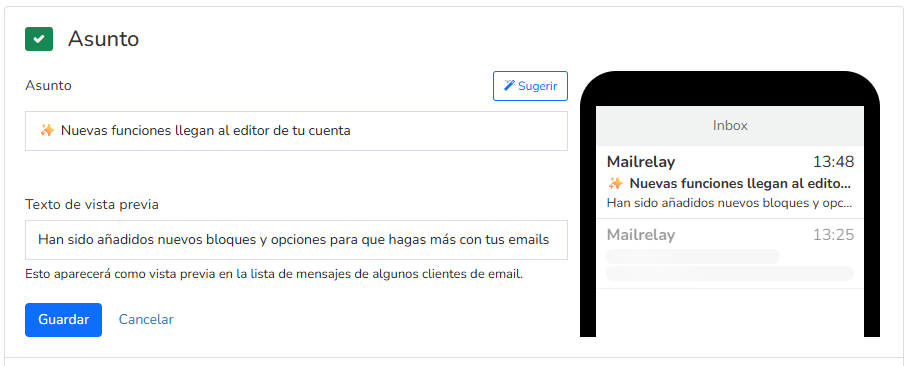
This text lets you expand on information, extending the subject line to give it more hook.
You can use it to add more context to your email, or emphasize a particular point.
· Let’s look at some subject line examples:
- “Explore the music that defines you” – a subject line that tries to empathize with the reader, encouraging them to explore something they already like. It’s a subject line that sparks curiosity — could it be true that the music I like is really in there?
- “Exclusive offers for a very limited time” – a subject line that plays on urgency, as we mentioned a few lines above. Though it may have the problem of being a bit vague.
- “Pedro, 20% off just for you” – using personalization to deliver a discount that feels more personal.
- “25 ideas to refresh your home” – a large number of ideas also grabs attention, simply because of the quantity.
- “Can I help?” – appealing as much as possible to the recipient’s curiosity: help with what?
Important!
Some of these subject lines are quite vague, generic, or don’t make the topic clear at all — do they work?
Yes, but with a small caveat.
The contact you’re emailing needs to know your sender, because knowing your sender, they’ll know what you sell, and that will give them context about your email’s content.
· Play it safe with A/B tests:
Wouldn’t it be great to be able to test subject lines and send your contacts the most effective one?
Well, you can.
Mailrelay lets you test several subject lines with a small percentage of your contacts, so you can gather information and find out which one performs better.
We covered how to use this type of email statistics in this article.
Use this tool, and your emails will get more opens, and you’ll sell more.
Email body: persuade with a message that captivates
You’ve already gotten the contact to open the email.
Now what?
The most important thing, something you should never forget, is:
- Keep the reader’s interest.
The first point of contact is the subject line — that’s where you need to grab interest.
And once the contact opens the email, you need to keep their attention in the first line.
Then in the next one, and so on.
Especially if it’s a sales email that you want to work, read it carefully: is there any part that seems unimportant? Doesn’t add anything? Or that flat out bores the reader?
You should cut that out.
Leave only what’s important — what keeps the contact’s interest from the start until they reach the point where they need to make a decision.
Other important points? These:
· Personal greeting and warmth:
Start with a greeting that includes the subscriber’s name if you have it (“Hi Juan!”).
A warm, friendly tone builds empathy.
Talk the way your contact would talk.
· Get to the point — what’s in it for the contact?:
Most people open emails with the mindset of:
- What’s in it for me?
And absolutely not thinking:
- What is this person going to tell me about how great their company is?
That’s why you should focus on what you can do for the reader.
Let’s look at a very simple example:
“Designing and writing emails can take you quite a bit of time, especially if you have no copywriting experience.
That’s why we’ve added AI features to the Mailrelay editor, so it can write for you.
The tool writes it, you just need to refine, adjust and add the finishing touches.
You save time you can spend on other tasks.
If you want to.
Without having to lose sales opportunities because of it.
Send more email campaigns in less time, get more results.
Easy, right?”
This is an email that makes clear from the start what the reader is going to get:
- More time
- More emails
- More sales
It’s clear. It doesn’t ramble.
· Highlight benefits, not just features:
The features of your product or service are very important.
But for them to be valued properly, you need to turn them into benefits.
A benefit is understood immediately; a feature requires analysis.
In the previous example, the feature would be Mailrelay’s AI editor.
Which is great.
But the contact will wonder: what does that do for me?
Those would be the benefits — for example, in the case we mentioned:
- Having more time
- Sending more emails, creating more chances to sell
This is quick to grasp.
· Address your potential customer’s objections:
No matter how perfect your product is, even with the greatest benefits, there will always be some objections.
Mailrelay’s free account is the largest free email marketing account, yet not every business in the world uses it — yet.
Why?
- Not everyone has experience: that’s why we offer support
- Some businesses don’t have much time: that’s where the AI features come in to save time
- Some don’t know how to design emails: examples, templates and pre-designed blocks
This is the work you need to do with your potential customers: think about what’s stopping them from signing up or buying your products.
If we go back to the earlier example, the editor’s AI features, we might think: great, this will save users time.
And that seems good in every case.
But what if contacts don’t want to leave all the content in the hands of AI? Or think it won’t be able to create a suitable email for their business?
That’s why we had this part:
- The tool writes it, you just need to refine, adjust and add the finishing touches.
That sounds more convincing.
· Make it easy to read:
Just like with the subject line, most people won’t want to spend much time reading your email.
Nobody has time!
How do you get them to read as much as possible?
- Short paragraphs
- short sentences
- Bulleted lists of key points
- Bold text
Basically, you need to make it impossible — inevitable — not to read the main point of your email.
· Trust!:
Nobody is going to buy a product that raises doubts.
Especially nowadays, when finding reviews about a product, or a comparison, is as easy as making an AI query.
That’s why you need to earn your potential customers’ trust.
How?
By sending email campaigns regularly, showing real contact details in your emails, links to your website, which should also look trustworthy.
Also by giving them the option to reply to your emails — which is why it’s better not to use no-reply senders.

Include clear and compelling calls to action
The call to action is basically telling the potential customer, “this is what I’d like you to do.”
Typically:
- Buy
- Click a link
- Sign up
- Request more information
- Download something
What do these actions have in common?
Well, they usually require two things from contacts:
- Time
- And often money
Do the benefits you’re offering justify that?
You can try condensing the benefits into the call to action, to further encourage the action.
If we continue with the earlier example, we could say:
- Sign up now and start selling more, in less time, with AI-written emails
But isn’t that too long?
Yes, that’s why it’s best to split it up — for example, your button could say:
- Sign up now for free
And right below the button, the line:
- Start selling more, in less time, with AI-written emails
And that covers everything.
· Highly visible:
The call to action should be highly visible, ideally on a button that contrasts with the surrounding color.
Now, with Mailrelay, it’s very easy, thanks to pre-designed blocks:
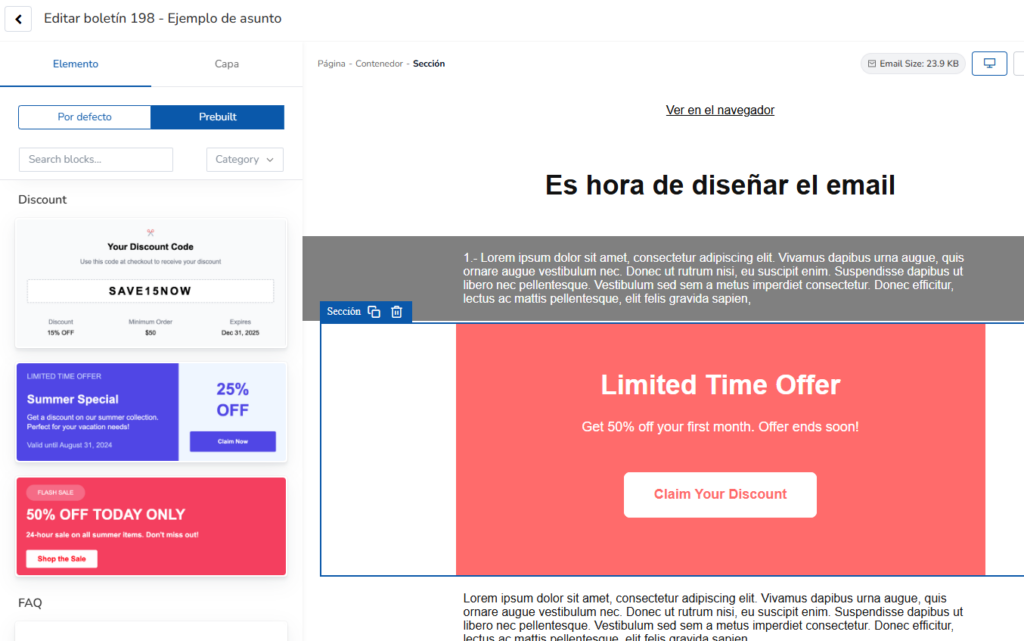
These pre-designed blocks will help make your call to action clearly visible.
· Concrete actions:
Phrases that include an action verb, encouraging someone to do something, work better.
Like “buy now”, “save my spot”, etc.
Less specific phrases like “click here” can be too vague.
· One single goal:
Contacts can only do one thing at a time.
Yes, we live in a multitasking world — but if you want to sell, or want them to sign up, or want them to read a specific article,
it’s better to just point to one of those.
If you need them to take more than one action, it’s better to send several emails.
· Location, location, location:
A marketing classic.
Location matters.
But where should you place the call to action?
If you place it too high up in the email, you won’t have had time to show the benefits.
Too far down, and they might never see it.
Ideally, it should be visible as soon as the email is opened, without scrolling, but with a few benefits shown first.
That would be ideal, if possible.
If that’s not possible, don’t put it too far down either.

Automate your sales emails and save time
If you’re short on time — which often happens — you can automate certain actions.
In your Mailrelay account, you can automate email chains, among other options. Here are a few:
· Welcome series:
This is the typical series of emails sent after a contact subscribes.
With Mailrelay, it’s very easy to create drip campaigns to send a series of emails.
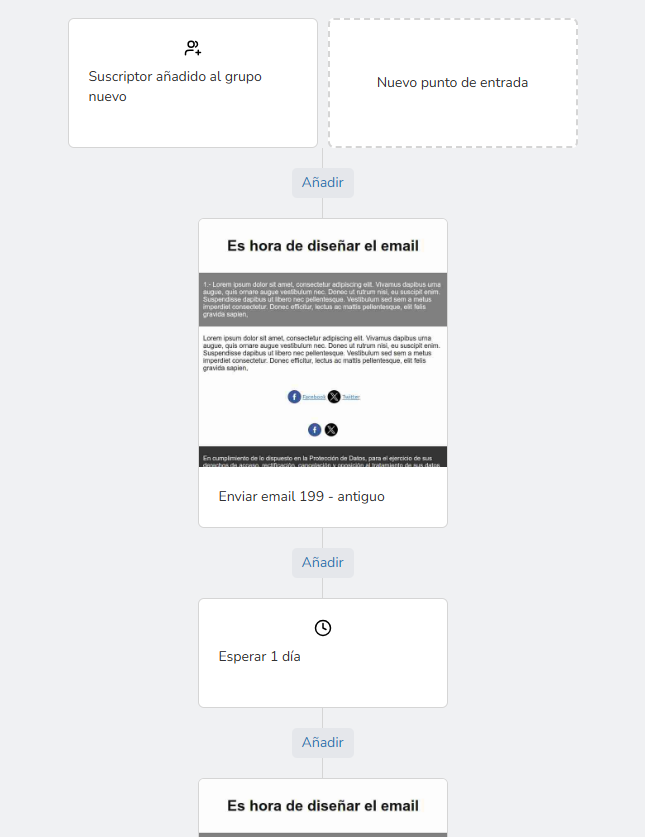
You can schedule a series of emails, even add conditions to them, send SMS messages, etc.
There are many options — the best thing to do is create your free account, if you don’t already have one, and try them out.
· Re-engagement:
Sometimes lists become a bit “dormant”, and you need to try to reactivate them.
An automated campaign can save you work.
You can schedule a series of emails aimed at trying to recapture these contacts’ attention, perhaps with a specific offer.
The conditional block can be very useful in these cases, letting you carry out different actions depending on whether they click your emails or not.
Segment, personalize and analyze your campaigns to get better results
Segmenting your contacts before trying to sell is very useful.
This is what we mentioned earlier about getting to know your customers.
If you know their interests and needs, you’ll be able to do a better job showing them the benefits of your product or service.
What aspects might be worth considering?
· Segment by characteristics or interests:
This might seem difficult, but there are things you can almost always do.
For example, something minimal but already useful: you can separate customers from subscribers.
In other words, separate who has already bought from you from who hasn’t.
With that minimal split, you can already send specific emails to each segment, improving your results.
Easy and effective.
· Segmentation by stage (funnel):
This one is trickier.
Because it can be hard to know which part of the sales funnel your contacts are in.
What can we do in this case?
A practical solution is usually to build an automation with a drip campaign — that is, a series of emails where, starting from a base email, you send out a sequence designed to move all contacts forward.
Turning new, cold contacts into customers takes time.
If you want to go deeper, I’d suggest this article.
· Content Personalization:
Beyond segmenting your audience, personalize the message.
Mailrelay lets you use custom fields to create variables in your emails.
You can load data into these custom fields so it shows up when you send, generating emails with unique content for each recipient.
This makes it easier to get sales.
· Measure, analyze and optimize your email marketing campaigns
For your newsletter to truly become a selling machine, you can’t just send emails.
You need to measure the results of every campaign and adjust your strategy based on the data you gather.
I recommend taking a look at the link above, where you’ll see how important it is to analyze:
- Open rate: This shows the percentage of subscribers who opened your email. If your open rate is low, it could be a sign of unappealing subject lines or other issues.
- Click-through rate (CTR): Of those who opened the email, how many clicked your link or buy button? This percentage gives you an idea of how effective your copy and call to action are. If your CTR is low, review your copy and calls to action.
- Click heatmap: if you’ve included the call to action in several spots, the heatmap can help you see which area worked best.
What does Mailrelay give you so your mailings sell at no cost?
Mailrelay isn’t just “the largest free account.”
What can you find?
· An epically huge free plan:
With Mailrelay, you can send up to 80,000 emails a month to up to 20,000 contacts, completely free.
No feature limits.
This free account far outperforms all the competitors.
Most competitors tend to restrict their free plans to smaller lists or very limited monthly sends.
· Dedicated technical support, even on the free account:
Unlike other tools, where support is limited or nonexistent on free plans, Mailrelay provides multilingual customer service (including Spanish) via phone, chat and tickets for all its users.
If you’re short on time or experience, having fast, personalized help lets you resolve questions or problems instantly.
With support you save time, and time is money.
· Automation and A/B testing included in every plan:
Mailrelay includes email automation features for building welcome flows, drip emails, autoresponders, and more — even on the free account.
You can also run A/B tests on subject lines or senders.
Many platforms reserve these advanced features for paid plans only.
· Real-time reports with click maps and ROI analysis:
In Mailrelay, you’ll find a complete stats dashboard where you can see opens, clicks, unsubscribes, conversions and more, instantly.
The click heatmap feature stands out, visualizing which links in your email get the most interaction.
That way you know which areas of the newsletter are performing best.
· High deliverability and reliability:
Mailrelay has servers optimized for high sending capacity, along with its own IP ranges and algorithms specifically developed for large sending volumes.
This helps your emails avoid blocks and increases their chances of reaching the inbox.
All this and much more awaits you in your free account, to help you turn your newsletter into a selling machine.

Jose Argudo
CMO at Mailrelay. Writes about email marketing, copywriting, and conversion for small businesses and entrepreneurs.