
Your store, your forms and your CRM generate contacts every day. If you move them to your email tool by hand, some get lost and others arrive late.
No-code automation platforms like Make or Zapier solve this: they connect your apps and move the data on their own.
In this guide we explain how to connect them with Mailrelay, what you can do with each one, and three scenarios you can copy.
In summary: Mailrelay has an official integration in Make, verified and maintained by Make itself, with modules to create and update subscribers, manage groups and make API calls. It also works on the free account. It doesn’t have its own app in Zapier, but you can connect it using Zapier’s webhooks and the Mailrelay API. Other tools, like Mailchimp, Brevo or MailerLite, do have an app in Zapier. If you’re starting from scratch, Make is the easiest way to connect Mailrelay with any app without coding.
Connect Mailrelay with your apps
Create your free account, generate your API key and set up your first scenario in Make in a few minutes.
What are Make and Zapier?
Make (formerly Integromat) and Zapier are platforms that connect apps without writing code. Both work the same way: something that happens in one app, the trigger, starts one or more actions in others.
In Make, each automation is called a scenario. In Zapier, a zap. Both have a free plan with a monthly operations limit and paid plans for larger volumes.
How do you integrate Zapier or Make with an email tool?
The process is the same with any email tool:
- Choose the trigger: a new order, a form response or a new row in a spreadsheet.
- Connect your email tool with its API key.
- Choose the action, for example creating the subscriber or adding them to a group.
- Map the fields: email, name and any others you need.
- Run a test and turn on the automation.
With Mailrelay, this is the difference between the two platforms:
| Make | Zapier | |
|---|---|---|
| Integration with Mailrelay | Official, verified by Make | No dedicated app: via webhooks and the Mailrelay API |
| What you can do | Create, update, search and delete subscribers, manage groups, resend the confirmation email and call the API | Whatever the API allows, with you configuring each request |
| How it connects | API key and your account’s domain | API key in each request |
| Difficulty | Low | Medium: you need to understand the API |
With Make you can connect Mailrelay with hundreds of tools without knowing how to code: you build the integration visually and Make takes care of talking to the API. Quick and easy. My advice: start with a simple scenario, like sending your form responses to Mailrelay, and once it works, add the next one.
Jose Argudo, CMO at Mailrelay
How to connect Mailrelay with Make
- In your Mailrelay account, go to the settings and create an API key.
- In Make, create a scenario and add the module for the app that triggers the automation, for example WooCommerce, Google Forms or Typeform.
- Add the Mailrelay “Create/Update a Subscriber” module and create the connection with a name, your API key and your account’s domain. If you log in at xyz.ipzmarketing.com, the domain is “xyz”.
- Map the fields and choose the Mailrelay group the contacts will go to.
- Run a test with your own email address and turn on the scenario.
Always use “Create/Update”: if the contact already exists, it’s updated rather than duplicated.
And if you use Zapier
Since Mailrelay doesn’t have an app in Zapier, use the source app’s trigger and, as the action, Webhooks by Zapier. With it you send a request to the Mailrelay API that creates or updates the subscriber. If you’d rather not deal with the API, Make is simpler.
How do you integrate forms with Google Sheets or CRMs?
A single form can feed your email list, a spreadsheet and your CRM at the same time. With Make, a single scenario can do all three. Here are three examples you can copy.
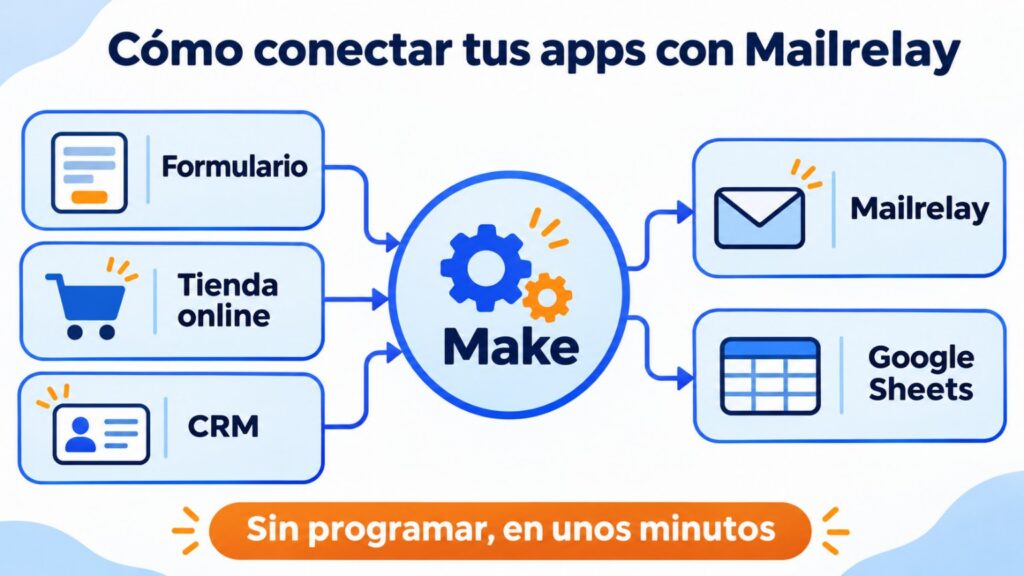
1. Form → Mailrelay and Google Sheets
- Trigger: a new response in Google Forms or Typeform.
- Actions: create the subscriber in Mailrelay, in that form’s group, and add a row in Google Sheets with the date and source.
- Important: add a filter so that only people who ticked the consent box are subscribed. We explain why in legal email marketing.
2. Online store → Mailrelay
- Trigger: a new order in Shopify or another store.
- Action: create or update the subscriber in the customers group.
- If your store runs on WooCommerce, you don’t need Make: the official Mailrelay plugin syncs customers, products and carts. You’ll find it in WooCommerce.
3. CRM → Mailrelay
- Trigger: a new contact or a stage change in your CRM, such as HubSpot or Pipedrive.
- Action: create or update the subscriber in Mailrelay and move them to the right group, for example from “leads” to “customers”.
- For the initial import you don’t need Make: Mailrelay imports contacts directly from HubSpot.
What about the other way round? To bring your Mailrelay subscribers into Google Sheets, schedule a scenario with the subscriber search module that copies each week’s new sign-ups into a sheet.
Common mistakes when connecting your apps
- Subscribing everyone. A customer or a CRM contact isn’t a subscriber unless they’ve given you permission.
- Not choosing the group. If everything goes to the same group, you won’t be able to segment later.
- Duplicating contacts. Use “Create/Update” instead of always creating a new one.
- Not testing. Test with your own email address before turning on the scenario.
- Forgetting the limits. Check how many operations per month your Make or Zapier plan includes.
How Mailrelay helps
- Official integration in Make, verified and maintained by Make, also on the free account.
- Documented REST API, for Zapier or for custom integrations.
- Official plugin for WordPress and WooCommerce.
- Direct import from Mailchimp and HubSpot.
- Up to 80,000 emails a month and 20,000 contacts for free, with human support on every plan.
Your list, up to date without copying and pasting
Up to 80,000 emails a month and 20,000 contacts for free, with an official integration in Make and human support on every plan.
Frequently asked questions
Does Mailrelay integrate with Zapier?
It doesn’t have its own app in Zapier, but you can connect it with Webhooks by Zapier and the Mailrelay API. If you don’t want to configure requests, use Make, where Mailrelay has an official integration.
Does the Make integration work on the free account?
Yes. The subscribers and groups API that Make uses is available on all plans, including the free one. The only paid features are the ones for sending transactional emails.
Is Make free?
It has a free plan with a monthly operations limit, enough to get started. If your automations grow, you’ll need to move to a paid plan.
Can I move my Mailrelay subscribers to Google Sheets?
Yes. You can schedule a scenario in Make with the subscriber search module or export the list from your account.
Do I need to know how to code?
With Make, no: you choose the modules and map the fields. With Zapier you’ll need to configure an API request.
Related posts:
- How to improve the deliverability of confirmation emails
- Alternatives to Mailrelay: Is There an Efficient One?
- Quality Leads: Strategies and Techniques to Get Them
- Brand Manager: What Is It and What Does It Involve? Features
- Write the Perfect Opt-in Form Without a Lead Magnet

Jose Argudo
CMO at Mailrelay. Writes about email marketing, copywriting and conversion for SMEs and entrepreneurs.