How to verify an email: check if an email address exists and validate your list before sending
Free methods for a single address, how to clean an entire list and what no verifier can detect

Free methods for a single address, how to clean an entire list and what no verifier can detect
Verifying an email means checking, before you send anything to it, that the address is spelled correctly, that its domain receives email and that the mailbox exists. It keeps you from sending to addresses that will bounce and protects your sender reputation.
A single mistyped address isn’t a problem. Hundreds of old or poorly collected addresses are: mailbox providers read those bounces as a sign that you don’t look after your list, and start sending your campaigns to spam.
In this guide you’ll see how to check if an email address exists, how to validate an entire list, what no tool can detect and how to avoid having to verify later.
An email verifier doesn’t send any message. It runs a series of technical checks, from the simplest to the most precise:
| Check | What it detects | Example |
|---|---|---|
| Syntax | Malformed addresses | ana@@empresa.com, ana.empresa.com |
| Domain | Domains that don’t exist or don’t receive email | [email protected] |
| Mailbox | Accounts that don’t exist on a valid domain | [email protected] |
| Risk | Temporary or role-based addresses and spam traps | info@, disposable addresses |
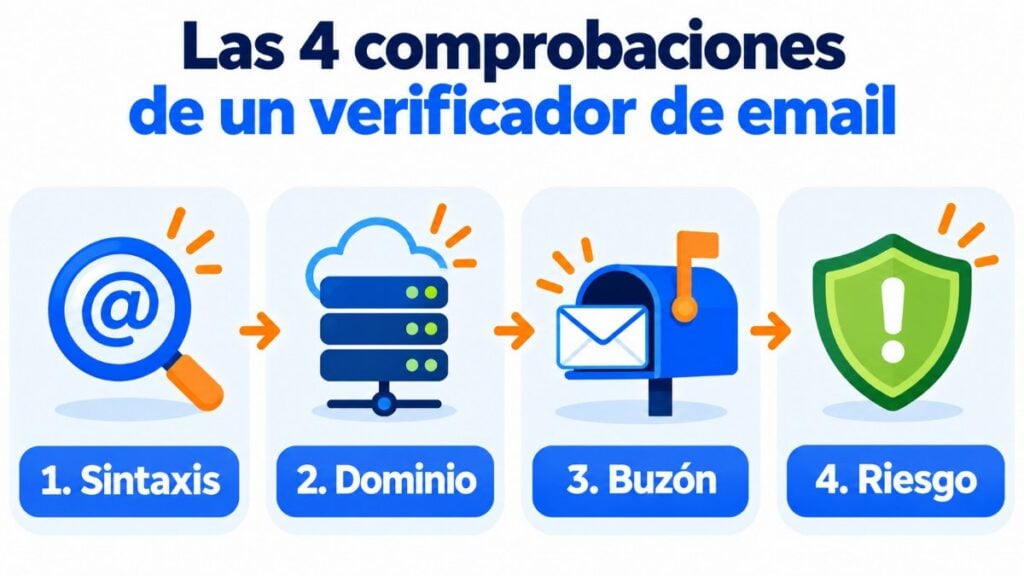
The third check is the most useful. The verifier “knocks on the door” of the recipient’s email server, asks whether that mailbox exists and says goodbye before delivering anything.
Validating an email is often used as a synonym for verifying it. Sometimes “validate” is kept for the format check and “verify” for the mailbox check, but in practice the tools do both.
Start with a clean list
Mailrelay detects bounces and cleans your lists automatically, on the free account too.
If you only have one or two doubtful addresses, you don’t need any paid tool.
Step 4 is reliable, but you shouldn’t repeat it with many addresses from your usual account: every bounce counts against you.
When you’re dealing with hundreds or thousands of contacts, a bulk verifier is the practical option. It’s worth using in these cases:
The process is always similar:
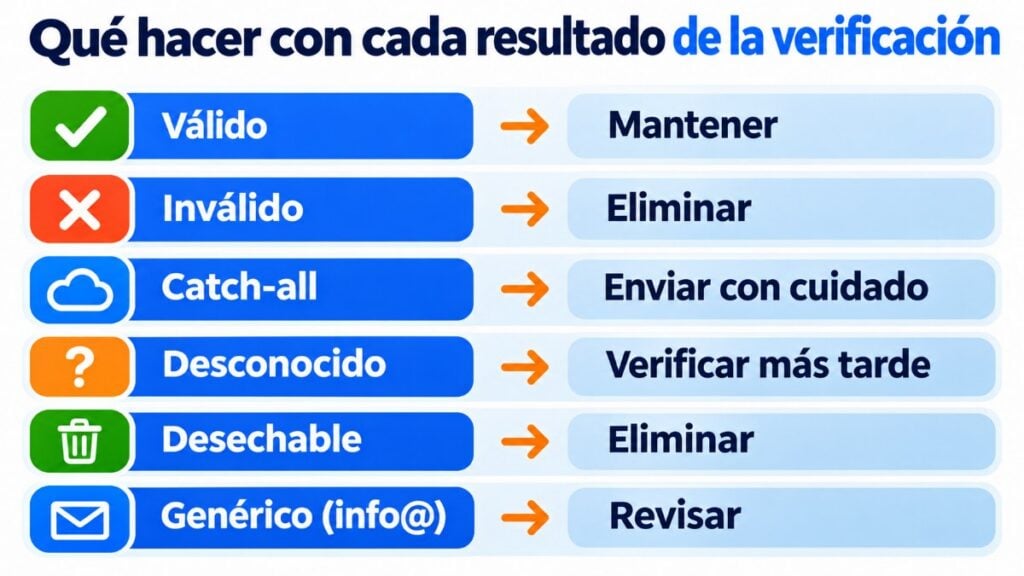
These are the usual results and what to do with each one:
| Result | What it means | What to do |
|---|---|---|
| Valid | The mailbox exists and accepts email | Keep it |
| Invalid | The mailbox or the domain doesn’t exist | Remove it |
| Catch-all | The domain accepts any address | Send with care and watch the bounces |
| Unknown | The server didn’t respond | Verify it again later |
| Disposable | Temporary address | Remove it |
| Role-based | info@, sales@, admin@ | Keep it only if that address subscribed |
Temporary email addresses last minutes or hours. Even if they’re valid today, they won’t be tomorrow.
There are dozens of email verifiers and they all promise sky-high accuracy. Before uploading your list, pay attention to these points:
Run a test with a small sample of your list and compare the report with the actual bounces from your last send. It’s the best way to know whether the verifier gets it right with your type of contacts.
No verifier is 100% accurate. It’s worth knowing their limits so you don’t get overconfident:
That’s why verification is a help, not a substitute for good list building.
Every time you send to an address that doesn’t exist, the recipient’s server returns the message. If bounces pile up, Gmail, Outlook or Yahoo conclude that your list is neglected and treat you with more suspicion.
Gmail’s sender guidelines say it clearly:
If you send more than 5,000 messages a day to Gmail accounts, you must also meet the bulk sender requirements: email authentication, DMARC and one-click unsubscribe.
As for bounces, the industry usually considers a bounce rate below 2% healthy. Above 5%, the list needs urgent cleaning.
Look after your sender reputation
Send with double opt-in, automatic handling of unsubscribes and complaints, and bounce statistics for every campaign.
The best verification is the one you don’t need. If addresses come in correctly from the start, your list stays healthy on its own:
All of this is part of list hygiene: small habits that keep your list useful and your sender reputation intact.
If you send your campaigns with Mailrelay, a good part of this work takes care of itself:
With the free account you can send up to 80,000 emails a month to 20,000 contacts, with human support on every plan. If you want to go further, here’s how to improve the deliverability of your campaigns.
Send only to people who want to read you
Up to 80,000 emails a month to 20,000 contacts, with human support on every plan.
These are the most common questions.
With an email verifier. It checks the format, the domain and, if the server allows it, asks whether the mailbox exists without actually delivering any message.
Checking whether an address exists isn’t prohibited. What requires permission is sending it commercial communications: verifying a list doesn’t replace the subscriber’s consent.
It’s a domain configured to accept email at any address, even if the mailbox doesn’t exist. That’s why verifiers can’t confirm those addresses 100%.
If you use double opt-in and send regularly, almost never. Verify it before using a list that’s old, imported or hasn’t received emails in months.
As a reference, below 2% is considered healthy. If you go above 5%, stop sending to that list and clean it before the next campaign.