WhatsApp link (wa.me): what it is, how to create your link and where to place it
How to get a customer to message you on WhatsApp in a single click, from your email, your website or a QR code
A WhatsApp link is a web address that opens a chat with a specific number directly, without having to save it in your contacts first.
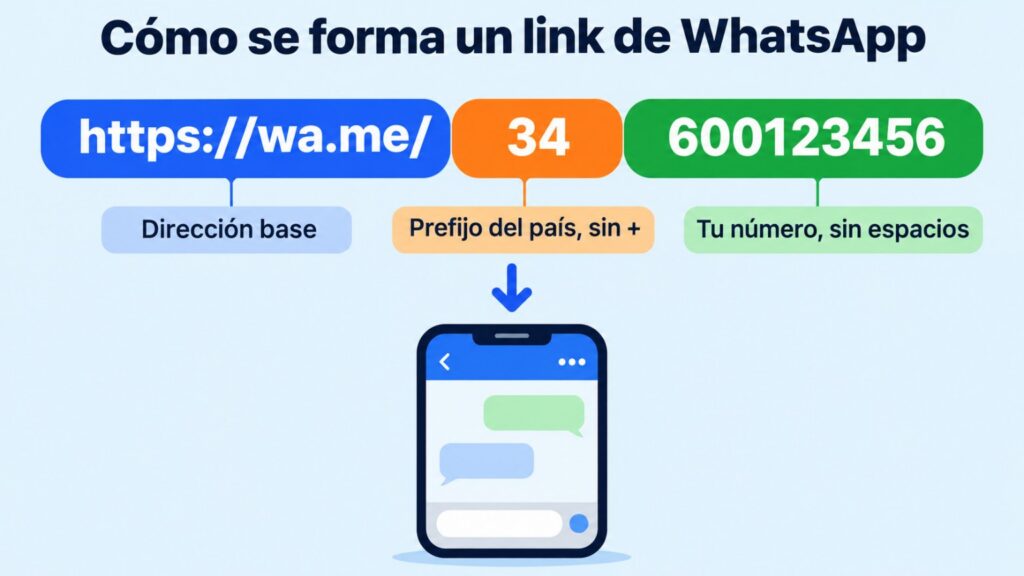
It looks like this: https://wa.me/34600123456. Whoever taps it on their phone or computer lands in the conversation and only has to type.
It’s the simplest way to get a customer to message you on WhatsApp in one click: from a button in your newsletter, your email signature, your website or a QR code.
You can also add a pre-written message, such as “Hi, I’d like to book an appointment”, so the person only has to tap send.
What is a WhatsApp link and what is it for?
WhatsApp calls it “click to chat”. It works in the regular app and in WhatsApp Business, on mobile and on WhatsApp Web.
A WhatsApp link helps you:
- Get enquiries without showing your number as text. The customer doesn’t have to copy it or save it.
- Remove steps. From the ad, the email or the website to the chat in a single click.
- Know where each conversation comes from, if you use a different pre-filled message in each place.
- Handle orders, appointments or questions on the channel many customers already use every day.
How to create a WhatsApp link step by step
You don’t need any tool to create your WhatsApp link. Just write the address with your number in international format:
- Start with
https://wa.me/ - Add the country code without the “+” or any leading zeros. For Spain, 34.
- Add the number without spaces, hyphens or brackets.
- Test it from another phone before publishing it.
Here is what the WhatsApp link looks like with a few example numbers:
| Number as you write it | WhatsApp link |
|---|---|
| +34 600 12 34 56 | https://wa.me/34600123456 |
| +52 55 1234 5678 (Mexico) | https://wa.me/525512345678 |
| +54 9 11 1234-5678 (Argentina) | https://wa.me/5491112345678 |
Add a WhatsApp button to your next newsletter
Design your emails with the Mailrelay editor and add your wa.me link in one click.
How to add a pre-filled message
If you add ?text= to the end of the WhatsApp link, the chat opens with the message already written. Spaces are written as %20:
https://wa.me/34600123456?text=Hola,%20quiero%20pedir%20cita
Whoever taps it will see “Hi, I’d like to book an appointment” in the text box and only has to send it. They can change it before sending, so use it as a prompt, not as a form.
Some ideas depending on where you place the link:
- In a newsletter: “Hi, I’m coming from the November offer email”.
- On your website: “Hi, I have a question about a product”.
- On an event landing page: “Hi, I’d like to book a place at the workshop”.
Accented letters and symbols such as “?” or “&” also need to be encoded. If you don’t want to do it by hand, type the message into any free URL encoder and copy the result.
How to create the link from WhatsApp Business
The WhatsApp Business app has its own short WhatsApp link, in this format: wa.me/message/…. You’ll find it in the settings, under the business tools, in the “Short link” option. Menu names may vary slightly depending on the version.
From there you can:
- Copy and share the link.
- Turn on a pre-filled message.
- See the link’s QR code, ready to print.
The advantage is that it doesn’t show your number in the address. If you change the message, the link stays the same.
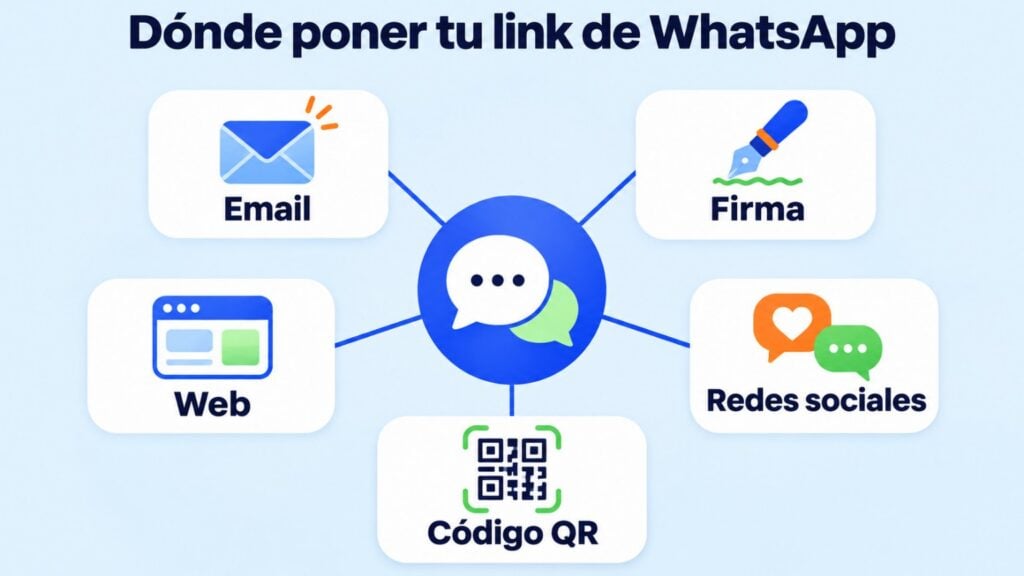
Where to place your WhatsApp link
- In your emails. A “Message us on WhatsApp” button in the newsletter or in an order confirmation email.
- In your email signature. Next to your phone number, with clear text: “WhatsApp: message us here”.
- On your website and landing pages. On the contact page, on product pages or in a sticky button.
- On social media. In your Instagram or TikTok bio, or on your LinkedIn profile.
- On paper. As a QR code on business cards, flyers, shop windows or receipts.
Common mistakes with the WhatsApp link
- Leaving in the “+”, spaces or a leading zero. The WhatsApp link can’t find the number.
- Forgetting the country code. Without it, WhatsApp doesn’t know who to contact.
- Not encoding the message. Unencoded spaces or accented letters can cut the text short.
- Using a number nobody answers. If you publish the link, reply quickly or set up an away message.
- Not testing it. Always open it from another phone before sending it to your list.
WhatsApp link vs WhatsApp campaigns: not the same thing
The link is for the customer to message you. It’s an open door, but you have to wait for people to use it.
WhatsApp campaigns work the other way round: you message your whole list of contacts who have agreed to receive your messages, using templates approved by Meta.
Ideally, combine them: the link in your emails and on your website to receive enquiries, and campaigns for notices, reminders and promotions. You’ll find more ideas in WhatsApp marketing and in how to create a poll on WhatsApp.
How Mailrelay helps you
With Mailrelay you can take your WhatsApp link to your whole list and also message them on WhatsApp:
- Buttons with your WhatsApp link in newsletters and landing pages: a button accepts any address, including a wa.me one.
- WhatsApp campaigns with templates, buttons and statistics for every send, from the same dashboard as email and SMS.
- Segmentation, to send the WhatsApp button only to those who are interested.
WhatsApp is included in the Standard and Enterprise plans, with a 10-day trial on the free account. Meta’s per-message fees are paid separately.
And when you want to message them yourself, use WhatsApp campaigns
Meta-approved templates and statistics for every send, in the same dashboard as your email.
Frequently asked questions
Two common questions we haven’t answered above.
Is it free to create a WhatsApp link?
The wa.me link is a free WhatsApp feature: you don’t need to pay or install anything. The same goes for the WhatsApp Business short link.
Can I create a WhatsApp link for a group?
You can, but it’s a different thing: a group invite link is created from the group info and takes the person to join the group, not to a chat with you.