LinkedIn: what it is, what it's for and how to use it for your business
How to set up your profile and your company page, what Premium adds and how to turn connections into clients
LinkedIn is the professional social network: a site where people and companies publish their professional profile, share content from their industry and connect with each other to find jobs, talent or clients.
Here’s what it’s for, how to set up your profile and your company page, what Premium adds and how to turn your connections into clients.
What is LinkedIn?
It’s a social network built for work. It was founded in 2003 and has been owned by Microsoft since 2016.
It has more than 1.3 billion members worldwide, and 71 million companies are on it.
It works in the browser and in the app for Android and iPhone, and signing up is free.
Unlike Instagram or TikTok, people here join with their real name, job title and company. That’s why it’s the most useful network for B2B: you know who you’re talking to.
What is LinkedIn for?
Mainly for four things:
| Goal | How it’s used |
|---|---|
| Finding a job | A complete profile, job alerts and applications from within the network |
| Finding talent | Job postings, candidate search and employer branding |
| Selling to businesses | Social selling: reaching the person who makes the buying decision |
| Building a brand | Posting content about your industry so people get to know you |
How do you create a good LinkedIn profile?
Signing up takes a couple of minutes. What makes the difference is filling in your profile properly:
- Use a professional photo with your face clearly visible.
- Write a headline that says what you do and for whom, not just your job title.
- In the “About” section, your bio, explain what problems you solve.
- Add your experience with concrete results.
- Customize your URL with your name.
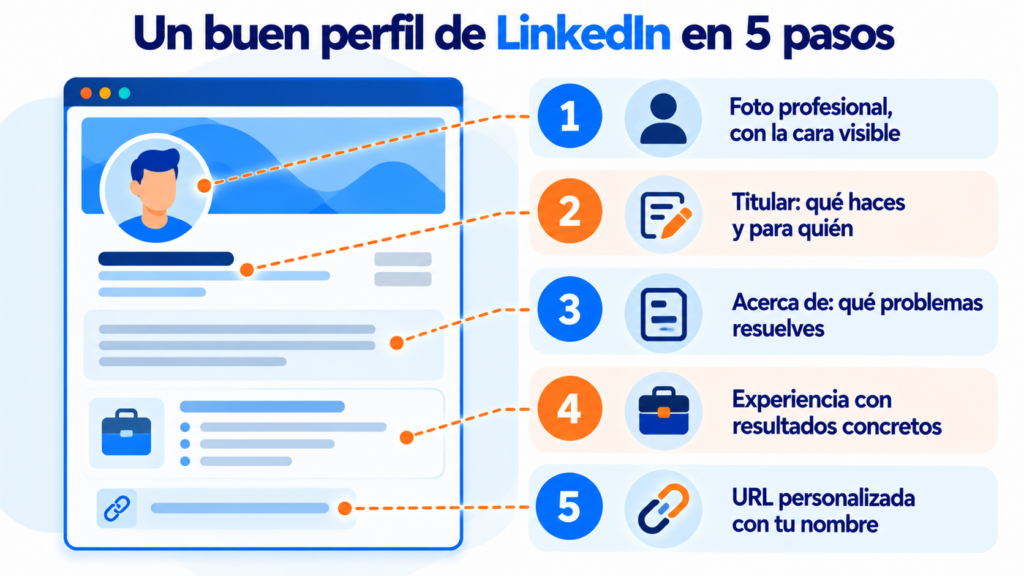
A complete profile shows up more often in searches and builds more trust when you message someone who doesn’t know you.
Don’t let your LinkedIn connections stay on LinkedIn
With Mailrelay you create a signup form for your profile and your posts, and send your newsletter to a list that belongs to you. Free account with up to 80,000 emails a month.
Personal profile vs. company page: what’s the difference?
They’re two different things, and it’s worth having both.
| Personal profile | Company page | |
|---|---|---|
| Who manages it | You | One or more admins |
| Relationship | Connections and followers | Followers only |
| Post reach | Higher | Lower without ads |
| Ads | No | Yes, from the page |
| What it’s for | Your personal brand and your network | The company’s brand and its job postings |
In practice, team members reach more people than the company page does. Many B2B brands rely on the profiles of their founders and salespeople, and the community manager coordinates everyone’s content.
What does LinkedIn Premium include?
The free version is enough for most people. Premium adds features depending on your goal, often with a free one-month trial:
- Premium Career, for job hunting with more information about job postings.
- Premium Business, to see who views your profile and to search for companies.
- Sales Navigator, for sales prospecting with advanced filters.
- Recruiter, for hiring teams.
All of them include InMail messages so you can write to people who aren’t your connections. Prices vary by country: check them on LinkedIn’s website.
How do you win clients on LinkedIn?
What works is giving value before selling. Post regularly about your clients’ problems, as part of a content marketing strategy that attracts rather than interrupts, as inbound marketing suggests.
Comment on profiles in your industry and write personal messages, never generic templates. A cold message copied to a hundred people works as badly as a mass cold email.
And log every conversation in your CRM so you don’t lose track.
If you have a budget, LinkedIn Ads lets you target by job title, industry or company size. It’s one of the most expensive social ads platforms, but also one of the most precise for generating B2B leads.
Its lead gen forms fill in the profile data automatically, and it’s worth pointing them to a landing page or a lead magnet your buyer persona actually cares about.
The network lets you publish your own newsletter inside the platform, and it notifies your subscribers every time a new issue comes out. It’s a good way to gain visibility.
But the subscribers belong to LinkedIn, not to you. You can’t download their emails, segment them or measure much beyond views. And if the algorithm changes, your reach changes with it.
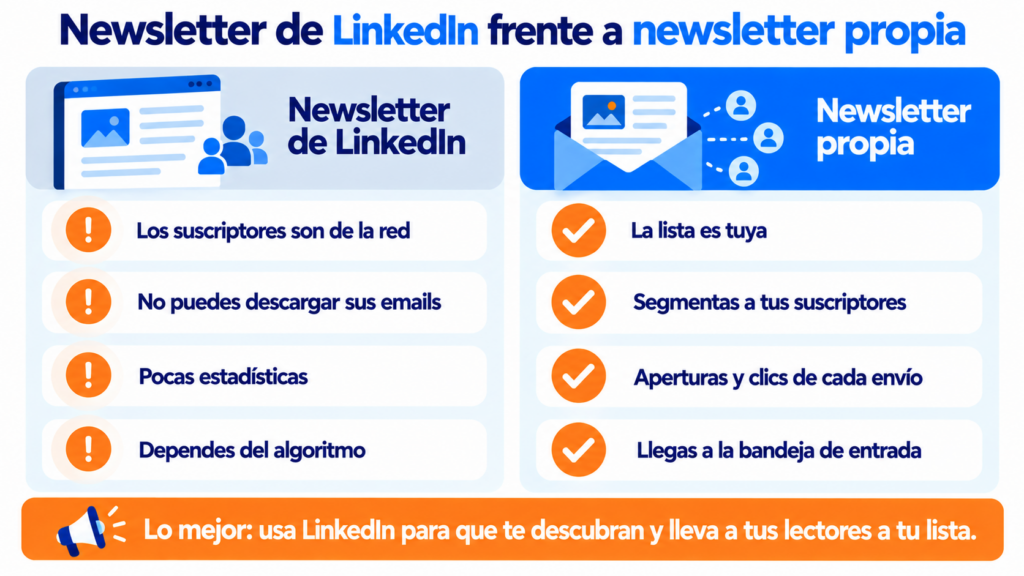
With your own newsletter, the list is yours. The most profitable approach is to combine both: use LinkedIn to get discovered and send your readers to your subscription form.
Watch out for a common shortcut. Exporting your LinkedIn connections doesn’t give you permission to send them emails. To add them to your list you need their consent, as the GDPR requires, and ideally you confirm it with double opt-in.
How Mailrelay helps you
With Mailrelay you turn your LinkedIn followers into subscribers. You create a signup form, link to it from your profile and your posts, and send your newsletter to the people who really want to receive it.
The free account includes up to 80,000 emails a month and 20,000 contacts. You get a visual editor, automations to welcome every new subscriber, and open and click statistics.
And all with human support on every plan. See pricing for details.
From followers to subscribers
Forms, welcome automations and statistics, with human support on every plan.
LinkedIn FAQ
These are the most common questions.
Is LinkedIn free?
Yes. Creating your profile, connecting, posting and looking for a job are free. Premium and ads are paid.
Who owns LinkedIn?
Microsoft, which bought it in 2016. It still operates as an independent brand.
What’s the difference between following and connecting?
Connecting creates a two-way relationship, and you both see what the other posts. Following only shows you what that person or company posts.
How many connections can I have?
Up to 30,000 first-degree connections. Beyond that, people can only follow you.
Can I send emails to my LinkedIn connections?
Only if they give you their consent. Invite them to subscribe to your newsletter with a link to your form, instead of adding them to the list yourself.