SMTP service: what it is, what it's for and how to choose one
What it is, how it differs from hosting or Gmail, and what to check before signing up for one
An SMTP service is an external platform that sends the emails from your website, store or app on your behalf. It uses servers set up so that your messages reach the inbox. You connect with a username and password, and the provider takes care of the rest.
Think of a courier company. You could deliver your parcels in your own car, but a delivery network gets there faster, reaches more places and tracks every shipment.
Email works the same way: your server can send, but a specialized service delivers better and tells you what happened to each message.
What is an SMTP service?
It’s a provider that gives you sending servers based on the SMTP protocol, the standard that email uses to travel across the internet.
The difference lies in everything it adds around the sending: IPs with a good reputation, domain authentication, bounce management, statistics and support.
It’s also called a professional SMTP server, external SMTP or SMTP relay. In practice, they all mean the same thing: handing off your sending to someone who specializes in it.
What is an SMTP service for?
It’s used to send the emails your business generates automatically or in bulk, without them ending up in spam:
- order confirmations, invoices and shipping notifications from an online store;
- contact forms and sign-ups from a WordPress website;
- password resets and verification codes from an app;
- notifications from a CRM, an ERP or a booking system;
- emails sent from your own software that needs an outgoing server.
Most of them are transactional emails: messages the user is expecting and that have to arrive within seconds.
How does it work?
Your app connects to the provider’s server with its access details: server, port, username and password.
The usual ports are 587, 465 and 2525. You’ll find the details in SMTP port.
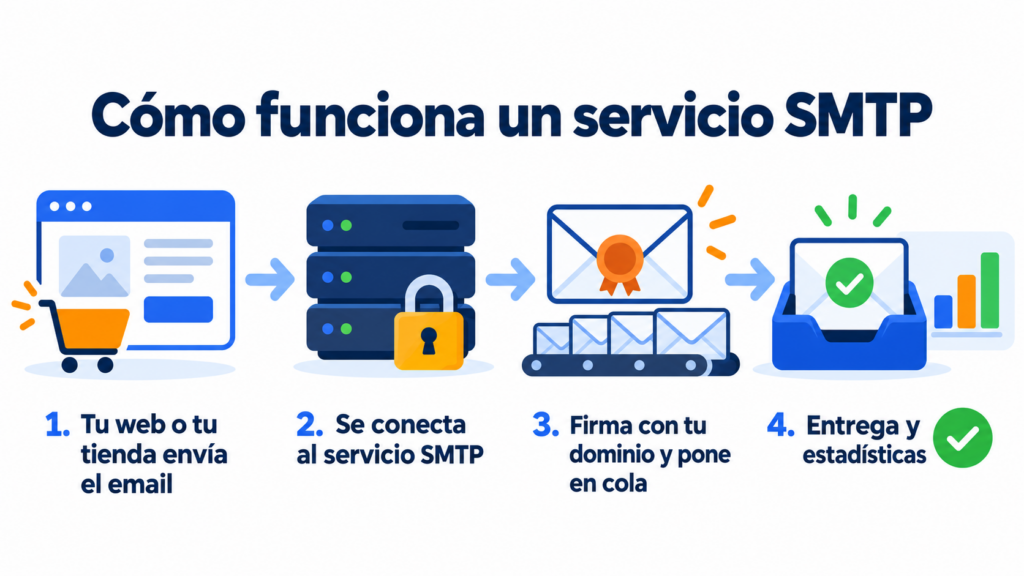
From there, the provider receives each message, signs it with your domain, queues it and delivers it. If the recipient doesn’t exist or their mailbox is full, it records the bounce so you don’t write to them again.
Many services also offer an API. It’s another way to connect, more convenient when the emails are sent from a custom-built app.
SMTP service, hosting, Gmail or your own server
These are the four most common ways to send email from a website or an app:
| Option | Advantages | Disadvantages | When it fits |
|---|---|---|---|
| Hosting email | It’s included and there’s nothing to configure | IPs shared with other customers, little authentication and no statistics | Websites that send few emails |
| Gmail or Google Workspace | Easy to connect and reliable for low volumes | Daily limits (500 emails on a free Gmail account) and designed for people, not apps | Testing and small businesses |
| Your own server | Full control | You have to maintain it, monitor blacklists and build a reputation from scratch | Technical teams with high volumes |
| SMTP service | Good deliverability, statistics, managed bounces and support | It has a monthly cost | Stores, websites and apps that depend on their emails |
If a lost email costs you a sale or a support call, a specialized service is worth it.
How to choose the best SMTP service for your business
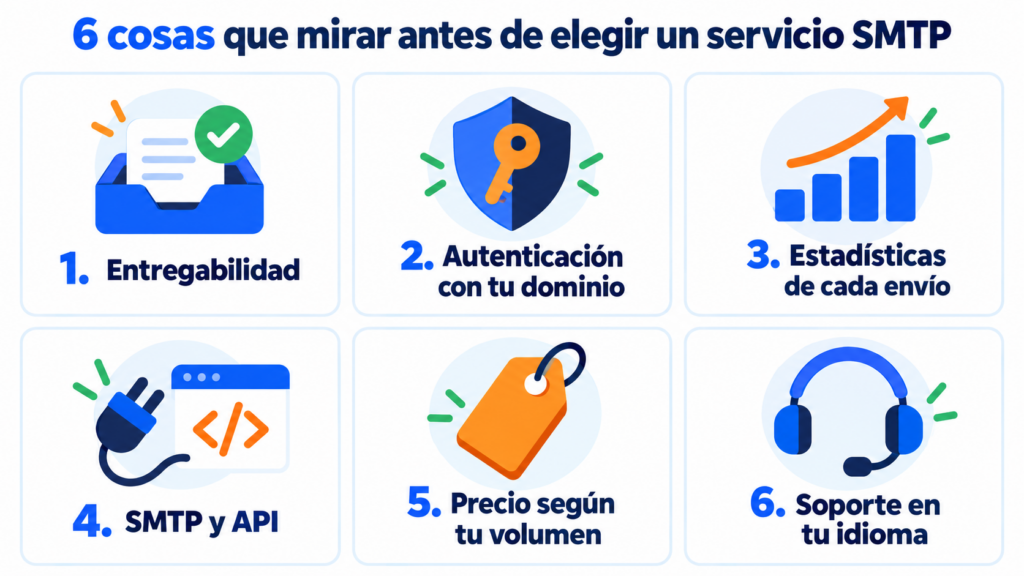
There’s no provider that’s perfect for everyone. Check these six points before you decide.
1. Deliverability and IP reputation
Ask how they look after their IPs and whether they separate transactional emails from bulk sends. It’s what has the biggest impact on your deliverability.
2. Authentication with your domain
You need to be able to send from your own domain and set up SPF, DKIM and DMARC. Gmail, Yahoo and Microsoft require them from bulk senders.
3. Statistics and a log of every email
Make sure you can see deliveries, opens, clicks and bounces, and search for a specific email when a customer says they didn’t receive it.
4. SMTP and API
If you use a WordPress plugin today but plan to integrate an app tomorrow, you’ll want a provider that offers both options.
5. Price based on your volume
Work out how many emails you send per month and compare the real cost, not just the entry price. Also check what happens if you send more in a given month.
6. Support in your language
When an order email doesn’t arrive, you need someone who answers quickly and understands you. See which channels they offer and on which plans.
Send your website and store emails with Mailrelay
Connect your website via SMTP or API and track deliveries, opens, clicks and bounces in real time. Try it free for 30 days.
Common mistakes when signing up for an SMTP service
The most common one is connecting it and forgetting to authenticate your domain. The emails go out, but with the provider’s signature, and deliverability suffers.
Other common mistakes:
- mixing marketing campaigns and transactional emails in the same channel;
- not checking bounces and continuing to send to addresses that don’t exist;
- choosing on price alone without first testing delivery to Gmail and Outlook.
Mailrelay’s SMTP service
Mailrelay includes an SMTP server and an API for transactional emails. You can connect your website, store or app and see the deliveries, opens, clicks and bounces of every email in real time.
SMTP is included in the Standard and Enterprise plans. With the free account you can try it for 30 days and then add it for €14.95 a month.
You set up your domain authentication right from your account, following the sending domain guide.
And if you get stuck, support will help you by chat, ticket or phone on every plan.
You’ll find more details in our article on professional SMTP and API for transactional emails.
An SMTP service with real support
SMTP and API included in Standard and Enterprise, with chat, ticket and phone support on every plan.
Frequently asked questions about SMTP services
These are the most common questions when choosing a provider.
What’s the difference between SMTP and an SMTP service?
SMTP is the protocol used to send email. An SMTP service is the provider that gives you servers ready to send with that protocol, with deliverability, statistics and support.
Are there free SMTP services?
Some providers have free plans with a few emails per day or limited trials. They’re fine for getting started, but check the limits before using them in production.
Do I need an SMTP service if I use WordPress?
Yes, in most cases. WordPress’s mail function uses your hosting server, and forms and order notifications often end up in spam. An SMTP plugin connected to a provider solves this.
Can I send email marketing campaigns via SMTP?
You can, but it’s not ideal. For newsletters and campaigns, an email marketing tool is better, with lists, unsubscribes and campaign statistics. SMTP shines with individual and automated emails.
What details do I need to set up an SMTP service?
The server name, port, username and password your provider gives you. You’ll also need the SPF, DKIM and DMARC records for your domain.