Sending domain
The name your emails use to reach the inbox
When someone receives your newsletter, the first thing they see is who sent it. If it says hello@yourcompany.com, they recognise your brand. If it says yourcompany2024@gmail.com, they hesitate. And spam filters hesitate even more. Behind that address sits a technical piece that decides much of your deliverability: the sending domain.
What is a sending domain?
A sending domain is the domain your emails are sent from. It’s the part after the @ in the sender’s address: in hello@yourcompany.com, the sending domain is yourcompany.com.
But an email carries more than one domain inside it. Besides the one the reader sees in the “From” field, two others work in the background. The return path collects bounces. And the DKIM signature shows which domain takes responsibility for the message. Many platforms add a fourth: the tracking domain, used in links and images.
For Gmail, Outlook or Yahoo to trust you, those domains have to be authorised and, above all, aligned with the sender’s domain. That’s what DMARC checks.
Send from your own domain from day one
With Mailrelay you authenticate your domain with SPF, DKIM and DMARC, and our support team helps you set it up. Up to 80,000 emails a month for free.
Create a free accountWhy you shouldn’t send campaigns from @gmail.com
It’s tempting to use the free address you already have. But since 1 February 2024, gmail.com has published a DMARC quarantine policy. Yahoo goes further and has applied a reject policy to its own domain for years.
What does that mean in practice? Your email marketing platform can’t sign messages on behalf of gmail.com, and it isn’t one of Google’s authorised servers. So if you send a campaign from a @gmail.com address through another tool, the message fails DMARC. It will most likely land in spam or not arrive at all.
On top of that, Gmail requires every sender to authenticate their domain with SPF or DKIM. Anyone sending more than 5,000 emails a day must use SPF, DKIM and DMARC with alignment. All of that is only possible with a sending domain of your own.
Main domain or subdomain?
Your sending domain can be your main domain or a subdomain, such as news.yourcompany.com or mail.yourcompany.com. Many companies prefer a subdomain for marketing.
The reason is domain reputation. Mailbox providers look at each domain’s history. If a campaign gets lots of complaints, a separate subdomain protects your corporate email: invoices, support or messages from your sales team.
That said, don’t multiply domains without a reason. Separating types of email makes sense; switching domains to dodge filters doesn’t. We cover this in our entry on sending domain rotation.
The DNS records for your sending domain
You set everything up in your domain’s DNS. It’s the system that translates names into addresses and stores each domain’s public information. These are the records you need:
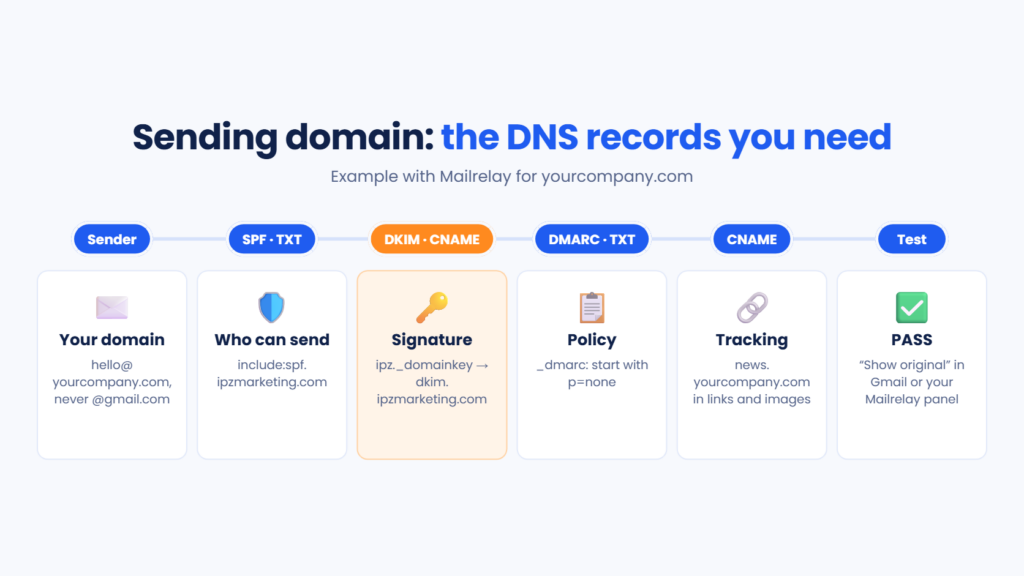
- SPF (TXT record): lists the servers authorised to send on behalf of your domain.
- DKIM (TXT or CNAME): publishes the key used to verify each message’s signature.
- DMARC (TXT record at _dmarc): says what to do with emails that fail and sends you reports.
- Tracking CNAME: customises the domain used in your campaign links and images.
What is a CNAME record?
A CNAME record is an alias: it points one name to another. When someone looks up the first, DNS answers with the details of the second.
It’s widely used in email marketing for a practical reason. If your DKIM points to your provider through a CNAME, they can rotate the key without you touching your DNS. And a tracking CNAME makes your links show news.yourcompany.com instead of a domain shared with other senders. That way your deliverability depends on your own history.
One detail causes a lot of trouble: the Cloudflare proxy. If your DNS is managed there, turn off the orange cloud on these CNAMEs and leave them as “DNS only”.
How to set up your sending domain step by step
The process takes less than half an hour, plus propagation time. Start by choosing the sender address, for example hello@yourcompany.com or news@mail.yourcompany.com.
Then log in to your domain’s DNS panel, usually at your hosting provider or domain registrar. If you don’t have access, ask whoever manages your website.
Add the SPF record for your sending domain. If you already have one, don’t create a second: a domain can only have one. Add your platform’s include to the existing record. And keep an eye on the 10 DNS lookups SPF allows.
Create the DKIM record and then the DMARC one. Start with a p=none policy to get reports without blocking anything. Once you’ve checked that all your legitimate email passes authentication, you can move up to quarantine or reject.
Finally, add the tracking CNAME and wait. DNS changes can take anywhere from a few minutes to 48 hours to propogate. Once they’re live, send yourself a test to Gmail and open “Show original”: SPF, DKIM and DMARC should all show PASS.
How to set up your sending domain in Mailrelay
In Mailrelay, these are the records you add to your DNS to authenticate your sending domain. Replace yourdomain.com with your real domain:
SPF: add include:spf.ipzmarketing.com to your SPF record. If you don’t have one, create a TXT record with the value v=spf1 a mx include:spf.ipzmarketing.com -all.
DKIM: create a CNAME called ipz._domainkey.yourdomain.com pointing to dkim.ipzmarketing.com.
DMARC: if you don’t have one yet, create a TXT record at _dmarc.yourdomain.com with v=DMARC1; p=none;.
Custom domain: create a CNAME with the subdomain of your choice, such as news.yourdomain.com, pointing to your account’s domain on ipzmarketing.com. Your links and images will then carry your brand.
You can then check everything in your account, under Settings → Email authentication, by entering your domain. If anything doesn’t add up, our support team helps you by chat, phone or ticket, even on the free account. You’ll find the full guide, with screenshots, in our article on configuring SPF, custom domain and DKIM in Mailrelay.
Common sending domain mistakes
The most common one is having two SPF records. When that happens, the check fails with an error and servers ignore both.
Another classic is authenticating one domain and sending from another. If you sign with yourcompany.com but the sender is @yourcompany.co.uk, DMARC finds no alignment.
Jumping straight to p=reject without reviewing the reports is also risky. You could block your own invoices, or emails from another tool you forgot to authenticate.
And, of course, carrying on sending from a free mailbox. With Gmail’s and Yahoo’s current requirements, it’s the quickest way into the spam folder.
Reach the inbox with your own brand
Authenticate your sending domain, brand your links and track every campaign in real time. Get started with Mailrelay for free.
Try Mailrelay for freeSending domain FAQ
Can I send campaigns from my Gmail address? It isn’t recommended. Since February 2024, gmail.com has applied a DMARC quarantine policy, so emails sent from another platform with a @gmail.com sender usually end up in spam.
Which DNS records do I need? SPF, DKIM and DMARC for authentication, plus a tracking CNAME if you want to brand your links.
How long does it take to work? DNS changes can propagate in minutes, though they sometimes take up to 48 hours.
Is it better to use a subdomain as a sending domain? For marketing it usually is, because it keeps its reputation separate from your corporate email.
How do I know it’s set up correctly? Send yourself a test to Gmail and check “Show original”. In Mailrelay you can also check it under Settings → Email authentication.
In short
Your sending domain is your signature in front of mailbox providers. Use your own domain, or a subdomain for marketing, and authenticate it with SPF, DKIM and DMARC. Add a tracking CNAME so your links carry your brand, and check that everything shows PASS. It’s a half-hour set-up that protects every campaign you send.