
If you have a contact list, or database, with 20,000 emails or fewer, if you pay to send your bulk emails, it’s because you want to spend more money than you need to.
Thanks to the free Mailrelay account you can send bulk emails for free to up to 20,000 contacts a month. In fact, you can send up to 80,000 emails a month, which is the same as 4 emails to each of those 20,000 contacts.
Every month.
For free.
Can you imagine all the sales opportunities within your reach?
Investing €0 in advertising.
· Have you already created your #Mailrelay account? We can continue, remember that bulk email
It consists of sending emails to the addresses in a database all at once (without sending each email one by one, and without grouping them in a way that makes the addresses visible afterwards), in order to get commercial information about products or services to them.
This means we can get our offers and promotions to our contacts directly.
Bulk email sending has many benefits over other marketing tools, such as social media, paid ads, etc.
Your contact list or database belongs to you, and you can send them whatever you want. You don’t depend on a third party.
No algorithm limits, no rising cost per click, none of that.
That’s why email has a much greater capacity to generate sales opportunities.
And with Mailrelay’s free account, at a cost of €0
Ready to sell at zero cost?
Well, first we have to do something.
· First, check the viability of the database, the contact list
Checking your contact list, the emails you have, is important. Do it before sending, not afterwards when the problems arrive.
It is without a doubt a determining factor in the result of our bulk email sending. That’s why, if you have a somewhat old email list, or one you haven’t sent to in quite a while, it’s best to review it.
Whether or not we sell will depend on its quality or viability.
And this is very easy to understand.
If the contact list you are going to use in your email marketing is full of incorrect or non-existent emails, we will hardly sell anything.
But not only that.
The importance of incorrect emails
lies in the fact that they increase the volume of bounced emails. And if this figure rises, correct emails will be rejected too. You must be careful. Don’t use mailings to clean your contact list. It won’t work and it will harm your future sends.
So, let’s review our contact list:
- Check whether it has duplicates and syntax errors in the emails,
- Check the number of bounces
- Look for suspicious or problematic emails
- Check whether it has emails that have complained about spam or have unsubscribed
- Check that it is an active database
- Check whether they are public emails and request the registration logs
- Run a prior pilot and check the emails (for example, to see whether there are many bounces)
(You have more information in this post)
What we want to do with all this is assess the options we have, the sales possibilities.
You need to be careful if the contact list is very old. Even if they are our customers, if many years have passed, the emails may be incorrect, no longer maintained, or the owner may not remember us.
► When in doubt, segment your list to reduce the incidence of incorrect emails
If you have doubts about your database before doing the bulk email sending, it’s better to segment your list, that is, to split it into several groups so that you don’t send to the whole list but to a part of it. It’s something you can do quickly and it will improve your results.
This will help us in several ways.
On the one hand, to assess the real quality of the database, something that, as we’ve already said, is important.
And on the other, to have fewer errors in case there are problems with the list.
The recommendation would be that, when you split your list into several groups, you make the first sends to the most recent group of contacts, as it will be the most effective.
Follow these tips
Don’t use bulk email sending to clean your contact list, as it will only harm the reputation of your sending domain. Be careful with that!
In addition, Mailrelay makes it very easy to segment your lists, by various parameters.
► If your domain is new, start with small mailings
That’s right, especially if you have just registered a new domain. Until your new domain is more than six months old and you have used it normally. That is, you should use it regularly to send normal emails, not mailings or newsletters.
After a while you can start using it for email campaigns.
If your domain is new and you want to send bulk emails to tens of thousands of contacts, the results won’t be very good, and some of those emails may end up in SPAM.
It’s better to start with small sends and gradually increase the volume.
The free account isn’t going away, so you can start slowly and do things right, without taking unnecessary risks

· Tips for free bulk email sending with #Mailrelay
Now I’m going to give you some tips so that your sending gets better results.
Remember, though, that you will have reviewed your contact list first, as we mentioned earlier.
Something key and fundamental is the design of the mailing.
► Make your newsletter design as simple as possible, because that’s what works best:
Seriously, don’t overcomplicate it, look at this example:
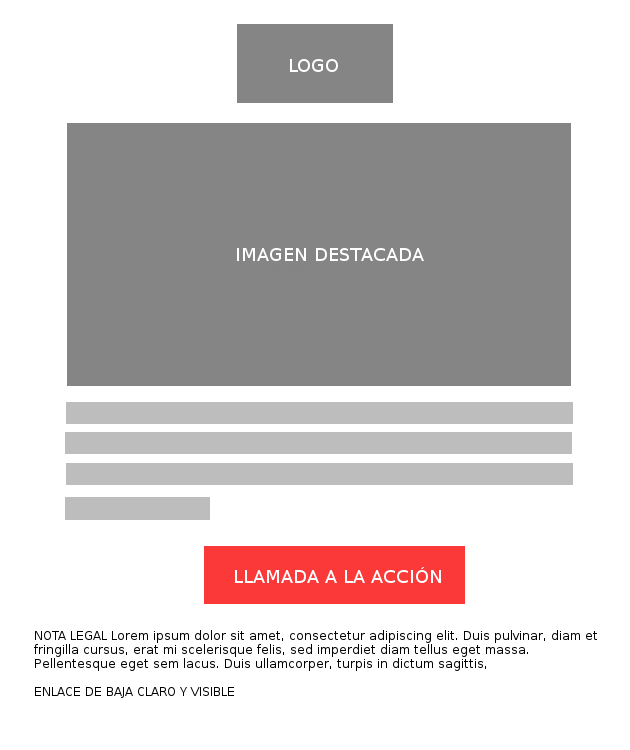
It’s a very simple design and very easy to create with the new Mailrelay newsletter editor. It only has a few elements:
- Your company logo
- An eye-catching featured image
- The sales copy of your newsletter
- And the call to action, extremely important!
You can put this newsletter design together in no time with Mailrelay’s drag & drop editor. Or, if you prefer, you can use one of the email templates we have available.
► Plan, plan, plan
What are you going to sell to your list?
I imagine you have that clear, since you’ll have your product or service and want to sell it. But you probably can’t sell it with a single bulk email. And even if you could, you’d surely want to sell more than once, so why sell just one time?
But back to the point: just because you send a mailing doesn’t mean your whole list will buy right away. Some will, and some will need more time.
That’s why you should plan a series of emails with different sales-closing strategies.
You could, for example, set up a series of 3 emails in which each one reinforces different aspects of your product or service, or tries to answer various objections.
Or approach it from different perspectives:
- Show the value the product brings
- Answer the usual questions about it
- And finish with an offer or discount
At the end of this series of emails, analyze your results, segment those who haven’t bought from you yet and plan a new series of emails.
► Subject line and call to action
Work on these two parts of your bulk email sending too.
In many cases the subject line is what will convince your contacts to open the email.
And the call to action, for its part, is the element that will motivate the contact to move forward in the sales funnel.
My recommendation is that you keep testing and making changes, and that you don’t always use the same subject lines.
► Be consistent, repetition helps, even in your bulk emails
If you have a free bulk email sending tool, why not use it?
Be consistent: send, analyze, test, segment your contact list.
Little by little you’ll see what works best in your case, and you’ll adapt your sends to your list.
In most marketing actions, learning costs money; in this case, with #Mailrelay it doesn’t, so make the most of it!
· How to send bulk emails for free and get good results?
To get good results from your bulk mailings consistently, you need to achieve the following:
- Your emails reach the inbox
And for that to stay the case:
- Check that the technical settings are still correct
- Avoid SPAM complaints. If someone doesn’t want to receive your emails, it’s better that they can unsubscribe as soon as possible
- Make sure to keep your contacts engaged. Don’t send too many emails, or too few
- Analyze the statistics of your email sends and implement variations and improvements
Also, don’t forget to run tests.
Before sending, send some tests to your own email addresses, to see that everything looks right, that the links work correctly and that, in general, the process will work as expected.
► Learn from the experience of other companies
Don’t hesitate to take a look at the competition.
Subscribe to their newsletters and analyze what they do well, what they do badly, even what ideas they can give you.
Time spent studying the competition is never wasted.
· Free bulk email sending, truly free
#Mailrelay offers you a free account you can use to send bulk emails:
- No ads
- No daily sending limit
- No feature limitations
- And with technical support included
You’ll be able to manage a list of up to 20,000 contacts and send up to 80,000 emails a month for free.
To take advantage of this opportunity, create your account.
Before launching your sends, it’s worth applying good email marketing segmentation and taking care of your email list hygiene so that your free sends work well.