
When you send emails, using videos makes your campaigns much more engaging.
So if you want to increase your click-through and conversion rates, it’s worth considering adding video marketing to your email campaigns. Not sure which key points to keep in mind, both in terms of approach and from a technical point of view? Here we explain how to include videos in your email marketing strategy.
How to include videos in your email marketing strategy
We’ve all seen a promotional email and sent it straight to the trash. You open it, see that it doesn’t interest you, and that’s it. It’s normal: we don’t have time for everything we’d like to do. That’s why brands have to make an effort to stand out.
You may be about to send an automated email marketing campaign and have decided to include a video to make it more appealing. If so, congratulations on your decision.
Video can be your ally in making sure your next email marketing campaign doesn’t end up in the trash for most of your audience.
Did you know that people are estimated to watch an average of 100 minutes of video per day in 2021? Some of those minutes could be yours, if you manage to find a format, style, topic and channel that appeals to your audience.
Don’t miss out on the power of email marketing, because it lets you reach potential customers in a closer and much more personalized way than social media. Use video so that your emails are read with more interest and convert more customers.

Different ways to add your video
Most of the leading email marketing platforms on the market offer some way to include videos. You can link the video yourself or use the tools they provide for that purpose.
You can link the video to YouTube, Vimeo or other video platforms. You can also upload the video to your website and link to it in your email marketing campaign.
Important
Most of the time it isn’t possible to embed the video directly in the email, since the different email clients (Gmail, Outlook, etc.) can’t display a video embedded in an email.
The most common approach is to place an image that links to the video. The user will click on the image and be taken to the page where they can watch the video.
Learn how to insert the video in your email
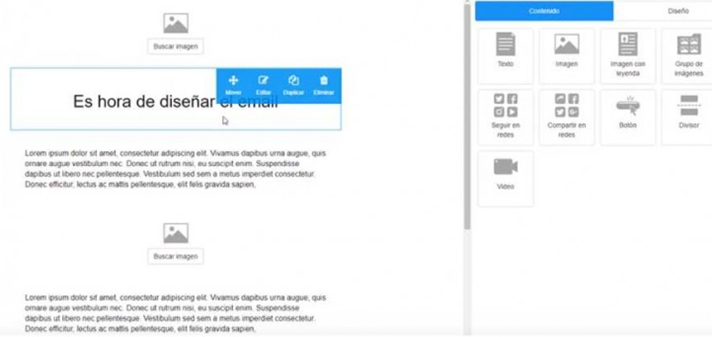
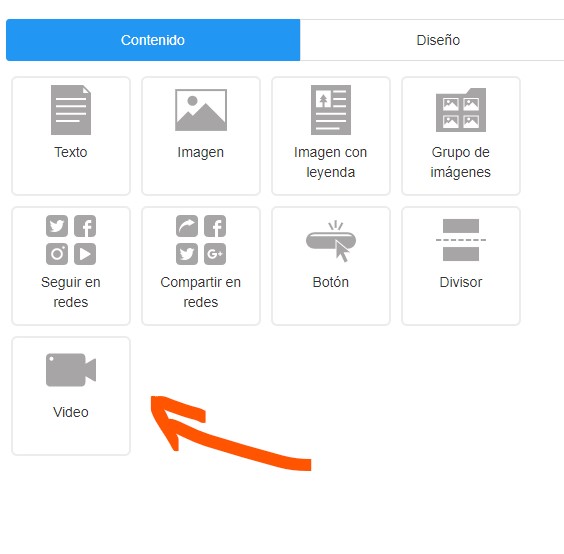
With Mailrelay, the easiest way to insert the video is to use the video block, which you can see on the right in the image:
Here’s a close-up of that specific area so you can see it:
To make it easy for you, here’s a step-by-step suggestion you can follow:
- Create a YouTube account and customize the channel to match your brand
- Upload the video you want to include in your email marketing strategy
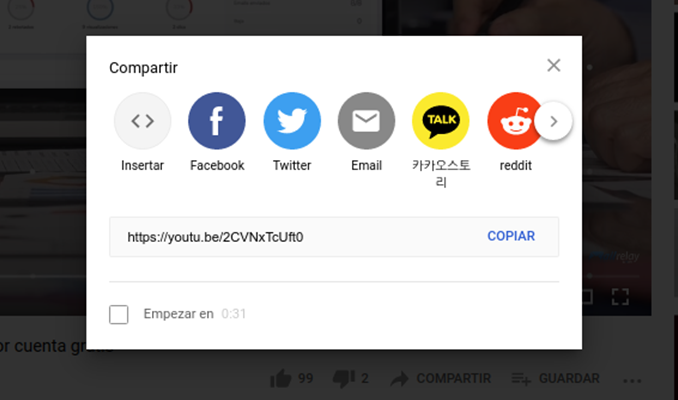
- Play the video and go to the “Share” section
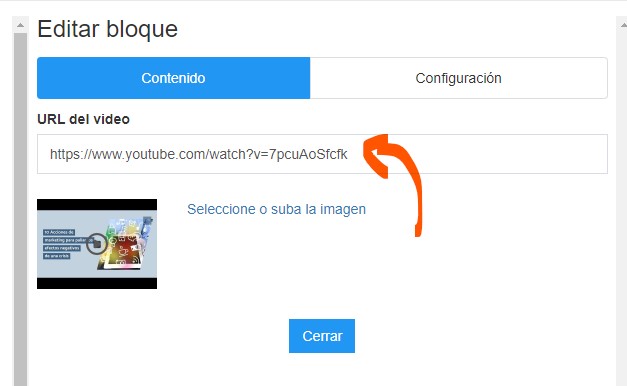
- Create a video block in your email and add that URL
This is what you’ll see on YouTube if you click the “Share” button.
You’ll add that URL to the field in the video widget:
Let’s look at a second option you could follow, similar to the previous one but with other approaches that may also work for you.
- Create a Vimeo account
- Upload your video so you can insert it in the email
- Edit the video and find the link to share it
- Create a video block in your email and add that URL
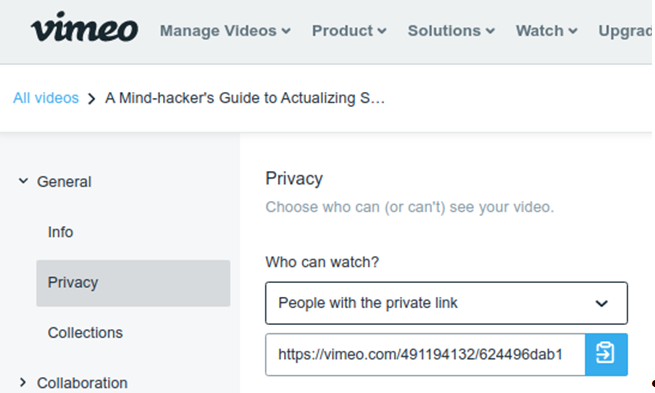
You can also use that URL, and the one from the YouTube example, manually to link any image you want. We’ll see how in the next section.
The result of the insertion will look something like what you can see in the following image:
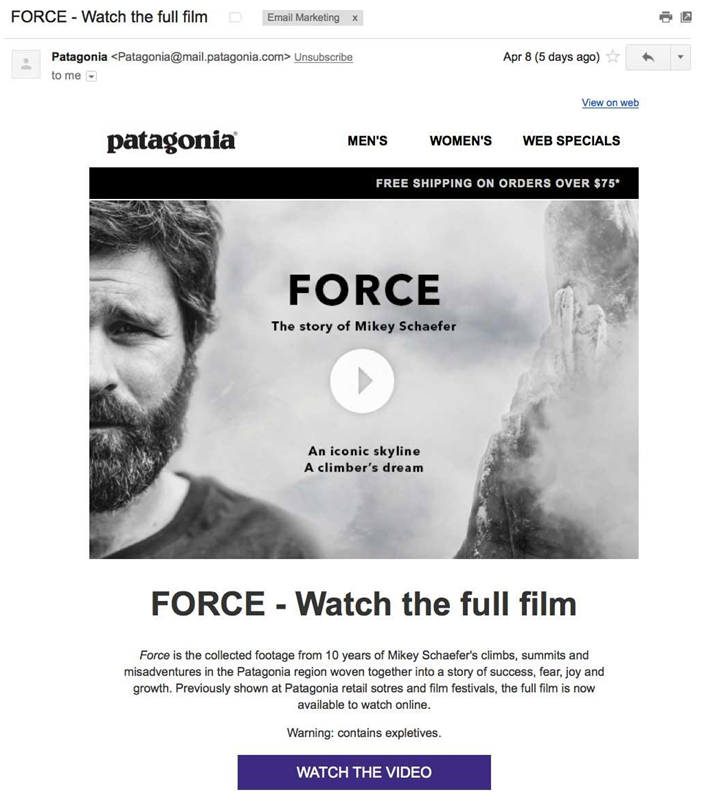
Then, when the recipient clicks on the image, they’ll be taken to where the video is hosted to watch it.
Find out how to add your video without embedding it
Some email marketing platforms don’t let you insert videos, but don’t worry, because there are other ways. For example, you can add a hyperlink to your email so that the user can click on it and watch the video.
You can also add an image of a scene from the video to your email as a preview, and link it to the video so that it opens elsewhere. The key is to put the player controls at the bottom of the image, so that it really looks like an embedded video even though it’s just a static image.
This is a very popular technique that lets you host the video on another platform or on your website while making it easy to watch from the email.
Whenever you add external links, always remember to choose whether you want the link to open in another tab or in the same one. If you don’t want your audience to leave the email, it’s best to set the link to open in a new tab.
Related posts:
- Business Expense Forecasting [Steps]
- Off-Page SEO Strategies: Improve your digital project
- Ecommerce Copywriting: 8 Ways to boost conversions
- Email Clicks: 3 Simple Ways to Get Them
- Direct Marketing: Types and how to use it
Create animated GIFs for your email campaigns
There are some alternatives to videos that you can use in an email marketing campaign to spark interest. The animated GIF is a good option in many cases. The idea is to share an animated image, showing a series of products in motion, for example. There are many tools for creating animated GIFs easily and for free.
Keep in mind that this type of format is very visual and appealing to potential readers of your campaigns on mobile devices. However, programs like Outlook don’t display GIFs (a static image will be shown instead), so avoid this format if you’re sending emails to business addresses.
Depending on whether you have a B2B online marketing strategy (aimed at businesses) or a B2C one (aimed at consumers), one email style or another may suit you better.
Tips to make your video look professional
Now that you know how to include videos in your email marketing strategy, don’t forget to make sure you have high-quality audiovisual content.
Clearly define your goal, because it will be the starting point for deciding what type of video you want to share in your email. Let’s say you want your potential customer to become familiar with a product: in that case, you can add a video talking about that product.
Remember to take care of quality in every aspect:
- Make sure the video has good resolution
- The sound should be clean and, if there’s a voice, the content should be clearly understandable
- Try to add music that suits your brand and audience
- Take care of the content: be accurate in what you say and use correct language
- Edit your video so it doesn’t get boring: add cuts, music, transitions, overlays and everything else
- Don’t make videos that are too long: instead, follow the 4 Cs and try to make your video Concrete, Concise, Conversational and Creative
Another nice touch is adding subtitles, to make life easier for people reading your email on their phone with the sound off, for example. Did you know there’s a very handy and easy-to-use subtitle generator? You can upload any audio and it converts it into text.
Last but not least, don’t forget to create an “alternative image” for the video section of your email. This is a static image that users will see if they can’t view the video. That way you can make sure that space doesn’t look empty to users who, for whatever reason, don’t have a compatible device.
Conclusion
If you were wondering how to include videos in your email marketing strategy, you’ve now seen that it’s easier than it looks. With a good email marketing automation platform, you’ll be able to integrate it without any problems.
Don’t miss the opportunity to start adding videos to your emails, because they definitely make a difference. A high-quality video will help you come across as more trustworthy, transparent and approachable.
Plus, you won’t need a big investment: nowadays you can get a high-quality recording with a smartphone, and with the platforms available you can upload your content and share it easily.
Good luck with your next email marketing campaign! We hope video helps you boost your results.