
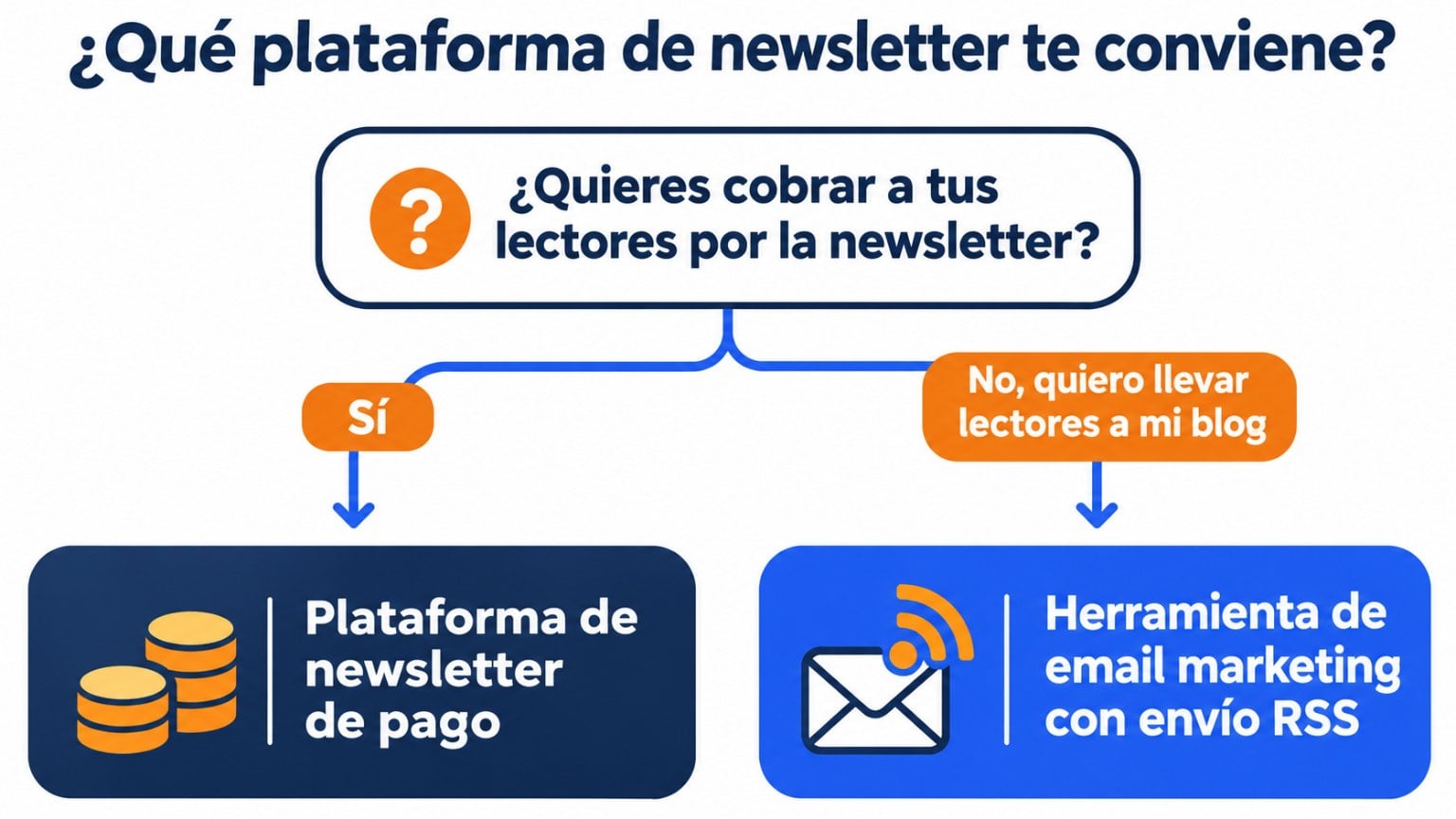
If you have a blog, a podcast or a channel, your newsletter is the most direct way to bring your readers back every time you publish. But which platform should you use? It mostly comes down to one question: do you want to charge for your newsletter, or do you want to grow your brand with your own list?
- If you want to charge your readers for subscriptions, the platforms built for that are Substack and Beehiiv.
- If you want your blog or business to grow with your own list, you’re better off with an email marketing tool that sends your posts automatically. Mailrelay gives you up to 80,000 emails a month and 20,000 contacts for free, with RSS campaigns, forms and landing pages on every plan, plus human support.
Have a blog? Send your posts by email effortlessly
Create your free account and schedule an RSS campaign that sends your new posts on its own, with human support on every plan.
Which email marketing platform is best for bloggers and creators?
The best one is the one that does the repetitive work for you and leaves the list in your hands. Look at four things:
- it sends your new posts automatically (RSS), so you don’t have to build an email every time you publish;
- it helps you gain subscribers, with forms and landing pages;
- the free plan holds up as your list grows;
- the list is yours: with your own domain and the option to export it whenever you want.
Newsletter platforms for bloggers and creators (November 2026)
| Platform | Free plan | Automatic blog sending (RSS) | Built for |
|---|---|---|---|
| Mailrelay | 80,000 emails a month and 20,000 contacts | Yes, with RSS campaigns, on every plan, including the free one | Blogs, creators and businesses that want their own list |
| MailerLite | 250 subscribers and 2,500 emails a month | Yes, on paid plans; not on the free plan | Creators and small businesses |
| Brevo | 300 emails a day | Yes, with its RSS Campaign integration | Businesses that combine email, SMS and CRM |
| Mailjet | 6,000 emails a month, with a maximum of 200 a day | An RSS block in the editor imports your posts; automatic sending requires Zapier | Teams that design their own emails |
| Substack | Publishing is free; if you charge for subscriptions, it takes a commission | Not needed: you publish on Substack and each post is sent by email | Writers and journalists who want to charge their readers |
| Beehiiv | Up to 2,500 subscribers | Not needed: you publish on Beehiiv and it’s sent by email | Creators and media outlets that run their newsletter as a business |
Plans and prices change often: check them on each tool’s website before choosing.
Substack and Beehiiv or an email marketing tool: when to choose each
Substack and Beehiiv are both a blog and a newsletter: you write on the platform and your readers get each post by email. They’re a good option if your newsletter is the product and you want to charge for it.
An email marketing tool is a better fit if you already have a blog or a website and want your readers to come back to it:
- your content lives on your website, with your domain and your design, and keeps building your brand;
- the newsletter takes your readers to your blog, not to another platform;
- besides the post roundup, you can send welcome emails, automations and promotions for your products or services.
Keep in mind that Mailrelay doesn’t handle paid subscriptions. If your model is charging your readers, take a look at Substack and Beehiiv, where we explain how they work.
How to send your blog posts by email automatically with Mailrelay
With an RSS campaign, Mailrelay reads your blog’s RSS feed and sends new posts to your subscribers, without you having to build each email.
- Copy your blog’s feed URL. In WordPress it’s usually yourdomain.com/feed. Open it in your browser to check that it loads.
- Create the RSS campaign. In Mailrelay, go to Campaigns > RSS campaigns and click Add.
- Set it up: the subject (you can include the title of the latest post with a variable), the sender, the groups or segments that will receive it, the feed URL, how many posts each send includes and the frequency: Manual, Daily, Weekly or Monthly.
- Choose the design. Start from one of Mailrelay’s templates for RSS campaigns.
- Send a test before activating it and check how the title, image and summary of each post look.
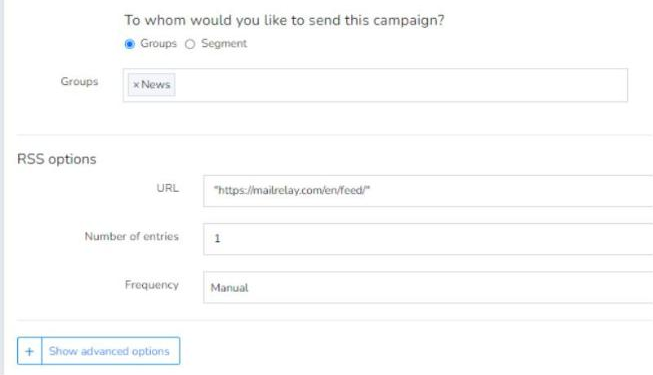
If you haven’t published anything new, the campaign isn’t sent: your subscribers won’t get an empty email. RSS campaigns are available on every plan, including the free account.
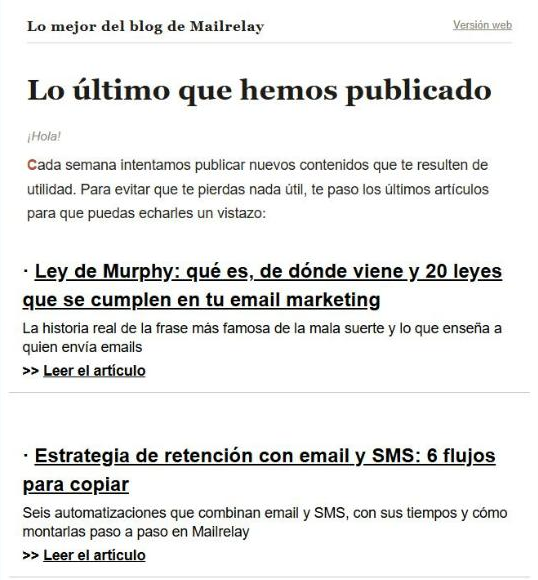
It’s the roundup we send with the new posts on our blog: a short greeting, the title of each article, a sentence summarizing it and a link to read it. The full content is on the blog, and the email just acts as a bridge.
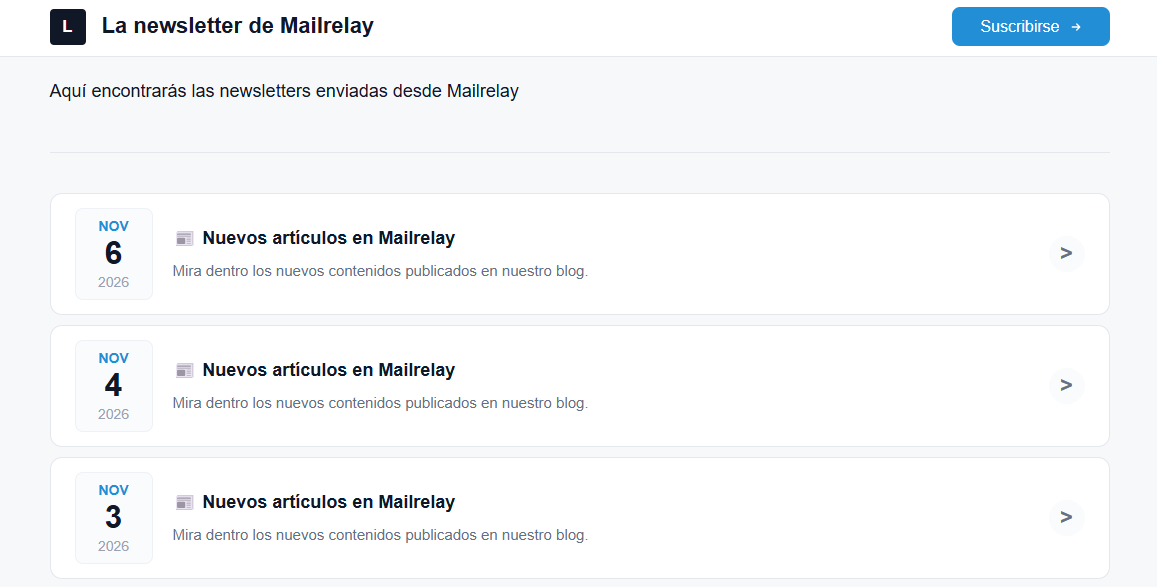
A public archive of your newsletters. Just like on Substack or Beehiiv, in Mailrelay you can create a public page with the newsletters you’ve sent, under Campaign archives. It’s available on every plan. It lets a new reader see what they’ll get, and it includes a button to subscribe.
Automating the sending of your blog posts will be very useful if you publish several posts every week. I see it in my own case: Mailrelay has a very active blog, and automating the newsletter saves hours at the end of the month. In the end, the interesting part is on the blog itself: the newsletter acts as a bridge, and that part can be automated. That said, for special or more unique content, writing its own email by hand is still more effective.
Jose Argudo, CMO at Mailrelay
What to send besides your posts
The automatic roundup of your posts is the foundation, but it doesn’t have to be the only thing you send. The practical approach is to automate what repeats and write by hand what’s special:
| How it’s done | When | |
|---|---|---|
| Roundup of new posts | Automatic, with an RSS campaign | Every week or every time you publish |
| Welcome email with your best articles | Automatic, with an automation | When someone subscribes |
| Exclusive content for subscribers | By hand | Once or twice a month |
| Launch of a course, an ebook or a product | By hand | When it’s ready |
| Seasonal special, like a year in review | By hand | Once or twice a year |
| A simple survey to find out which topics they prefer | By hand, with one link per answer and tracking the clicks | When you want to plan new content |
An example calendar for a creator
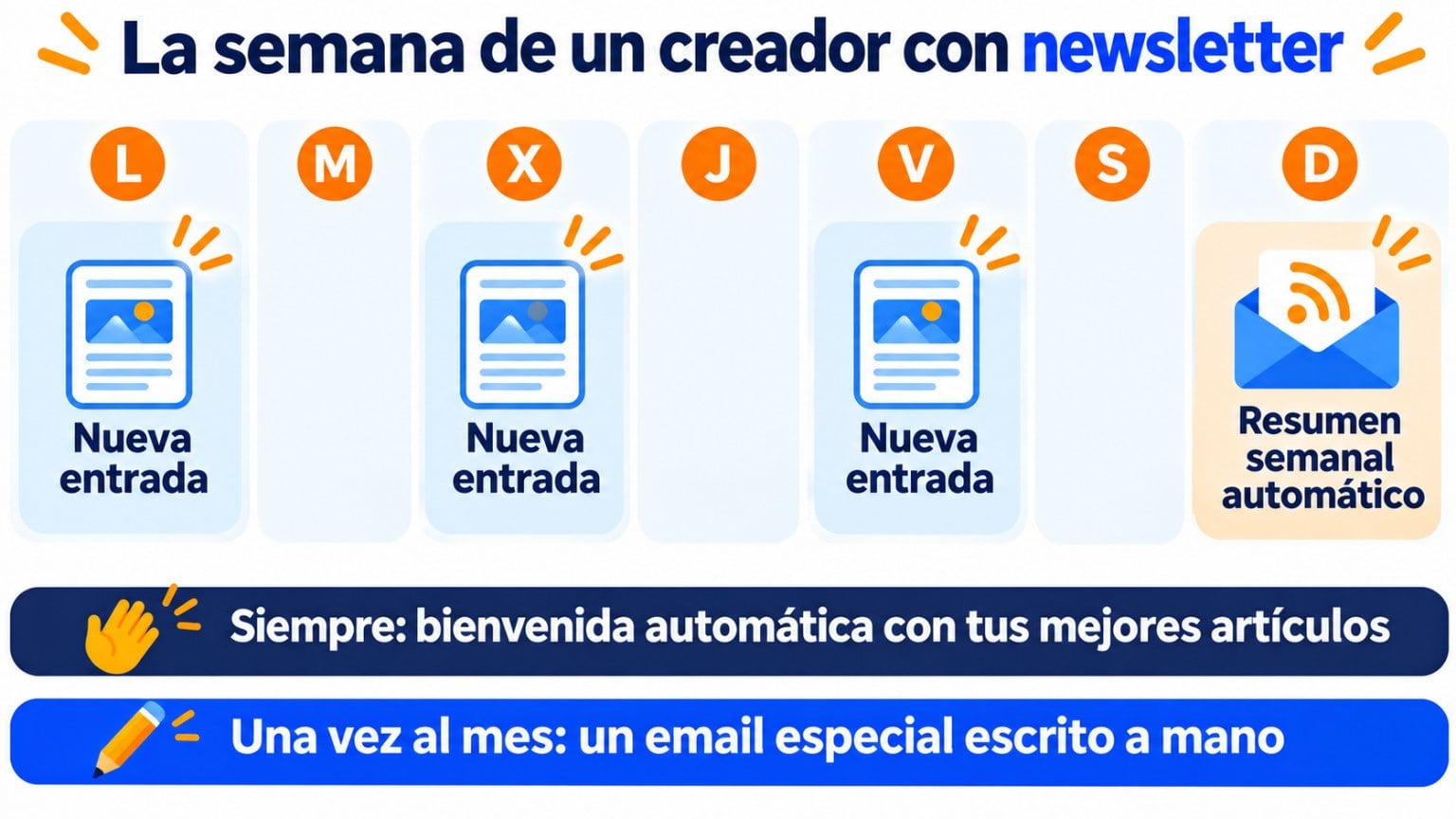
Imagine you publish three posts a week, for example on Monday, Wednesday and Friday. A simple calendar would look like this: at the end of the week, the roundup with the three posts goes out on its own; anyone who subscribes gets the automatic welcome email with your best articles right away; and once a month, you write a special email by hand with something that isn’t on the blog. Your readers get one email a week, and you only write one a month.
How to get your first subscribers if you have a blog
- A form on every post, at the end of the article, which is when readers already know whether they’re interested in what you write. You can also add a discreet pop-up.
- A landing page for your newsletter, which you can link from your social media, your email signature or your bio.
- Say what you’ll send and how often: “One email a week with the new posts.”
- A welcome email with your best articles, so new subscribers start with your best work.
- Waiting until you have lots of traffic to add the form. Every visitor who leaves without subscribing is a reader who may not come back.
- Sending each post the moment it’s published if you publish several a day. A daily or weekly roundup is better.
- Copying the entire article into the email. The email should whet the appetite and lead to the blog.
- Not testing the RSS campaign before activating it. A feed without images or summaries can leave the email almost empty.
What to look at in your statistics
A blog newsletter gets better by looking at the data from each send, not just by publishing more. Look at four things:
- Clicks on each post. They tell you which topics your readers really care about. Write more about them.
- Opens by send day. If you change the roundup’s day, compare a few weeks before deciding.
- Unsubscribes after each change, for example if you go from one email a week to a daily one.
- Replies. A reader who replies to your newsletter is telling you what they want to read.
You’ll find more details on each metric in our guide to email marketing metrics.
How Mailrelay helps you
- RSS campaigns on every plan, with templates, number of posts and frequency to suit you.
- Up to 80,000 emails a month and 20,000 contacts on the free account.
- Forms, landing pages, automations and a public newsletter archive.
- Human support on every plan.
Send your blog by email for free
Create your account, connect your blog’s feed and let your new posts reach your subscribers on their own.
Frequently asked questions
Can I send my blog by email for free?
Yes. With Mailrelay’s free account, you can create an RSS campaign that sends your new posts automatically, within the limit of 80,000 emails a month and 20,000 contacts.
Can I move my Substack or Beehiiv list to another tool?
Yes. Both platforms let you export your subscribers, and then you can import them into Mailrelay. If you charge for subscriptions, keep in mind that Mailrelay doesn’t handle payments.
It depends on how much you publish. If you publish several posts a week, a weekly roundup usually works well. If you rarely publish, send when there’s something new: the RSS campaign isn’t sent if there are no new posts.
Do I need my own domain?
It’s not required to get started, but it’s highly recommended: with your domain as the sender, you can set up SPF, DKIM and DMARC and reach the inbox more reliably.
Should I send the full post or just an excerpt?
An excerpt is better: the title, a sentence or two and a link. That way the email is short and the reader goes to your blog, where the full content is. Keep in mind that the RSS campaign shows what your feed includes: if the feed contains the whole article, the whole article will appear in the email. In WordPress you choose this under Settings > Reading.
Yes. Create a group for each topic and an RSS campaign for each one, using the feed for that category of your blog. In WordPress, each category has its own feed, for example yourdomain.com/category/recipes/feed. That way, each subscriber gets only what they chose.
Further reading
Substack
What it is, how it works and when another alternative suits you better.
Beehiiv
The newsletter platform for creators, and how it differs from Substack.
RSS feed
What an RSS feed is and what it’s for.
Free newsletter
How to create and send your newsletter without paying.

Jose Argudo
CMO at Mailrelay. Writes about email marketing, copywriting and conversion for small businesses and entrepreneurs.