Pop-up
The window that turns visitors into subscribers
A visitor lands on your website, reads half an article and leaves. They never come back. That is what happens with the vast majority of traffic. A well-planned pop-up gives you a second chance: it offers them something useful at just the right moment and turns that anonymous visit into a contact.
What is a pop-up?
A pop-up is an element that appears over the content of a web page to grab the user’s attention. It is triggered by a specific rule: on entry, after a few seconds, when scrolling down the page or when the visitor is about to leave.
In email marketing, its main use is to show a subscription form. It can also be used to announce an offer, deliver a discount code, promote a webinar or run a quick survey.
It is best not to confuse it with two other concepts. The advertising windows that opened another browser tab, typical of the 2000s, are something else, and browsers block them today. And a pop-up store is a temporary physical shop, unrelated to your website.
Turn your website visitors into subscribers
Create your form in Mailrelay, add it to your pop-up and then send up to 80,000 emails a month for free to your new contacts.
Types of pop-up by when they appear
What influences the result most is the trigger, that is, the rule that decides when the window is shown. These are the most common:
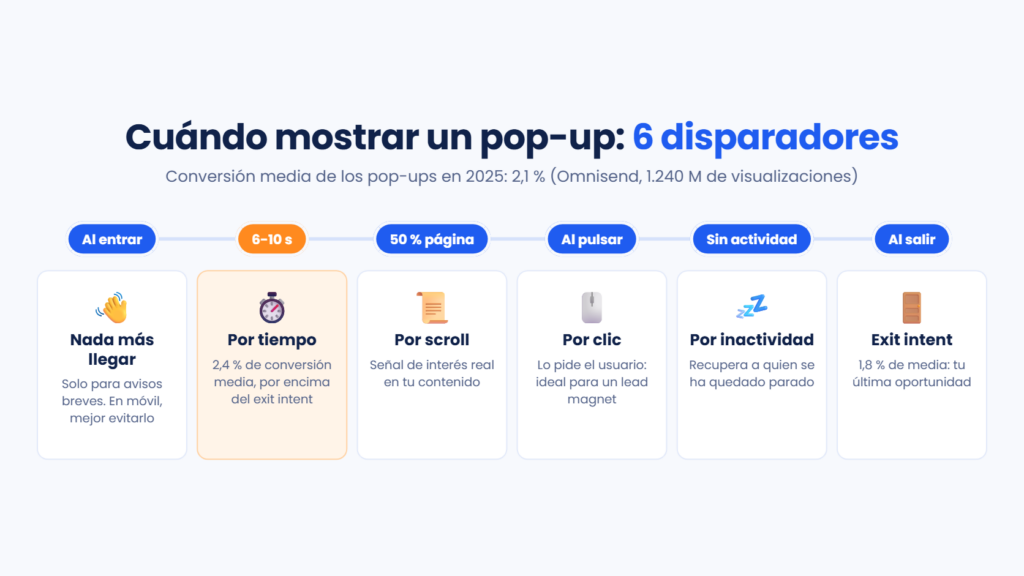
- On entry: it appears as soon as the page loads. It is the most intrusive and the worst fit for mobile.
- Time-based: it is shown after a few seconds on the page. It gives the user time to see your content first.
- Scroll-based: it pops up when the visitor has scrolled through part of the page, for example halfway. It is a sign that they are interested in what they are reading.
- On click: it only opens if the user clicks a button or a link. Since they asked for it, it usually converts very well with a lead magnet.
- On inactivity: it appears when the person stops interacting for a while.
- On exit (exit intent): it detects that the cursor is heading to close the tab and shows one last message before they leave.
Most common formats
Besides the timing, you can choose the format. The best known is the centered modal, which darkens the background and demands a response. But there are more discreet alternatives.
The fixed bar (sticky bar) takes up a narrow strip at the top or bottom of the screen. The slide-in comes in from a corner without covering the text. At the opposite extreme is the full screen, or welcome mat, which covers the whole page.
There are also multi-step formats. First a simple question is asked (“Would you like to receive offers?”) and, if the person says yes, they are asked for their email. And gamification formats, such as the prize wheel, have become very popular in ecommerce.
Do pop-ups really work?
The data says they do, as long as they are set up well. Omnisend analyzed 1.24 billion pop-up views during 2025. The average conversion rate was 2.1%: out of every 100 people who saw the window, two left their email.
The differences between setups are big. Wheel formats reached 3.5%, and those that appear after a few seconds, 2.4%. Exit pop-ups stayed at 1.8%. Offering a discount also helps: 2.4% versus 1.7% without one. And, contrary to what you might expect, they converted better on mobile than on desktop (2.2% versus 1.4%).
As a benchmark, the same study considers any result between 3% and 5% good. Above 5%, we are talking about excellent performance.
It doesn’t sound like much, does it? But think of a store with 20,000 visits a month: with a 2% conversion rate, that adds up to 400 new subscribers every month.
Pop-ups and SEO: what Google says
You need to be careful here. Since January 10, 2017, Google may rank pages that show intrusive interstitials on mobile lower. This refers to windows that cover the content as soon as the user arrives from the search engine and have to be closed before they can read.
Google recommends using banners that take up only a small part of the screen. Legally required notices, such as the cookies notice or age verification, do not count as intrusive.
In practice, this means delaying the window on mobile, making it smaller or saving it for scroll or exit. If you don’t, you could lose organic traffic just to capture a few more contacts.
Pop-ups and GDPR
If you collect emails in Spain or the European Union, your pop-up must comply with the GDPR just like any other form. The consent checkbox cannot be pre-ticked, you must state who processes the data and for what purpose, and link to your privacy policy.
Double opt-in is the safest way to prove consent. It also filters out fake addresses and protects your deliverability.
How to create a pop-up that converts without being annoying
Start with the offer. “Subscribe to our newsletter” rarely works. A 10% discount on the first purchase, a downloadable guide or free shipping give people a real reason to leave their email.
Ask for the minimum. The email is usually enough, and perhaps the name to personalize your campaigns. Every extra field reduces sign-ups.
Watch the timing and frequency. If someone closes the window, don’t show it to them again on every page. And never show it to people who are already subscribers.
Tailor the message to the page. A visitor reading about trail running shoes responds better to a trail offer than to a generic discount. Omnisend’s data confirms it: pop-ups segmented by URL converted at 2.4%, compared with 2% for generic ones.
And make it easy to close. A visible X and the option to close it by clicking outside the window prevent frustration. Then, measure and test: two headlines, two offers or two different moments will tell you what works with your audience.
If you want more ideas, our blog has tips for creating the perfect popup for your website and advice on how to close more sales with a discount coupon popup.
Which platforms include native forms and pop-ups for lead capture?
Mailrelay, Mailchimp and HubSpot include forms and pop-ups in their free plan, with no need to install another tool. MailerLite and Klaviyo limit how many forms you can have active, and Brevo reserves pop-ups for its Professional and Enterprise plans.
This table summarizes what each platform offers in its free plan, according to their websites in October 2026:
| Tool | Forms and pop-ups in the free plan |
|---|---|
| Mailrelay | Embedded forms, pop-up forms or forms within landing pages, on all plans |
| Mailchimp | Forms and pop-ups on all plans |
| HubSpot | Forms and pop-ups in the free tools |
| MailerLite | Subscription forms, with a maximum of 3 active |
| Klaviyo | 1 active form, with “Powered by Klaviyo” branding |
| Brevo | Subscription forms. Pop-ups only on Professional and Enterprise |
There are also tools that specialize in pop-ups, such as OptinMonster or Poptin. They offer more formats and rules, but they are one more tool to maintain and you have to connect them to your email platform.
How to create your pop-up with Mailrelay
The window is just the door. What matters is what happens when someone leaves their email.
In Mailrelay, you create your subscription form from the dashboard, with double opt-in and the fields you need, and choose how to show it: embedded in your website, as a pop-up or within a landing page. It is included in all plans, including the free account.
For the pop-up, you choose when it opens:
- When a button is clicked: the visitor opens the form whenever they want, for example from a “Subscribe” button.
- After a while: it appears after the number of seconds you choose, once the visitor has started reading.
- When trying to leave the page: the exit pop-up, your last attempt before they leave.
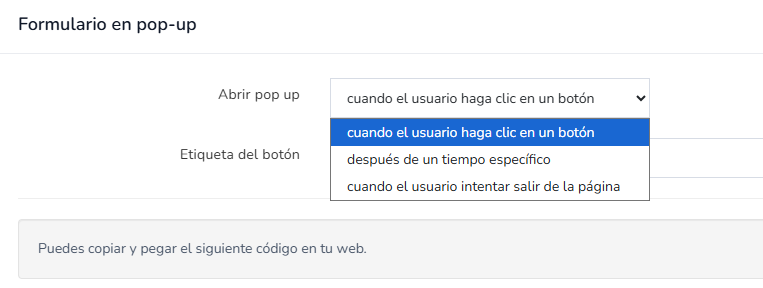
Then you copy the code Mailrelay gives you and paste it into your website. If you already use another pop-up tool, you can also paste the form’s HTML code into it, use our WordPress plugin or connect it through our API.
Each sign-up goes into the group you choose. That way, you can segment the people who came through the discount wheel and those who downloaded your guide, and send each of them a different automated welcome email. Our real-time reports then show you which contacts open, click and buy.
All with a free account for up to 20,000 contacts and support for any questions you have.
Start growing your list today
Forms with double opt-in, groups, welcome automation and real-time reports. All in a free account with expert support.
Frequently asked questions about pop-ups
Do I need another tool to create pop-ups? Not if your email marketing platform includes them. In Mailrelay, you create the form and show it as a pop-up when a button is clicked, after a while or when the visitor tries to leave the page, even with the free account. A specialized tool is only worth it if you need more advanced formats, such as discount wheels.
What is the difference between a pop-up and a subscription form? The form is the set of fields that collects the data. The pop-up is one way of showing it, just like a form embedded in your blog or a landing page.
Do pop-ups hurt SEO? Only if they are intrusive on mobile and cover the content as soon as the user arrives from Google. Small bars, scroll or exit pop-ups and legal notices don’t have that problem.
What is a good conversion rate? The average in 2025 was 2.1%, according to Omnisend. Between 3% and 5% is considered a good result.
When is the best time to show it? After a few seconds of reading or when the visitor reaches the middle of the page usually works better than right on entry. For a last attempt, use the exit pop-up.
In summary
A pop-up is one of the most effective ways to grow your list, as long as it respects the visitor. Offer something worthwhile, choose the right moment, take care of the mobile experience and connect each sign-up to a good welcome sequence. Your email marketing does the rest.