WhatsApp broadcast list: what it is, how to create one and its limits
How to send the same message to many customers without creating a group, and what to do when 256 contacts aren't enough
A WhatsApp broadcast list is a feature that sends the same message to several contacts at once, each in their own individual chat.
To the recipient, it looks as if you had written to them alone.
It’s the simplest way to tell your customers about an offer or a change in opening hours without creating a group. No one sees who else received it, and replies arrive in private conversations.
What is a WhatsApp broadcast list?
Think of it as the email blind carbon copy (BCC) applied to WhatsApp. You write once and the app sends the message separately to each person on the list.
It’s available in WhatsApp and WhatsApp Business. Small businesses use it a lot because it costs nothing and doesn’t require any extra tools.
That said, it has its own rules. The most important one: only contacts who have your number saved in their address book receive the message.
How does a broadcast list work?
The process is simple. You create the list, choose the contacts and write the message. Each recipient sees it in the chat they already have with you, with your name and photo.
If someone replies, the reply comes only to you, in their private conversation. The rest of the list doesn’t see it. And if someone doesn’t have your number saved, your message won’t reach them, even if they’re on the list.
This is how WhatsApp prevents anyone from sending mass messages to strangers.
How do you create a WhatsApp broadcast list?
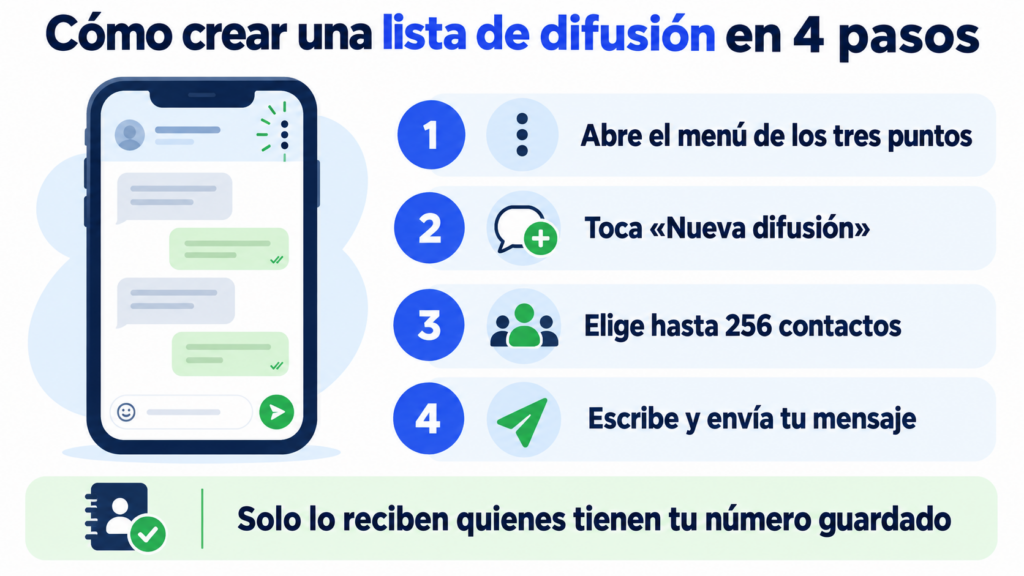
Creating one takes less than a minute. On Android, these are the steps:
- Open WhatsApp and tap the three dots in the top right corner.
- Choose “New broadcast”.
- Select the contacts you want to include.
- Tap the confirm button to create the list.
- Write your message and send it as you would in any chat.
On iPhone, the option is in the Chats tab. To edit a list you’ve already created, open it and go to “Broadcast list info”: there you can change the name and add or remove contacts.
Before sending anything, remember to ask for permission. The GDPR requires consent for commercial communications, just as with email.
You can collect it with a checkbox on your subscription form and confirm it with a double opt-in.
What is the difference between a broadcast list, a group and a channel?
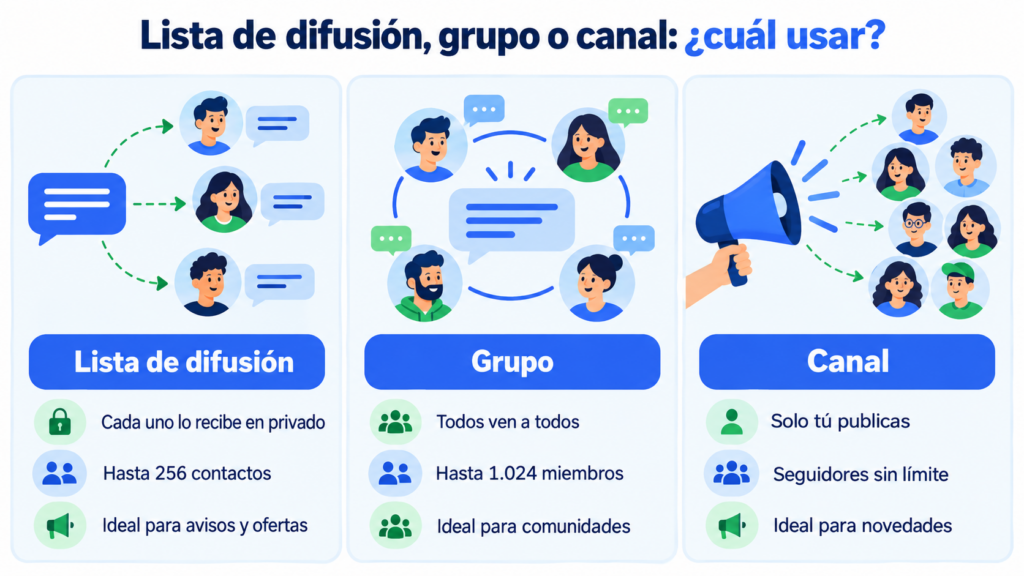
WhatsApp has three ways to talk to many people. Each one serves a different purpose.
| Broadcast list | Group | Channel | |
|---|---|---|---|
| Who sees the others | No one | All members | No one |
| Replies | Private, in individual chats | Visible to the whole group | Only reactions and polls |
| Limit | 256 contacts per list | Up to 1,024 members | No follower limit |
| Who receives it | Only those who have your number saved | All members | Whoever follows the channel |
| Best for | Personal notices and offers | Communities that talk to each other | One-way updates |
For a business, the broadcast list is usually the most respectful option. No one is exposed to strangers, and each customer feels you’re talking to them.
What are the limits of a broadcast list?
It works well for a small business, but it has several caps worth knowing about:
- 256 contacts per list. You can create several lists, although managing them by hand gets complicated.
- It only reaches people who have you saved. If your customer never added your number, they receive nothing.
- No statistics. You see the two blue ticks in each chat, but no report on deliveries, reads or clicks.
- No automation. You can’t schedule sends or trigger them from your online store, such as an abandoned cart reminder.
One last note. Since 2025, WhatsApp has been testing a monthly limit on broadcast messages in several countries, for businesses too. Its goal is to curb spam.
Are your broadcast lists falling short?
Send WhatsApp campaigns to all your contacts who have given permission, even if they haven’t saved your number.
What to use when a broadcast list falls short?
When your lists grow or you want to measure results, the alternative is the WhatsApp Business API. With it, you send campaigns to all your contacts who have given permission, even if they haven’t saved your number.
In exchange, every message you initiate has to be a template approved by Meta, and Meta charges per delivered message. You gain delivery and read statistics, scheduled sends and integration with your tools.
It’s the natural step towards conversational marketing: useful notices the customer can reply to in the same chat.
Watch out for one detail: if you connect your WhatsApp Business number to the API (so-called coexistence), the app disables broadcast lists for as long as it stays connected.
How to get the most out of a broadcast list?
A few rules make the difference between a useful message and one that ends up blocked:
Ask your customers to save your number. You can remind them on the receipt, on your website or in your welcome email. Without this step, the list doesn’t work.
Segment. Create lists by interest or customer type, just as you would with segmentation in email. A relevant message gets read; a generic one gets ignored.
Don’t overdo it. One or two broadcasts a month are usually enough. The more messages you send without a reply, the more blocks you get.
Imagine a clothing store with 200 loyal customers. It creates one list for those who buy children’s clothing and another for everyone else. It announces the sale a day before it goes live on the website and links to its WhatsApp Business catalog.
For more ideas, you’ll find the basics in WhatsApp marketing and examples in how to sell on WhatsApp.
And don’t use it on its own. The newsletter is still the place for long-form content, and RCS messaging reaches the phone’s messaging app. Coordinating them is the foundation of omnichannel marketing.
How does Mailrelay help you?
When broadcast lists are no longer enough, with Mailrelay you can send WhatsApp campaigns from the same dashboard as your email and SMS. You connect your number with Meta and create templates with images, text and buttons.
Instead of lists of 256 contacts, you send to your subscriber groups. You can import contacts from a CSV file and see how many messages are delivered and read.
WhatsApp sending is included in the Standard and Enterprise plans. The free account includes a 10-day trial; after that, WhatsApp sending costs €9.95 per month, according to the pricing page.
Meta’s per-message fees are not included: you pay them directly to Meta.
Email, SMS and WhatsApp in a single tool
Create your free account and try WhatsApp sending for 10 days.
Frequently Asked Questions
These are the most common questions about WhatsApp broadcast lists.
How many contacts fit in a broadcast list?
Up to 256 per list. You can create as many lists as you want, but each one is managed by hand.
Why don’t some contacts receive my broadcast?
Because they don’t have your number saved in their address book. WhatsApp only delivers broadcast messages to people who have added you as a contact.
Do contacts know they’re on a broadcast list?
No. Each person receives the message in their individual chat and can’t see who else is on the list.
Can you schedule a broadcast message?
Not from the app. To schedule sends, you need the WhatsApp Business API through a platform.
Are broadcast lists free?
Yes, in both WhatsApp and WhatsApp Business. You only pay if you send through the API, where Meta charges for each delivered template message.