MCP: what an MCP server is and how it connects AI to your tools
How the protocol that connects ChatGPT or Claude to your apps works and what it can do for your email marketing
An MCP (Model Context Protocol) is an open standard that lets an artificial intelligence assistant such as ChatGPT or Claude connect to other applications to look up their data and carry out tasks in them.
Thanks to it, AI no longer just answers with what it knows: it can also look at your account, prepare a draft or give you real figures. It is the next step beyond using ChatGPT as a simple chat.
It is often compared to a USB-C port. Before, every assistant needed a custom-built connection for each tool. With this protocol, all it takes is for both sides to speak the same language.
What does MCP stand for and who created it?
MCP stands for Model Context Protocol. Anthropic, the company behind Claude, introduced it in November 2024 as an open, free protocol.
In 2025, OpenAI, Google and Microsoft adopted it in their assistants and developer tools. In December of that year, Anthropic handed it over to the Agentic AI Foundation, a foundation set up within the Linux Foundation. Today it does not belong to any single company.
That backing explains why more and more software is announcing its own “MCP server”. It is the simplest way for an AI assistant to work with them.
What is an MCP server?
An MCP server is the piece an application makes available to AI assistants. It describes what the AI can do inside that application and with which permissions.
Three parts are involved in an MCP connection:
- The client: the assistant you use, such as ChatGPT, Claude or a code editor.
- The server: the application you connect to, for example your email marketing tool.
- The tools: the specific actions the server allows, such as “list subscribers” or “create a campaign”.
You don’t have to write any code. You add the server address in your assistant, sign in and choose which permissions to give it.
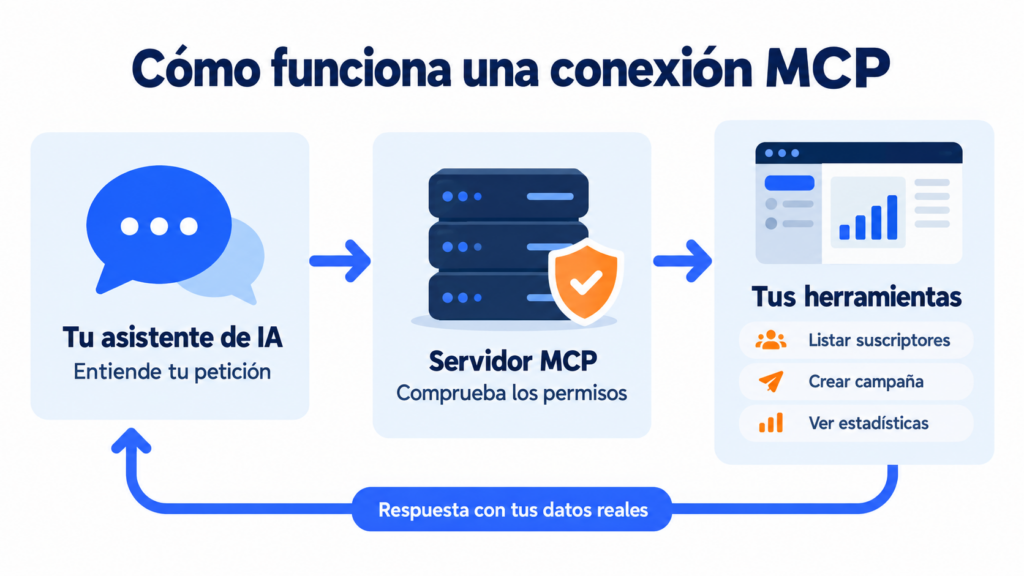
How does an MCP work, step by step?
Imagine you ask your assistant: “Compare the opens and clicks of my last five campaigns”. This is what happens:
- The assistant understands the request and looks among the server’s tools for the one that reads sent campaigns.
- It requests the data from the server using the permissions you gave it when you connected it.
- The server checks those permissions and returns the information.
- The assistant analyzes the data and answers you in natural language, with the comparison already done.
It all happens in seconds. And if the tool it needs is not allowed, it simply can’t use it.
How is an MCP different from an API?
An API is the technical door that programs use to talk to each other. This protocol is built on top of it, but it is designed to be used by an AI rather than a developer.
| API | Webhook | MCP | |
|---|---|---|---|
| Who uses it | A developer | A system waiting for notifications | An AI assistant |
| How it’s used | By writing code | By setting up a URL | By asking in your own words |
| What it does | Whatever the code says | Sends a notification when something happens | Chooses the action based on your request |
| Authentication | API key | Depends on the system | Sign-in (OAuth) and permissions |
| Who it is for | Technical teams | Automated integrations | Any user |
One does not replace the other. The API and webhooks are still the best option for fixed integrations, such as syncing your store with your list. MCP shines at one-off tasks that used to mean logging into the dashboard and searching by hand.
What is an MCP used for in email marketing?
Connecting your sending platform to an assistant saves you clicks on everyday tasks.
Reports in one sentence. You ask “Which links got the most clicks in my last newsletter?” and get the answer without opening the statistics.
Contact management. The AI finds subscribers, adds a tag, moves them between groups or creates custom fields.
Campaign drafts. It writes and builds the campaign with your usual sender for you to review. It can suggest two subject lines for an A/B test.
Other channels. It checks which WhatsApp templates are pending approval or how your last SMS send went.
The advantage is not that the AI writes better. It is that it works with your real data, not with guesses. If you already use AI for writing, this guide shows you other ways to apply AI to email marketing.
Bring your email marketing to AI
Create your free account and request access to the MCP server beta.
Is it safe to connect AI to your account?
It depends on the permissions you grant. A good server doesn’t give full access by default: it asks you what the assistant can do when you connect it.
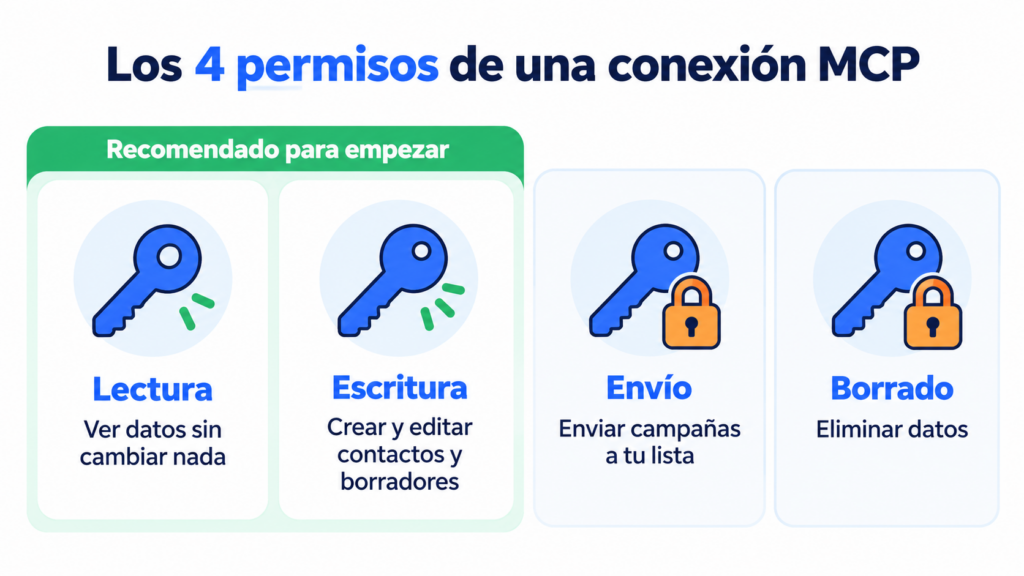
Mailrelay has four types of permission:
| Permission | What it allows |
|---|---|
| Read | View data without changing anything |
| Write | Create and edit contacts, groups or drafts |
| Send | Send campaigns and messages to real recipients |
| Delete | Delete data |
Our advice is to start with read, or read and write. That way the AI can prepare drafts, but sending is still up to you. Always ask for a test send before anything reaches your list.
Also keep in mind that every action is recorded under the user who approved the connection. To change the permissions, you remove the connector and add it again.
How do you connect Mailrelay to ChatGPT or Claude with MCP?
Mailrelay has its own MCP server, now in beta and, for the time being, also included in the free account.
During the beta, access is enabled on request. To use it, log into your account, open a ticket from Help → Support tickets and ask us to enable the MCP server. Once it is enabled:
- Copy your server address: https://[your-account]/mcp, with your Mailrelay account’s domain.
- In Claude, go to Customize → Connectors and add a custom connector. In ChatGPT, add a custom MCP server with OAuth authentication.
- Name it “Mailrelay”, paste the address and sign in with your user account.
- Choose the permissions: read-only, read and write, full access or custom permissions by area.
- Run a test: “Check my connection to Mailrelay and tell me which plan I’m on”.
You don’t need an API key, because you sign in with your user account. It also works with Claude Code, VS Code and any assistant that supports remote MCP servers. You’ll find all the details in our MCP server documentation and a step-by-step guide, with 20 prompts to copy, in how to connect Mailrelay to ChatGPT and Claude.
Connect Mailrelay to ChatGPT or Claude
Open your free account and request the MCP server from Help → Support tickets.
Frequently Asked Questions
These are the most common questions about this protocol and how to use it with Mailrelay.
What is an MCP in artificial intelligence?
It is a protocol that lets an AI assistant connect to external applications to read their data and carry out tasks in them, always within the permissions you give it.
Do I need to know how to code to use an MCP server?
No. In most assistants, all you need to do is add the server address, sign in and choose the permissions.
Does an MCP replace the API?
No. It is built on top of the API and designed to be used by AI. For automated, permanent integrations, the API is still the right option.
Can the AI send campaigns without me knowing?
Only if you give it the send permission. Without it, the assistant can prepare drafts, but not send them.
How do I enable the Mailrelay MCP server?
While it is in beta, open a ticket from your account, under Help → Support tickets, and ask us to enable it. Then connect it from your assistant with the address https://[your-account]/mcp.