Gmail Promotions tab: what it is, why your emails land there and how to get out
How to reach the Primary tab without tricks, and when you don't need to
The Promotions tab is one of the tabs in the Gmail inbox that automatically groups offers, commercial newsletters and emails from brands. Gmail created it in 2013 to separate personal mail from commercial mail.
Gmail can show up to five tabs in the inbox:
- Primary: messages from people and emails that Gmail considers important.
- Promotions: offers, discounts and communications from brands.
- Social: notifications from social networks and content platforms.
- Updates: confirmations, bills, receipts and alerts.
- Forums: messages from groups and discussion lists.
Each user decides which tabs they see. Some only use Primary and others have all five.
What is the difference between Primary and Promotions?
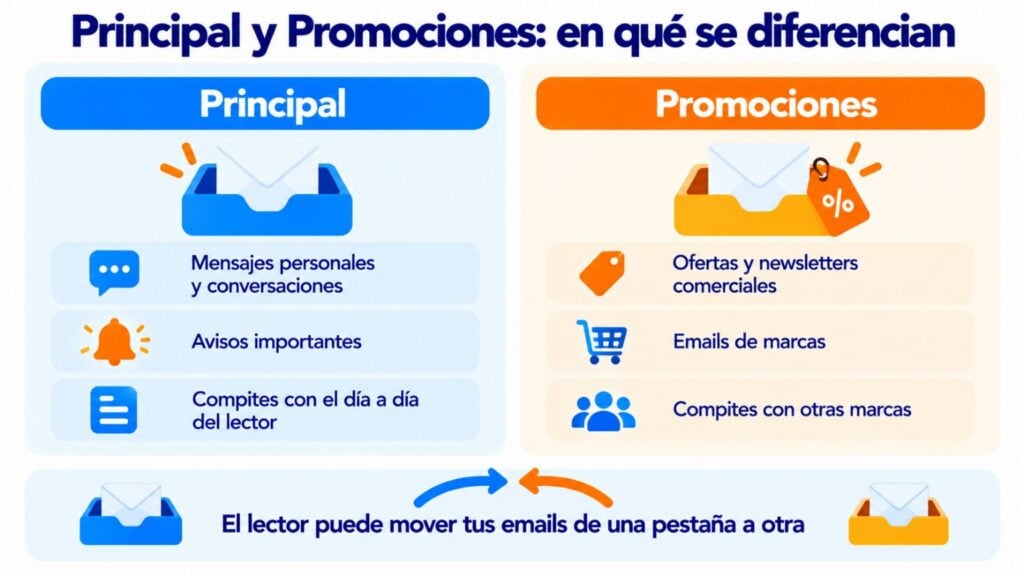
Both tabs are inside the inbox. The email is delivered the same way to either one. What changes is where the reader sees it and which other emails it competes with.
| Primary | Promotions | |
|---|---|---|
| Which emails it receives | Personal messages, conversations and important notices | Offers, commercial newsletters and emails from brands |
| Who decides | Gmail, based on the content and on each user’s behavior | Gmail, using the same criteria |
| What your email competes with | The reader’s day-to-day messages | Other brands and offers |
| Can the user move it? | Yes | Yes, by dragging it to Primary |
Write emails with your name and your style
Send your newsletters from a recognizable sender with simple templates that look as if they were written for each reader.
Why does Gmail send an email to Promotions?
Google doesn’t publish how it decides the tab for each email. What we do know is that it looks at several signals at once:
- The content. Words like “offer”, “discount” or “free”, prices and deadlines point to a commercial email.
- The format. Lots of design, lots of images and lots of links look more like a brochure than a personal message.
- The sender. If an address mostly sends commercial emails, its next sends usually end up in the same place.
- What each user does. If the reader moves your emails, replies to you or has you in their contacts, Gmail takes it into account.
That’s why the same email can land in Primary in one inbox and in Promotions in another. The classification is personal.
The Promotions tab is not the spam folder. It’s simply the tab where Gmail places promotional emails, as the name suggests. It’s fine if your emails end up there: they still have a chance of being seen. However, if you want to avoid it, work on making your emails look more personal and less like advertising. Avoiding mentions of discounts or prices can help. And if your subscribers prefer to receive you in Primary, ask them in the welcome email to drag your email there. In short, if your email has a promotional purpose, it will most likely end up in this tab, and that doesn’t have to be a problem.
Jose Argudo, CMO at Mailrelay
How to get out of the Promotions tab
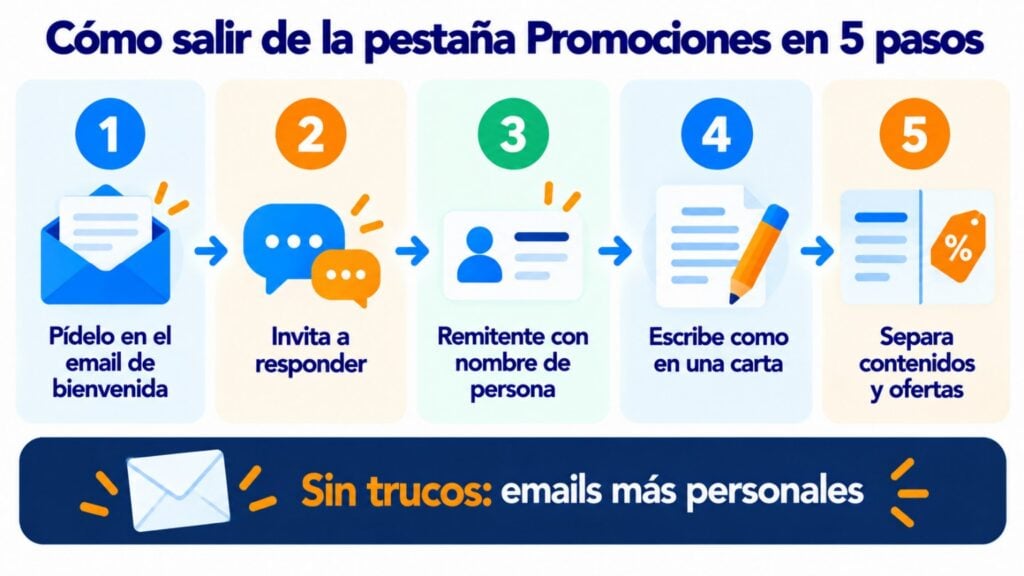
There is no trick that always works. What works is making your emails look, and be, more personal.
- Ask for it in the welcome email. Explain to your new subscribers how to drag your email to the Primary tab. When they do, Gmail asks them whether they want to do the same with future messages from that sender. On mobile, it’s done from the email’s menu: “Move to” and “Primary”.
- Invite replies. A simple question at the end of the email, such as “What topic would you like us to cover?”, generates replies. And replies are one of the clearest signals that there is a relationship.
- Use a sender with a person’s name. “Laura, from Café Lumbre” looks more like a personal message than a generic address. And avoid noreply addresses, which prevent replies.
- Write as if it were a letter. Fewer design blocks, fewer images and fewer links. A greeting, clear text and a single button.
- Separate informational content from commercial content. If you mix tips and offers in the same email, everything is treated as a promotion. Send useful content on one side and offers on the other.
Be careful with “tricks” to fool Gmail, such as hiding text or disguising an offer as a conversation. They may work for a while, but they damage the reader’s trust and the deliverability of your sends.
Is it worth getting out of Promotions?
It depends on what you send.
It is worth it if your newsletter is informational or if your emails aim to start a conversation. In Primary you compete with fewer messages and the reader sees you as someone they know.
You don’t need to if you have an online store and send offers. Many people open Promotions precisely when they want to buy. Having your offer there, alongside others, is what the reader expects.
Before changing anything, look at your data. Compare the opens and clicks of your Gmail subscribers with those of the rest. If they are similar, the tab isn’t hurting you.
What’s new in the Promotions tab
Gmail keeps changing the way it displays this tab. There are two new features worth knowing about:
- “Most relevant” sorting. Google announced it on September 11, 2025. Instead of sorting emails by date, it shows first those from the brands the user interacts with most. The reader can switch back to sorting by date whenever they want. For you, it means that subscribers who open and click see you sooner.
- Promotions annotations. With special markup in the email, Gmail can highlight an offer, a discount code or an expiration date right in the inbox. Google doesn’t guarantee they will be shown: it generates them automatically.
How Mailrelay helps you
With Mailrelay you can send from a sender with your name and your company’s domain, with SPF, DKIM and DMARC authentication. The editor lets you create simple, letter-style emails or designed newsletters, depending on what you need.
You can automate a welcome email that explains to your subscribers how to receive you in Primary. And with A/B tests you compare two subject lines or two versions of the content to see which one works best.
With the free account and with Enterprise you get statistics on opens and on clicks per link. That way you know whether the Promotions tab really affects your results.
Find out which email works best with your subscribers
Run A/B tests on subject lines and content and measure the opens and clicks of each send.
Frequently asked questions
Is the Promotions tab spam?
No. Emails in Promotions have reached the inbox and the reader can see them when they open that tab. Gmail simply groups them apart from personal mail.
How do I move an email from Promotions to Primary?
On a computer, drag the email to the Primary tab and accept when Gmail asks whether you want to do the same with future messages. On mobile, open the email, tap the menu and choose “Move to” and “Primary”.
Can Gmail’s tabs be removed?
Yes. In Gmail’s settings, in the inbox section, you can uncheck the categories you don’t want to see. All emails will then go to a single inbox.
Why has a personal email ended up in Promotions?
Because Gmail classifies by signals and sometimes gets it wrong. An email with lots of design, links or commercial words can look promotional even when it isn’t. If you move it to Primary, Gmail learns.
Not always. It depends on their content, their format and how each reader interacts with them. A letter-style newsletter with readers who reply has a better chance of reaching Primary.